Send Again
Close
Odoo POS Kitchen Receipt Print On Order Validation speeds up your kitchen by automatically printiAdmins can fully customize this module by turning filters on or off or adjusting them to fit their website’s needs. The intuitive and user-friendly interface ensures a seamless search experience.
With this module, you can choose if kitchen slips print automatically or with a button. You can also check the order on screen before printing to avoid mistakes and keep things smooth.
Using Odoo POS Kitchen Receipt Print On Order Validation means faster service for your customers, fewer errors in the kitchen, and better communication between everyone working in your business.

In busy restaurants, if kitchen orders get missed or are late, it messes things up. Printing them by hand takes time and can lead to mistakes.
With Odoo POS Kitchen Receipt Print On Order Validation, kitchen orders print right away or with one click. You can even see the order on the screen first to make sure it's right before printing.
This module helps the people taking orders and the kitchen works together smoothly without having to shout or write things down, even when it's busy in cafes or places with lots of checkout counters.
Automatically print kitchen receipts right after an order is validated in POS to save time.
Print manually using a visible print button on the receipt screen for more flexibility.
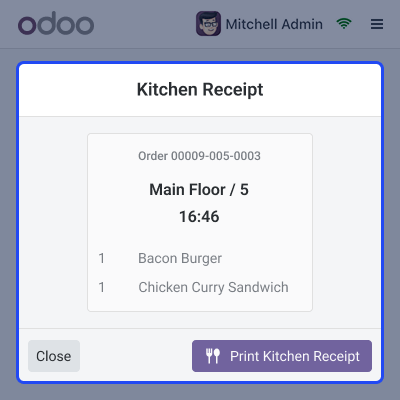
Quickly review the kitchen receipt before sending it to print, helping reduce order mistakes.
Enable or disable auto/manual print settings from the backend with just a few clicks.
Easily manage when and how kitchen receipts are printed with simple backend controls. Choose between auto and manual printing modes to suit your restaurant's needs.

Before printing, see a preview to make sure everything is correct and avoid mistakes in the kitchen. This feature helps avoid confusion and ensures the right orders go to the kitchen every time.
Easily adjust your printing settings with simple backend options no technical skills needed. This flexibility helps you improve your restaurant's printing process for better efficiency.

Odoo POS Kitchen Receipt Print on Order Validation improves communication between front-of-house and kitchen teams, speeding up service and reducing errors by automatically printing receipts.

For any query or issue, please create a support ticket here CREATE A TICKET HERE
You may also check our other top-quality Odoo Modules.
Detailed technical features and requirements to help you understand the module’s capabilities and ensure smooth integration with your system.
Detailed technical features and requirements to help you understand the module’s capabilities and ensure smooth integration with your system.
We’re partnered with top-tier, trusted providers!
Want to know more how exactly we are going to power up your eCommerce Website with Cloud to fasten up your store
* Server Configuration may vary as per application requirements.



