USD
  • EUR
  • INR
  • USD
Cart
Cart 0
  • You have no items in your shopping cart.
    Cart
    Cart 0
    • You have no items in your shopping cart.
    Hire a Developer
    ×
    Contact Us!
    Send Again
    Close
    Please Login to Write Your Review

    Odoo POS Paywizard Payment Terminal

    Odoo POS Paywizard Payment Terminal lets you take card and phone payments right from your Odoo checkout screen. It links directly to your Paywizard card machines. The system updates on its own the moment a customer pays, making your lines move much faster.


    • Link your Paywizard terminals to Odoo POS in a few easy steps.

    • Take customer payments directly from the POS screen.

    • Orders are marked as paid instantly after card payment.

    • Track and manage all payment terminals from one dashboard.

    • Automatically save card types, order details, and transaction codes.

    • Verify payments before saving data in Odoo.

    • Show clear success or retry messages for cashiers.

    • Send the exact payment amount to the terminal automatically.

    • Reduce manual work for faster customer service.

    Screenshots
    Odoo POS Paywizard Payment Terminal Odoo POS Paywizard Payment Terminal Odoo POS Paywizard Payment Terminal Odoo POS Paywizard Payment Terminal Odoo POS Paywizard Payment Terminal
    Show More Hide All
    $199.00

    * Required Fields

    Add To Cart
    $199.00
    Configure and Buy
    • Description
    • Reviews
    • FAQ
    • Customers ()
    • Specifications
    • Cloud Hosting
    • Changelog

    Odoo POS Paywizard Payment Terminal helps businesses use Paywizard payment machines with Odoo POS in a simple way.

    Cashiers can take card payments directly from the POS screen without typing payment details by hand.

    When a customer pays, Odoo sends the payment request to the Paywizard machine automatically.

    Once the payment is complete, the payment result comes back to Odoo instantly.

    The module checks the payment response before saving it.

    It updates payment status automatically and saves details like receipt number, payment method, and order details.

    Businesses can manage multiple Paywizard payment machines from the same Odoo system.

    This helps stores handle payments faster and reduce manual work at checkout.

    With automatic payment updates, secure payment checks, and simple terminal management, the module helps improve checkout speed and customer experience.
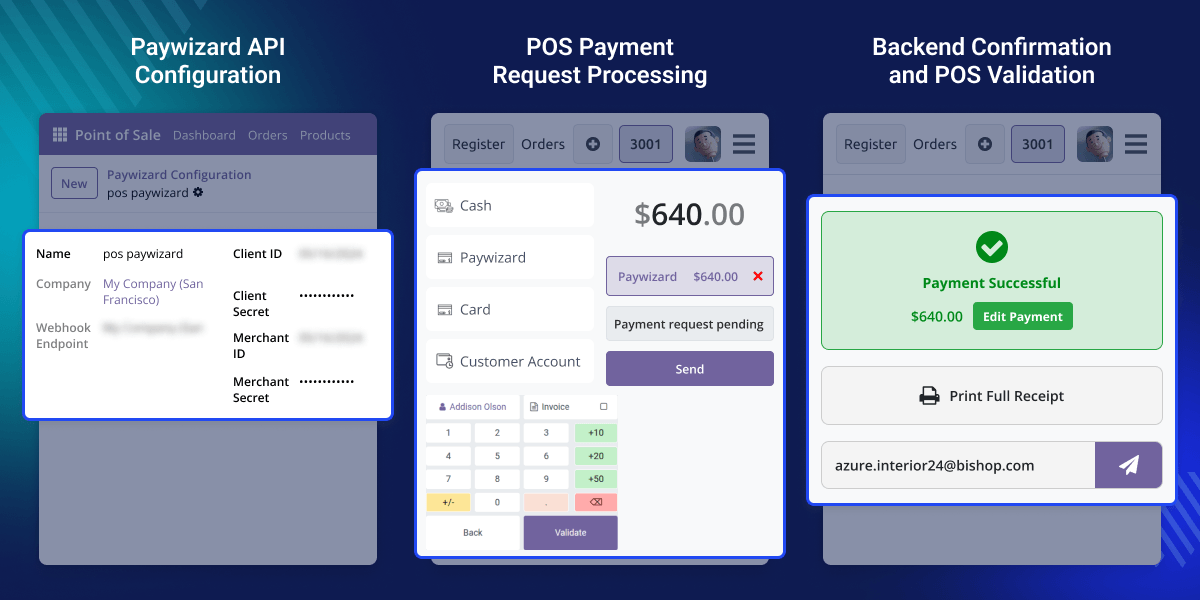
    Odoo POS Paywizard Payment Terminal

    Highlighted Features of Odoo POS Paywizard Payment Terminal

      Easy Paywizard Terminal Setup

    Quickly connect Paywizard terminals with Odoo POS for easy payments.

      Manage Multiple Payment Machines

    Use and manage many Paywizard payment machines from one Odoo system.

      Automatic Payment Updates

    The POS screen updates automatically as soon as payment is completed.

      Safe Payment Checking

    The module checks payment responses before saving them in Odoo.

      Auto Save Payment Details

    Receipt number, payment method, and order details are saved automatically.

      Clear Payment Status Alerts

    The module tells the cashier whether the payment was successful or needs to be retried.

    Why do we need Odoo POS Paywizard Payment Terminal?

    Taking card payments by hand is slow and creates delays at checkout. Staff have to type sale details manually or verify the machine separately.

    Out of the box, Odoo POS does not connect directly with Paywizard card machines. This creates extra work and increases the chances of payment errors.

    Odoo POS Paywizard Payment Terminal solves this by connecting Paywizard machines directly with Odoo. It sends updates instantly and saves payment data in real time, reducing manual work and speeding up checkout.

    Use Cases

    Odoo POS Paywizard Payment Terminal helps businesses handle card and digital payments more efficiently in daily POS operations.

      Restaurants and Cafes

    Help staff complete customer payments faster during busy hours.

      Supermarkets

    Speed up customer checkout with automatic payment updates.

      Retail Stores

    Take customer card payments directly from the Odoo POS screen without entering details manually.

      Multi-Counter Stores

    Manage multiple Paywizard payment machines from one Odoo system easily.

    Paywizard API Configuration Management

    Odoo POS Paywizard Payment Terminal helps businesses set up Paywizard API details easily in Odoo.
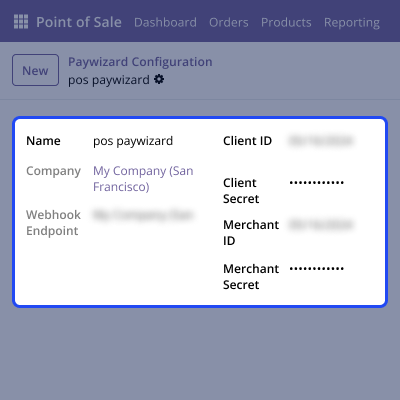
    • You can add Paywizard API credentials easily
    • It supports production mode configuration
    • Webhook URLs are created automatically
    • API setup becomes simple in this module
    Paywizard API Configuration Management

    Multiple Payment Terminal Management

    Businesses can manage many Paywizard payment terminals from one place.
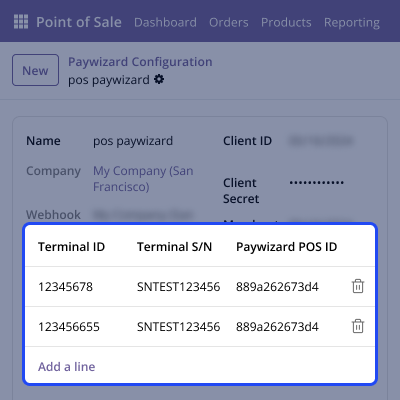
    • You can create multiple payment terminals
    • Each terminal gets a unique ID automatically
    • Terminal setup becomes easy in this module
    • You can manage all terminals in one system
    Multiple Payment Terminal Management

    POS Payment Processing

    Cashiers can start payments directly from the POS screen.
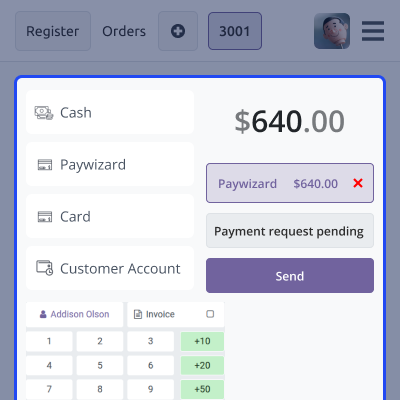
    • You can send payment requests from POS
    • The module connects with Paywizard automatically
    • Checkout becomes faster in this module
    • It helps reduce manual payment work
    POS Payment Processing

    Payment Notification and Status Update

    The module receives payment responses and updates payment status automatically.
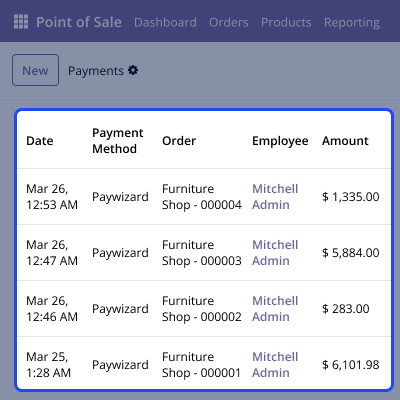
    • You can get payment updates in real time
    • It checks payment responses before saving
    • Payment details are saved automatically in this module
    • It shows payment success or retry alerts
    Payment Notification and Status Update

    Support

    For any query or issue, please create a support ticket here CREATE A TICKET HERE

    You may also check our other top-quality Odoo Modules.

    Specifications

    Product Version1.0.0
    ReleasedToday
    Last UpdatedMay 27, 2026 (Today)
    Supported VersionsOdoo  17.x  18.x  19.x  
    Write a review

    FAQ’s

      Can I use more than one Paywizard terminal?
    Yes, you can add and manage many Paywizard payment machines in Odoo.
     Does Odoo update on its own after a sale?
    Yes, the POS screen updates automatically after payment completion.
     Can I start a payment from the POS screen?
    Yes, staff can send payment requests directly from the POS screen.
     Is the payment info safe?
    Yes, the module checks payment responses before saving them in Odoo.
     What sales info does the system save?
    The module saves receipt number, payment method, order details, and payment status automatically.
     Can I manage multiple terminals in one system?
    Yes, you can manage many Paywizard terminals from the same Odoo setup.
     Does the module help reduce manual work?
    Yes, the module automates payment updates and saves payment details automatically.
     Is this module useful for busy retail stores?
    Yes, it helps businesses complete checkout faster and manage payments more easily.

    Move to Cloud Today

    AWS Free tier hosting for one year by amazon web services, for more details please visit AWS Free Tier.

    GCP Free tier hosting for one year with 300 credit points by google cloud platform, for more details please visit GCP Free Tier.

    Azure free tier hosting for one year with 25+ always free services, for more details please visit Azure Free Tier.

    In our default configuration we will provide tremendous configuration for your eCommerce Website which is fast to load and response.

    Default Configuration Details of Server

    • 1 GB RAM
    • 1 Core Processor
    • 30 GB Hard Disk
    • DB with 1 GB RAM and 1 Core Processor

    * Server Configuration may vary as per application requirements.

    Want to know more how exactly we are going to power up your eCommerce Website with Cloud to fasten up your store. Please visit the Cloudkul Services.

    Get Started with Cloud
    Not Available


