USD
  • EUR
  • INR
  • USD
Cart
Cart 0
  • You have no items in your shopping cart.
    Cart
    Cart 0
    • You have no items in your shopping cart.
    Hire a Developer
    ×
    Contact Us!
    Send Again
    Close
    Please Login to Write Your Review

    Odoo POS Restaurant Restrictions and Validations

    Odoo POS Restaurant Restrictions and Validations adds security by needing manager approval and a PIN before staff can
    change orders or close POS sessions.


    • Restrict orderline deletion for accurate POS operations.

    • Restrict the entire order deletion with manager control.

    • Block KOT edits after printing kitchen tickets.

    • Control POS session closure with secure access.

    • Track restricted actions history for better audits.

    • Allow managers to approve actions using a secure PIN.

    • Limit sensitive actions strictly to authorized users.


    Screenshots
    Odoo POS Restaurant Restrictions and Validations Odoo POS Restaurant Restrictions and Validations Odoo POS Restaurant Restrictions and Validations Odoo POS Restaurant Restrictions and Validations Odoo POS Restaurant Restrictions and Validations Odoo POS Restaurant Restrictions and Validations Odoo POS Restaurant Restrictions and Validations
    Show More Hide All
    $49.00

    * Required Fields

    Add To Cart
    $49.00
    Configure and Buy
    • Description
    • Reviews
    • FAQ
    • Customers ()
    • Specifications
    • Cloud Hosting
    • Changelog

    Running a restaurant needs control to avoid mistakes and lost income. Odoo POS Restaurant Restrictions and Validations adds extra checks to secure important tasks in your POS system.

    The system shows approval pop-ups when deleting items, orders, or closing sessions. This feature makes sure that only approved staff can make changes.

    It tracks key POS actions to make audits easier. It helps restaurants avoid mistakes, stop fraud, and protect their sales.
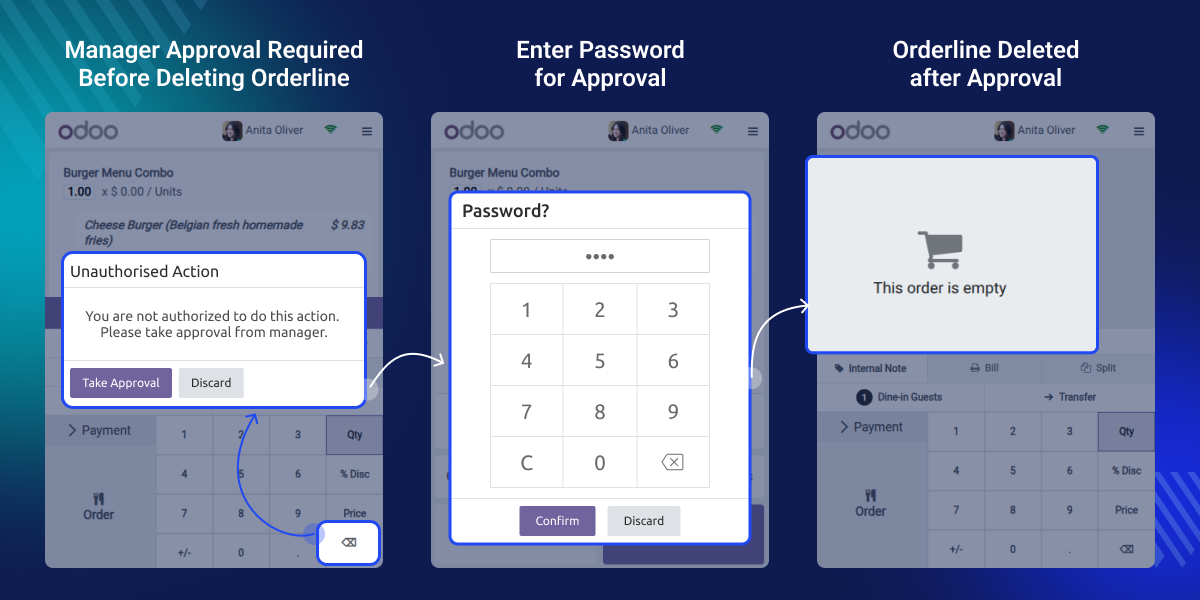
    Odoo POS Restaurant Restrictions and Validations

    Why do we need Odoo POS Restaurant Restrictions and Validations?

    In a busy restaurant, a server might delete a dish after it’s already sent to the kitchen, causing confusion and mistakes. Odoo POS Restaurant Restrictions and Validations stops changes without manager approval, helping avoid mistakes and keeping your sales safe.

    Only managers can close POS sessions to avoid mistakes while orders are still in progress. It helps keep things running smoothly and ensures all sales get saved correctly.

    Highlighted Features of Odoo POS Restaurant Restrictions and Validations

    Restrict Order Changes

    Staff can’t delete order lines without approval, helping keep placed orders accurate and unchanged.

    Protect Entire Orders

    Only allow full order deletion after a manager approves it or someone enters a valid PIN.

    Secure POS Closures

    Ask managers or trusted staff to enter a PIN before closing sessions to stop anyone from ending the day without permission.

    Track Staff Actions

    The system logs deleted items, orders, and closed sessions. This feature helps track actions and keeps staff accountable.

    Restrict Deletion of Orderlines

    This feature prevents staff from removing items once an order reaches the kitchen. It helps the restaurant run smoothly and ensures bills are accurate. It also boosts security by keeping kitchen workflows and customer orders perfectly in sync.
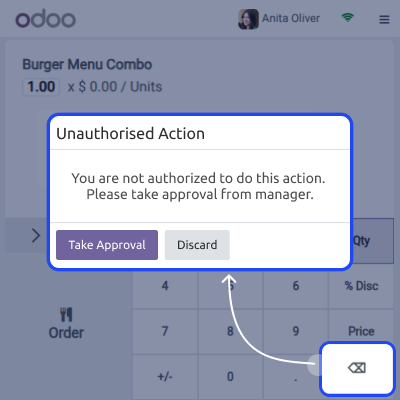
    • Prevents accidental removal of items after sending them to the kitchen.
    • Helps maintain accurate kitchen and billing records for all orders.
    • Adds security with manager approvals or PINs for any deletion.
    Restrict Deletion of Orderlines

    Restrict Deletion of Entire Order

    Deleting entire orders is controlled strictly to protect revenue and operational integrity. The module makes sure that only managers or trusted staff can delete orders, and only after proper checks and confirmations.
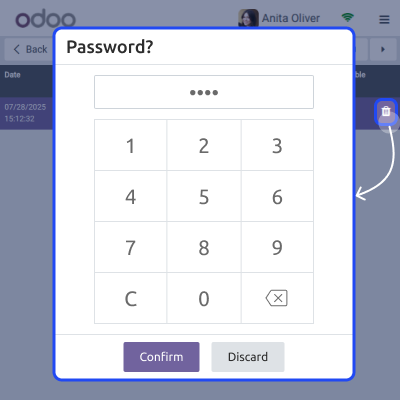
    • Blocks the deletion of full orders without proper manager verification.
    • Prompts staff to select a manager and enter a PIN before deletion.
    • Reduces the risk of fraud or errors in high-value orders.
    Restrict Deletion of Entire Order

    Session Closure Validation

    Only managers can close the POS to prevent errors or data loss. Odoo POS Restaurant Restrictions and Validations ensures that POS sessions close only after all orders and kitchen tasks are completed and saved.
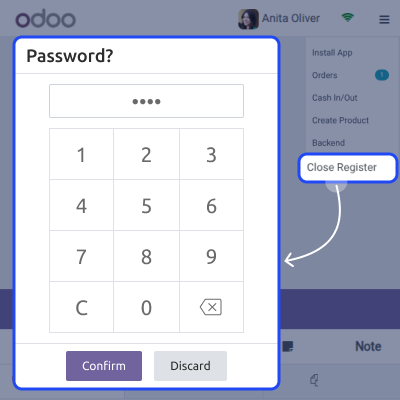
    • Allows only managers to close the POS session for security reasons.
    • Requires a PIN even for managers to confirm session closure actions.
    • Helps avoid incomplete records when orders are still in preparation.
    Session Closure Validation

    History and Action Logs

    Odoo POS Restaurant Restrictions and Validations keeps a clear record of all POS actions, so managers can easily track and understand what’s happening. They can quickly see who did what and when, which helps improve both security and trust.
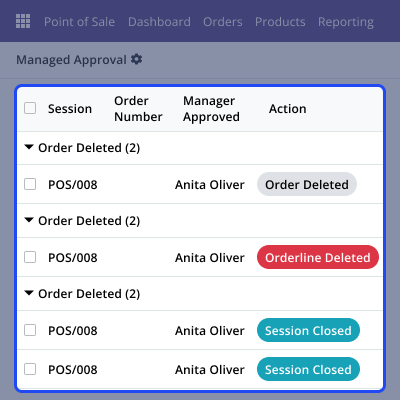
    • Records each deleted order line, order, and session closure by user.
    • Saves manager approvals and actions to make future audits or reviews easier.
    • Ensures transparency and helps spot suspicious activities quickly.
    History and Action Logs

    Support

    For any query or issue, please create a support ticket here CREATE A TICKET HERE

    You may also check our other top-quality Odoo Modules.

    Specifications

    Product Version1.0.0
    Released6 months ago
    Last UpdatedNovember 20, 2025 (3 months ago)
    Supported VersionsOdoo  16.x  17.x  18.x  19.x  
    Write a review

    Frequently Asked Questions

      Can I show stock for a specific location only?
    Yes, the module lets you show stock based on a chosen location, which you can set from the backend.
     Will the POS automatically stop selling products when out of stock?
    If configured, yes. You can set it to either block the sale or just show a warning message.
     Can I change the out-of-stock message in Odoo POS Stock Module?
    Absolutely. You can add a custom message in the backend that will be shown during the POS session.
      What if the available stock matches the set minimum limit?
    If the product stock reaches the exact limit you've set, the behavior depends on your configuration—it can either allow or block the sale.
     Does it work in offline mode?
    No, for accurate stock display and real-time updates, an internet connection is required in the POS session.

    Move to Cloud Today

    AWS Free tier hosting for one year by amazon web services, for more details please visit AWS Free Tier.

    GCP Free tier hosting for one year with 300 credit points by google cloud platform, for more details please visit GCP Free Tier.

    Azure free tier hosting for one year with 25+ always free services, for more details please visit Azure Free Tier.

    In our default configuration we will provide tremendous configuration for your eCommerce Website which is fast to load and response.

    Default Configuration Details of Server

    • 1 GB RAM
    • 1 Core Processor
    • 30 GB Hard Disk
    • DB with 1 GB RAM and 1 Core Processor

    * Server Configuration may vary as per application requirements.

    Want to know more how exactly we are going to power up your eCommerce Website with Cloud to fasten up your store. Please visit the Cloudkul Services.

    Get Started with Cloud
    Not Available


