USD
  • EUR
  • INR
  • USD
Cart
Cart 0
  • You have no items in your shopping cart.
    Odoo Apps Extensions
    Cart
    Cart 0
    • You have no items in your shopping cart.
    Hire a Developer
    ×
    Contact Us!
    Send Again
    Close
    Please Login to Write Your Review
    Odoo POS Saferpay Payment Acquirer

    Odoo POS Saferpay Payment Acquirer

    x
    Free

    * Required Fields

    $99.00
    Add To Cart


    Odoo POS Saferpay Payment Acquirer helps sellers take card payments in POS using
    Saferpay. It shows a QR code for payment, updates payment status automatically, and keeps
    records synced.


    • Accept Saferpay payments directly in POS

    • Show QR code for customer payment

    • Display payment status automatically in POS

    • Update payment records automatically in the backend

    • Keep POS and backend payment records synced

    Odoo POS Saferpay Payment Acquirer
    Odoo POS Saferpay Payment Acquirer
    $99.00
    Odoo Silver Partner
    Odoo Functional Certified Experts
    Check How It Works
    $99.00
    Configure and Buy
    X
    • Description
    • Reviews
    • FAQ
    • Customers ()
    • Specifications
    • Cloud Hosting
    • Changelog

    Odoo POS Saferpay Payment Acquirer makes card payments easy in the POS system. The module creates a QR code for the payment amount so customers can scan and pay safely.

    After scanning the QR, customers enter card details on a secure page. The POS updates the payment status automatically, making the payment process simple and clear.
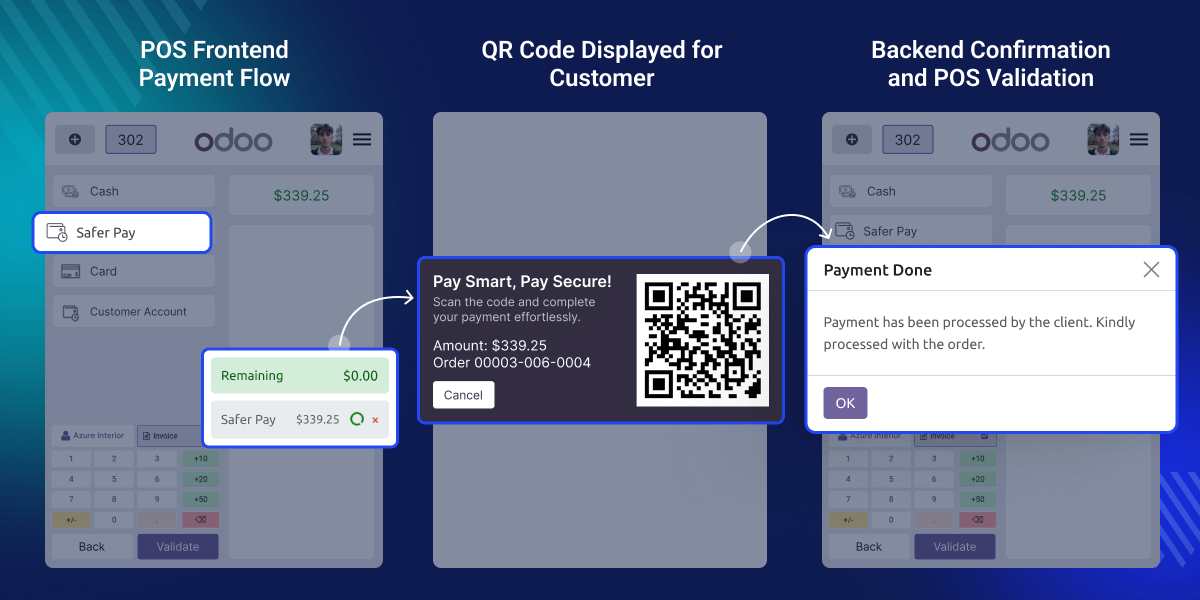
    Odoo POS Saferpay Payment Acquirer

    Why do we need Odoo POS Saferpay Payment Acquirer?

    Odoo POS Saferpay Payment Acquirer helps sellers take payments without typing card details. Customers scan a QR code and complete payment easily.

    Admins and sellers can see payment status clearly in the POS and the backend. This reduces mistakes and makes checkout faster and smoother.

    Prerequisites for using Odoo POS Saferpay Payment Acquirer

    Odoo POS Saferpay Payment Acquirer depends on the

    Odoo POS Payment Base

    You must install the POS Payment Base Module before using this module.

    Highlighted Features of Odoo POS Tap2Pay Payment Acquirer

     Secure Saferpay Payments

    Ensures safe and verified Saferpay transactions inside the POS, protecting payment data and keeping checkout secure.

     QR-Based Payment Flow

    Generates a QR code on the POS screen so customers can scan and complete payments quickly on a secure Saferpay page.

     Real-Time POS Sync

    Automatically updates payment status between POS and backend in real time, keeping transaction records correct.

     Duplicate Payment Handling

    Odoo POS Saferpay Payment Acquirer detects repeated QR scans after payment completion and blocks duplicate payment attempts for safety.

    Saferpay Credentials Setup

    Let's you add and save Saferpay credentials for POS payments. This keeps payment access safe and always ready inside the POS system.
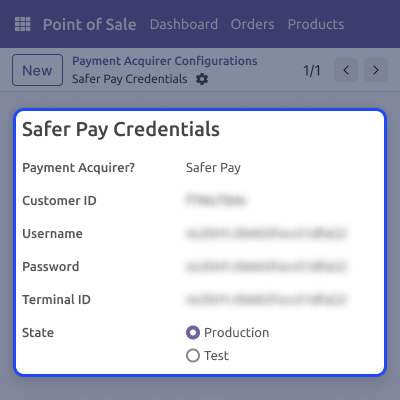
    • Stores Saferpay API details securely
    • Enables POS payment connection
    • Required for Saferpay payment usage
    • Managed from backend settings
    Saferpay Credentials Setup

    POS Frontend Payment Flow

    Let's POS users take Saferpay payments easily during checkout. Keeps payments simple and clear for staff and customers.
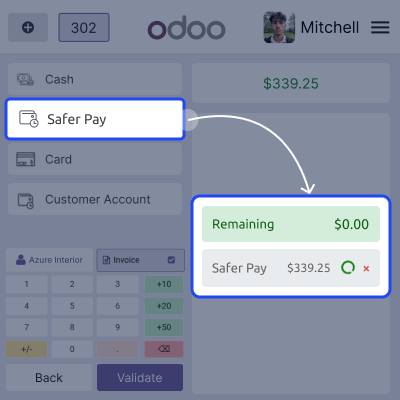
    • Supports Saferpay during checkout
    • Displays QR code for payment
    • Allows secure customer payment
    • Ensures a smooth POS experience
    POS Frontend Payment Flow

    QR Scan and Payment Authorization

    Manages customer payments using QR scanning. Ensures payments are processed safely through Saferpay.

    • Opens secure Saferpay payment page
    • Supports card-based customer payments
    • Processes payment through Saferpay
    • Sends confirmation to the POS system
    QR Scan and Payment Authorization

    Backend Confirmation and POS Validation

    Checks that the payment is finished and updates the POS order status. Keeps both backend and POS records correct and in sync.
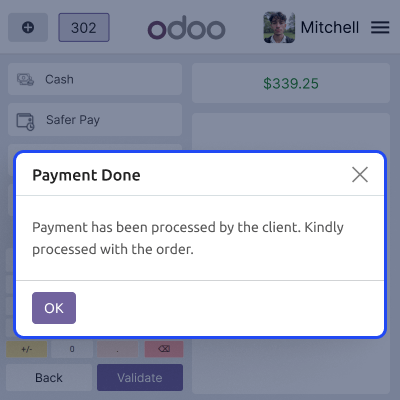
    • Records payment status in the backend
    • Shows payment success on POS
    • Validates the POS order automatically
    • Mark payment as completed
    Backend Confirmation and POS Validation

    Support

    For any query or issue, please create a support ticket here CREATE A TICKET HERE

    You may also check our other top-quality Odoo Modules.

    Specifications

    Product Version1.0.0
    Released5 months ago
    Last UpdatedFebruary 23, 2026 (5 months ago)
    Supported VersionsOdoo  17.x  18.x  19.x  

    Ratings

    We'd love to hear your thoughts! Share your feedback and help us craft an even better experience tailored just for you.

    Write a review

    FAQs

     How does Saferpay payment work in POS?
    How does Saferpay payment work in POS? The POS shows a QR code that customers scan to enter card details and complete payment safely.
     Can sellers see the payment status in POS?
    Yes, the POS clearly shows whether the payment is in process, failed, or completed.
     Can the Saferpay payment line be removed after success?
    No, once the payment is successful, the payment line cannot be removed from the POS.
     What happens if the payment is still in process?
    If someone tries to delete it, a warning message appears in the POS system.
     Are transactions saved in the backend automatically?
    Yes, Odoo POS Saferpay Payment Acquirer saves all payment states in the backend for proper tracking.

    Specification

    Detailed technical features and requirements to help you understand the module’s capabilities and ensure smooth integration with your system.

    Cloud Hosting

    Detailed technical features and requirements to help you understand the module’s capabilities and ensure smooth integration with your system.

    Default Configuration Details of Server

    1 GB
    RAM
    1 Core
    Processor
    30 GB
    Hard Disk
    1 GB RAM & 1 Core Processor
    Database

    Want to know more how exactly we are going to power up your eCommerce Website with Cloud to fasten up your store

    * Server Configuration may vary as per application requirements.

    Change Logs

    Not Available


