USD
  • EUR
  • INR
  • USD
Cart
Cart 0
  • You have no items in your shopping cart.
    Cart
    Cart 0
    • You have no items in your shopping cart.
    Hire a Developer
    ×
    Contact Us!
    Send Again
    Close
    Please Login to Write Your Review

    Odoo POS Scan & Go


    Odoo POS Scan & Go allows customers to scan QR codes for menu access, feedback, and offers. It simplifies ordering and enhances the shopping experience.


    • Instantly view restaurant menus by scanning QR codes.

    • Take surveys and share feedback via QR codes.

    • View ongoing discounts and offers on restaurants.

    • Pay directly through mobile for a smoother checkout.

    • Works with Odoo POS for easy restaurant management.

    • Reduces wait times and enhances service efficiency.

    • Customers can place orders without physical interaction.

    Screenshots
    $99.00

    * Required Fields

    Add To Cart
    $99.00
    Configure and Buy
    • Description
    • Reviews
    • FAQ
    • Customers ()
    • Specifications
    • Cloud Hosting
    • Changelog

    Odoo POS Scan & Go simplifies the shopping and dining experience. Customers can scan QR codes to see menus, give feedback, and check discounts no need for paper menus or manual surveys.

    With quick menu access, customers can browse dishes and apply discounts in just a few taps. The module works smoothly with Odoo POS for a hassle-free ordering process.

    By cutting wait times and automating feedback, businesses can serve customers faster and improve their experience. This module helps restaurants and stores run more smoothly.

    Odoo ShipEngine Shipping Integration

    Why Do We Need Odoo POS Scan & Go?

    Handling menus manually and collecting feedback can be time-consuming and prone to errors. Using QR codes makes these tasks faster and improves the customer experience.

    For example, in a busy restaurant, customers can scan a QR code to see the menu, order food, and give feedback. They can also check discounts easily, helping them decide faster.

    With this module, businesses can serve customers quickly, stay organized, and make the process smooth for both staff and customers.

    Prerequisites for Using Odoo POS Scan & Go

    Odoo POS Scan & Go Works in Conjunction with the Following Module:

    Odoo Scan and Go

    You need to install the module mentioned above to use POS Scan & Go.

    Highlighted Features of Odoo POS Scan & Go

    QR Code Menu Access

    Generate and scan QR codes to view restaurant menus instantly.

    Easy Customer Feedback

    Allow customers to easily take surveys and share feedback through QR codes.

    Check Discounts & Offers

    Enable customers to check and apply for restaurant discounts.

    Mobile Payment Options

    Facilitate seamless online payments through mobile devices.

    Quick POS Integration

    Easily integrates with Odoo POS for smooth restaurant management.

    Faster Ordering Process

    Let customers place orders quickly, reducing wait times.

    QR Code Menu Access

    Make it super easy for customers to see your menu! They just scan a QR code with their phone to see all your food and prices online. No more paper menus, and they always see the latest menu!
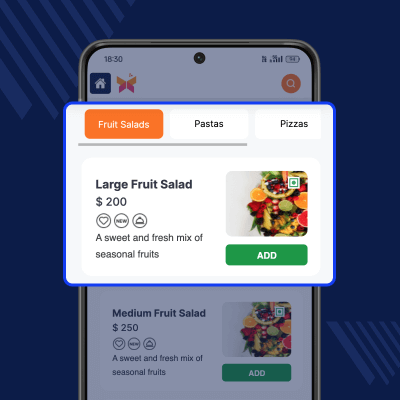
    • Generate a QR code for each restaurant menu.
    • Customers can scan the code to view the digital menu.
    • Avoid printed menus and reduce manual efforts.
    • Improve the overall dining experience wiith Odoo POS Scan & GO.
    QR Code Menu Access

    Customer Feedback & Surveys

    Enable customers to share their feedback instantly by scanning a QR code, making the process quick and paperless. Gather valuable insights to improve service quality and customer satisfaction.
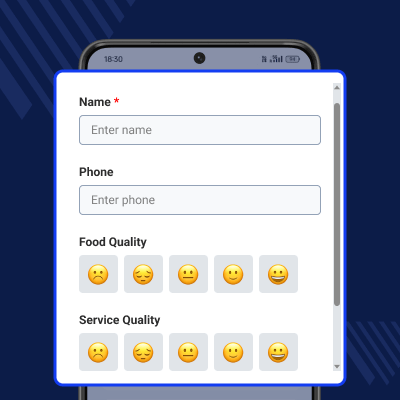
    • Customers scan the QR code to take a survey.
    • Collect valuable customer insights effortlessly.
    • It improves service quality based on real feedback.
    • You can store responses for future analysis.
    Customer Feedback & Survey

    Make Discounts & Offers

    Help customers easily discover and apply the best available offers through QR code access, encouraging quicker decisions and boosting sales.
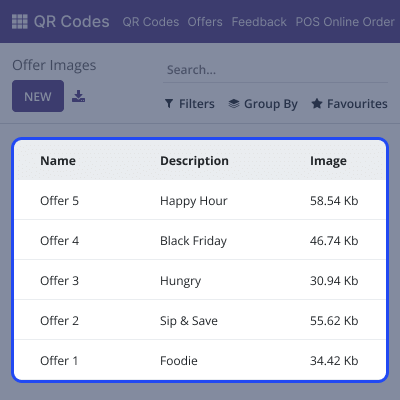
    • Display active discounts on the restaurant’s menu page.
    • Customers can check and apply for the best deals.
    • It encourages more sales with strategic offers.
    • Improve customer engagement with real-time deals.
    Make Discounts & Offers

    Support

    For any query or issue, please create a support ticket here CREATE A TICKET HERE

    You may also check our other top-quality Odoo Modules.

    Specifications

    Product Version1.1.1
    Released9 months ago
    Last UpdatedDecember 8, 2025 (2 months ago)
    Supported VersionsOdoo  16.x  17.x  18.x  19.x  
    Write a review

    Frequently Asked Questions

     Can I generate a QR code for each restaurant?
    Yes, you can create a unique QR code for each restaurant, allowing customers to scan and access menus easily.
      How do customers provide feedback using this module?
    Customers scan a QR code that directs them to a feedback form where they can submit their responses.
      Does Odoo POS Scan & Go support discount applications?
    Yes, customers can view and apply available restaurant discounts while browsing the menu.
     Can customers pay directly through their phones?
    Yes, if an integrated payment gateway is available, customers can complete transactions from their mobile devices.
      Does this module work with all POS restaurant setups?
    This module is designed to work seamlessly with Odoo POS Restaurant Management, ensuring smooth integration.

    Move to Cloud Today

    AWS Free tier hosting for one year by amazon web services, for more details please visit AWS Free Tier.

    GCP Free tier hosting for one year with 300 credit points by google cloud platform, for more details please visit GCP Free Tier.

    Azure free tier hosting for one year with 25+ always free services, for more details please visit Azure Free Tier.

    In our default configuration we will provide tremendous configuration for your eCommerce Website which is fast to load and response.

    Default Configuration Details of Server

    • 1 GB RAM
    • 1 Core Processor
    • 30 GB Hard Disk
    • DB with 1 GB RAM and 1 Core Processor

    * Server Configuration may vary as per application requirements.

    Want to know more how exactly we are going to power up your eCommerce Website with Cloud to fasten up your store. Please visit the Cloudkul Services.

    Get Started with Cloud
    Not Available


