Send Again
Close
Odoo POS SumUp Terminal Integration links SumUp card readers with Odoo POS, making in-store payments faster, safer, and more accurate. It makes checkout faster and gives a smooth and easy payment experience.
You can set up multiple terminals, each linked to its own SumUp reader and merchant code. Linking a separate SumUp account to each counter or location makes payment management easy and organized.

In a store with three counters, manual entry at each SumUp reader can cause delays, errors, and upset customers. This not only takes extra time but also increases the risk of entering the wrong amount.
Without this module, staff have to enter payment amounts manually on SumUp devices. This can lead to errors and make checkout slower and less efficient. This can cause customer wait times and incorrect payments.
With Odoo POS Sumup Terminal Integration, each POS can directly send payment requests to its linked SumUp solo device. It speeds up payments and records each one clearly in Odoo, making tracking and reporting simple.
Directly links SumUp solo devices to Odoo POS for fast and automatic card payments.
Keep SumUp payments separate from cash, card, or bank payments for easy handling.
Avoid errors with automatic payment requests; no typing is required.
Use different SumUp accounts for each store or counter easily with Odoo POS SumUp Terminal Integration.
Quickly connect SumUp card readers to Odoo POS without extra apps or steps. Payments move directly forward from POS to the SumUp device with no need for typing or extra steps. This makes payments quicker, with fewer errors, and helps finish transactions easily.
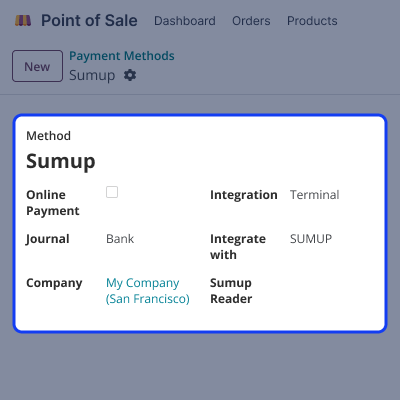
Odoo POS SumUp Terminal Integration allows you to make payments directly via SumUp, keeping them separate from other types like cash, bank transfer, or manual card. This ensures clarity in records and smooth payment processing.
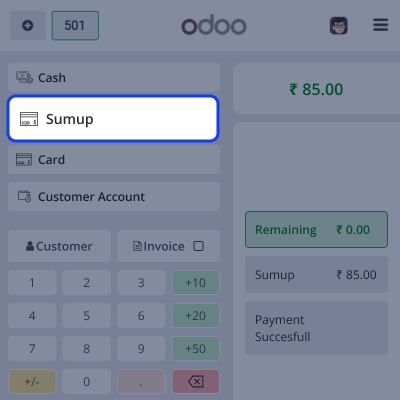
In Odoo POS Sumup Terminal Integration, Payment amounts are sent directly from POS to SumUp device, so no typing is needed. It reduces mistakes and speeds up the checkout process.

For any query or issue, please create a support ticket here CREATE A TICKET HERE
You may also check our other top-quality Odoo Modules
Detailed technical features and requirements to help you understand the module’s capabilities and ensure smooth integration with your system.
Detailed technical features and requirements to help you understand the module’s capabilities and ensure smooth integration with your system.
We’re partnered with top-tier, trusted providers!
Want to know more how exactly we are going to power up your eCommerce Website with Cloud to fasten up your store
* Server Configuration may vary as per application requirements.



