USD
  • EUR
  • INR
  • USD
Cart
Cart 0
  • You have no items in your shopping cart.
    Cart
    Cart 0
    • You have no items in your shopping cart.
    Hire a Developer
    ×
    Contact Us!
    Send Again
    Close
    Please Login to Write Your Review

    Odoo POS Table Reservation From Website

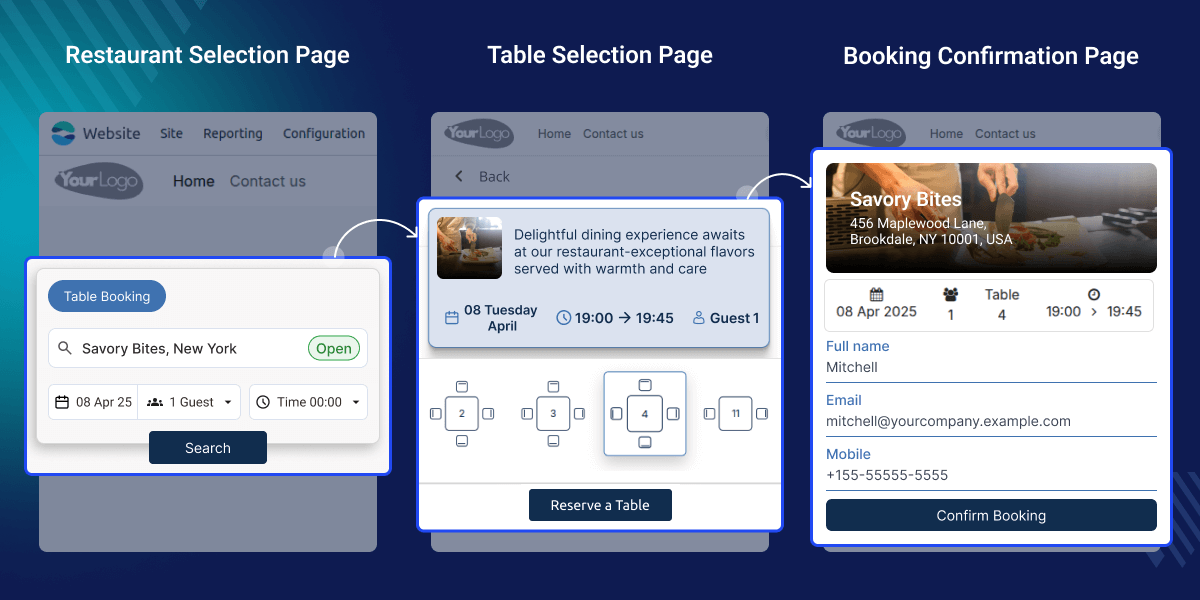
    Odoo POS Table Reservation From Website lets customers easily select a restaurant, check real-time availability, and book a table instantly.


    • Easily enable or disable bookings on your website whenever you want.

    • Customers can choose the date they want to come.

    • Only restaurants open on that date will show up.

    • Customers can pick a time from the available slots.

    • Tables are automatically filtered based on their choices.

    • Customers can cancel their bookings or download their booking info.

    • Instant booking confirmations are sent by email.

    Screenshots
    $199.00
    Add To Cart
    $199.00
    Configure and Buy
    • Description
    • Reviews
    • FAQ
    • Customers ()
    • Specifications
    • Cloud Hosting
    • Changelog

    Odoo POS Table Reservation from website makes booking tables online easy! Customers pick a restaurant, date, and time, and confirm with a few clicks.

    It shows what tables are open right now, so there are no double bookings. Customers get email confirmations right away. Odoo POS Table Reservation from Website helps restaurants and cafes book tables automatically, saving time and making customers happy.
    Odoo POS Table Reservation From Website

    Why do we need Odoo POS Table Reservation From Website?

    Restaurants often face problems like too many bookings or last-minute cancellations. Odoo POS Table Reservation From Website helps fix this by making table booking quick and automatic.For busy restaurants with lots of bookings every day, this system keeps everything organized online.

    No need to take phone calls or write things down by hand. Customers can quickly check which tables are free, book in just a few seconds, and get a confirmation right away. This saves time for both customers and restaurant staff.

    Highlighted Features of Odoo POS Table Reservation From Website

    Quick & Easy Booking

    Customers book tables online in just a few easy steps.

    See What's Open Now

    Only tables and times that are free show up, so no overbooking.

    Smart Table Choices

    The system helps pick the best table for the number of people.

    Get Confirmed Right Away

    Customers get an email as soon as they book.

    Change or Cancel Anytime

    Customers can easily change or cancel their booking.

    Easy for Restaurant Staff

    Restaurant staff can see and change all bookings from one place.

    No Double Bookings

    The system stops bookings when tables are already taken.

    Super Easy to Use

    The booking page is simple and easy for everyone.

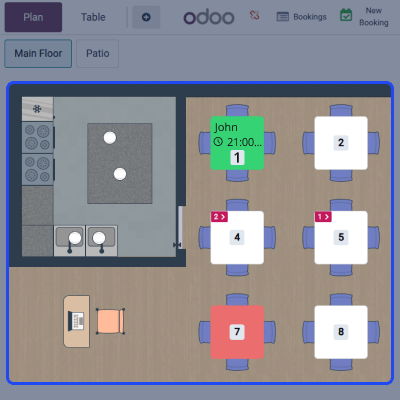
    Easy Table Booking

    No more phone calls or long waits customers can now book their tables online in just a few clicks with Odoo POS Table Reservation from Website.
    • Select a reservation date using the built-in calendar.
    • View a list of restaurants available on your chosen date.
    • Pick a time slot based on real-time table availability.
    • Confirm your booking instantly through a quick and easy process.
    • Customers also receive a confirmation message right after booking, so they know it's done.
    Easy Table Booking

    Smart Booking System

    The system is designed to handle everything smartly and smoothly, helping both restaurants and customers avoid any confusion.
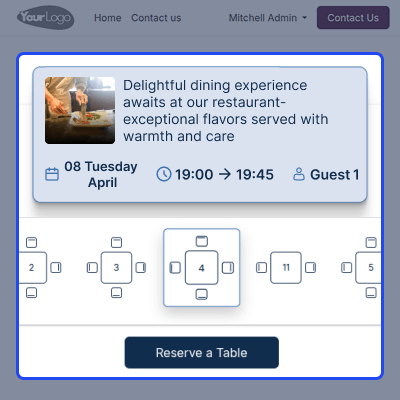
    • Automatically manages bookings to stop overbooking or double reservations.
    • Keeps table availability updated in real time.
    • Displays only available slots unavailable ones are marked in red.
    • Adjusts bookings according to the number of guests and restaurant capacity.
    • Helps staff plan ahead and use space more efficiently.
    Smart Booking System

    Manage Reservations Easily

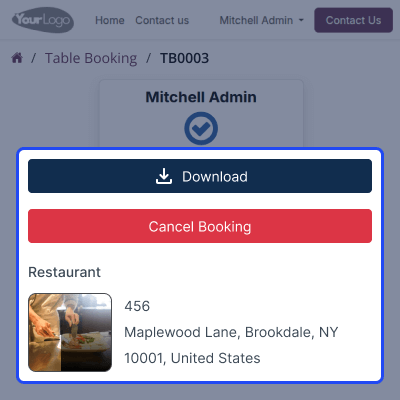
    Customers stay in control of their bookings, with the flexibility to make changes anytime.
    • Update reservation details easily from the customer account.
    • Cancel a reservation if your plans change no need to call.
    • Download booking confirmation for future reference.
    • Get instant email alerts for every update or change.
    • Simple and user-friendly interface makes managing reservations stress-free.
    Manage Reservations Easily

    Smooth Restaurant Operations

    Managing tables becomes quicker and easier for the staff, so they can focus more on serving guests.
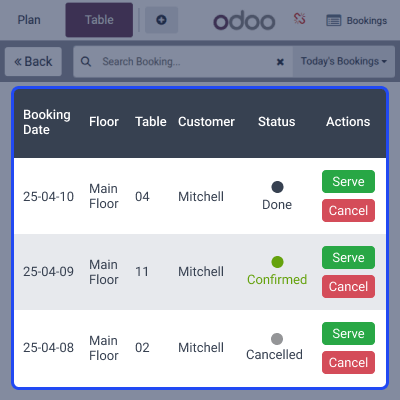
    • Track all bookings live from the backend dashboard.
    • Make changes or cancel bookings instantly if needed.
    • View table availability at a glance to avoid any overlaps.
    • Helps staff plan better during peak hours and busy days.
    • Ensures a smooth and organized dining experience for everyone involved.
    Smooth Restaurant Operations

    Support

    For any query or issue, please create a support ticket here CREATE A TICKET HERE

    You may also check our other top-quality Odoo Modules.

    Specifications

    Product Version1.0.0
    Released10 months ago
    Last UpdatedOctober 7, 2025 (5 months ago)
    Supported VersionsOdoo  17.x  18.x  19.x  
    Write a review

    Frequently Asked Questions

     Can customers book more than one table at a time?
    No, each reservation is for one table only. However, customers can make multiple bookings separately.
     What if no tables are available?
    Unavailable slots are marked in red, and customers can only select from the available tables.
     Can users cancel or change their booking in Odoo POS Table Reservation from the website?
    Yes! Customers can modify or cancel their reservations anytime from their account.
     How do restaurant owners manage reservations?
    Owners can approve, edit, or cancel bookings directly from the backend panel.
     Do customers receive a confirmation after booking?
    Yes! As soon as they reserve a table, they receive an instant email confirmation.

    Move to Cloud Today

    AWS Free tier hosting for one year by amazon web services, for more details please visit AWS Free Tier.

    GCP Free tier hosting for one year with 300 credit points by google cloud platform, for more details please visit GCP Free Tier.

    Azure free tier hosting for one year with 25+ always free services, for more details please visit Azure Free Tier.

    In our default configuration we will provide tremendous configuration for your eCommerce Website which is fast to load and response.

    Default Configuration Details of Server

    • 1 GB RAM
    • 1 Core Processor
    • 30 GB Hard Disk
    • DB with 1 GB RAM and 1 Core Processor

    * Server Configuration may vary as per application requirements.

    Want to know more how exactly we are going to power up your eCommerce Website with Cloud to fasten up your store. Please visit the Cloudkul Services.

    Get Started with Cloud
    Not Available


