USD
  • EUR
  • INR
  • USD
Cart
Cart 0
  • You have no items in your shopping cart.
    Cart
    Cart 0
    • You have no items in your shopping cart.
    Hire a Developer
    ×
    Contact Us!
    Send Again
    Close
    Please Login to Write Your Review

    Odoo POS Weight Scale Integration

    Odoo POS Weight Scale Integration helps you manage PLU data for weight scales directly from POS. It supports preview, export control, and multiple-scale devices.


    • Supports multiple weight scales with Odoo POS

    • Export PLU data in TXT, CSV, and XLSX

    • Preview PLU data before export

    • Create reusable PLU export templates

    • Manage export fields and field order

    • Export products using POS categories

    • Support general and vendor-specific scales

    • Add custom values for PLU export fields

    • Enable or disable export headers

    Screenshots
    Odoo POS Weight Scale Integration Odoo POS Weight Scale Integration Odoo POS Weight Scale Integration Odoo POS Weight Scale Integration Odoo POS Weight Scale Integration
    Show More Hide All
    $99.00

    * Required Fields

    Add To Cart
    $99.00
    Configure and Buy
    • Description
    • Reviews
    • FAQ
    • Customers ()
    • Specifications
    • Cloud Hosting
    • Changelog

    Odoo POS Weight Scale Integration lets you export PLU data with a live preview, so you can check and adjust product values before exporting. The module lets users create and export PLU data in formats supported by different weight scales.

    Users can preview the export data before downloading the file. This helps avoid mistakes and ensures the data is correct for the connected scale.

    The module supports multiple weight scale devices in the same setup. Businesses can create separate export templates based on their scale requirements.

    Users can map product fields, add custom values, and create scale-ready PLU files easily. This makes it easier to manage large product lists.

    The module supports TXT, CSV, and XLSX export formats. Users can also export products using products or POS categories. This reduces manual work and saves time.

    With reusable templates, preview options, and flexible export settings, the module helps improve accuracy and simplify daily POS tasks.
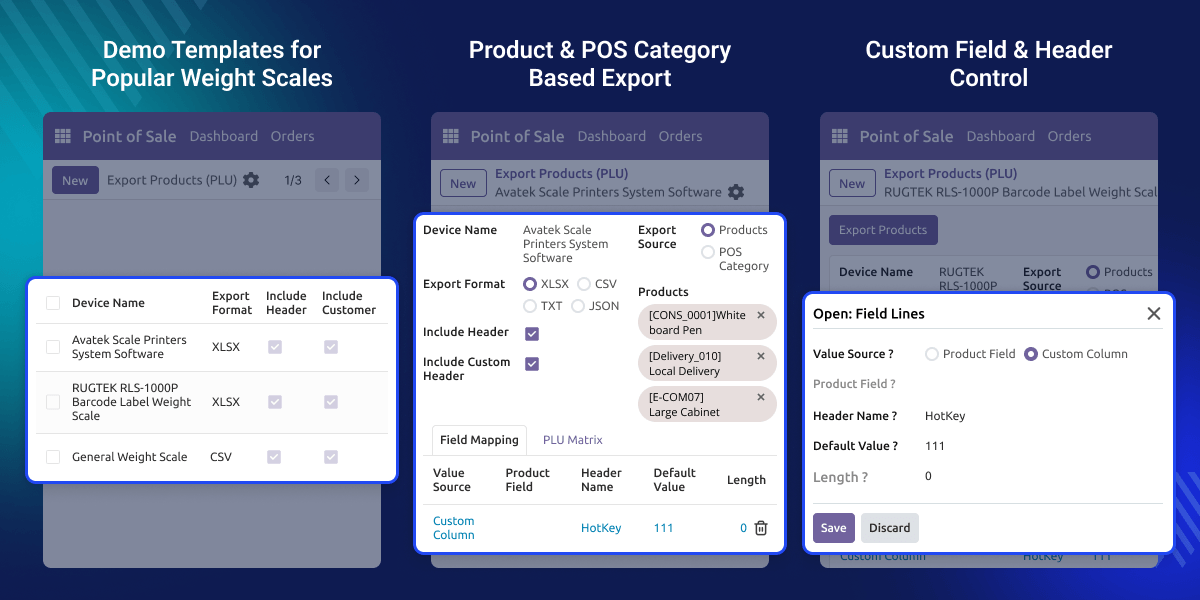
    Odoo POS Weight Scale Integration

    Highlighted Features of Odoo POS Weight Scale Integration

      Vendor-Neutral Weight Scale Support

    Compatible with both general and vendor-specific weight scale devices.

      Multiple Weight Scale Integration

    Create and support multiple weight scale templates.

      Dynamic Product Field Mapping

    Map product fields or add custom values based on scale requirements.

      Multi-Format PLU Export

    Export PLU files in TXT, CSV, and XLSX formats for different scales.

      Export View Preview

    Preview PLU data before export and update values when needed.

      Reusable Export Templates

    Create reusable export templates to save setup time and effort.

    Why do we need Odoo POS Weight Scale Integration?

    Managing PLU data manually for weight scales can be time-consuming. Businesses often need to create export files again and again for different scales and products.

    The default POS system does not provide flexible PLU export options for external weight scales. This increases manual work and can lead to export mistakes.

    Odoo POS Weight Scale Integration helps this process with export templates, preview options, and flexible field mapping. Businesses can manage multiple scale templates and create accurate PLU files quickly.

    The module helps retail businesses improve accuracy and handle weight scale data more easily.

    Use Cases

    Odoo POS Weight Scale Integration helps businesses manage weight scale data more easily in daily retail operations.

      Supermarkets and Grocery Stores

    Handle large product lists and export PLU data for different weight scales without extra manual work.

      Retail Stores with Multiple Counters

    Support multiple weight scales and create export files for different counters easily.

      Department-Based Product Setup

    Export products using POS categories for separate store sections or billing areas.

      Businesses with Custom Scale Needs

    Add custom values and adjust export fields based on your weight scale setup.

    PLU Export Preview

    Odoo POS Weight Scale Integration lets users check PLU data before exporting the file. This helps avoid mistakes and keeps product details correct.
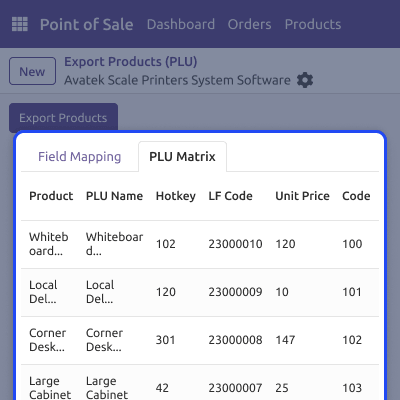
    • You can preview PLU data before export
    • You can edit values when needed
    • It helps reduce wrong or incomplete exports
    • Original product data remains unchanged
    PLU Export Preview

    PLU Export Configuration Management

    Users can create different export setups for different weight scales. This makes daily export work faster and easier.
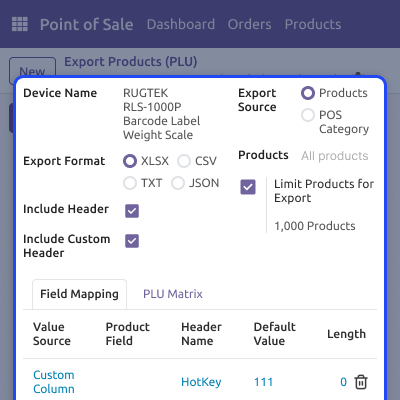
    • You can create multiple export templates
    • It supports custom headers and field order
    • You can use different export formats in this module
    • You can duplicate templates to save time
    PLU Export Configuration Management

    Product Export and Field Control

    Odoo POS Weight Scale Integration allows users to export products using products or POS categories. It also helps manage export fields more easily.

    • You can export products or POS categories
    • It supports custom values for PLU export
    • You can manage the field sequence easily
    • You can enable or disable headers in this module
    Product Export and Field Control

    Multiple Weight Scale Management

    Businesses can manage multiple weight scale templates from the same POS setup. This is useful for stores with different counters or sections.
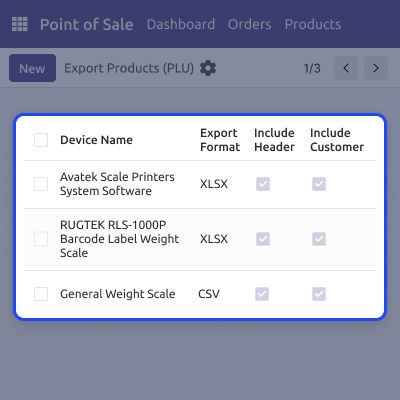
    • You can manage multiple scale templates
    • It supports different weight scale brands
    • You can create separate export settings
    • Scale setup becomes easier in this module
    Multiple Weight Scale Management

    Support

    For any query or issue, please create a support ticket here CREATE A TICKET HERE

    You may also check our other top-quality Odoo Modules.

    Specifications

    Product Version1.0.0
    Released2 days ago
    Last UpdatedMay 15, 2026 (Today)
    Supported VersionsOdoo  16.x  17.x  18.x  19.x  
    Write a review

    FAQ’s

      Can I export templates for multiple weight scale devices?
    Yes, the module supports multiple weight scale templates in the same POS system.
     Does the module support different weight scale brands?
    Yes, it works with both general and vendor-specific weight scales.
     Can I preview PLU data before export?
    Yes, users can preview and verify PLU data before export.
     Which export formats are supported?
    The module supports TXT, CSV, and XLSX export formats.
     Can I create multiple export templates?
    Yes, users can create and manage multiple PLU export templates easily.
     Can I export products using POS categories?
    Yes, products can be exported using POS categories or selected products.
     Can I control export field sequence and headers?
    Yes, users can manage export field order and headers easily.
     Is Odoo POS Weight Scale Integration useful for large retail stores?
    Yes, it is useful for supermarkets and businesses with large product inventories.

    Move to Cloud Today

    AWS Free tier hosting for one year by amazon web services, for more details please visit AWS Free Tier.

    GCP Free tier hosting for one year with 300 credit points by google cloud platform, for more details please visit GCP Free Tier.

    Azure free tier hosting for one year with 25+ always free services, for more details please visit Azure Free Tier.

    In our default configuration we will provide tremendous configuration for your eCommerce Website which is fast to load and response.

    Default Configuration Details of Server

    • 1 GB RAM
    • 1 Core Processor
    • 30 GB Hard Disk
    • DB with 1 GB RAM and 1 Core Processor

    * Server Configuration may vary as per application requirements.

    Want to know more how exactly we are going to power up your eCommerce Website with Cloud to fasten up your store. Please visit the Cloudkul Services.

    Get Started with Cloud
    Not Available


