USD
  • EUR
  • INR
  • USD
Cart
Cart 0
  • You have no items in your shopping cart.
    Cart
    Cart 0
    • You have no items in your shopping cart.
    Hire a Developer
    ×
    Contact Us!
    Send Again
    Close
    Please Login to Write Your Review

    Odoo Postmark Integration


    Odoo Postmark Integration helps you track the delivery status of emails sent through Postmark. It shows clear Email states, alerts, and error details directly inside your system.


    • Easy tracking of all email delivery updates.

    • Widget that shows new email alerts clearly.

    • Webhook setup that brings fresh event updates.

    • Easily mark widget alerts read with one click.

    • Simple tracking views for users and admins.

    • SMTP API error monitoring added for support.

    • Organized list view for Postmark notifications.

    Screenshots
    Odoo Postmark Integration Odoo Postmark Integration Odoo Postmark Integration Odoo Postmark Integration Odoo Postmark Integration Odoo Postmark Integration Odoo Postmark Integration Odoo Postmark Integration Odoo Postmark Integration
    Show More Hide All
    $199.00

    * Required Fields

    Add To Cart
    $199.00
    Configure and Buy
    • Description
    • Reviews
    • FAQ
    • Customers ()
    • Specifications
    • Cloud Hosting
    • Changelog

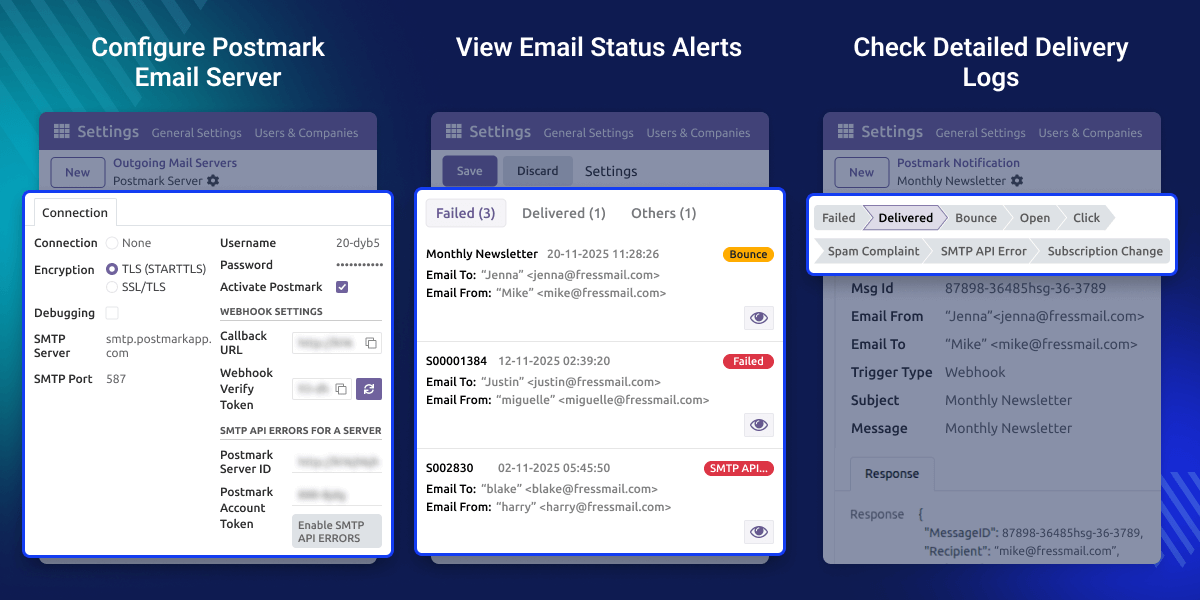
    Odoo Postmark Integration helps you see the delivery status of every email sent through Postmark. It shows simple states like delivered, opened, bounced, clicked, or rejected.

    Odoo Postmark Integration receives updates through Postmark webhooks and shows new statuses when data is available. It also records SMTP API Errors so you can find suppressed or blocked emails early.

    With a clean widget, clear logs, and an easy notifications list, the module makes email tracking simple to understand. Admins can view all records, while each user sees only their own emails.
    Odoo Postmark Integration

    Why Do We Need Odoo Postmark Integration?

    Teams often send important emails and need to confirm if messages reached the recipient. Odoo Postmark Integration shows whether an email was delivered, opened, or bounced, helping teams communicate more confidently.

    If an email is blocked or suppressed because of past issues, Odoo Postmark Integration records an SMTP API Error. This helps users find the problem early and adjust their next actions.

    Managers can view all delivery logs to monitor communication quality. Each user sees only their own emails, keeping the interface clean and easier to follow.

    Highlighted Features of Odoo Postmark Integration

      Delivery Status Tracking

    Track email delivery updates whenever Postmark shares new status information.

      User-Based Visibility

    Users see only the emails they send, keeping their workspace clean and focused.

      Admin Full Access

    Admins can view all email delivery events across the system for clear oversight.

      Easy Webhook Setup

    Set up the Postmark webhook in simple steps to begin receiving delivery updates.

      SMTP Error Alerts

    See when an email is rejected before sending so you can resolve the issue quickly.

      Updated Widget Alerts

    Receive notifications from a small widget that refreshes email status when new updates appear.

    Webhook & SMTP API Error Configuration

    Webhook settings help your system get delivery updates from Postmark. They also capture SMTP API Errors to improve how you track email issues.
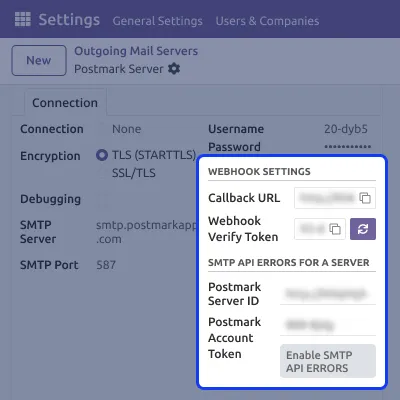
    • Add the Callback URL and Webhook Verify Token for secure webhook updates.
    • Enter the Postmark Server ID and Account Token to turn on SMTP API Error reporting.
    • Record rejected, suppressed, or failed emails through Postmark’s error tracking.
    Webhook & SMTP API Error Configuration

    Email Status Notification Widget

    This widget shows recent email delivery updates in a small, easy-to-view panel. It helps users quickly see whether their sent emails were delivered, bounced, or failed.
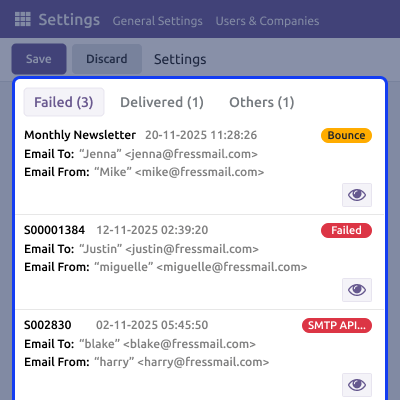
    • View delivery states such as Delivered, Failed, Bounce, SMTP API Error in one place.
    • Open any notification to read key details like the recipient, time, and email source.
    • Check recent email activity without leaving your current Odoo screen or workflow.
    Email Status Notification Widget

    Postmark Notifications List

    A dedicated list view shows all Postmark notifications clearly. Users can open entries to understand message states and issues.
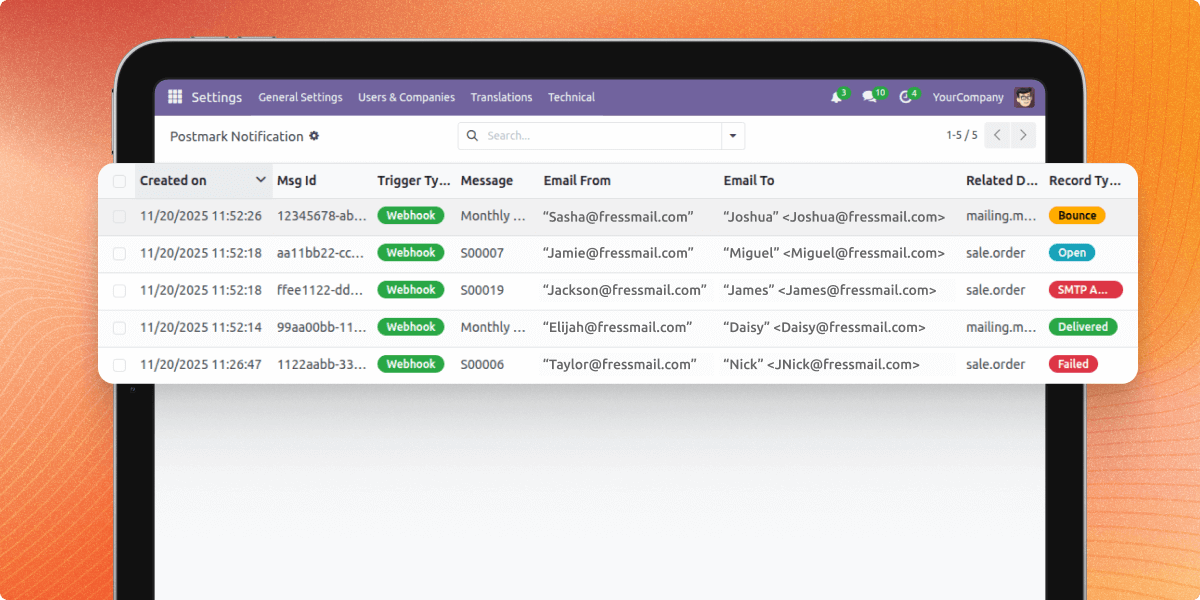
    • View updated delivery states of emails in a clean, structured list.
    • Check opened, bounced, failed, or suppressed emails at a glance.
    • Open any notification to review related issues and message details.
    Postmark Notifications List

    Support

    For any query or issue, please create a support ticket here CREATE A TICKET HERE

    You may also check our other top-quality Odoo Modules.

    Specifications

    Product Version1.0.0
    Released2 months ago
    CategoryOdoo AppsTool
    Last UpdatedJanuary 22, 2026 (1 month ago)
    Supported VersionsOdoo  18.x  19.x  
    Write a review

    FAQs

     Can I send emails using this module?
    Odoo sends emails through Postmark using the SMTP server you configure. Postmark handles the actual sending, while this module only tracks the mail delivery events and status updates.
      What is an SMTP API Error?
    It is a rejection from Postmark before sending an email, usually caused by a suppression list or blocked recipient. The module logs these errors so you can identify issues early.
      Does the module support inbound email tracking?
    No. The module supports only outbound email tracking and webhook-based updates.
      Can users see delivery logs of other team members?
    No. Users can view only their own email notifications. Admins can see all logs across the system.
      How are delivery updates received in the system?
    Updates are sent through Postmark webhooks. You may need to refresh the page to see the latest entries.
      What if a message is bounced or suppressed?
    A bounce or SMTP API Error is added to the notifications list, helping you understand the issue and take action.

    Move to Cloud Today

    AWS Free tier hosting for one year by amazon web services, for more details please visit AWS Free Tier.

    GCP Free tier hosting for one year with 300 credit points by google cloud platform, for more details please visit GCP Free Tier.

    Azure free tier hosting for one year with 25+ always free services, for more details please visit Azure Free Tier.

    In our default configuration we will provide tremendous configuration for your eCommerce Website which is fast to load and response.

    Default Configuration Details of Server

    • 1 GB RAM
    • 1 Core Processor
    • 30 GB Hard Disk
    • DB with 1 GB RAM and 1 Core Processor

    * Server Configuration may vary as per application requirements.

    Want to know more how exactly we are going to power up your eCommerce Website with Cloud to fasten up your store. Please visit the Cloudkul Services.

    Get Started with Cloud
    Not Available


