Odoo Product Catalogs
Odoo Product Catalogs simplifies product display and customer decision-making. It also reduces costs associated with physical catalogs. While also providing easy access to product details for employees.
- This tool lets you display your products or services to customers in a professional way.
- The module acts as a helpful guide for customers when they're deciding what to buy.
- It Reduces the time and money needed to update, print, and distribute physical catalogs.
- Catalogs come with links that take customers to the specific webpage on the website.
- Employees can find product details in the catalog, reducing the extensive training.
- Description
- Reviews
- FAQ
- Customers ()
- Specifications
- Cloud Hosting
- Changelog
Odoo Product Catalogs: make a catalog with ease!!!
No more hard work—let Odoo take care of making your catalogs. Make your product catalogs easy with Odoo Product catalogs! These are like handy catalogs that help people choose what to buy. Pick the products you want, click a button, and your catalog is ready in PDF format.
You can choose which products to include, and decide if you want a card or list look. It also allows you to adjust image sizes, and add descriptions and references to show in the catalog.
Also, Check our Odoo Product Wishlist which Helps to keep track of popular products.

Why do we need the Odoo Product catalog?
Creating your product catalogs with Odoo Product Catalogs is easy. choose your products and go to the product catalog section. You can also make your catalogs look the way you want with Odoo Product catalogs. There are two styles to choose from, i.e., card or list.
Decide what to show in your catalogs, like product descriptions and references. If you like the card style, you can even change the size of the pictures in your catalog.
Explore our Odoo POS Optional Products to add products with a particular product.
Highlighted features of Odoo Product Catalogs
Print Odoo Product Catalogs PDF
- Provide an option for users to customize and generate PDFs of their product catalogs.
Different Styles for Category Catalogs
- It provides various templates to match the needs of their product categories.
Different Styles of Product Catalogs
- Offer diverse templates for product catalogs to different industries and preferences.
Set the Size Card View
- Enable users to set the size of the card view according to different preferences.
Configure Odoo Product Catalogs
Customize details style, descriptions, internal references, select products, and print the catalog.
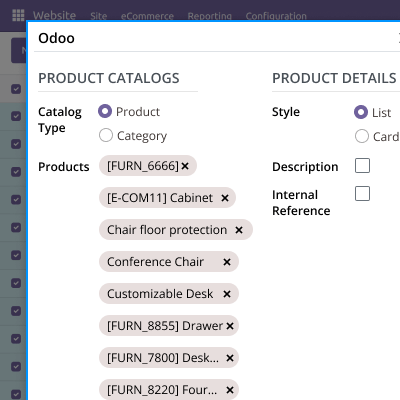
- Create a category and product catalog.
- Provides Customize product details style.
- It Allows you to Show/hide descriptions.
- It Allows you to Show/hide internal references.
- You can select products for the catalog.
- It allows you to Print the catalog.

Customize the Odoo Product Catalogs
The catalog displays product information, and prices, and offers navigation links. YOu can also configure company details, image size changes, etc.
- Display the catalog in the desired view.
- It presents product information in the catalog.
- It also displays product prices.
- Provide hyperlinks for navigation.
- You can add company details and adjust the image size.
- Provide an interface for adding, editing, and organizing product descriptions within the catalog.

Easy Navigation
The system offers various features like easy navigation, preview, easy navigation, etc.
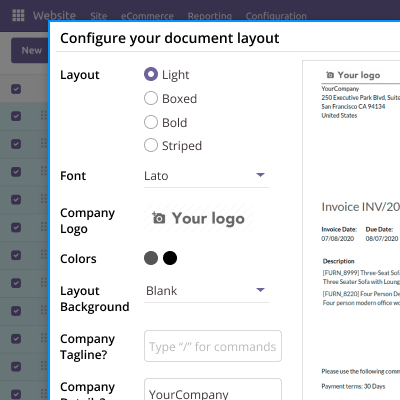
- It allows for easy navigation to help the printing process.
- Preview feature so users can choose the best style for showcasing their products.
- You can adjust card sizes for optimal viewing on various devices.
- Search and filter functionality to help users manage and locate specific product information.
- Linking mechanism for navigation between products using internal references.

Specifications
Frequently Asked Questions
Move to Cloud Today
AWS Free tier hosting for one year by amazon web services, for more details please visit AWS Free Tier.
GCP Free tier hosting for one year with 300 credit points by google cloud platform, for more details please visit GCP Free Tier.
Azure free tier hosting for one year with 25+ always free services, for more details please visit Azure Free Tier.
In our default configuration we will provide tremendous configuration for your eCommerce Website which is fast to load and response.
Default Configuration Details of Server
- 1 GB RAM
- 1 Core Processor
- 30 GB Hard Disk
- DB with 1 GB RAM and 1 Core Processor
* Server Configuration may vary as per application requirements.
Want to know more how exactly we are going to power up your eCommerce Website with Cloud to fasten up your store. Please visit the Cloudkul Services.
Get Started with Cloud


