USD
  • EUR
  • INR
  • USD
Cart
Cart 0
  • You have no items in your shopping cart.
    Cart
    Cart 0
    • You have no items in your shopping cart.
    Hire a Developer
    ×
    Contact Us!
    Send Again
    Close
    Please Login to Write Your Review

    Odoo Product Media Bulk Upload

    Product Media Bulk Upload lets Odoo users add multiple product images at once, set thumbnails, and arrange media order with ease.


    • Upload multiple product images to your store in a single bulk action.

    • Mark any uploaded media file as the product thumbnail instantly.

    • Set a custom sequence to control how product images are displayed.

    • Selected thumbnail appears prominently on the product details page.

    • No coding or technical setup required to get started right away.

    • Saves hours of manual upload work for large product catalogs.

    • Keeps every product page looking consistent and well-organized.

    Screenshots
    Odoo Product Media Bulk Upload Odoo Product Media Bulk Upload Odoo Product Media Bulk Upload Odoo Product Media Bulk Upload Odoo Product Media Bulk Upload
    Show More Hide All
    $29.00

    * Required Fields

    Add To Cart
    $29.00
    Configure and Buy
    • Description
    • Reviews
    • FAQ
    • Customers ()
    • Specifications
    • Cloud Hosting
    • Changelog

    Product Media Bulk Upload helps Odoo users manage product images on their storefront. Instead of adding files one by one, you upload several at once. Every uploaded file can be marked as a thumbnail using a simple checkbox, and that image becomes the face of your product.

    You can also arrange the files in sequence. This lets you decide the exact order in which images appear, so your product story flows the way you want. For stores with large catalogs, this saves real time and effort. And the result is a cleaner, more consistent product page.

    Customers see a clear thumbnail first, followed by organized supporting images in the right order. Whether you sell apparel, electronics, or furniture, visual presentation drives buying decisions. And this module gives you control over that presentation.
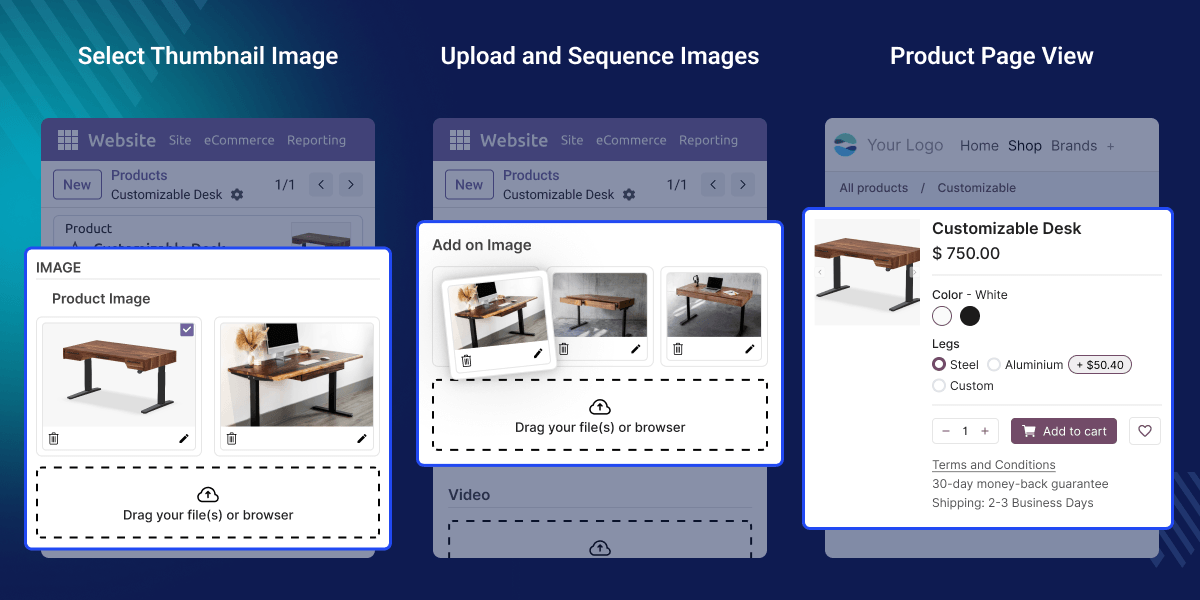
    Product Media Bulk Upload

    Highlighted Features

    Bulk Media Upload

    Add multiple product images or videos in one single action instead of uploading them one at a time.

    Thumbnail Selection

    Use a Boolean field to set the uploaded file as the thumbnail, so it appears first when representing your product.

    Media Sequencing

    Arrange your uploaded media in the exact order you want it to appear on the product page.

    Improved Product Page Display

    Your thumbnail and sequenced media combine to create a clean, organized product details page.

    Scale Catalogue Management

    The module helps in easily managing thousands of product catalogues on your Odoo storefront.

    Save Valuable Time

    The team can update product galleries faster and spend more time growing the business.

    Why do we need Product Media Bulk Upload?

    Odoo's default product media setup requires uploading files one at a time, with no way to choose a thumbnail or control display order. For stores with hundreds of products, this limitation slows down daily operations. This leads to inconsistent product pages across the catalog.

    Product Media Bulk Upload solves this by combining bulk upload, thumbnail control, and sequencing into a single, easy-to-use module. In practice, teams managing large Odoo catalogs report saving significant hours each week with this module.

    Use Cases

    Fashion and Apparel Stores

    Upload multiple angle shots per product and set the best shot as the thumbnail for faster browsing.

    Electronics and Gadget Catalogs

    Bulk upload spec sheets, unboxing shots, and product photos, then sequence them for clear comparison.

    Furniture and Home Decor

    Showcase room-setting photos first, followed by close-up detail shots, using custom sequencing.

    Multi-Vendor Marketplaces

    Let each vendor bulk upload their own product media and control their own thumbnails.

    Bulk Media Upload

    Upload several product images together in a single action with Product Media Bulk Upload. This saves time for store teams managing large or frequently updated catalogs.
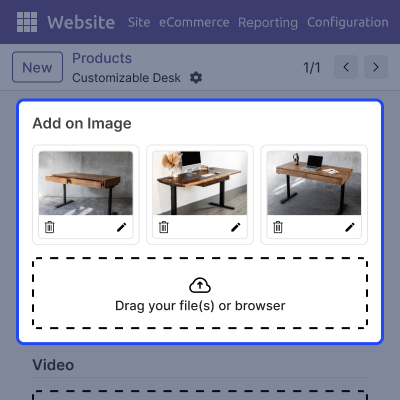
    • Select and upload multiple files together in one go.
    • Works directly within the standard Odoo product images.
    • Manage an Odoo storefront with a large catalogue easily.
    • Reduces repetitive manual upload tasks significantly.
    Bulk Media Upload

    Thumbnail Selection

    Choose exactly which image represents each product on its details page. This gives you full control over the first impression customers get.
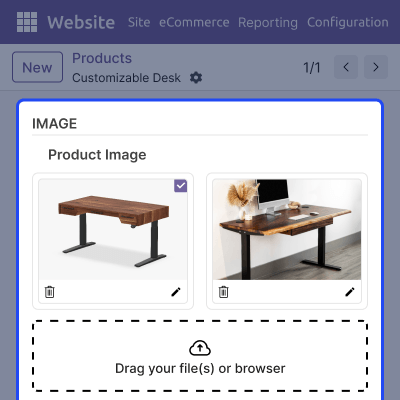
    • Simple Boolean toggle: Is a Thumbnail.
    • Apply to any uploaded media file instantly.
    • Thumbnail updates are reflected immediately on the product page.
    • Switch thumbnails any time without re-uploading files.
    Thumbnail Selection

    Media Sequencing

    Control the exact order in which your product media files are displayed. This helps you tell a clear, intentional visual story for every product.
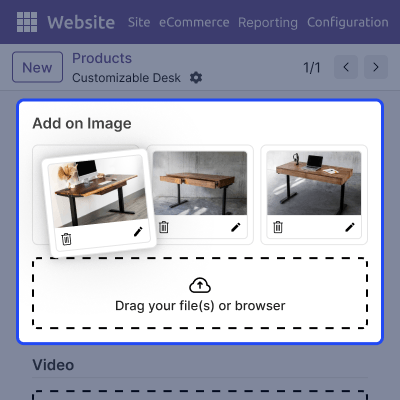
    • Drag and arrange every uploaded media file.
    • Easily adjust ordering based on priority or preference.
    • Media displays in your defined order automatically.
    • Keeps presentation consistent across your entire catalog.
    Media Sequencing

    Improved Product Page Display

    See your thumbnail and sequenced media come together on the live product page. This feature ensures the product display stays clean and organized at all times.
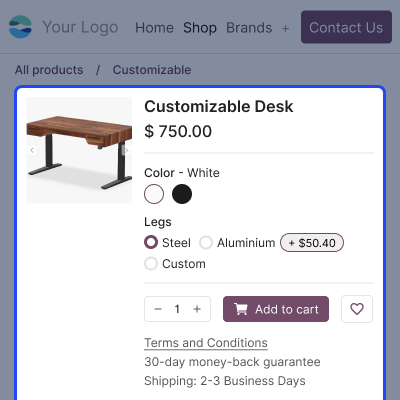
    • Thumbnail always displayed prominently first.
    • Remaining media follow your defined sequence.
    • No custom templates or developer work needed.
    • Consistent, professional layout across every product.
    Improved Product Page Display

    Support

    For any query or issue, please create a support ticket here CREATE A TICKET HERE

    You may also check our other top-quality Odoo Modules.

    Specifications

    Product Version1.0.0
    ReleasedToday
    Last UpdatedJuly 21, 2026 (Today)
    Supported VersionsOdoo  16.x  17.x  18.x  19.x  
    Write a review

    FAQs

     How can I upload more than one file at a time?
    Select, drag, and drop multiple product images in a single bulk action instead of adding each image file manually when uploading product images.
     How do I set a product thumbnail?
    Use the Boolean field in the ‘Product Image’ section to select the thumbnail image, and it instantly becomes the main display image on the product page.
     Can I change the product thumbnail later on Odoo Images?
    Yes, you can change the thumbnail at any time on Odoo product images. Simply select the given Boolean field on your preferred image to change the thumbnail.
     How does the media sequencing control work in Odoo?
    The media sequencing control in Odoo storefront is achieved simply by dragging and dropping product images in your preferred order with our module.
     Do I need coding skills to use this module?
    No, Product Media Bulk Upload works entirely through Odoo's standard product form interface, so no coding knowledge is required at any point.
     Does this work with existing product images?
    Yes, no matter how many products you have before installing the module. It works smoothly alongside any product media files uploaded earlier to this module.
     Is bulk media upload suitable for large catalogs?
    Yes, it is specifically built for storefronts that manage a large volume of catalogues – saving time while uploading media in bulk for Odoo product pages.
     Will the thumbnail always show first on the product page?
    Yes, the selected thumbnail image will always display first, followed by all your other arranged product media files on the product details page.
     Can different products have different thumbnails?
    Yes, each product has its own independent thumbnail setting, giving you complete control over every single product page you manage on your store.
     What Odoo versions does this module support?
    This module supports multiple recent Odoo versions. For better understanding, please check the supported version information dropdown on this page.

    Move to Cloud Today

    AWS Free tier hosting for one year by amazon web services, for more details please visit AWS Free Tier.

    GCP Free tier hosting for one year with 300 credit points by google cloud platform, for more details please visit GCP Free Tier.

    Azure free tier hosting for one year with 25+ always free services, for more details please visit Azure Free Tier.

    In our default configuration we will provide tremendous configuration for your eCommerce Website which is fast to load and response.

    Default Configuration Details of Server

    • 1 GB RAM
    • 1 Core Processor
    • 30 GB Hard Disk
    • DB with 1 GB RAM and 1 Core Processor

    * Server Configuration may vary as per application requirements.

    Want to know more how exactly we are going to power up your eCommerce Website with Cloud to fasten up your store. Please visit the Cloudkul Services.

    Get Started with Cloud
    Not Available


