USD
  • EUR
  • INR
  • USD
Cart
Cart 0
  • You have no items in your shopping cart.
    Cart
    Cart 0
    • You have no items in your shopping cart.
    Hire a Developer
    ×
    Contact Us!
    Send Again
    Close
    Please Login to Write Your Review

    Odoo Purchase Barcode Scan by Camera

    Odoo Purchase Barcode Scan by Camera makes the purchase process faster and easier. It lets users scan barcodes using their device’s camera.


    • Users can scan barcodes with their phone or computer camera.

    • The system picks the right vendor for the product automatically.

    • If the barcode is wrong or can’t be read, the system shows a message.

    • Products are added to the purchase order with little effort.

    • Users can turn the camera scanning on or off whenever they want.

    • It saves time by reducing the need to type in details.

    • Helps prevent mistakes by making sure the correct items are added.

    Screenshots
    Odoo Purchase Barcode Scan by Camera Odoo Purchase Barcode Scan by Camera Odoo Purchase Barcode Scan by Camera Odoo Purchase Barcode Scan by Camera Odoo Purchase Barcode Scan by Camera
    Show More Hide All
    $99.00

    * Required Fields

    Add To Cart
    $99.00
    Configure and Buy
    • Description
    • Reviews
    • FAQ
    • Customers ()
    • Specifications
    • Cloud Hosting
    • Changelog

    Odoo Purchase Barcode Scan by Camera makes it easy to create purchase quotations. Instead of typing vendor and product details, users can scan barcodes using their device's camera.

    The module also helps in creating purchase orders by scanning vendor and product barcodes. It lets users choose between typing the details or scanning them, based on what works best.

    It is really helpful for big orders because it saves time and reduces mistakes. Overall, it makes the buying process quicker and more accurate.

    Odoo Purchase barcode scan by camera

    Why do we need Odoo Purchase Barcode Scan by Camera?

    Imagine a supermarket that needs to place big orders from different suppliers. With Odoo Purchase Barcode Scan by Camera module, the staff does not need to type product or vendor information. Instead, they use a phone or computer camera to scan a barcode.

    It saves a lot of time, reduces chance of mistakes, and makes the ordering process much faster. This module helps the supermarket team handle bulk orders easily, manage inventory better, and work with less manual effort.

    Highlighted Features of Odoo Purchase barcode scan by camera

     Instant Barcode Scanning

    Users can quickly scan vendor and product barcodes with their cameras, and the system will fill in the details automatically.

     Vendor Selection

    Users can find and add vendor details just by scanning their barcode. The module automatically fills in the vendor information.

     Quick Product Addition

    Users can add products to purchase orders by scanning their barcodes. When a product is scanned with the camera, the system adds it to the order.

     Configurable Camera Settings

    Users can turn the scanning feature on or off whenever they need, giving them control over when to use barcode scanning.
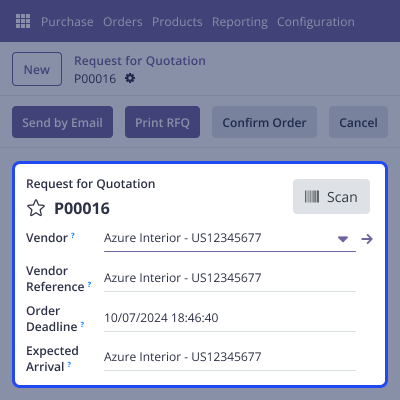
    Seamless Barcode Scanning

    Seamless Barcode Scanning

    Odoo Purchase Barcode Scan by Camera module makes buying products faster and easier. Instead of typing in product details, you can just scan the barcode with your device’s camera. The system will quickly find the product and vendor information and fill it in for you, saving you time.
    • Uses your device’s camera to scan barcodes.
    • Saves time by reducing the need to type information.
    • Helps create accurate purchase orders.
    • Reduces mistakes in the purchasing process.

    Camera Feature Management

    Camera Feature Management

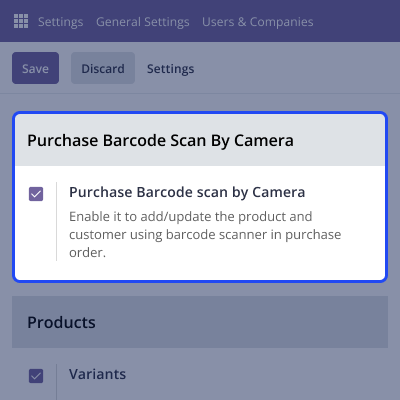
    This module lets admins easily turn the barcode scanning feature on or off. You can change it based on the needs of your business.

    • Gives an option to turn barcode scanning on or off.
    • Easy-to-use settings in the configuration panel.
    • Allows different camera setups for different needs.
    • Warns users if the barcode is wrong or invalid.

    Smart Barcode Scanning

    Smart Barcode Scanning

    Odoo Purchase Barcode Scan by Camera module helps find and fix problems with barcodes. If a barcode is broken, missing, or wrong, the system will notice and alert you.

    • Finds incomplete or incorrect barcodes and alerts the user.
    • Makes sure data is correct in purchase orders.
    • Helps reduce mistakes in purchasing.
    • Makes scanning easier with multiple options.

    Support

    Odoo Purchase barcode scan by camera

    Webkul's dedicated support provides you with customizations and troubleshooting solutions for Odoo Purchase barcode scan by camera

    For any query or issue please CREATE A TICKET HERE

    You can also explore our additional Odoo Modules.

    Specifications

    Product Version1.0.0
    Released11 months ago
    Last UpdatedOctober 7, 2025 (6 months ago)
    Supported VersionsOdoo  17.x  18.x  19.x  
    Write a review

    FAQs

     Can I scan vendor barcodes directly from my mobile camera?
    Yes, Odoo Purchase allows you to scan vendor barcodes using your mobile or desktop camera to fill in vendor details automatically.
     What happens if a barcode is unreadable?
    The system will alert you and give you an option to rescan or enter the details manually.
     Can we turn off the barcode scanning feature if needed?
    Yes, admins can turn the barcode scanning feature on or off in the settings.
     Does this module support scanning multiple products in one session?
    Yes, users can scan multiple products without restarting, using the "Scan Again" option.
     Is this module compatible with all types of cameras?
    Yes, it works with any device camera, and users can choose their preferred camera setup.

    Move to Cloud Today

    AWS Free tier hosting for one year by amazon web services, for more details please visit AWS Free Tier.

    GCP Free tier hosting for one year with 300 credit points by google cloud platform, for more details please visit GCP Free Tier.

    Azure free tier hosting for one year with 25+ always free services, for more details please visit Azure Free Tier.

    In our default configuration we will provide tremendous configuration for your eCommerce Website which is fast to load and response.

    Default Configuration Details of Server

    • 1 GB RAM
    • 1 Core Processor
    • 30 GB Hard Disk
    • DB with 1 GB RAM and 1 Core Processor

    * Server Configuration may vary as per application requirements.

    Want to know more how exactly we are going to power up your eCommerce Website with Cloud to fasten up your store. Please visit the Cloudkul Services.

    Get Started with Cloud
    Not Available


