USD
  • EUR
  • INR
  • USD
Cart
Cart 0
  • You have no items in your shopping cart.
    Cart
    Cart 0
    • You have no items in your shopping cart.
    Hire a Developer
    ×
    Contact Us!
    Send Again
    Close
    Please Login to Write Your Review

    Odoo Purchase Order Advance Payments

    Odoo Purchase Order Advance Payments lets you manage supplier prepayments efficiently, keeping all records organised in one clear and simple place.


    • Admin can handle PO advance payments.

    • A simple way to track advance payments.

    • Show advance payments as Outstanding debits.

    • Keep payments in a separate account.

    • Match payments with purchase orders.

    • Link payments to the right POs.

    • Vendor balances are updated timely manner.


    Screenshots
    Odoo Purchase Order Advance Payments Odoo Purchase Order Advance Payments Odoo Purchase Order Advance Payments Odoo Purchase Order Advance Payments Odoo Purchase Order Advance Payments
    Show More Hide All
    $99.00

    * Required Fields

    Add To Cart
    $99.00
    Configure and Buy
    • Description
    • Reviews
    • FAQ
    • Customers ()
    • Specifications
    • Cloud Hosting
    • Changelog

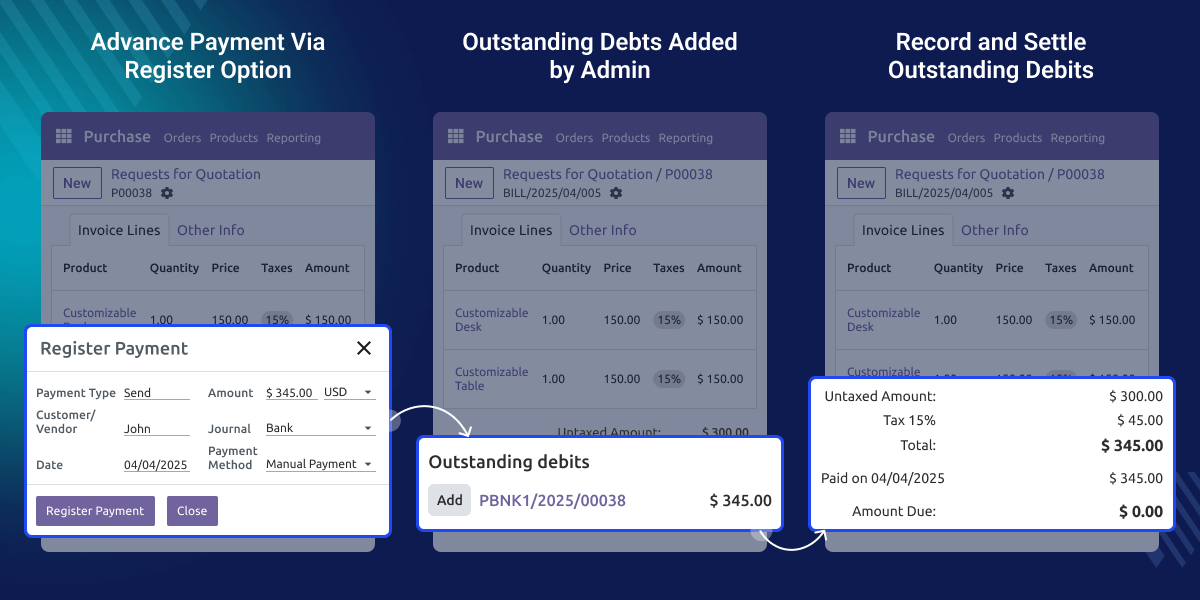
    Odoo Purchase Order Advance Payments lets you pay a partial or full amount to the vendor before the items are received. This payment is directly linked to your purchase order, so everything stays connected.

    The advance payment is recorded separately in the accounts, making it easy to track and manage. It helps keep your records clean and organised.

    When the final bill is created, the advance amount is automatically shown and subtracted from the total. This makes the billing process faster, easier, and more accurate. It’s a great way to manage vendor payments smoothly, especially when you need to confirm orders in advance.
    Odoo Purchase Order Advance Payments

    Why do we need Odoo Purchase Order Advance Payments?

    Odoo Purchase Order Advance Payments allows businesses to order goods and make partial or full payments, either upfront or at a later time. Companies can pay part of the amount in advance and settle the remaining balance later, making it more flexible for cash flow management.

    The module helps track all payments, ensuring that the bill is updated automatically every time a payment is made. This feature simplifies the process, ensuring businesses always have an accurate view of what has been paid and what is still due.

    Highlighted Features of Odoo Purchase Order Advance Payments

    Advance Payment Tracking

    Easily monitor all vendor prepayments, which in turn ensures full transparency.

    Advance Payment Utilization

    Pay a partial or full payment in advance and use it across multiple purchase orders. You can easily choose how and where to utilize the funds.

    Prepayment Overview

    Admins can view the advance payments made to the vendors in the journal entries.

    Outstanding Advance Debits

    Advance payments appear as outstanding debits on vendor bills and are adjusted manually.

    Apply for Advance Payments

    Odoo Purchase Order Advance Payments lets you pay your vendor early, and that amount is used when the bill comes, so no extra work is needed.
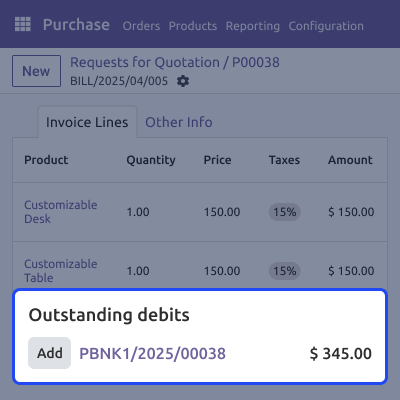
    • The bill shows an outstanding debit.
    • Only need to pay the rest of the amount after the order is created.
    • In Odoo Purchase Order Advance Payment, advance payments are tracked and used for multiple orders
    Apply for Advance Payments

    Separate Accounts Setup

    Odoo Purchase Order Advance Payments allows admins to keep track of advance payments in a separate place, so everything stays clear and easy to follow.
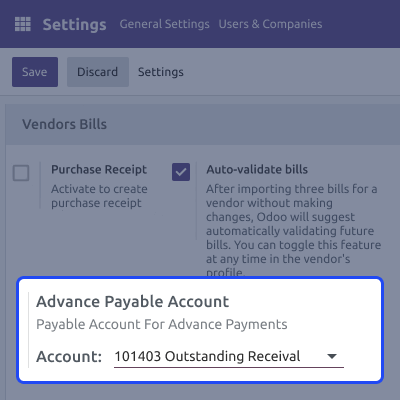
    • Admins can create dedicated accounts to handle all advance payments smoothly.
    • Accounts help track prepayments clearly and avoid confusion in accounting.
    • Payments can be seen under Outstanding Payments and Accounts Payable in the Journal Entries section.
    Separate Accounts Setup

    Quickly Record Payment

    Advance payments can be recorded and used for multiple purchase orders.
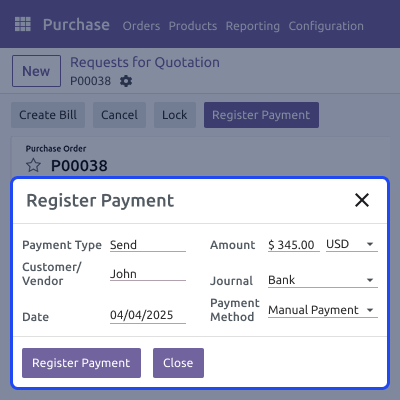
    • Easily apply multiple advance payments to one purchase order.
    • Track advances per purchase order
    • A purchase order can be placed by paying a small advance amount.
    Quickly Record Payment

    Odoo Purchase Order Advance Payments

    Webkul's dedicated support provides you with the customizations and troubleshooting solutions for Odoo Purchase Order Advance Payments

    For any query or issue please CREATE A TICKET HERE

    You may also check our other top-quality Odoo Plugins.

    Specifications

    Product Version1.0.0
    Released9 months ago
    Last UpdatedOctober 7, 2025 (4 months ago)
    Supported VersionsOdoo  17.x  18.x  19.x  
    Write a review

    Frequently Asked Questions

     What features are available for order placement and payment management?
    In Odoo Purchase Order Advance payments module, advance payments for PO can be registered and applied across multiple purchase orders.
      How can the admin register advance payments?
    Advance payments are registered after creating a purchase order. Admins can register either a partial or full payment.
     Is the advance payment managed by holding the amount in a separate account?
    Yes, advance payments are managed through a separate account, but this requires configuration. To set it up, navigate to Configuration > Invoicing > Vendor Bills > Advance Payable Account.
      Can a single payment cover multiple orders?
    Yes, one advance payment can be applied to multiple purchase orders, provided they are all linked to the same vendor.
      How can all payments associated with an account be viewed?
    Completed and pending payments are visible in the profile's Payments section.

    Move to Cloud Today

    AWS Free tier hosting for one year by amazon web services, for more details please visit AWS Free Tier.

    GCP Free tier hosting for one year with 300 credit points by google cloud platform, for more details please visit GCP Free Tier.

    Azure free tier hosting for one year with 25+ always free services, for more details please visit Azure Free Tier.

    In our default configuration we will provide tremendous configuration for your eCommerce Website which is fast to load and response.

    Default Configuration Details of Server

    • 1 GB RAM
    • 1 Core Processor
    • 30 GB Hard Disk
    • DB with 1 GB RAM and 1 Core Processor

    * Server Configuration may vary as per application requirements.

    Want to know more how exactly we are going to power up your eCommerce Website with Cloud to fasten up your store. Please visit the Cloudkul Services.

    Get Started with Cloud
    Not Available


