Odoo Purchase Quotation from CRM
With Odoo Purchase Quotation from CRM, teams can create purchase quotations from CRM leads and continue working within the CRM workflow.
- Create Purchase Quotation directly from CRM Leads
- Stay within the CRM workflow during purchase creation
- Select or create a customer during Purchase Quotation creation
- Add products manually in the Purchase Quotation
- Maintain clear Lead to Purchase Quotation traceability
- Control access using standard Odoo user roles
- Description
- Reviews
- FAQ
- Customers ()
- Specifications
- Cloud Hosting
- Changelog
Odoo Purchase Quotation from CRM connects CRM activities with the purchase process by allowing purchase quotations to be created directly from CRM leads.
The module follows standard Odoo workflows and link each Purchase Quotation to its related Lead. This improves visibility, tracking, and coordination between sales and purchase teams.
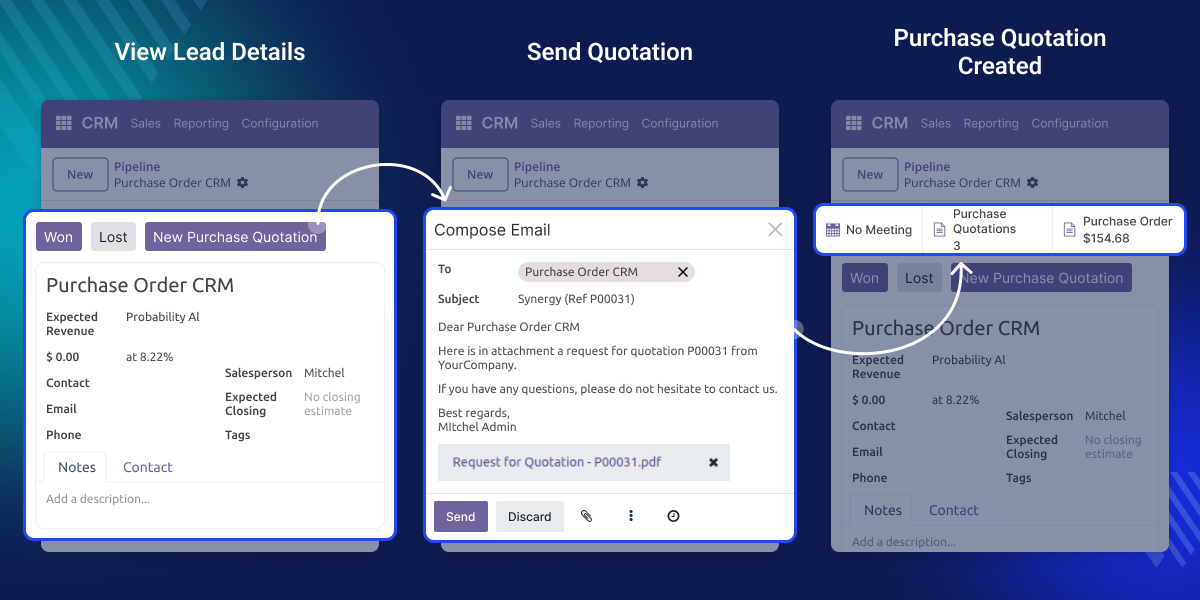
Why do we need Odoo Purchase Quotation from CRM?
In many business cases, purchase needs may come while working on CRM leads. Switching between modules or informing the purchase team can cause delays and missing information.
For example, a sales user may have a purchase requirement during a lead discussion that needs quick action. Instead of sending emails or messages, they can directly create a purchase quotation from the lead using Odoo Purchase Quotation from CRM
The purchase team then gets a ready purchase order linked to the lead, which helps speed up the process and keeps proper tracking of the lead.
Highlighted Features of Odoo Purchase Quotation from CRM
CRM Purchase Creation
Create purchase quotations directly from CRM leads without leaving the CRM screen.
Partner Selection
Choose an existing customer or create a new one while creating a purchase quotation.
Manual Product Entry
Manually add products with the required quantity and price in the purchase quotation.
Lead Traceability
Each quotation is automatically linked to the CRM lead it was created from with Odoo Purchase Quotation from CRM
Purchase Quotation Creation from CRM
Odoo Purchase Quotation from CRM adds a dedicated option on the CRM Lead form to create Purchase Orders without leaving the CRM workflow.
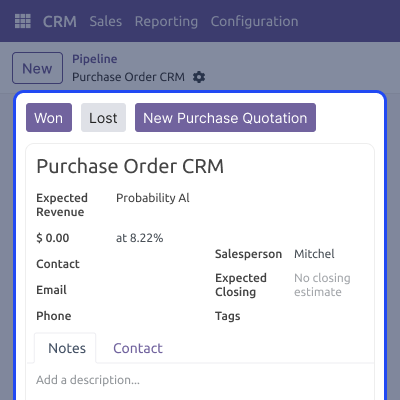
- A New Purchase Quotation button is available directly on the CRM Lead form for quick access.
- Users can create Purchase Orders without switching between CRM and Purchase modules.
- Purchase requests can be initiated faster during lead discussions.
- Better coordination between CRM and Purchase teams using standard Odoo workflows.

Customer and Vendor Handling
You can manage customer or vendor selection while creating purchase orders from CRM leads.
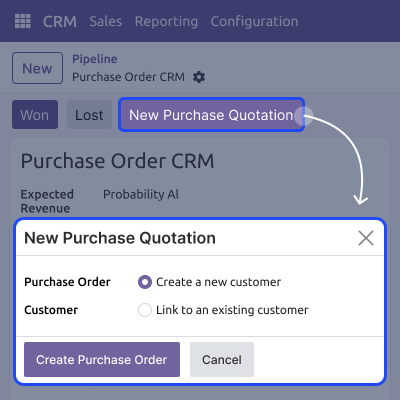
- You can select an existing customer or vendor during purchase quotation creation.
- Add a new customer or vendor directly from the purchase process.
- Keeps the correct link between CRM and purchase records.
- Reduces extra steps and keeps data consistent across the system.

Manual Product Management
The module supports manual product entry while creating a Purchase Quotation from CRM Leads.
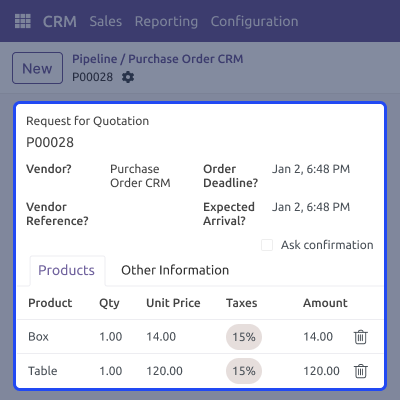
- You can add products manually to Purchase Quotation lines.
- Quantities and pricing can be defined based on lead requirements.
- Purchase Quotations can be tailored to specific CRM Lead needs.
- Provides full control over Purchase Quotation line details using standard Odoo products.

Lead to Purchase Traceability
Each Purchase Quotation remains linked to its CRM Lead for better tracking.
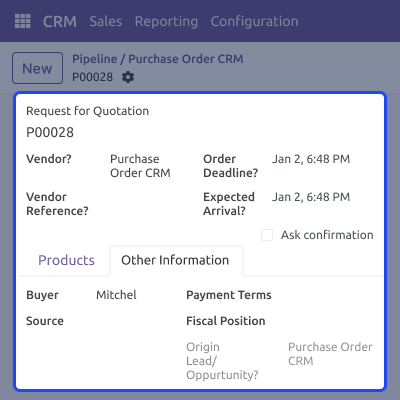
- Purchase Quotations automatically store a reference to the CRM Lead.
- Users can view all related Purchase Quotations directly from the Lead.
- Improves visibility of procurement against each Lead.
- Helps maintain clear audit and tracking between sales and purchase processes.

Support
For any query or issue, please create a support ticket here CREATE A TICKET HERE
You may also check our other top-quality Odoo Modules.
Specifications
FAQs
Move to Cloud Today
AWS Free tier hosting for one year by amazon web services, for more details please visit AWS Free Tier.
GCP Free tier hosting for one year with 300 credit points by google cloud platform, for more details please visit GCP Free Tier.
Azure free tier hosting for one year with 25+ always free services, for more details please visit Azure Free Tier.
In our default configuration we will provide tremendous configuration for your eCommerce Website which is fast to load and response.
Default Configuration Details of Server
- 1 GB RAM
- 1 Core Processor
- 30 GB Hard Disk
- DB with 1 GB RAM and 1 Core Processor
* Server Configuration may vary as per application requirements.
Want to know more how exactly we are going to power up your eCommerce Website with Cloud to fasten up your store. Please visit the Cloudkul Services.
Get Started with Cloud


