USD
  • EUR
  • INR
  • USD
Cart
Cart 0
  • You have no items in your shopping cart.
    Cart
    Cart 0
    • You have no items in your shopping cart.
    Hire a Developer
    ×
    Contact Us!
    Send Again
    Close
    Please Login to Write Your Review

    Odoo QiCard Payment Gateway

    Odoo QiCard Payment Gateway connects QiCard as a secure payment option for your website. This module helps businesses take IQD payments and handle online transactions with ease.


    • Accept secure online payments through QiCard.

    • Support IQD payments for website orders.

    • Add QiCard as a payment option at checkout.

    • Update payment status after successful transactions.

    • View payment details from the Odoo backend.

    • Set up the QiCard payment gateway with ease.

    • Control payment availability for your website.

    • Track payment records for website orders.

    • Connect payment details with sales orders.

    • Keep transaction history for future reference.

    Screenshots
    Odoo QiCard Payment Gateway Odoo QiCard Payment Gateway Odoo QiCard Payment Gateway Odoo QiCard Payment Gateway Odoo QiCard Payment Gateway Odoo QiCard Payment Gateway Odoo QiCard Payment Gateway Odoo QiCard Payment Gateway
    Show More Hide All
    $99.00

    * Required Fields

    Add To Cart
    $99.00
    Configure and Buy
    • Description
    • Reviews
    • FAQ
    • Customers ()
    • Specifications
    • Cloud Hosting
    • Changelog

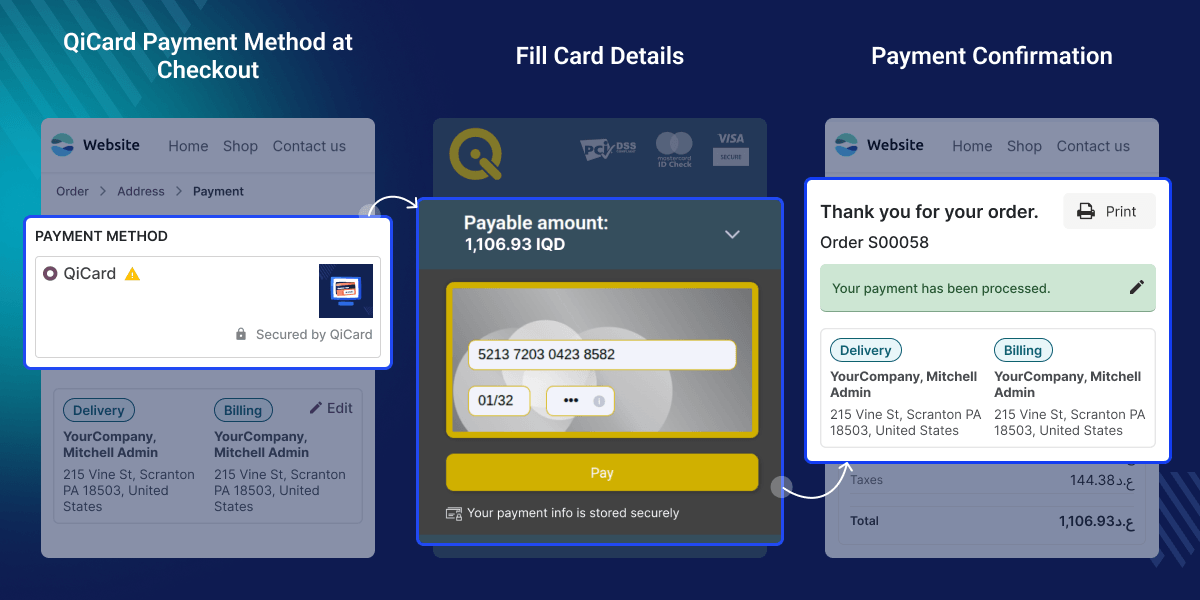
    Odoo QiCard Payment Gateway helps businesses accept QiCard payments on their Odoo website. It gives customers a simple way to pay for online orders. This module adds QiCard to the website checkout page. Customers can choose this payment method and complete their purchases with ease.

    Transaction records update automatically after each successful payment. This helps businesses keep website payment information accurate and organized for daily operations.

    Each payment stays linked with its website order. Store owners can check payment details whenever they need them. Businesses can manage QiCard settings from the Odoo backend. They can control payment options and update account details with ease. Odoo QiCard Payment Gateway helps businesses handle website payments from one place. It keeps payment records arranged for daily use.
    ERPNext Website Product Stock

    Highlighted Features of Odoo QiCard Payment Gateway

      QiCard Website Payments

    Let customers pay for website orders through QiCard. This gives businesses a simple payment option for online sales.

      IQD Payment Support

    Accept IQD payments for website purchases. This helps businesses serve customers using their local currency.

      Payment Status Updates

    Payment details update after successful transactions. Users can check the latest payment information in Odoo.

      Backend Payment Management

    Access payment details and transaction history from the Odoo backend. Keep website payment records organized in one place.

    Why Do We Need This Module?

    Using many tools for website payments can take more time. Businesses need an easy way to accept online payments.

    Default Odoo does not offer QiCard during website checkout. This can lead to extra work for store owners.

    Checking payments by hand can slow down orders. It can also make payment records hard to keep.

    Odoo QiCard Payment Gateway solves these issues. It connects QiCard to Odoo and stores payment records in one place.

    Use Cases

      E-Commerce Businesses

    Online stores can accept QiCard payments during website checkout. This gives customers a simple way to pay for their orders.

      Local Retail Businesses

    Businesses serving IQD customers can take online payments through QiCard. This helps them manage website sales with ease.

      Growing Online Stores

    Growing businesses can review website payments and order details in Odoo. This helps reduce manual work and keep payment records organized.

    QiCard Configuration

    Set up QiCard in Odoo by entering the required account details and payment information. Businesses can configure gateway settings, manage payment options, and prepare QiCard for website transactions from one place.
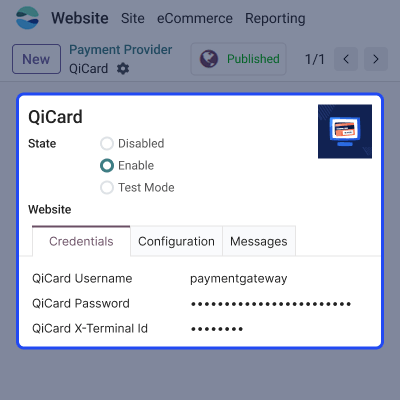
    • Add and manage QiCard account details.
    • Configure website payment processing with ease.
    • Control payment method across different websites.
    • Connect QiCard with your Odoo website.
    QiCard Configuration

    Website Payment Processing

    Customers can select QiCard as their preferred payment method during website checkout. This module supports a smooth payment flow and keeps payment information connected with the related website order.
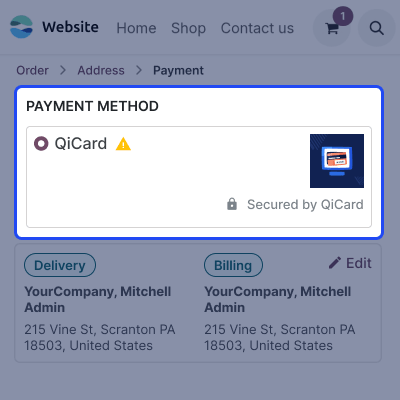
    • Display QiCard during website checkout.
    • Accept secure online payments from customers.
    • Support IQD payments for website orders.
    • Keep payments linked with related orders.
     Website Payment Processing

    QiCard Payment Flow

    After selecting QiCard, customers are sent to the payment page to finish their transaction. The tool processes payment information and keeps the checkout flow going for website orders.
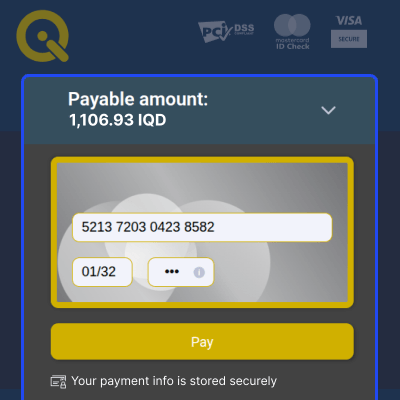
    • Open the QiCard payment page securely.
    • Process customer payments for website orders.
    • Complete transactions through the online payment gateway.
    • Continue the checkout process with ease.
    QiCard Payment Flow

    Payment Status & Order Management

    Businesses can review payment activity, check order information and keep website payment records organized in Odoo after each transaction. This helps teams monitor payment updates, verify order details and manage transaction records from one place.
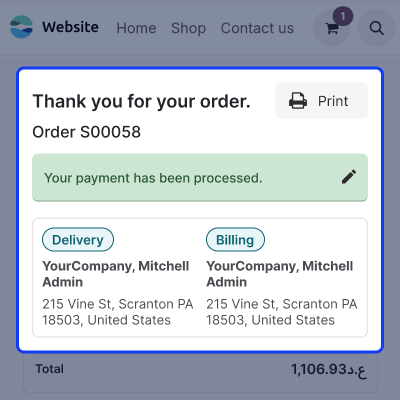
    • Update payment details after transactions.
    • View payment and order information easily.
    • Keep website payment records organized.
    • Monitor transaction activity from Odoo.
    Payment Status & Order Management

    Backend Payment Management

    Odoo QiCard Payment Gateway helps store owners review payment records from the Odoo backend. Payment details remain connected with website orders, making it easier to check transaction history and manage payment information.
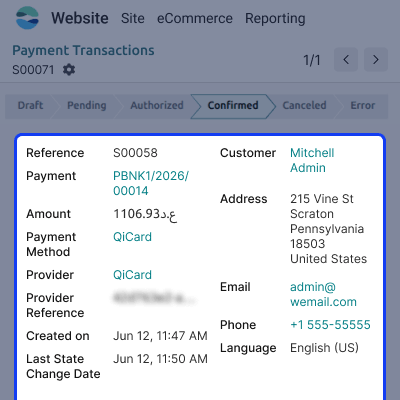
    • Access QiCard payment records from Odoo.
    • Review linked website order information.
    • Monitor transaction status and payment progress.
    • Keep payment information organized in one place.
    Backend Payment Management

    Support

    For any query or issue, please create a support ticket here CREATE A TICKET HERE

    You may also check our other top-quality Odoo Modules.

    Specifications

    Product Version1.0.0
    ReleasedToday
    CategoryOdoo AppsPayment
    Last UpdatedJuly 7, 2026 (1 day ago)
    Supported VersionsOdoo  16.x  17.x  18.x  19.x  
    Write a review

    FAQ’s

      What is Odoo QiCard Payment Gateway?
    Odoo QiCard Payment Gateway adds QiCard to your online store. It allows customers to pick QiCard and pay for website orders with ease.
     How do I set up QiCard in Odoo?
    Open the QiCard settings in Odoo, enter the required account details, and save them to start accepting website payments.
     Does this module support IQD payments?
    Yes, this module supports IQD payments for website orders. This helps businesses accept payments from local customers.
      How do customers pay with QiCard?
    Customers select QiCard during website checkout to complete their payment. This module syncs payment details in Odoo.
     Can I view payment details from Odoo?
    Yes, payment details are available in the Odoo backend. This helps businesses review website payment records with ease.
     Can I manage which websites offer QiCard payments?
    Yes, you can use the backend settings to choose which websites offer QiCard payments. This lets you manage payment options for different websites.
     Does this module update payment information automatically?
    Yes, this module refreshes payment details after a successful sale. This helps keep website payment records up to date.
     Can I review payment records for website orders?
    Yes, this module keeps payment records with website orders. This helps you check payment details with ease.

    Move to Cloud Today

    AWS Free tier hosting for one year by amazon web services, for more details please visit AWS Free Tier.

    GCP Free tier hosting for one year with 300 credit points by google cloud platform, for more details please visit GCP Free Tier.

    Azure free tier hosting for one year with 25+ always free services, for more details please visit Azure Free Tier.

    In our default configuration we will provide tremendous configuration for your eCommerce Website which is fast to load and response.

    Default Configuration Details of Server

    • 1 GB RAM
    • 1 Core Processor
    • 30 GB Hard Disk
    • DB with 1 GB RAM and 1 Core Processor

    * Server Configuration may vary as per application requirements.

    Want to know more how exactly we are going to power up your eCommerce Website with Cloud to fasten up your store. Please visit the Cloudkul Services.

    Get Started with Cloud
    Not Available


