USD
  • EUR
  • INR
  • USD
Cart
Cart 0
  • You have no items in your shopping cart.
    Cart
    Cart 0
    • You have no items in your shopping cart.
    Hire a Developer
    ×
    Contact Us!
    Send Again
    Close
    Please Login to Write Your Review

    Odoo Qlik Connector


    Odoo Qlik Connector helps you connect your Odoo ERP with Qlik to organize, export, and sync your business data in a structured, flexible, and secure way.


    • Create Qlik spaces within Odoo easily.

    • Import existing Qlik cloud spaces seamlessly.

    • Quickly export the business data files you need.

    • Design and sync flexible data models smoothly

    • Use advanced filters to export only the data you need.

    • Safe and secure connection between systems.


    • Keep your data synchronized in a clear and organized way.


    Screenshots
     Odoo Qlik Connector  Odoo Qlik Connector  Odoo Qlik Connector  Odoo Qlik Connector  Odoo Qlik Connector  Odoo Qlik Connector  Odoo Qlik Connector  Odoo Qlik Connector  Odoo Qlik Connector
    Show More Hide All
    $249.00

    * Required Fields

    Add To Cart
    $249.00
    Configure and Buy
    • Description
    • Reviews
    • FAQ
    • Customers ()
    • Specifications
    • Cloud Hosting
    • Changelog

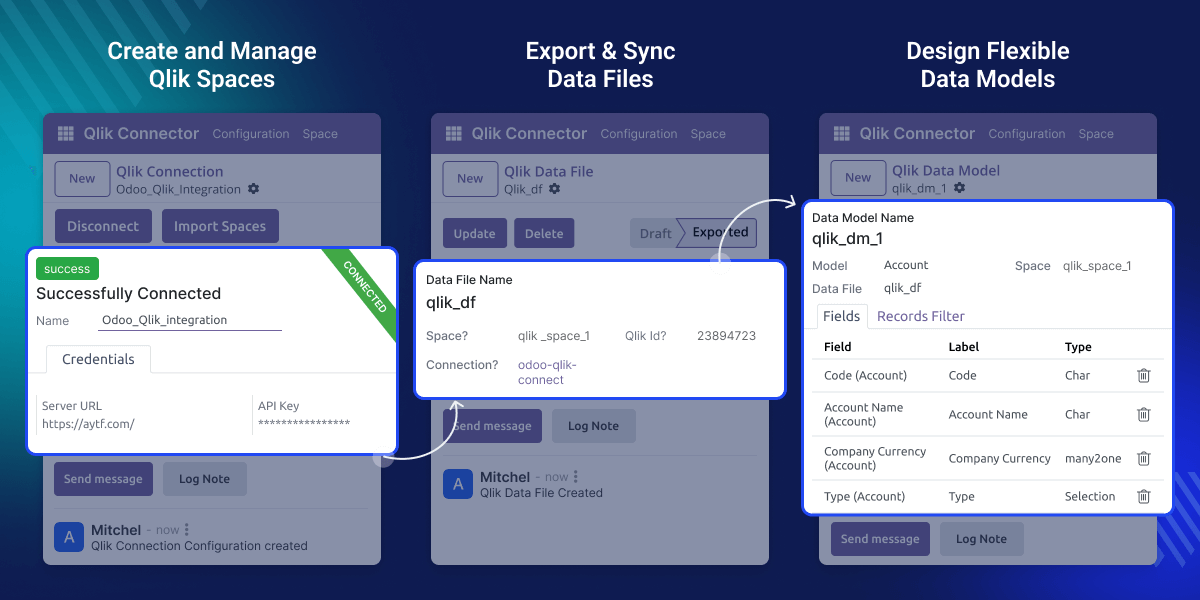
    Odoo Qlik Connector enables businesses to connect their Odoo operations with Qlik’s powerful analytics. You can create spaces, export data files, add data models, and sync all this with a simple, structured workflow.

    This connector delivers live insights straight from your data, skips messy sheets, With a clear hierarchy — Space → Data File → Data Model — your data remains organized, clean, and easy to analyze in Qlik.
    Odoo Qlik Connector

    Why Do We Need Odoo Qlik Connector

    In many businesses, teams still rely on downloading spreadsheets and manually uploading them to Qlik, which often causes delays and reporting errors. Odoo Qlik Connector removes these hassles by allowing you export well-structured data directly from Odoo to Qlik in just a few clicks, keeping everything clean and organized.

    For example, a retail chain with multiple stores can create spaces, add files, set models, and apply filters inside Odoo. Then, with a single export, they can send accurate and structured data to Qlik for clear reporting and faster decision-making.

    Prerequisites for using Odoo Qlik Connector:

    To use Odoo Qlik Connector, you must have an active Qlik Cloud account and API credentials.

    Highlighted Features of Odoo Qlik Connector

     Create Spaces Easily

    Quickly create dedicated spaces in Odoo for better data organization and export.

     Import Qlik Spaces

    Pull your existing Qlik spaces into Odoo in just a few clicks.

     Export Data Files

    Generate and send custom Odoo data files to Qlik seamlessly.

     Flexible Data Models

    Add data models inside files under spaces for clean, logical sync.

    Create & Export Spaces

    Manage structured data spaces in Odoo and sync them to Qlik for better reporting and organization.
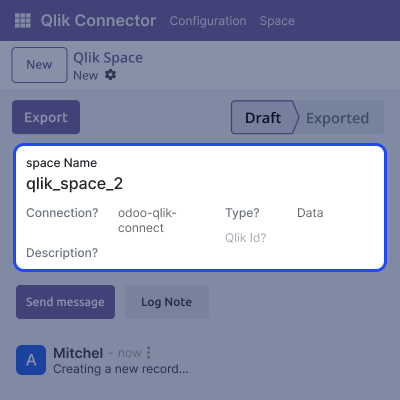
    • Easily create Qlik spaces in Odoo based on teams, departments, or regions.
    • Export created spaces directly to Qlik Cloud using a simple and secure method.
    • View and track export status updates instantly for each Qlik space.
    • Ensure seamless integration with Qlik Cloud using secure API-based connections.
    Create & Export Spaces

    Design Flexible Data Models

    Manage and define powerful data models under each file with full control over fields and filters with the help of Odoo Qlik Connector.
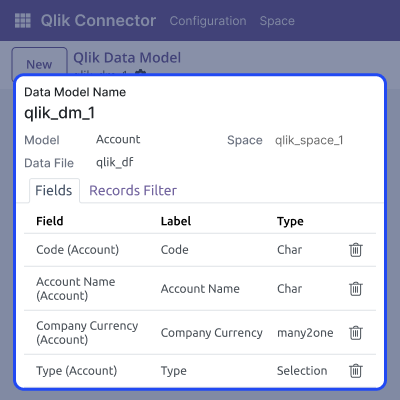
    • Add multiple flexible models under every exported data file from Odoo.
    • Map essential Odoo fields for each model as per Qlik Cloud requirements.
    • Change or adjust data models easily without requiring any coding knowledge.
    • Apply filters to exclude irrelevant or duplicate data from your export files.
    Design Flexible Data Models

    Data Sync Control

    Keep your Odoo data synchronized with Qlik Cloud on demand, ensuring complete control, accuracy, and reliability.
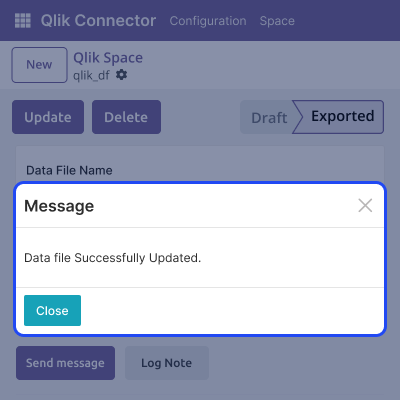
    • Trigger manual syncs with a single click whenever you need to update data.
    • Manage exactly when and how each file or model is exported for full workflow control.
    • Ensure your dashboards always reflect the most recent and accurate business data.
    • Stop accidental or repeated data transfers to protect your datasets.
    Data Sync Control

    Filter and Customize Data Instantly

    Qlik Connector allows users to add powerful filters to control what data you send from Odoo to Qlik for analysis.
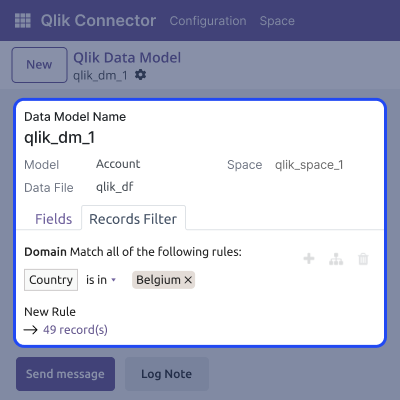
    • Apply advanced filters to sync only selected or specific Odoo data records.
    • Filter based on conditions across any module or custom field in Odoo.
    • Customize different filters for each data model to ensure flexible control.
    • Reduce unnecessary data and optimize file size with focused filtering.
     Filter and Customize Data Instantly

    Support

    For any query or issue, please create a support ticket here CREATE A TICKET HERE

    You may also check our other top-quality Odoo Modules.

    Specifications

    Product Version9.0.0
    Released2 months ago
    CategoryOdoo AppsConnectors
    Last UpdatedJanuary 22, 2026 (1 month ago)
    Supported VersionsOdoo  18.x  19.x  
    Write a review

    FAQs

     Can I sync many spaces at once?
    No, currently you can create and export only one space at a time. To sync multiple spaces, repeat the create/export steps for each space.
      Can I use filters for specific data?
    Yes, add advanced filters to exclude unwanted records before syncing.
      Is technical expertise required to configure the module?
    No, the setup is simple and doesn’t require coding. Everything is done using user-friendly mapping and a secure API..
      Can I track the status of data exports
    Yes, Odoo Qlik Connector provides tracking for every export.
      Does it support syncing data from custom Odoo modules?
    Yes, you can sync data from both standard and custom Odoo modules using the connector.

    Move to Cloud Today

    AWS Free tier hosting for one year by amazon web services, for more details please visit AWS Free Tier.

    GCP Free tier hosting for one year with 300 credit points by google cloud platform, for more details please visit GCP Free Tier.

    Azure free tier hosting for one year with 25+ always free services, for more details please visit Azure Free Tier.

    In our default configuration we will provide tremendous configuration for your eCommerce Website which is fast to load and response.

    Default Configuration Details of Server

    • 1 GB RAM
    • 1 Core Processor
    • 30 GB Hard Disk
    • DB with 1 GB RAM and 1 Core Processor

    * Server Configuration may vary as per application requirements.

    Want to know more how exactly we are going to power up your eCommerce Website with Cloud to fasten up your store. Please visit the Cloudkul Services.

    Get Started with Cloud
    Not Available


