USD
  • EUR
  • INR
  • USD
Cart
Cart 0
  • You have no items in your shopping cart.
    Cart
    Cart 0
    • You have no items in your shopping cart.
    Hire a Developer
    ×
    Contact Us!
    Send Again
    Close
    Please Login to Write Your Review

    Odoo Quality Control Management

    Odoo Quality Control Management helps you check product quality using simple templates, team roles, and alerts to keep your products excellent when you buy and sell.


    • Build quality teams with clear job roles

    • Create templates for each type of task

    • Get a quality warning before you approve an order

    • Use custom settings for quality checks

    • Give quality tasks using template rules

    • See progress with easy dashboards and charts

    • Follow quality steps: check, approve, review


    Screenshots
    $99.00

    * Required Fields

    Add To Cart
    $99.00
    Configure and Buy
    • Description
    • Reviews
    • FAQ
    • Customers ()
    • Specifications
    • Cloud Hosting
    • Changelog

    Odoo Quality Control Management ensures that your products are in excellent condition when you buy and sell them. The system checks all products before validating any sale/purchase order.

    Every quality test has three steps. First, someone inspects the product. Then, someone approves it. Last, someone checks it one more time. This process helps your team work in an organised way and makes sure all quality checks aim for high quality.

    When you link templates to your products or categories, quality checks are triggered automatically. Use Odoo Quality Control Management dashboard to track tasks and check the team's work.

    Odoo Quality Control Management

    Why do we need Odoo Quality Control Management?

    Companies get trouble when they miss quality checks or when jobs are not clear. This often causes delays, sent back products, and mad customers.

    Odoo Quality Control Management solves this by running checks during sales and purchase orders. It assigns tasks to the right teams using templates.

    Each product goes through checking, approval, and review. This process cuts mistakes, saves time, boosts quality, and keeps teams working smoothly.

    Highlighted Features of Odoo Quality Control Management

     Create Quality Teams

    Create teams with people who check, approve, and review to make quality work faster and easier.

     Set up Quality Templates

    Make templates for delivery, receipt, and transfer with simple task settings.

     Use Custom Parameters

    Record inspection data using Yes/No, text, grading scale, or multiple checkbox selections.

     Multi-level Quality Checks

    Set up clear steps for inspection, approval, and review to ensure reliable quality checks.

     Assign Priorities and Rules

    Allocate responsibilities using predefined rules and priority levels to manage task flow.

     Trigger QC Alerts

    Receive alerts for inspection failures or pending checks to avoid process delays.

     Track Performance with Dashboard

    Use graphs and visual reports to monitor team performance and inspection results.

     Support Sales & Purchase Workflows

    Run quality checks on products during sales and purchase order validations.

    Manage Quality Teams

    With Odoo Quality Control Management, you can build teams with clear roles so they can manage checks, approvals, and reviews smoothly.
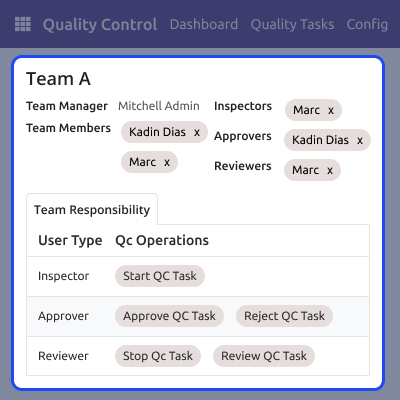
    • Define team roles like inspector, approver, and reviewer
    • Assign managers to lead and monitor each team
    • Link specific teams to sales and purchase operations
    • Improve coordination and accountability in quality checks
    Manage Quality Teams

    Assign Quality Checks Automatically

    Quality checks are assigned automatically when an order is validated. You do this by linking templates to products or groups.
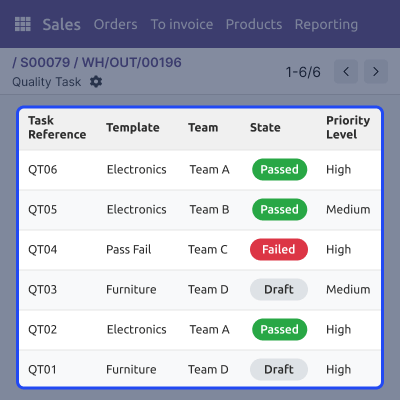
    • Quality checks run when you confirm sales or purchase orders
    • Apply templates by product or category for consistent processes
    • Saves time and reduces errors in inspections
    • Ensures quality processes are consistently applied
    Assign Quality Checks Automatically

    Use Quality Parameters

    Set up quality parameters you can reuse. Record test results the same way every time. This makes results easy to track, review, and understand.

    • Choose value types like Yes/No, text, or grading
    • Add checklists using multi-select or checkbox options
    • Mark parameters as required or optional
    • Give clear descriptions and guidance for accurate input
    Use Quality Parameters

    Analyze Quality Performance Visually

    Use the QC dashboard to see test results. Track quality trends with simple filters and charts.
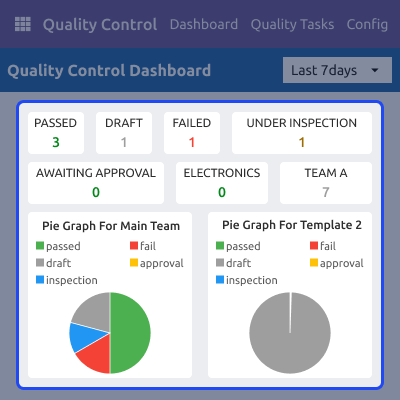
    • View total tests by status: Passed, Failed, Draft, Under Inspection
    • View trends over time with simple line and bar charts
    • Use pie and donut charts to show quality results
    • Make smart decisions with real-time insights
    Analyze Quality Performance Visually

    Support

    For any query or issue, please create a support ticket here CREATE A TICKET HERE

    You may also check our other top-quality Odoo Modules.

    Specifications

    Product Version1.0.0
    Released3 months ago
    CategoryOdoo AppsTool
    Last UpdatedJanuary 14, 2026 (1 month ago)
    Supported VersionsOdoo  17.x  18.x  19.x  
    Write a review

    Frequently Asked Questions

     Are the parameters for Inspection customizable?
    You can create inspection parameters with options such as Yes/No, text, grades, or multiple choices to suit different testing needs.
     What happens if a product fails a quality check?
    Based on your template settings, you can either stop the order and show a warning or proceed after displaying the warning.
     Can I set different inspection rules for various products?
    You can create quality check templates. Then, you can apply them to certain products or categories using simple rules you set.
     Can I assign multiple inspectors, approvers, or reviewers to a team?
    A quality team has many users. Some users are inspectors, approvers, or reviewers. This helps teams work together and makes quality checks smoother.
     Can I track the status of all quality tasks in one place using Odoo Quality Control Management?
    The 'Quality Tasks' section helps you track all tasks. It displays the task ID, the team in charge, and the current status, like Passed, Failed, or Draft.
     Can I receive notifications for failed quality tests?
    You can set up the quality template to send alerts when a test fails. These alerts can appear as system messages or emails, depending on your settings.

    Move to Cloud Today

    AWS Free tier hosting for one year by amazon web services, for more details please visit AWS Free Tier.

    GCP Free tier hosting for one year with 300 credit points by google cloud platform, for more details please visit GCP Free Tier.

    Azure free tier hosting for one year with 25+ always free services, for more details please visit Azure Free Tier.

    In our default configuration we will provide tremendous configuration for your eCommerce Website which is fast to load and response.

    Default Configuration Details of Server

    • 1 GB RAM
    • 1 Core Processor
    • 30 GB Hard Disk
    • DB with 1 GB RAM and 1 Core Processor

    * Server Configuration may vary as per application requirements.

    Want to know more how exactly we are going to power up your eCommerce Website with Cloud to fasten up your store. Please visit the Cloudkul Services.

    Get Started with Cloud
    Not Available


