USD
  • EUR
  • INR
  • USD
Cart
Cart 0
  • You have no items in your shopping cart.
    Cart
    Cart 0
    • You have no items in your shopping cart.
    Hire a Developer
    ×
    Contact Us!
    Send Again
    Close
    Please Login to Write Your Review

    Odoo Safaricom M-PESA Payment Provider

    Odoo Safaricom M-PESA Payment Provider lets customers pay with M-Pesa at checkout. It uses the Daraja API STK Push to get payment approval fast and securely.


    • Accept M-Pesa payments at checkout.

    • Send STK Push requests to customer phones.

    • Set up Daraja API details from the backend.

    • Track payment status and updates with ease.

    • View payment references and transaction details.

    • Process payments with registered M-Pesa numbers.

    • Manage all payment records from one dashboard.

    Screenshots
    Odoo Safaricom M-PESA Payment Provider Odoo Safaricom M-PESA Payment Provider Odoo Safaricom M-PESA Payment Provider Odoo Safaricom M-PESA Payment Provider Odoo Safaricom M-PESA Payment Provider Odoo Safaricom M-PESA Payment Provider Odoo Safaricom M-PESA Payment Provider
    Show More Hide All
    $99.00

    * Required Fields

    Add To Cart
    $99.00
    Configure and Buy
    • Description
    • Reviews
    • FAQ
    • Customers ()
    • Specifications
    • Cloud Hosting
    • Changelog

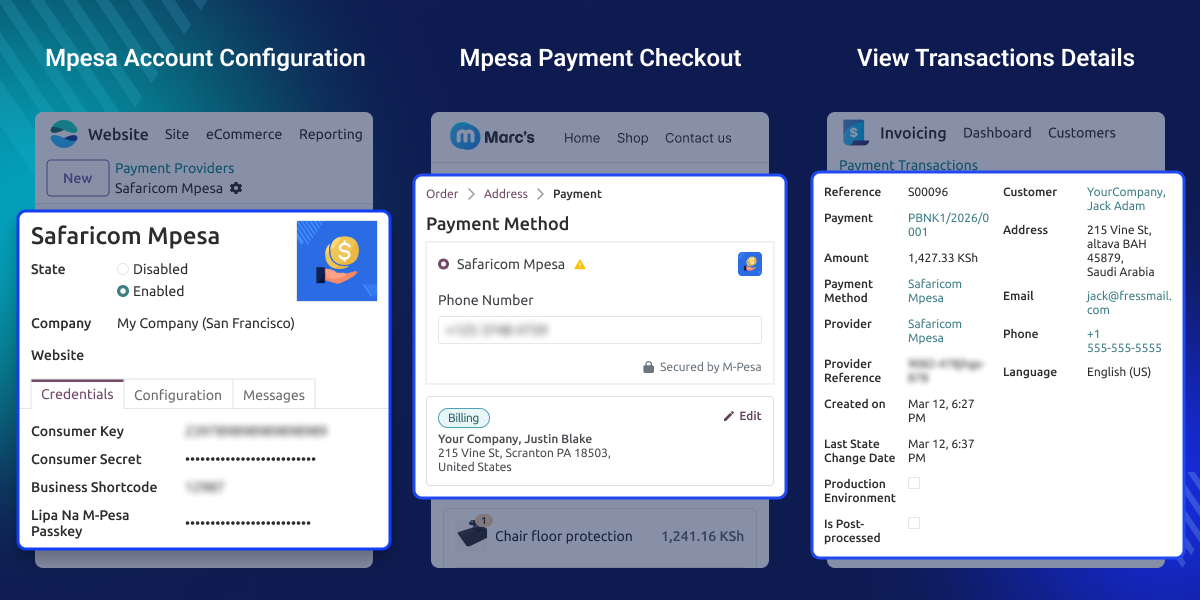
    Odoo Safaricom M-PESA Payment Provider helps businesses collect mobile payments via M-Pesa. Customers pay at checkout with their registered mobile numbers. This module links your store to the Daraja API. It sends an STK Push to the customer's phone for payment approval.

    Customers enter their M-Pesa number and tap approve. It is fast, safe, and easy. This module removes manual work and helps businesses handle mobile payments with ease. Businesses add API keys, Shortcodes, and Passkeys from the backend. No extra setup is needed. 

    This module runs in sandbox and live modes. Teams can test payments before going live. Admins track payment status and view records from one dashboard.
    Odoo Safaricom M-PESA Payment Provider

    Highlighted Features

    Secure API Authentication

    Add Daraja API credentials to keep payments safe and smooth.

    Mobile Payment Authorization

    Customers approve payments right from their M-Pesa phones.

    Instant Payment Processing

    Payments go through as soon as the customer says yes.

    Real-Time Payment Updates

    Payment status and updates show up on their own after approval.

    Test And Live Modes

    Test payments in sandbox mode before going live with real customers.

    Mobile Number Payments

    Customers pay with their M-Pesa number right at checkout.

    Why do we need Odoo Safaricom M-PESA Payment Provider?

    Most default payment options do not support M-Pesa. Businesses end up using separate tools to handle mobile payments and track transactions. Manual payment checks take too long and add extra work for admins.

    Odoo Safaricom M-PESA Payment Provider puts payment approval, tracking, and management all in one place. This module is built for businesses that need fast, safe, and reliable mobile payment collection.

    Use Cases

    Mobile Commerce Payments

    Let customers pay using their registered M-Pesa numbers.

    Secure Checkout Payments

    Collect payments safely right from the checkout page.

    Payment Verification

    Check transaction references and verify payment records with ease.

    Transaction Monitoring

    Monitor payment status and updates from one dashboard.

    Configure M-Pesa Credentials

    This feature helps businesses set up M-Pesa payment details. It works in both sandbox and live modes.
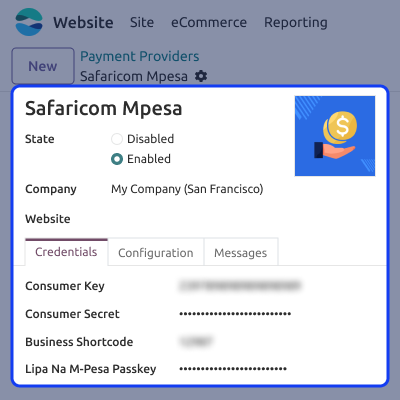
    • Turn M-Pesa payments on or off.
    • Add Consumer Key and Consumer Secret.
    • Enter the Business Shortcode and Passkey.
    • Switch between sandbox and live modes.
    Configure M-Pesa Credentials

    Complete Mobile Payment Checkout

    This feature allows customers to complete payments using their registered M-Pesa mobile numbers. Customers receive a payment request on their phone and approve it instantly.

    • Select M-Pesa during checkout.
    • Enter a registered mobile number.
    • Receive STK Push payment requests.
    • Approve payments from mobile devices.
    Complete Mobile Payment Checkout

    Payment Transaction Tracking

    This feature helps admins track and manage payments. All records and references stay in one place.

    • Track payment status with ease.
    • View transaction references.
    • Monitor customer payment records.
    • Access full transaction details.
    Payment Transaction Tracking

    Support

    For any query or issue, please create a support ticket here CREATE A TICKET HERE

    You may also check our other top-quality Odoo Modules.

    Specifications

    Product Version1.0.0
    Released8 days ago
    CategoryOdoo AppsPayment
    Last UpdatedJune 29, 2026 (5 days ago)
    Supported VersionsOdoo  19.x  
    Write a review

    FAQs

     How does the Safaricom M-PESA Payment Provider payment process work?
    Customers enter their registered M-Pesa number, get an STK Push request on their phone, approve the payment, and complete the checkout process securely.
     Does this module support sandbox and live environments?
    Yes, businesses can test complete payment workflows in sandbox mode and switch to live mode when ready to process real customer payments securely.
     Can customers pay using their mobile number?
    Yes, customers can pay using their registered M-Pesa mobile number and approve payment requests directly from their mobile device during checkout.
     What credentials are required for setup?
    This module needs a Consumer Key, Consumer Secret, Business Shortcode, and Passkey provided through the Safaricom Daraja Developer Portal to get started.
     Can administrators track payment transactions?
    Yes, admins can monitor payment status, transaction references, customer records, payment details, and transaction history from one dashboard.
     Are payment records stored in the system?
    Yes, payment records, references, transaction details, and payment statuses are saved for tracking, verification, auditing, and future review.

    Move to Cloud Today

    AWS Free tier hosting for one year by amazon web services, for more details please visit AWS Free Tier.

    GCP Free tier hosting for one year with 300 credit points by google cloud platform, for more details please visit GCP Free Tier.

    Azure free tier hosting for one year with 25+ always free services, for more details please visit Azure Free Tier.

    In our default configuration we will provide tremendous configuration for your eCommerce Website which is fast to load and response.

    Default Configuration Details of Server

    • 1 GB RAM
    • 1 Core Processor
    • 30 GB Hard Disk
    • DB with 1 GB RAM and 1 Core Processor

    * Server Configuration may vary as per application requirements.

    Want to know more how exactly we are going to power up your eCommerce Website with Cloud to fasten up your store. Please visit the Cloudkul Services.

    Get Started with Cloud
    Not Available


