USD
  • EUR
  • INR
  • USD
Cart
Cart 0
  • You have no items in your shopping cart.
    Cart
    Cart 0
    • You have no items in your shopping cart.
    Hire a Developer
    ×
    Contact Us!
    Send Again
    Close
    Please Login to Write Your Review

    Odoo Sale Barcode Scan by Camera

    Odoo Sale Barcode Scan by Camera creates quotes and sales orders by scanning customer and product barcodes using any device camera.


    • Scan customer barcodes using the phone camera

    • Scan product barcodes to add items automatically

    • Customers are selected automatically after scanning

    • Products are added directly to order lines

    • Checks barcodes and shows an error if they are invalid

    • Reduces manual work and saves time during the sales process

    Screenshots
    Odoo Sale Barcode Scan by Camera Odoo Sale Barcode Scan by Camera Odoo Sale Barcode Scan by Camera Odoo Sale Barcode Scan by Camera Odoo Sale Barcode Scan by Camera Odoo Sale Barcode Scan by Camera Odoo Sale Barcode Scan by Camera Odoo Sale Barcode Scan by Camera Odoo Sale Barcode Scan by Camera Odoo Sale Barcode Scan by Camera
    Show More Hide All
    $99.00

    * Required Fields

    Add To Cart
    $99.00
    Configure and Buy
    • Description
    • Reviews
    • FAQ
    • Customers ()
    • Specifications
    • Cloud Hosting
    • Changelog

    Odoo Sale Barcode Scan by Camera helps users create sales quotations and orders faster by scanning barcodes directly with a device camera.

    Users can quickly add customers by scanning their barcodes instead of searching for them manually.

    Products can also be added instantly through barcode scanning. Once a barcode is scanned, the product is automatically added to the order line.

    This module is useful for businesses that process orders regularly and need a faster way to create sales documents.

    It works with mobile phones, tablets, laptops, and desktop systems that have a camera, giving users flexibility to scan from different devices.

    For bulk order creation, users can continue scanning multiple products using the Add & Scan Again option without repeating the scanning process.

    To improve accuracy, the system checks every scanned barcode. If an invalid barcode is scanned, an error message is displayed to prevent incorrect entries.

    Built for daily sales operations, this module helps reduce manual work, speed up order creation, and improve overall efficiency.
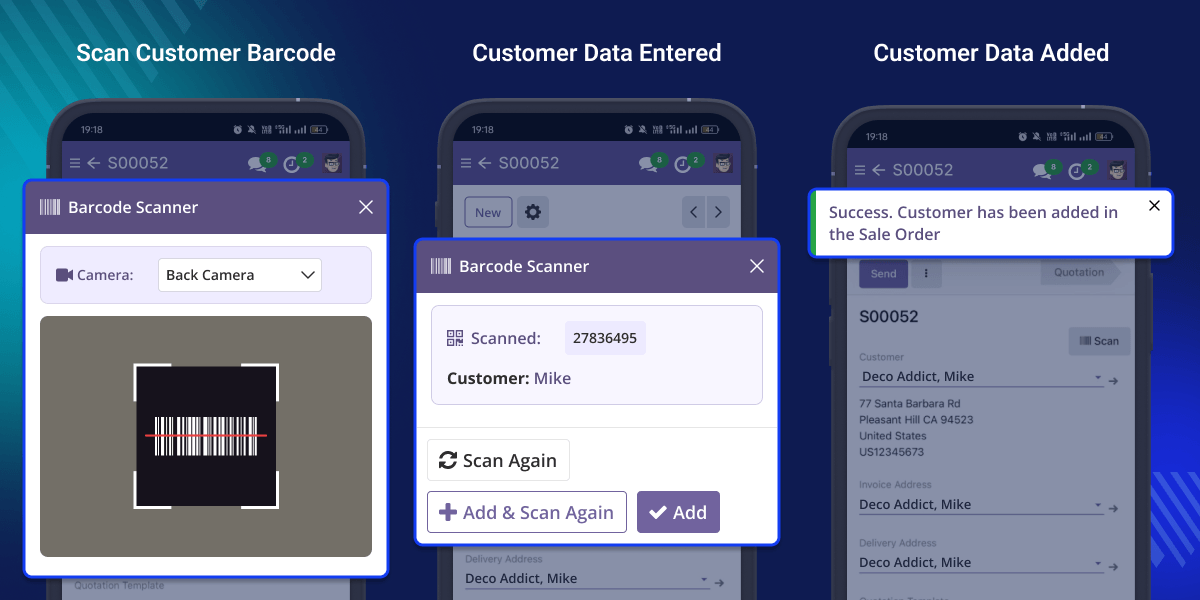
    Odoo Sale Barcode Scan by Camera

    Highlighted Features of Odoo Sale Barcode Scan by Camera

      Customer Barcode Scan

    Scan a customer barcode using your camera to fill in all the customer details automatically.

      Product Barcode Scan

    Odoo Sale Barcode Scan by Camera scans product barcode and adds them to order lines automatically.

      Auto Customer Fill

    Customer details appear in the order form right after scanning the barcode.

      Auto Product Add

    Products gets added automatically to order lines without any manual typing or searching.

      Scan Multiple Items

    This module scans multiple products one after another without closing the scanner each time.

      Barcode Check

    This module shows an error message when you scan a wrong or unknown barcode.

    Why do we need Odoo Sale Barcode Scan by Camera?

    Odoo Sale Barcode Scan by Camera makes it easier to create sales quotations and orders. In the standard sales process, users usually spend time finding customers and products before adding them to an order.

    This extra effort can slow down the workflow and increase the chance of selecting the wrong record.

    As businesses handle more orders, manually looking up information becomes less efficient. A quicker and more practical approach is needed to keep sales operations running smoothly.

    This module allows users to scan customer and product barcodes directly through a device camera.

    Once scanned, the related details are instantly added to the sales order, helping users complete orders with less effort.

    Built for everyday business use, this module helps reduce manual steps, improve accuracy, and make order creation faster.

    Use Cases

      Retail Shops

    Cashiers can scan customer loyalty cards and product barcodes to create bills in seconds.

      Wholesale Business

    Teams handle large orders faster by scanning repeat customer codes and bulk products.

      Field Sales Team

    In this module, agents can use their mobile camera at client locations to create orders on the spot.

      Showrooms

    Floor staff reduces typing by scanning customer QR codes and furniture tags directly.

      Distribution Business

    Warehouses process high order volumes accurately with continuous barcode scanning.

      High Order Volume Business

    Companies with many daily orders save hours and prevent expensive typing mistakes.

    Customer Barcode Scan

    Scan a customer barcode using your camera from the quotation or sales order screen. This module finds the correct customer and fills in all their details without any typing.
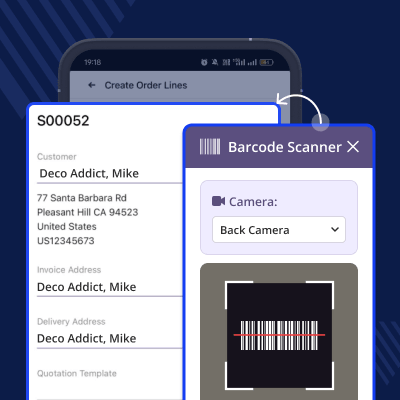
    • Scan customer barcodes directly from the order screen
    • All customer details are filled automatically without keyboard typing
    • Works for new quotations and existing sales orders
    Customer Barcode Scan

    Product Barcode Scan

    Scan a product barcode using your camera to add that item straight to your order.

    You never need to search for products by name or code ever again.
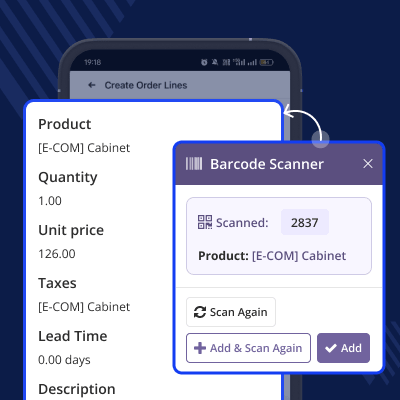
    • Scan product barcodes from the order screen
    • Products get added to order lines automatically
    • No manual product search required at all
    Product Barcode Scan

    Add & Scan Again

    Click Add & Scan Again after scanning one product. The scanner stays open for the next item.

    This module can scan many products one after another without stopping or reopening anything.
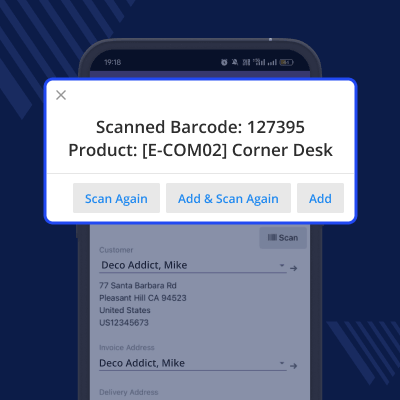
    • Scan unlimited products in one continuous flow
    • Scanner stays open after each successful scan
    • No need to click add or reopen the scanner again
    Add & Scan Again

    Barcode Validation

    This module checks every barcode against your customer and product database.

    If a barcode is wrong or missing, the system shows an error message immediately.
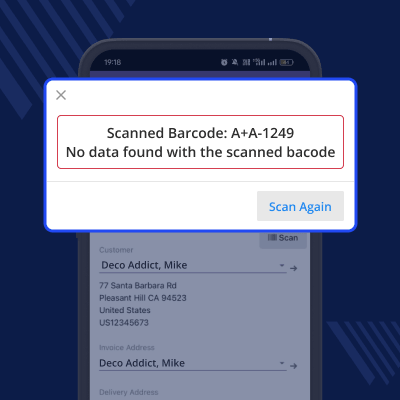
    • Detect wrong barcode
    • Show error message
    • Prevent wrong customer or product entry
    Barcode Validation

    Support

    For any query or issue, please create a support ticket here CREATE A TICKET HERE

    You may also check our other top-quality Odoo Modules.

    Specifications

    Product Version1.0.0
    Released16 days ago
    CategoryOdoo AppsSalesTool
    Last UpdatedJune 19, 2026 (15 days ago)
    Supported VersionsOdoo  15.x  16.x  17.x  18.x  19.x  
    Write a review

    FAQ’s

     What does this module do?
    Odoo Sale Barcode Scan by Camera allows users to create sales orders and quotations easily by scanning product or customer barcodes using a camera.
     Can I scan a customer's barcode?
    Yes, scanning a customer's barcode automatically adds all their saved details into the sales order or quotation form instantly.
     Can I scan product barcode?
    Odoo Sale Barcode Scan by Camera scans product barcodes can be scanned, and items are added directly to the order without any manual entry required.
     What happens after scanning customer's barcode?
    After scanning customer's barcode, the customer is selected automatically in the sales order or quotation without any extra clicks.
     Can I scan many products together?
    Use "Add & Scan Again" button to scan multiple products one after another for fast and efficient order creation.
     Does it show an error for wrong barcode?
    Yes, this module immediately shows a clear error message on screen when an invalid or unrecognized barcode is scanned.
     Which devices support this?
    This feature works on all modern devices, including mobile phones, tablets, laptops, and any system with a webcam.

    Move to Cloud Today

    AWS Free tier hosting for one year by amazon web services, for more details please visit AWS Free Tier.

    GCP Free tier hosting for one year with 300 credit points by google cloud platform, for more details please visit GCP Free Tier.

    Azure free tier hosting for one year with 25+ always free services, for more details please visit Azure Free Tier.

    In our default configuration we will provide tremendous configuration for your eCommerce Website which is fast to load and response.

    Default Configuration Details of Server

    • 1 GB RAM
    • 1 Core Processor
    • 30 GB Hard Disk
    • DB with 1 GB RAM and 1 Core Processor

    * Server Configuration may vary as per application requirements.

    Want to know more how exactly we are going to power up your eCommerce Website with Cloud to fasten up your store. Please visit the Cloudkul Services.

    Get Started with Cloud
    Not Available


