Send Again
Close
Odoo Scan Picking by Camera makes the picking process faster by letting you scan barcodes using a phone, tablet, or webcam. It removes the need for costly barcode scanners and typing in details by hand.
With a simple design, warehouse staff can use it easily without much training. You can turn barcode scanning on or off anytime, making it flexible for different tasks.
By reducing errors and automating data entry, Picking Scan by Camera saves time and money. It helps businesses manage inventories smoothly and efficiently.

Odoo Scan Picking by Camera helps make warehouse work faster and easier by letting you scan barcodes using a phone, tablet, or webcam. It removes the need for expensive scanners and typing details by hand.
It quickly updates product done quantities. It ensures that the products are right-picked. Automating the picking process, Odoo Scan Picking by Camera saves time, cuts costs, and helps businesses manage inventory smoothly.
Users can use phones, tablets, or webcam to scan. It helps make the picking process faster and more efficient.
It makes sure the correct product is picked by checking it immediately after it is scanned.
It automatically updates the product done quantity when you scan it, which helps reduce extra manual work.
Users can quickly and easily allow or disallow barcode scanning at any time, depending on their needs.
It saves time by removing manual data entry. This makes the work faster and easier.
It helps you choose the right items during picking, which reduces mistakes. It also means fewer wrong deliveries and fewer returns from customers.
Users do not have to spend money on expensive barcode scanners. They can use devices like phones or tablets.
It is made to be simple and easy to use, so anyone can start using it without needing a lot of training or experience.
Odoo Scan Picking by Camera scans barcodes using a phone, tablet, or webcam, making the picking process smooth and effortless. Users do not have to go for expensive barcode scanners or extra hardware.
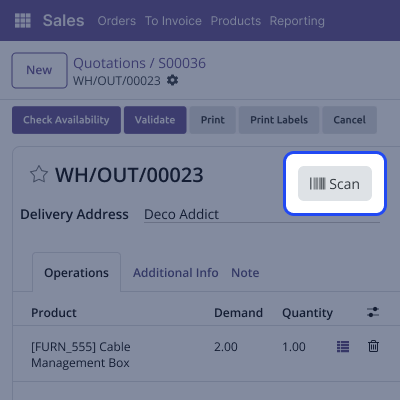
This module automatically updates product done quantities while scanning to keep stock levels up-to-date. It also avoids mistakes and makes warehouse management easier.
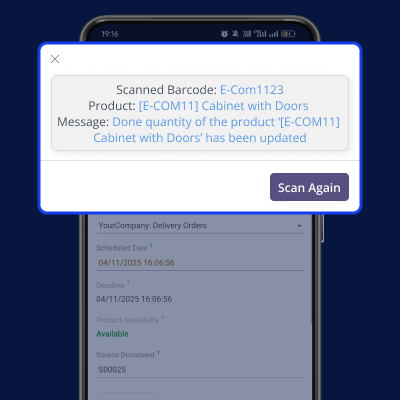
Users can turn scanning on or off anytime. This feature gives better control over the picking process.
For any query or issue, please create a support ticket here CREATE A TICKET HERE
You may also check our other top-quality Odoo Modules.
Detailed technical features and requirements to help you understand the module’s capabilities and ensure smooth integration with your system.
Detailed technical features and requirements to help you understand the module’s capabilities and ensure smooth integration with your system.
We’re partnered with top-tier, trusted providers!
Want to know more how exactly we are going to power up your eCommerce Website with Cloud to fasten up your store
* Server Configuration may vary as per application requirements.



