USD
  • EUR
  • INR
  • USD
Cart
Cart 0
  • You have no items in your shopping cart.
    Cart
    Cart 0
    • You have no items in your shopping cart.
    Hire a Developer
    ×
    Contact Us!
    Send Again
    Close
    Please Login to Write Your Review

    Odoo SendCloud Delivery Carrier

    Odoo Sendcloud Delivery Carrier connects Odoo with Sendcloud to fetch live shipping rates, generate shipments, print labels, and manage real-time tracking, returns, and cancellations efficiently.


    • Live Multi-Carrier Rate Fetching.

    • Shipment & Label Generation.

    • Real-Time Tracking Sync.

    • Return Shipment Processing.

    • Quick Shipment Cancellation.

    • Sendcloud API-Based Odoo Integration.

    • Centralized Shipping Workflow.

    Screenshots
    $149.00

    * Required Fields

    Add To Cart
    $149.00
    Configure and Buy
    • Description
    • Reviews
    • FAQ
    • Customers ()
    • Specifications
    • Cloud Hosting
    • Changelog

    Odoo SendCloud Delivery Carrier helps you handle all shipping work in Odoo using SendCloud. You can fetch live rates, create shipments, print labels, and track orders from one place.

    The module runs many tasks on its own to save time and reduce errors. It also supports return shipment management and shipment cancellation, so all shipping work stays simple and organized.
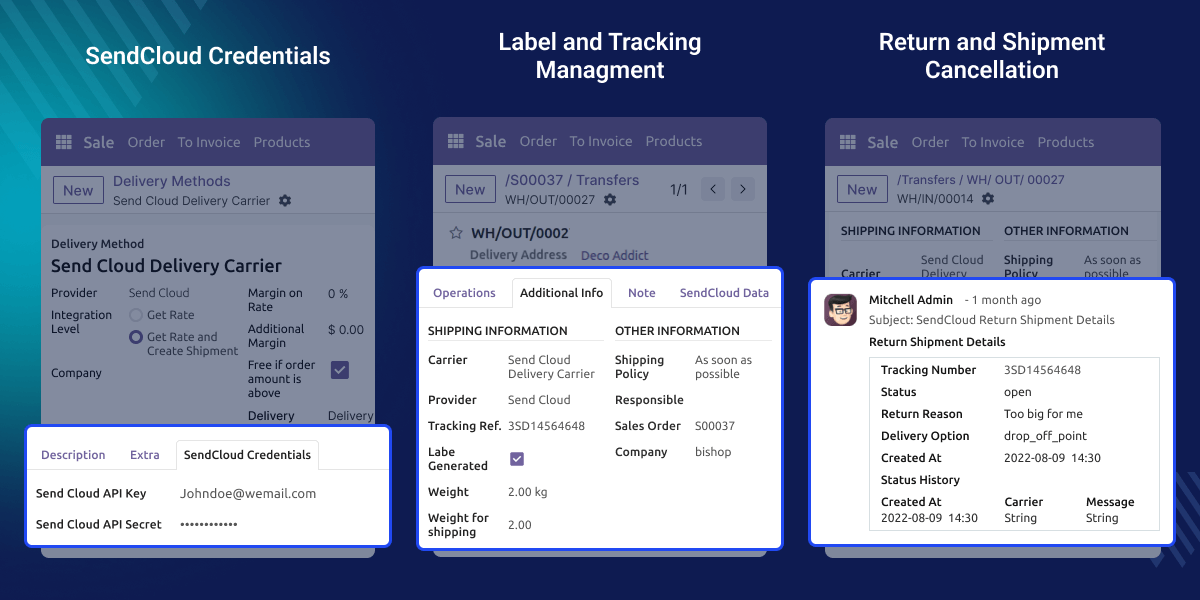
    SendCloud Delivery Carrier

    Why Do We Need SendCloud Delivery Carrier?

    Performing shipping work on multiple platforms requires more time and can lead to errors. This module connects SendCloud with Odoo to make shipping simple and fast.

    It gives correct shipping rates, helps send orders faster, and keeps tracking in one place. This helps businesses work better and keep customers happy.

    Prerequisites for using Odoo SendCloud Delivery Carrier

    Odoo SendCloud Delivery Carrier works in conjunction with the following module:

    Odoo Shipping Service Apps

    You need to install the module mentioned above to use Odoo SendCloud Delivery Carrier

    Highlighted Features of SendCloud Delivery Carrier

    SendCloud-Based Delivery Carrier

    Connect Odoo directly with SendCloud to manage all shipping operations from one system without switching platforms.

    Live Rate Fetching

    You can see live shipping rates for every available carrier. Live Rate Fetching helps you know the correct shipping cost at once.

    Shipment & Label Creation

    You can create shipments and print shipping labels directly in Odoo. No other system is needed.

    Smooth Tracking Sync

    Tracking numbers are added to delivery orders. You can see where the shipment is in real time by clicking on the tracking button.

    SendCloud Configuration & Setup

    With Odoo SendCloud Delivery Carrier, you can connect SendCloud with Odoo in a few easy steps. Just add your keys and choose your shipping settings.
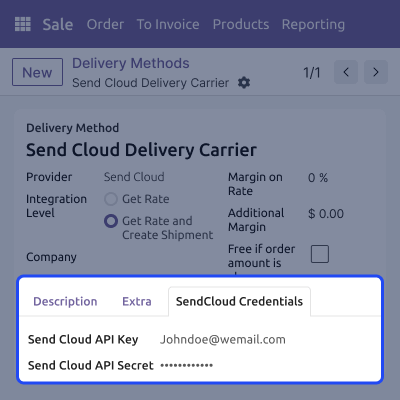
    • Add SendCloud API and subscription keys.
    • Choose the integration level for fetching rates and creating shipments.
    • Choose delivery products for shipping.
    • Choose estimated or actual billing cost.
    • Turn on the SendCloud shipping method.
    SendCloud  Configuration & Setup

    Live Rate & Shipment Processing

    You can see live shipping rates and create shipments in Odoo after the order is confirmed.
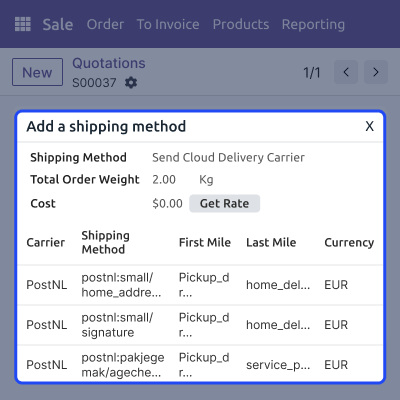
    • Fetch live rates with the “Get Rate” button.
    • Compare different carrier services.
    • Add the carrier service after selecting the rate.
    • Sync shipment details to SendCloud.
    • Apply the selected shipping rate to the delivery order after choosing a service.
    Live Rate & Shipment Processing

    Label & Tracking Management

    Shipping labels and tracking numbers are created on their own. This makes it easy to follow each shipment.
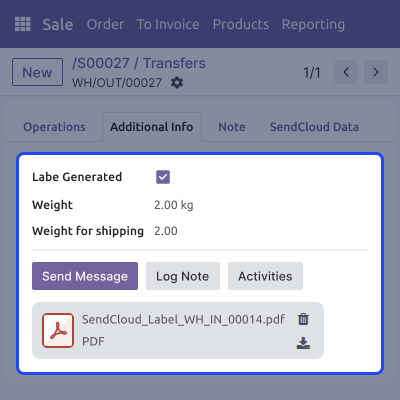
    • Auto-generate shipping labels.
    • Sync tracking numbers in real time.
    • Show tracking details in the delivery order chatter.
    • Enable clear and simple delivery tracking.
    Label & Tracking Management

    Returns & Shipment Cancellation

    You can return or cancel shipments with ease and keep all records up to date in Odoo.
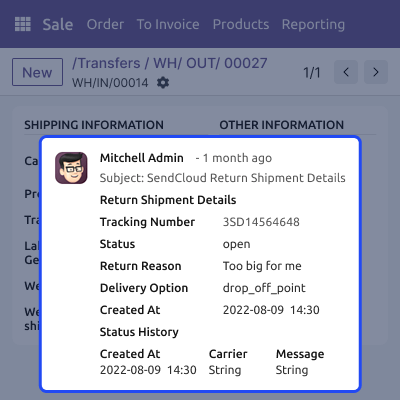
    • Create return shipments easily.
    • Generate return shipping labels.
    • Cancel shipments directly from Odoo.
    • Keep full shipment history.
    • Track all returns and cancellations.
    Returns & Shipment Cancellation

    Support

    For any query or issue, please create a support ticket here CREATE A TICKET HERE

    You may also check our other top-quality Odoo Modules.

    Specifications

    Product Version1.0.0
    Released2 months ago
    Last UpdatedFebruary 24, 2026 (7 days ago)
    Supported VersionsOdoo  16.x  17.x  18.x  19.x  
    Write a review

    FAQs

      What happens if SendCloud API credentials are incorrect?
    If the SendCloud API Key or Subscription Key is wrong, Odoo SendCloud Delivery Carrier will not work. It will not fetch rates or create shipments.
      Can admins control which shipping methods are shown to customers?
    Yes, admins can choose which shipping methods customers can see and use in Odoo.
      Does this module support international shipping?
    Yes, this module supports both local and international shipping using Sendcloud carriers.
      Can multiple warehouses use this integration?
    Yes, this integration works with multiple warehouses. Delivery routes and carriers must be set correctly.
      What happens if a shipment is cancelled after label generation?
    When a shipment is cancelled, Odoo updates it and sends the cancellation to SendCloud, but if a carrier doesn’t allow cancellations after creation, Odoo will display a popup message.
      Are return shipments chargeable?
    Return shipment charges depend on the carrier and the SendCloud setup.

    Move to Cloud Today

    AWS Free tier hosting for one year by amazon web services, for more details please visit AWS Free Tier.

    GCP Free tier hosting for one year with 300 credit points by google cloud platform, for more details please visit GCP Free Tier.

    Azure free tier hosting for one year with 25+ always free services, for more details please visit Azure Free Tier.

    In our default configuration we will provide tremendous configuration for your eCommerce Website which is fast to load and response.

    Default Configuration Details of Server

    • 1 GB RAM
    • 1 Core Processor
    • 30 GB Hard Disk
    • DB with 1 GB RAM and 1 Core Processor

    * Server Configuration may vary as per application requirements.

    Want to know more how exactly we are going to power up your eCommerce Website with Cloud to fasten up your store. Please visit the Cloudkul Services.

    Get Started with Cloud
    Not Available


