USD
  • EUR
  • INR
  • USD
Cart
Cart 0
  • You have no items in your shopping cart.
    Cart
    Cart 0
    • You have no items in your shopping cart.
    Hire a Developer
    ×
    Contact Us!
    Send Again
    Close
    Please Login to Write Your Review

    Odoo Sendle Shipping Integration

    Odoo Sendle Shipping Integration makes shipping easy by allowing you to create labels, pick shipping services, and track packages inside Odoo.


    • Shipping labels are made automatically right after you confirm an order.

    • Track packages live using tracking refrence.

    • Pick from different shipping services as needed.

    • See live shipping rates before sending a package.

    • Ship both local and international orders smoothly.

    • Use different shipping options in one delivery.

    • Manage a whole shipping process right in Odoo.

    Screenshots
    $149.00

    * Required Fields

    Add To Cart
    $149.00
    Configure and Buy
    • Description
    • Reviews
    • FAQ
    • Customers ()
    • Specifications
    • Cloud Hosting
    • Changelog

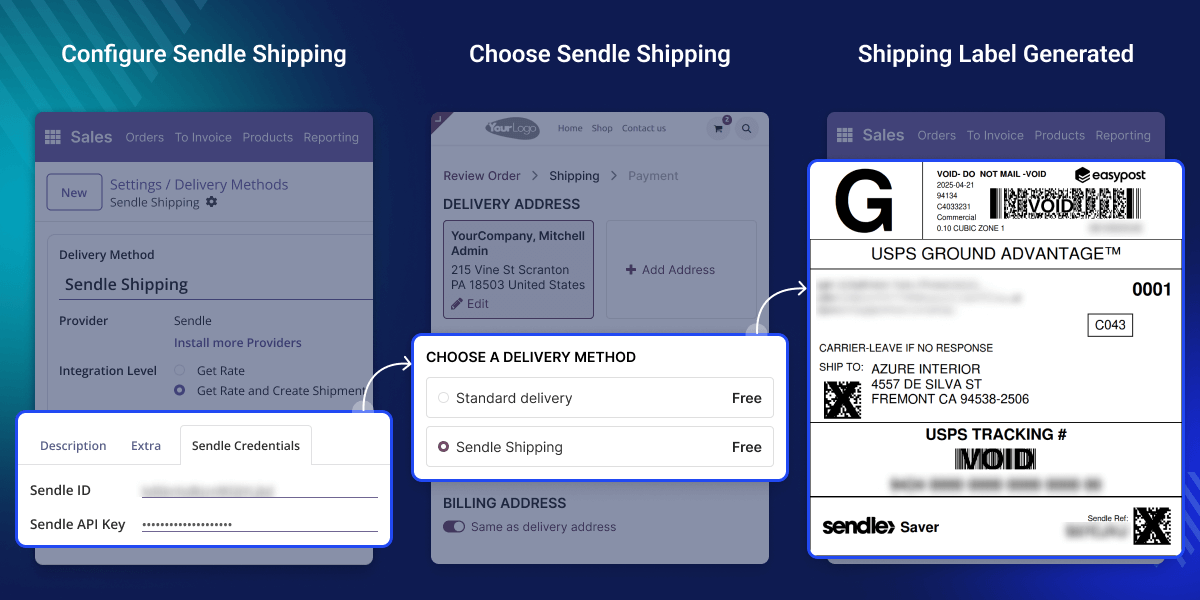
    Odoo Sendle Shipping Integration module helps Odoo users ship more easily by linking their Odoo system with Sendle. This module lets you ship packages both within your country and across the globe, allowing you easily connect with your customers no matter where they are.

    It shows you the shipping rates in real time and guides you to pick the best delivery option automatically. Sendle shipping module works not just with Sendle, but also with other shipping services.

    In sendle shipping integration, You can choose the best delivery partner based on your order, location, or how fast you need package delivered, without having to log in to different websites.
    Odoo Marketplace Product Tags

    Why do we need Odoo Sendle Shipping Integration?

    Odoo Sendle Shipping Integration module is important for any business that wants to save time and reduce mistakes in shipping. For example, a small shop that sells handmade candles online.

    Without this module, the shop owner has to manually switch between Odoo and Sendle to copy customer details, check shipping rates, print labels, and update details about package tracking.

    This takes time and increases the chances of making mistakes. With this Sendle integration, all of these tasks happen directly in Odoo. Once a sales order is confirmed, Shipping rates are automatically retrieved.

    Highlighted Features of Odoo Sendle Shipping Integration

    Automatic Label Generation

    Automatically generates shipping labels for every order, helping you save time, reduce manual work, and speed up shipping process.

    Live Shipment Tracking

    It shows where the package is right now, so you and your customers always stay updated.

    Real-Time Shipping Costs

    In Odoo Sendle shipping integration shows updated shipping prices right away based on order details.

    Multiple Shipping Services

    Let's you choose from different shipping options based on cost, speed, or destination all within Odoo.
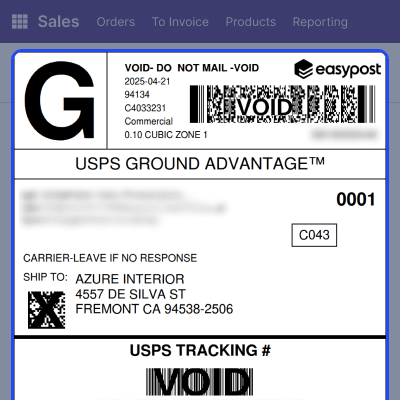
    Automatic Label Generation

    Automatic Label Generation

    Make shipping labels for orders quickly. A system does everything in Odoo, making shipping faster and more accurate. It saves time, prevents mistakes, and speeds up shipping.
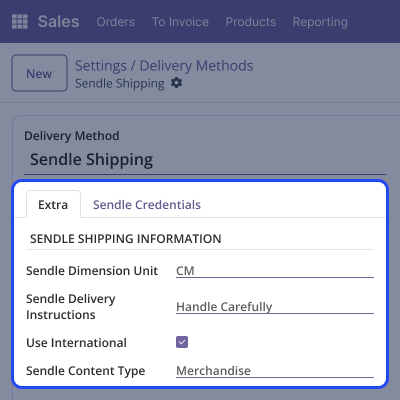
    • Customer and product details are taken directly from the order, which helps reduce the chances of mistakes.
    • A shipping label gets generated automatically when a delivery order is confirmed, helping you save time and effort.
    • It cuts down mistakes from manual typing and makes everything run more smoothly.
    • Download and print labels quickly from Odoo without using other programs or platforms.
    • Works with Sendle and other shipping services in Odoo, giving you more shipping choices.

    Domestic & International Shipping

    Domestic & International Shipping

    Odoo Sendle Shipping Integration helps you quickly ship orders inside your country or to other countries. You can easily enable local or international shipping in Odoo settings. With Sendle shipping, you can send orders anywhere based on your business needs.
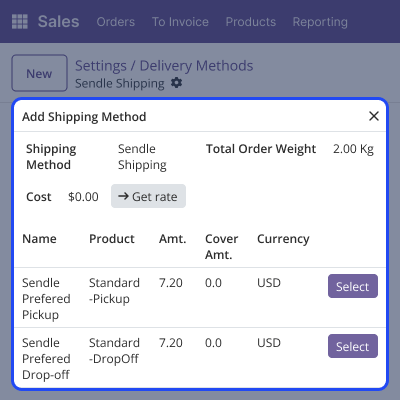
    • Turn on local or international shipping directly in Odoo without a complicated setup.
    • Use Sendle's large network to ship to many places, in your country and abroad.
    • Get shipping prices based on where the package is going, its weight, and size.
    • Whether sending packages nearby or far away, you can rely on Sendle eco-friendly service, all inside Odoo.
    • Change shipping options depending on where the order is going, so you can easily manage deliveries.

    Sendle Shipping Options

    Sendle Shipping Options

    Sendle provides various shipping options to suit your needs. Whether you are shipping locally or internationally, you can choose standard shipping as an affordable option or expedited shipping for quicker delivery.

    • Choose from several Sendle shipping services based on your order's needs.
    • You can pick up regular shipping, fast (express) delivery, or international shipping for overseas orders.
    • Pick a best service based on the size of the package and how quickly you want it delivered.
    • Manage your shipping options directly in Odoo to simplify a order process.
    • Sendle makes worldwide shipping simple with easy access to global delivery options, saving you time.

    Support

    For any query or issue, please create a support ticket here CREATE A TICKET HERE

    You may also check our other top-quality Odoo Modules.

    Specifications

    Product Version1.0.0
    Released9 months ago
    CategoryOdoo AppsShipping
    Last UpdatedOctober 7, 2025 (4 months ago)
    Supported VersionsOdoo  18.x  19.x  
    Write a review

    Frequently Asked Questions

     What is Odoo Sendle Shipping Integration?
    This module connects your Odoo system with Sendle. It allows you to print shipping labels, track orders, and view shipping rates directly from Odoo, without the need to open any other tools or websites.
     Is this module suitable for shipping packages within the country and to other countries?
    Yes, you can set up both local and international shipping in Odoo, depending on your specific needs.
     Do I need a Sendle account to use this module?
    Yes, you need to have Sendle API details, which you can get from your Sendle account.
     Can I set Sendle as the default shipping provider?
    Yes, you can set Sendle as the default option in Odoo, so it will be selected automatically without requiring any additional action.
     Does the module support label printing?
    Yes, the module generates shipping labels for each order. You can download and print them directly from Odoo

    Move to Cloud Today

    AWS Free tier hosting for one year by amazon web services, for more details please visit AWS Free Tier.

    GCP Free tier hosting for one year with 300 credit points by google cloud platform, for more details please visit GCP Free Tier.

    Azure free tier hosting for one year with 25+ always free services, for more details please visit Azure Free Tier.

    In our default configuration we will provide tremendous configuration for your eCommerce Website which is fast to load and response.

    Default Configuration Details of Server

    • 1 GB RAM
    • 1 Core Processor
    • 30 GB Hard Disk
    • DB with 1 GB RAM and 1 Core Processor

    * Server Configuration may vary as per application requirements.

    Want to know more how exactly we are going to power up your eCommerce Website with Cloud to fasten up your store. Please visit the Cloudkul Services.

    Get Started with Cloud
    Not Available


