USD
  • EUR
  • INR
  • USD
Cart
Cart 0
  • You have no items in your shopping cart.
    Cart
    Cart 0
    • You have no items in your shopping cart.
    Hire a Developer
    ×
    Contact Us!
    Send Again
    Close
    Please Login to Write Your Review

    Odoo ShipEngine Shipping Integration


    Odoo ShipEngine Integration makes shipping easy with live rates, label printing, returns, and multi-carrier support all in one place.


    • Connect top shipping carriers like FedEx, UPS, and DHL in one place.

    • Get real-time shipping rates while placing orders.

    • Automatically generate and print shipping labels.

    • Ship internationally with built-in global support.

    • Create return labels with just one click.

    • Track shipments directly from your Odoo dashboard.

    • Add your ShipEngine account details quickly and start shipping.


    Screenshots
    $149.00
    Add To Cart
    $149.00
    Configure and Buy
    • Description
    • Reviews
    • FAQ
    • Customers ()
    • Specifications
    • Cloud Hosting
    • Changelog

    Odoo ShipEngine Shipping Integration  makes it easy to handle shipping inside Odoo. It works with many carriers, saves time, and helps avoid mistakes.

    Users can view live shipping rates, print labels fast, and send orders within the country or to other countries. It makes shipping simple and quick. With features like easy returns, tracking packages, and automatically making labels, this module helps you deliver faster and keep your customers happy.
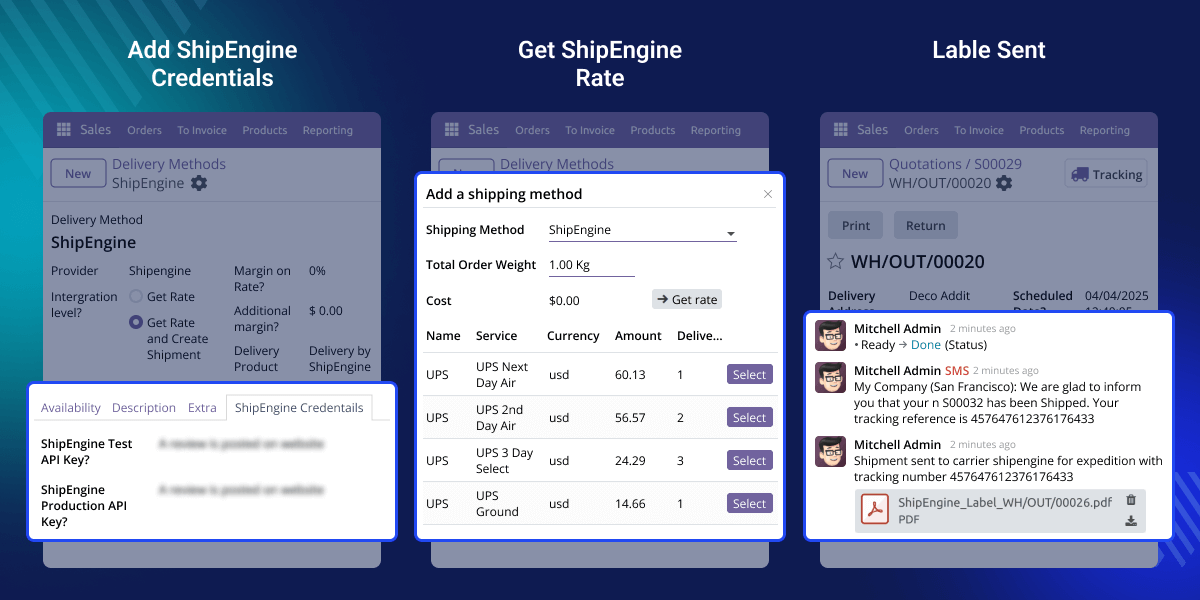
    Odoo ShipEngine Shipping Integration

    Why do we need Odoo ShipEngine Shipping Integration?

    Imagine a fashion store selling clothes online and shipping to the US and Europe. The team wastes time going to different carrier websites, checking prices, and making labels by hand.

    With Odoo ShipEngine Shipping Integration, they connect all their carriers in one place. When someone places an order, they can quickly see shipping prices, pick the best option, and print the label.

    This module helps businesses avoid errors, speed up deliveries, and reduce manual work. From auto-labels to returns, it covers every shipping need inside Odoo.

    Highlighted Features of Odoo ShipEngine Shipping Integration

    Simple Carrier Selection

    In Odoo ShipEngine Shipping Integration, admins can import carriers that are enabled in their ShipEngine account.

    Real-Time Shipping Rates

    The module shows you live shipping rates from different carriers right away. It helps you choose the best price or fastest option quickly.

    Return Handling System

    You can easily create return labels and follow the return process without using other tools or websites.

    International Shipping Support

    Users can ship orders to any country and track their international packages directly in Odoo. It's simple and doesn't require extra steps.

    Add ShipEngine Credentials

    With the Odoo ShipEngine Shipping Integration, users can easily connect their ShipEngine account by entering API keys into Odoo. The module works with both Test and Live keys to ensure your setup is safe and seamless.
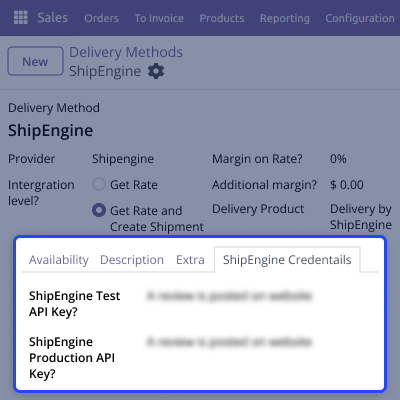
    • Quick setup from the configuration panel.
    • Easily enter and update your API keys anytime.
    • Add new credentials or switch between Test and Live modes without any hassle.
    • Credentials are stored securely within the Odoo system.
    Add ShipEngine Credentials

    Multiple Shipping Carrier Support

    With this module, users can connect different shipping carriers to the Odoo system. This helps them choose the best shipping option based on their needs.
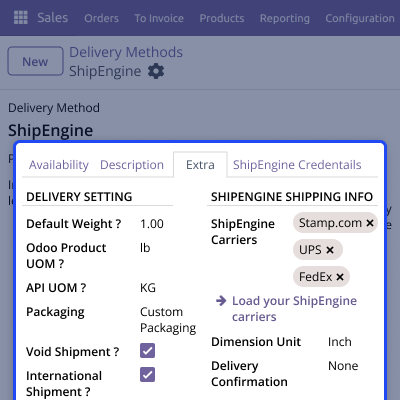
    • Admins can import all enabled carriers from the ShipEngine account.
    • Users can instantly compare shipping rates from various carriers in Odoo.
    • Choose the best shipping option based on delivery time or cost.
    • Work directly within Odoo without needing to switch to other platforms.
    Multiple Shipping Carrier Support

    Shipment Tracking and Easy Returns

    Users can track shipments and manage returns with ease. Both customers and admins can follow delivery updates and handle return requests smoothly.
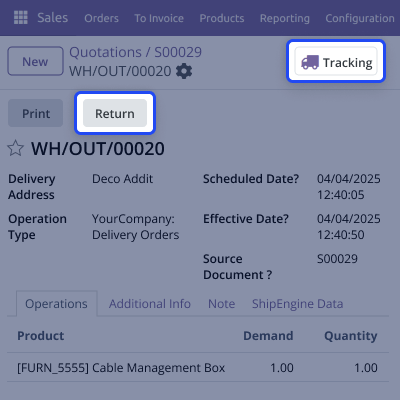
    • Each delivery order comes with a tracking button.
    • The system automatically fetches the latest updates from the carrier.
    • Return labels can be generated in just one click.
    Shipment Tracking and Easy Returns

    Support

    For any query or issue, please create a support ticket here CREATE A TICKET HERE

    You may also check our other top-quality Odoo Modules.

    Specifications

    Product Version1.0.0
    Released10 months ago
    Last UpdatedOctober 7, 2025 (4 months ago)
    Supported VersionsOdoo  17.x  18.x  19.x  
    Write a review

    Frequently Asked Questions

     Can I import more than one shipping carrier?
    Yes, you can connect multiple carriers under one account. This makes it easier to manage everything in one place.
     Can I track packages directly in the Odoo ShipEngine Shipping Integration?
    When you click the tracking button, it will take you to another page where you can see the tracking details.
     What format is the shipping label generated in?
    The shipping label is created in PDF format. It’s ready to print and includes all the important details like barcode, address, and tracking number.
     How do I add a shipping method and get the shipping rates?
    Go to the delivery method settings, select ShipEngine as the provider, and choose your carrier. After that, the rates will show up automatically based on the product and shipping address.
     Can I see tracking details and other shipping information?
    Yes, each delivery order has a Tracking Reference and shows extra info like the carrier name, shipping rate, and label type. You can see all of this on the order screen.

    Move to Cloud Today

    AWS Free tier hosting for one year by amazon web services, for more details please visit AWS Free Tier.

    GCP Free tier hosting for one year with 300 credit points by google cloud platform, for more details please visit GCP Free Tier.

    Azure free tier hosting for one year with 25+ always free services, for more details please visit Azure Free Tier.

    In our default configuration we will provide tremendous configuration for your eCommerce Website which is fast to load and response.

    Default Configuration Details of Server

    • 1 GB RAM
    • 1 Core Processor
    • 30 GB Hard Disk
    • DB with 1 GB RAM and 1 Core Processor

    * Server Configuration may vary as per application requirements.

    Want to know more how exactly we are going to power up your eCommerce Website with Cloud to fasten up your store. Please visit the Cloudkul Services.

    Get Started with Cloud
    Not Available


