Send Again
Close
Odoo ShipTime Shipping Integration connects Odoo with ShipTime. Users can manage shipping and carrier services from one place.Get live rates from multiple carriers in a single popup. Compare the available options and pick the best service for each order.
Choose a carrier and validate the Delivery Order. This module creates the shipment, assigns a tracking number and adds the shipping label to the chatter as a PDF.Check delivery updates with the tracking button on the Delivery Order. This helps users check the latest shipment status quickly.
If the carrier supports it, open the Additional Info tab to cancel the shipment. Click Cancel next to the Tracking Reference. Odoo records the update and removes the Tracking Reference after the cancellation is complete.
Use the ShipTime Delivery Carrier to manage shipping tasks in Odoo. This module lets users compare rates, create labels, track shipments, and cancel orders from a single platform.
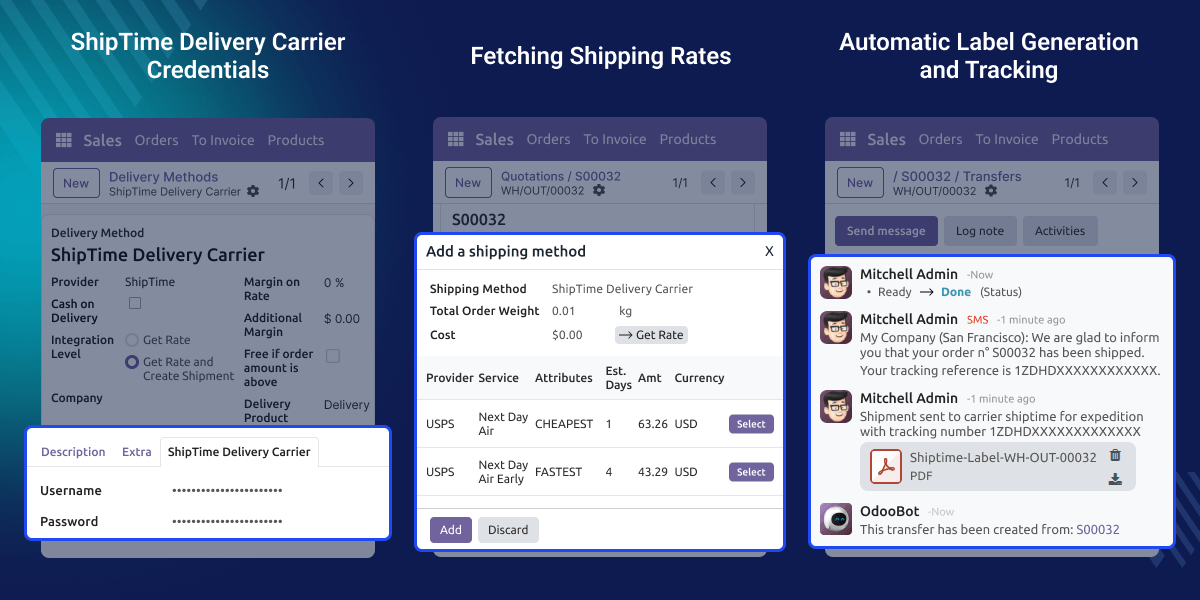
See live rates from multiple carriers in one place. Compare and pick the best option for each shipment.
Create shipments from the Delivery Order. The shipping label is saved as a PDF in the chatter.
Check the latest shipment status from the Delivery Order. Users can track shipments without switching platforms.
Cancel shipments in Odoo as long as the carrier supports cancellation. The chatter logs the update and clears the Tracking Reference.
Managing multiple carriers is hard. Businesses jump between platforms to compare rates, process shipments, and track deliveries. This wastes time and causes errors.
Odoo has no built-in live rate comparison. Businesses need one place to check carrier rates and manage all shipments.No integration means more manual work. Labels and tracking updates take extra time. This slows fulfillment and adds pressure on shipping teams.
The ShipTime Delivery Carrier helps solve these issues. It brings ShipTime tools into Odoo. Select carriers, process shipments, generate labels, track orders, and cancel shipments from one place.
Online stores can fetch live rates and create shipments directly from the Delivery Order. This speeds up order fulfillment and improves customer experience.
Wholesale businesses can compare multi-carrier rates and choose the most cost-effective option for every order. This reduces shipping costs significantly.
Businesses with high shipment volumes can automate label generation and tracking sync. This saves time and reduces manual errors across all orders.
Setup is quick. Enter your ShipTime details to connect with Odoo. Set your Integration Level, shipment behavior, delivery product, and invoicing policy. Manage all shipping settings from one screen.

Use Live Rate Fetching to get shipping rates from multiple carriers on the Delivery Order. Select the best option and create the shipment. ShipTime syncs the shipping details with Odoo automatically.

ShipTime adds the shipping label to the chatter as a PDF. Download it directly from the Delivery Order. Track all deliveries in Odoo without switching platforms.

Cancel eligible shipments from the Delivery Order via the Additional Info tab. Once processed, ShipTime updates the status, logs it in the chatter, and clears the Tracking Reference.

For any query or issue, please create a support ticket here CREATE A TICKET HERE
You may also check our other top-quality Odoo Modules.
Detailed technical features and requirements to help you understand the module’s capabilities and ensure smooth integration with your system.
Detailed technical features and requirements to help you understand the module’s capabilities and ensure smooth integration with your system.
We’re partnered with top-tier, trusted providers!
Want to know more how exactly we are going to power up your eCommerce Website with Cloud to fasten up your store
* Server Configuration may vary as per application requirements.



