USD
  • EUR
  • INR
  • USD
Cart
Cart 0
  • You have no items in your shopping cart.
    Cart
    Cart 0
    • You have no items in your shopping cart.
    Hire a Developer
    ×
    Contact Us!
    Send Again
    Close
    Please Login to Write Your Review

    Odoo Sign Document

    Odoo Sign Document helps businesses send PDF documents for digital signing. It uses reusable sign elements, ready templates, and secure email links.


    • Create reusable sign elements to prepare documents quickly.

    • Support different sign element types for various signing needs.

    • Design reusable PDF-based sign templates with ease.

    • Drag and place sign elements directly on PDF documents.

    • Resize sign elements to improve document clarity and layout.

    • Send documents to customers through secure email links.

    • Let customers sign documents online without any login.

    Screenshots
    Odoo Sign Document Odoo Sign Document Odoo Sign Document Odoo Sign Document Odoo Sign Document Odoo Sign Document Odoo Sign Document Odoo Sign Document Odoo Sign Document Odoo Sign Document Odoo Sign Document
    Show More Hide All
    $69.00

    * Required Fields

    Add To Cart
    $69.00
    Configure and Buy
    • Description
    • Reviews
    • FAQ
    • Customers ()
    • Specifications
    • Cloud Hosting
    • Changelog

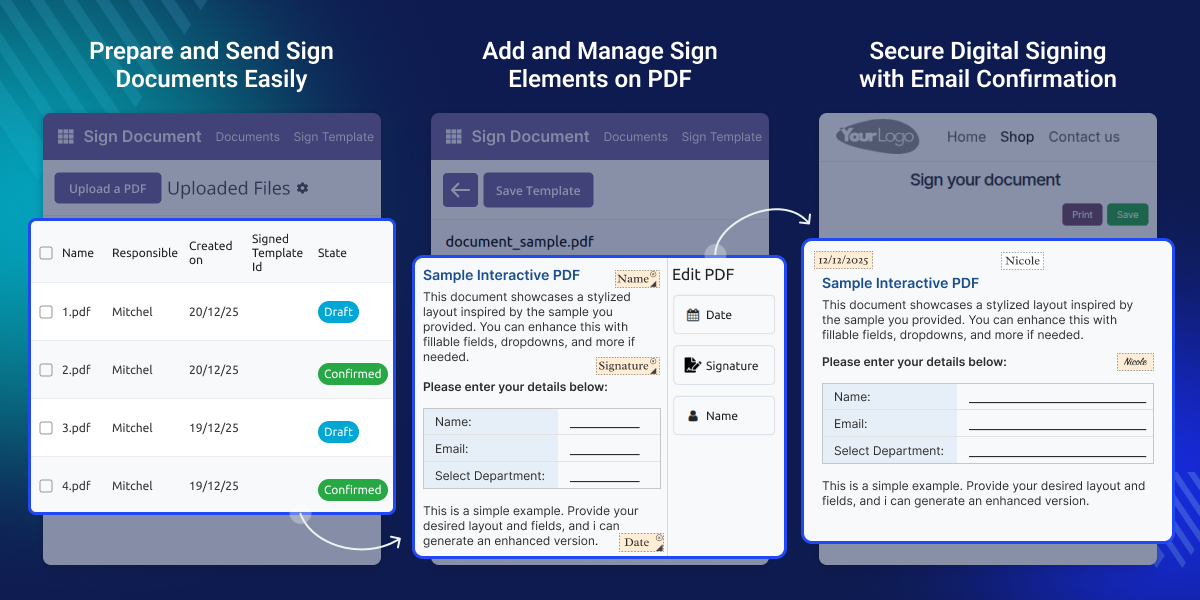
    Odoo Sign Document makes digital document signing simple and paperless. Admins can upload PDF files, add required sign elements, and send documents to customers using secure email links.

    Odoo Sign Document allows teams to reuse sign elements and templates, which saves time and avoids repeated work. Sign elements can be placed clearly on PDFs before sending the document.

    Customers can sign documents online without creating an account. After the document is signed, the admin receives an automatic email, helping approvals move faster and smoothly.
    Odoo Sign Document

    Why do we need Odoo Sign Document?

    In many businesses, documents are still printed, signed by hand, and sent back by email or courier. This process takes time and often leads to delays, missing files, or unsigned documents.

    Odoo Sign Document removes these problems by letting businesses send documents for digital signing through email. Customers sign using a secure link, and the admin receives a confirmation email, helping teams complete approvals faster and with fewer mistakes.

    Highlighted Features of Odoo Sign Document

    Dynamic Sign Elements

    Create text, date, signature, and textarea sign elements for clear and consistent document signing.

    Reusable Templates

    Use the same templates for many documents to save time and avoid repeated setup.

    Email-Based Signing

    Send documents using secure email links so customers can open and sign easily.

    Admin Email Alerts

    An email is sent to the admin after the customer signs the document successfully.

    Drag and Resize Elements

    Drag sign elements onto PDFs and resize them to fit the document layout.

    No-Login Signing

    Customers can sign documents online without needing to create an account or log in.

    Create Sign Items

    With Odoo Sign Document, Admins can define reusable sign elements that are used while preparing documents. This ensures consistency and reduces repeated setup work.
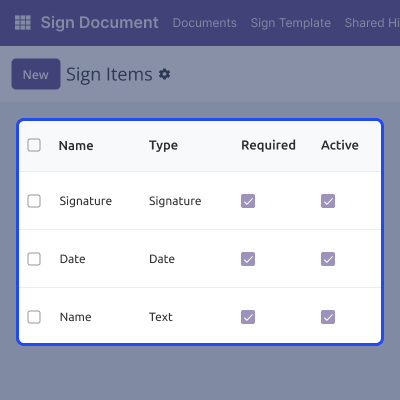
    • Add text, date, signature, and textarea sign elements.
    • Reuse sign elements across multiple templates.
    • Maintain consistent naming for all sign elements.
    • Manage all sign elements from a centralized menu.
    Create Sign Items

    Design Sign Templates

    Sign templates help organize PDF documents and required sign elements for repeated use. This makes document preparation faster and easier.
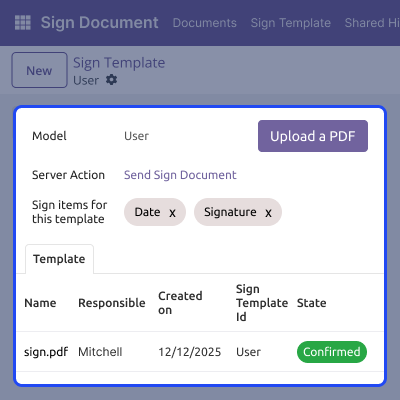
    • Select the required model to link with the template.
    • Choose the sign elements needed for the document.
    • Upload a PDF document that needs to be signed.
    • Place sign elements clearly on the PDF layout.
    Design Sign Templates

    Drag and Resize Sign Elements

    Admins can adjust sign elements easily to ensure correct placement before sending documents.
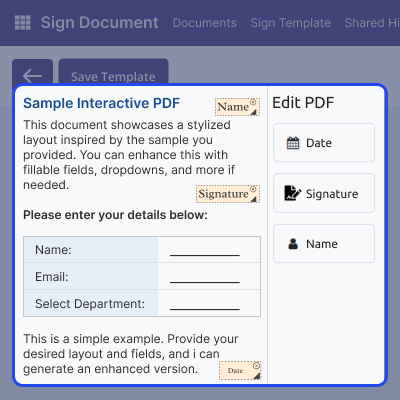
    • Drag sign elements anywhere on the PDF document.
    • Resize sign elements to match the document layout.
    • Adjust placement for better clarity and alignment.
    • Preview the document before sending for signature.
    Drag and Resize Sign Elements

    Manage Sent Sign Documents

    Admins can easily review documents that were sent for signing. This helps keep better control over all sent sign requests.
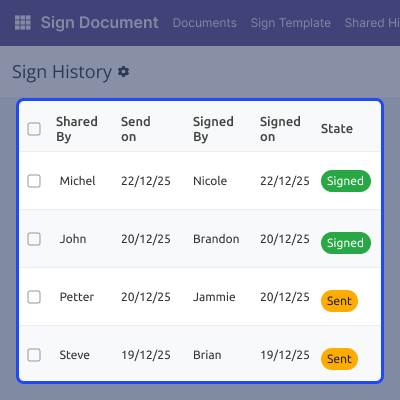
    • View all sent sign documents together in one place.
    • Clearly see which documents have already been signed.
    • Check documents that are waiting for customer action.
    • Keep a clear record of all sent documents.
    Manage Sent Sign Documents

    Support

    For any query or issue, please create a support ticket here CREATE A TICKET HERE

    You may also check our other top-quality Odoo Modules.

    Specifications

    Product Version1.0.0
    Released2 months ago
    Last UpdatedJanuary 27, 2026 (1 month ago)
    Supported VersionsOdoo  18.x  19.x  
    Write a review

    FAQs

     Can I reuse the same template for multiple customers?
    Yes, the same template can be reused for many documents without setting it up again.
     Can I change sign elements after uploading the PDF?
    Yes, sign elements can be moved or resized before you send the document.
     Do customers need to log in to sign documents?
    No, customers can sign documents directly using the email link.
     How does the admin know when a document is signed?
    In Odoo Sign Document, the admin receives an automatic email after the customer signs the Document.
     Can I use the same document for different records?
    Yes, contextual actions allow the same template to be used for different records.
     What happens if the customer does not sign the document?
    The document stays unsigned until the customer completes the signing.

    Move to Cloud Today

    AWS Free tier hosting for one year by amazon web services, for more details please visit AWS Free Tier.

    GCP Free tier hosting for one year with 300 credit points by google cloud platform, for more details please visit GCP Free Tier.

    Azure free tier hosting for one year with 25+ always free services, for more details please visit Azure Free Tier.

    In our default configuration we will provide tremendous configuration for your eCommerce Website which is fast to load and response.

    Default Configuration Details of Server

    • 1 GB RAM
    • 1 Core Processor
    • 30 GB Hard Disk
    • DB with 1 GB RAM and 1 Core Processor

    * Server Configuration may vary as per application requirements.

    Want to know more how exactly we are going to power up your eCommerce Website with Cloud to fasten up your store. Please visit the Cloudkul Services.

    Get Started with Cloud
    Not Available


