USD
  • EUR
  • INR
  • USD
Cart
Cart 0
  • You have no items in your shopping cart.
    Odoo Apps Extensions
    Cart
    Cart 0
    • You have no items in your shopping cart.
    Hire a Developer
    ×
    Contact Us!
    Send Again
    Close
    Please Login to Write Your Review
    Odoo SKN Pay Payment Provider
    Odoo SKN Pay Payment Provider
    x
    Free

    * Required Fields

    $99.00
    Add To Cart

    Odoo SKN Pay Payment Provider adds the SKN Pay Payment Gateway to your website. Configure your account from the backend and let customers make secure online card payments through a protected checkout process.


    • Accept secure online payments through SKN Pay.

    • Offer SKN Pay as a payment choice during website checkout.

    • Configure SKN Pay credentials from the Odoo backend.

    • Support Visa, Mastercard, Discover card , and other international cards.

    • Accept payments in USD and XCD.

    • Control payment availability by country.

    • Set a maximum payment amount with ease.

    • Manage payment settings from one place.

    • Redirect customers to the secure SKN Pay payment page.

    • Return customers to the order confirmation page automatically.

    Odoo SKN Pay Payment Provider
    Odoo SKN Pay Payment Provider
    $99.00
    Odoo Silver Partner
    Odoo Functional Certified Experts
    Check How It Works
    $99.00
    Configure and Buy
    X
    • Description
    • Reviews
    • FAQ
    • Customers ()
    • Specifications
    • Cloud Hosting
    • Changelog

    Integrate the SKN Pay Payment Gateway with your Odoo website to accept secure online card payments. It helps businesses accept secure online card payments with ease. Set up your SKN Pay account from the backend. Save the settings to start accepting payments.

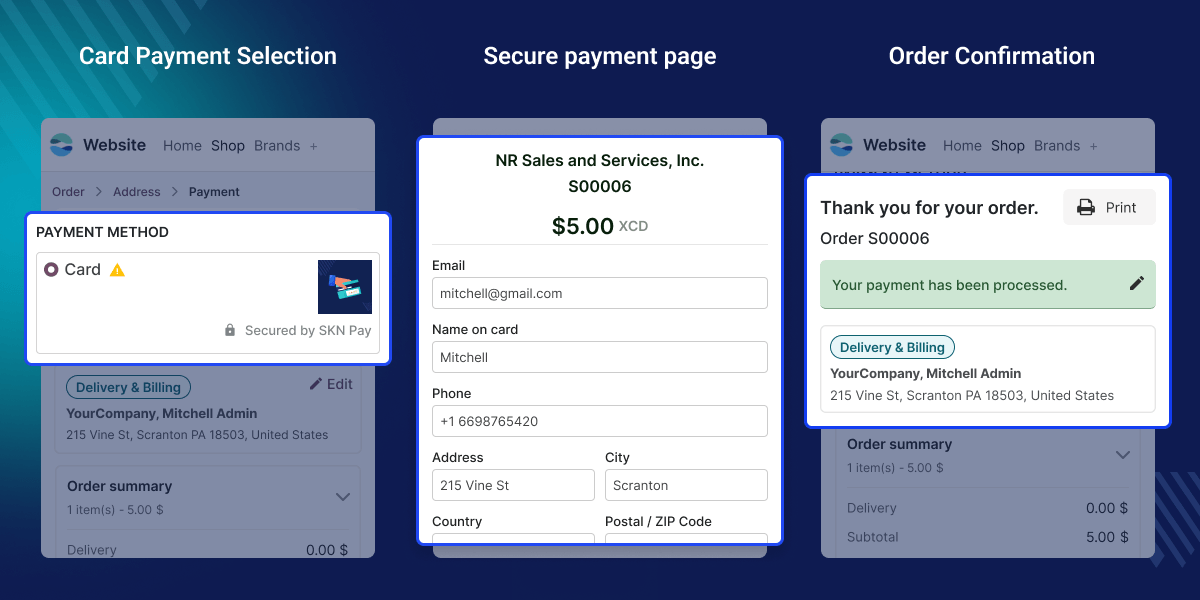
    Customers add products to the cart and go to checkout. They choose Card and open the secure SKN Pay payment page. Enter your card details to complete the transaction. The SKN Pay Payment Gateway checks the payment and sends customers back to your website.

    The order confirmation page shows the payment status and order details. Customers can quickly confirm that the payment was successful. Manage currencies, payment limits, countries, and journals from the backend. Update these settings whenever you need.

    Odoo SKN Pay Payment Provider keeps the checkout process simple. It gives customers a secure way to pay online.
    Odoo SKN Pay Payment Provider

    Highlighted Features of Odoo SKN Pay Payment Provider

      SKN Pay Payment Provider Setup

    Add your SKN Pay credentials and configure the payment provider from the backend to start accepting secure online payments.

      Secure Card Payments

    Accept secure online card payments through the SKN Pay Payment Gateway using Visa, Mastercard, Discover cards and other international cards.

      Secure Payment Page

    Redirect customers to the secure SKN Pay payment page to complete payments without interrupting the checkout process.

      Flexible Payment Settings

    Manage currencies, country access, payment limits, and journals from one convenient place.

      Website Checkout Integration

    Display SKN Pay as a payment option during checkout and provide a smooth payment experience for website orders.

      Automatic Order Confirmation

    Customers are taken back to the website after payment, where the order confirmation page displays the payment details.

    Why Do We Need This Module?

    Many businesses want a safe and simple way to accept online card payments. Without a direct connection to SKN Pay, they often spend more time managing payments.

    By default, Odoo does not support the SKN Pay Payment Gateway for website checkout. As a result, customers cannot choose SKN Pay while placing an order.

    Manual payment processing takes time and can lead to mistakes. It also makes daily order management more difficult.

    This module connects your Odoo website with the SKN Pay Payment Gateway for secure online payment processing. Customers can pay securely and return to the order confirmation page after a successful payment.

    Whether you run a small store or handle many online orders, this module makes checkout simple and keeps the payment process smooth.

    Use Cases

      E-Commerce Stores

    Online stores can accept secure card payments through SKN Pay during checkout. This gives customers a simple and secure way to complete website orders.

      Businesses Serving Caribbean Customers

    Businesses that accept USD and XCD payments can offer a familiar payment option. This helps improve the checkout experience for customers in supported regions.

      Growing Online Businesses

    Growing businesses can control payment settings from the backend and provide a smooth checkout experience. This makes daily payment tasks and website order handling easier.

    SKN Pay Payment Provider Setup

    Odoo SKN Pay Payment Provider lets you connect the SKN Pay Payment Gateway with your website. Complete the setup from the backend and start accepting secure online payments.
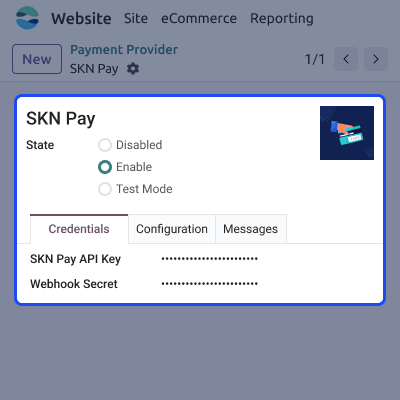
    • Add your SKN Pay credentials from the backend.
    • Complete the payment provider setup in a few steps.
    • Enable the payment provider for website checkout.
    • Save your settings to start accepting payments.
    SKN Pay Payment Provider Setup

    Payment Configuration

    Manage how Odoo SKN Pay Payment Provider works by adjusting the available payment options. Flexible settings help you match your business and customer requirements.
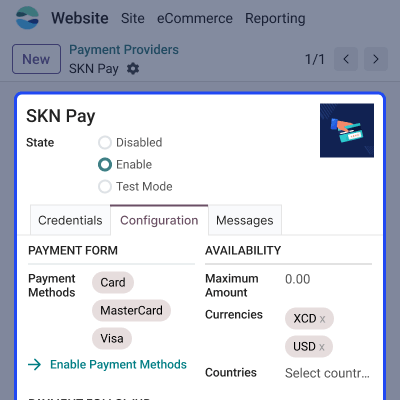
    • Configure supported currencies for customer payments.
    • Choose the countries where the payment option is available.
    • Set a maximum payment amount when required.
    • Select the payment journal for completed transactions.
     Payment Configuration

    Website Checkout

    Offer SKN Pay as a payment option during website checkout for a smooth buying experience. Customers can continue without leaving the standard checkout flow.
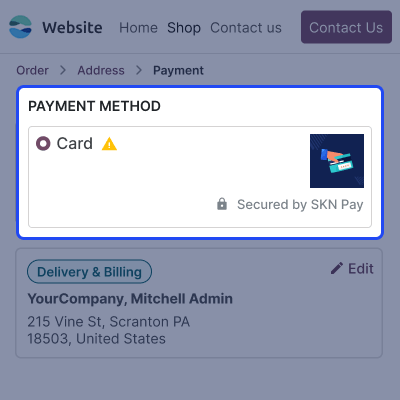
    • Display SKN Pay during website checkout.
    • Let customers choose Card as the payment method.
    • Redirect customers to the secure SKN Pay payment page.
    • Keep the checkout process simple and secure.
    Website Checkout

    Secure Payment Process

    The SKN Pay Payment Gateway provides a secure page where customers can complete their transactions safely. Once the payment is verified, the process continues automatically.
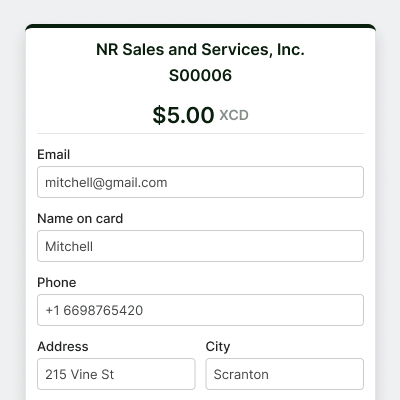
    • Accept payments through the SKN Pay payment gateway.
    • Support Visa, Mastercard, and other international cards.
    • Process payments on a secure payment page.
    • Redirect customers after a successful payment.
    Secure Payment Process

    Order Confirmation

    After payment, customers return to your website and view the order confirmation page.The confirmation page clearly displays the order and payment status.
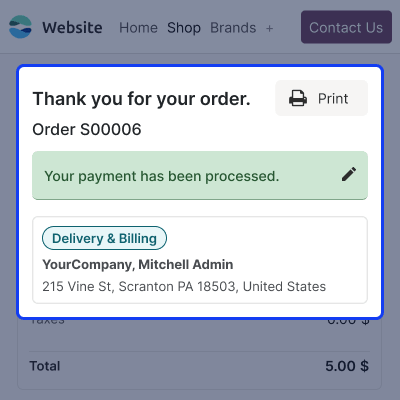
    • Return customers to the website automatically.
    • Display the order confirmation page after payment.
    • Show payment status for completed orders.
    • Let customers review their order details.
    Order Confirmation

    Support

    For any query or issue, please create a support ticket here CREATE A TICKET HERE

    You may also check our other top-quality Odoo Modules.

    Specifications

    Product Version1.0.0
    ReleasedToday
    Last UpdatedJuly 29, 2026 (1 day ago)
    Supported VersionsOdoo  16.x  17.x  18.x  19.x  

    Ratings

    We'd love to hear your thoughts! Share your feedback and help us craft an even better experience tailored just for you.

    Write a review

    FAQ’s

     What is Odoo SKN Pay Payment Provider?
    This module integrates the SKN Pay Payment Gateway with your Odoo website, allowing customers to make secure online card payments during checkout.
     How do I configure Odoo SKN Pay Payment Provider?
    Open the SKN Pay Payment Provider, add your credentials, configure the required payment settings, and save the changes from the backend.
      Which currencies does Odoo SKN Pay Payment Provider support?
    Accept payments in USD and XCD with Odoo SKN Pay Payment Provider, giving customers a secure way to pay in supported currencies.
     Which payment cards are supported?
    Customers can complete secure online payments using supported Visa, Mastercard, and other international cards through the SKN Pay Payment Gateway.
     How does the payment process work?
    Choose Card during checkout, complete the payment on the secure SKN Pay page, and return to your website after payment confirmation.
     Can I limit the payment provider to specific countries?
    Yes, Select the countries from the payment settings to control where Odoo SKN Pay Payment Provider is available for checkout.
     Can I set a maximum payment amount?
    Yes, Enter the preferred maximum payment amount from the payment settings to control the highest value customers can pay.

    Specification

    Detailed technical features and requirements to help you understand the module’s capabilities and ensure smooth integration with your system.

    Cloud Hosting

    Detailed technical features and requirements to help you understand the module’s capabilities and ensure smooth integration with your system.

    Default Configuration Details of Server

    1 GB
    RAM
    1 Core
    Processor
    30 GB
    Hard Disk
    1 GB RAM & 1 Core Processor
    Database

    Want to know more how exactly we are going to power up your eCommerce Website with Cloud to fasten up your store

    * Server Configuration may vary as per application requirements.

    Change Logs

    Not Available


