USD
  • EUR
  • INR
  • USD
Cart
Cart 0
  • You have no items in your shopping cart.
    Cart
    Cart 0
    • You have no items in your shopping cart.
    Hire a Developer
    ×
    Contact Us!
    Send Again
    Close
    Please Login to Write Your Review

    Odoo Skydropx Shipping Integration

    The Skydropx Shipping Integration helps Odoo users manage all shipping tasks in one place. You can check prices, create shipments, print labels, and track orders. It is built with a clean, user-friendly interface to ensure smooth and effortless operation.


    • You can fetch live shipping rates while creating sales orders.

    • Create shipments quickly from your delivery orders.

    • Labels are generated automatically once the delivery order has been confirmed.

    • Use the tracking number on the order to check the delivery status of the package.

    • Choose and compare different shipping carriers for every order.

    • Shipments can be canceled at any time before they are collected by the carrier.

    • Shipping services are shown according to your location.


    Screenshots
    Odoo Skydropx Shipping Integration Odoo Skydropx Shipping Integration Odoo Skydropx Shipping Integration Odoo Skydropx Shipping Integration Odoo Skydropx Shipping Integration Odoo Skydropx Shipping Integration Odoo Skydropx Shipping Integration Odoo Skydropx Shipping Integration Odoo Skydropx Shipping Integration
    Show More Hide All
    $149.00

    * Required Fields

    Add To Cart
    $149.00
    Configure and Buy
    • Description
    • Reviews
    • FAQ
    • Customers ()
    • Specifications
    • Cloud Hosting
    • Changelog

    Skydropx Shipping Integration connects Odoo with Skydropx so you can handle all shipping work in one tool. Users can view live prices, compare different carriers, and select shipping rates according to customer’s needs.

    Once an order is confirmed, the system creates the shipment from the delivery screen. It automatically makes shipping labels and tracking numbers.

    If you make a mistake, you can cancel the shipment before the carrier has picked up the order in Odoo and get a clear message that it is done. This keeps your work organised and simple.
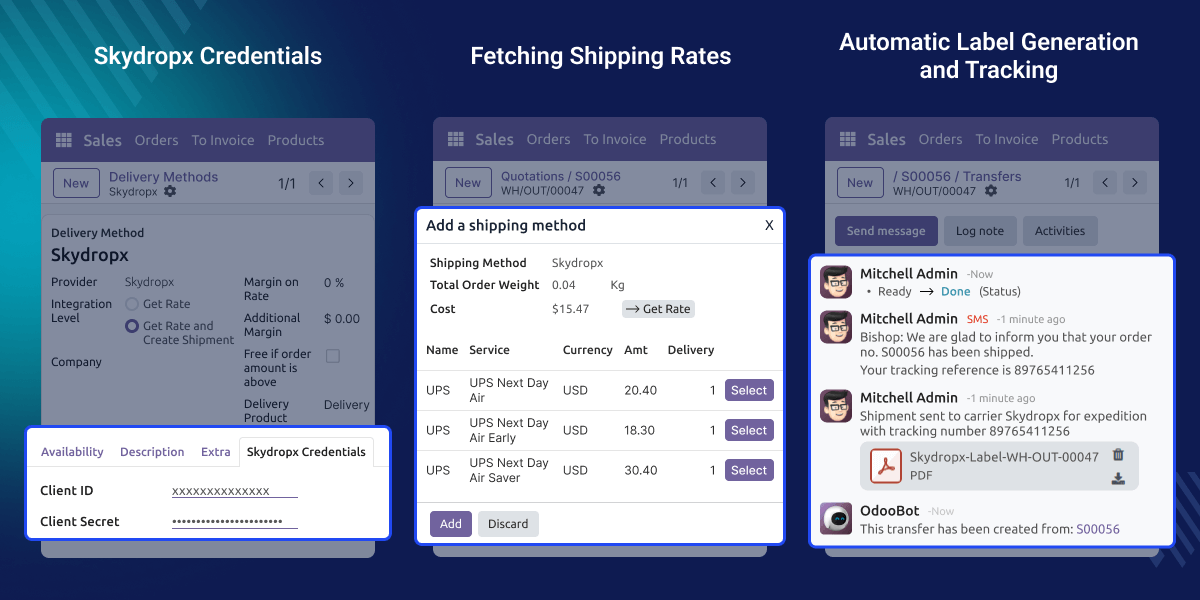
    Odoo Skydropx Shipping Integration

    Why do we need Odoo Skydropx Shipping Integration?

    Skydropx Shipping Integration shows available shipping services and live shipping rates based on the delivery location. It automatically displays carriers that operate in the selected area.

    It helps users work faster, reduce manual work, and avoid mistakes. By managing prices, shipments, labels, and tracking number in one place, teams can handle orders more easily.

    Highlighted Features of Odoo Skydropx Shipping Integration

    Live Shipping Rates

    Check prices based on the package size and address. This helps you choose the best shipping option every time.

    Quick Label Printing

    Labels are generated automatically after the delivery order is confirmed and the shipment is created.

    Tracking Orders

    Check the status of any package directly from the delivery order. Tracking numbers are also generated automatically after delivery order confirmation.

    Package Details

    The system checks the weight and size of your package before shipping. This prevents errors and ensures your data is correct.

    Shipment Tracking Inside Odoo

    You can track your package with the help of tracking numbers generated on the delivery screen.

    Simple Shipment Cancellation

    If a shipment has not yet been picked up by the carrier, you can cancel it directly from Odoo. A clear confirmation message will appear once the cancellation is successful.

    Delivery Method Setup

    Managers can add Skydropx as a shipping method in Odoo.
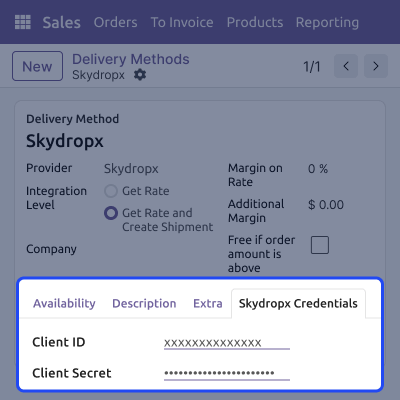
    • Enter your Skydropx ID and Secret key to link your account safely.
    • Switch test mode on or off to check how everything works before processing real orders.
    • Save your shipping configuration to save time on future orders.
    • Service availability is determined by your geographic location.
    Delivery Method Setup

    Multiple Carrier Selection

    This feature lets you see and pick from different shipping carriers. It helps you choose the best service for every package.
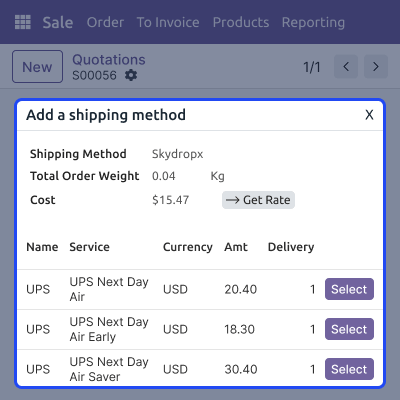
    • See all available shipping carriers on the sales screen.
    • Look at different prices and delivery times side by side.
    • Choose the carrier you want before you confirm the order.
    • Select the best carrier based on what the customer need
    Multiple Carrier Selection

    Shipping Label Generation

    The system makes shipping labels as soon as the order is ready. This helps the warehouse team pack and send items with very little effort.
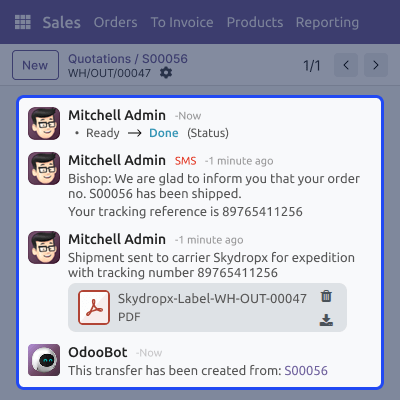
    • Labels are generated directly inside the Odoo system.
    • Labels are ready immediately, so you can start packing.
    • Quick labels mean packages leave the warehouse sooner.
    • Since the labels are automatic, there is less chance of making an error.
    Shipping Label Generation

    Package Validation Before Shipment

    This feature checks your package details before the shipment is made. It makes sure all the important information is there so the delivery goes smoothly.
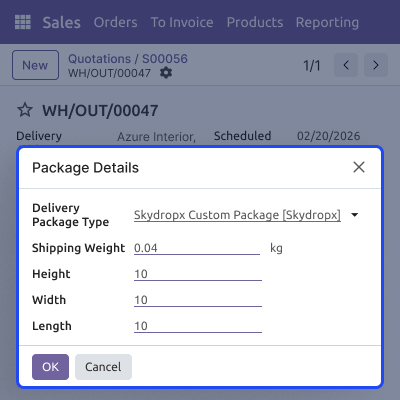
    • The system ensures you have entered the weight and dimensions of the box.
    • It stops mistakes caused by missing information.
    • It ensures that the shipping data sent to the carrier is correct.
    • It reduces the number of times a shipment fails to be created.
    Package Validation Before Shipment

    Shipment Cancellation

    This feature lets you stop a shipment directly inside Odoo. It helps fix mistakes or stop an order before it leaves the warehouse.
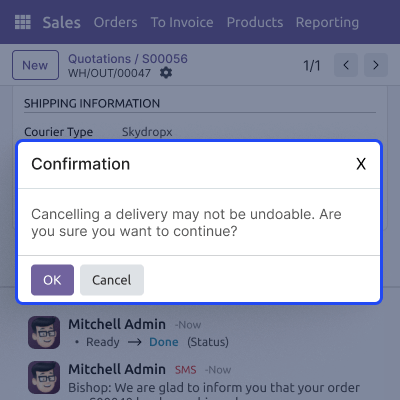
    • Stop the shipment right from the delivery screen before the order is picked up.
    • Receive a simple message that tells you the cancellation worked.
    • Prevent the wrong packages from being sent out.
    • Keep your shipping history organised and up to date.
    Shipment Cancellation

    Support

    For any query or issue, please create a support ticket here CREATE A TICKET HERE

    You may also check our other top-quality Odoo Modules.

    Specifications

    Product Version1.0.0
    Released4 days ago
    Last UpdatedMarch 9, 2026 (2 days ago)
    Supported VersionsOdoo  16.x  17.x  18.x  19.x  
    Write a review

    Frequently Asked Questions (FAQ)

     Where can I see shipping prices?
    You can see prices on the sales order by picking Skydropx as your shipping method.
     What if the prices do not show up?
    Check your login details, the delivery address, and the package weight. All these must be correct.
     Can I cancel a shipment?
    Yes, you can cancel it directly in Odoo. You will see a message confirming the cancellation.
     Does it support Multi carrier shipping?
    Yes. It supports Multi carrier shipping.
     Are labels created automatically?
    Yes. Labels are made as soon as the shipment is created and are ready to print.
     How do I track a package?
    The tracking number is added to the delivery order automatically for you to see the status of delivery.

    Move to Cloud Today

    AWS Free tier hosting for one year by amazon web services, for more details please visit AWS Free Tier.

    GCP Free tier hosting for one year with 300 credit points by google cloud platform, for more details please visit GCP Free Tier.

    Azure free tier hosting for one year with 25+ always free services, for more details please visit Azure Free Tier.

    In our default configuration we will provide tremendous configuration for your eCommerce Website which is fast to load and response.

    Default Configuration Details of Server

    • 1 GB RAM
    • 1 Core Processor
    • 30 GB Hard Disk
    • DB with 1 GB RAM and 1 Core Processor

    * Server Configuration may vary as per application requirements.

    Want to know more how exactly we are going to power up your eCommerce Website with Cloud to fasten up your store. Please visit the Cloudkul Services.

    Get Started with Cloud
    Not Available


