Send Again
Close
Odoo Stripe Terminal Integration lets you accept in-person payments with Stripe Terminal. Send payment requests from invoices without leaving Odoo.
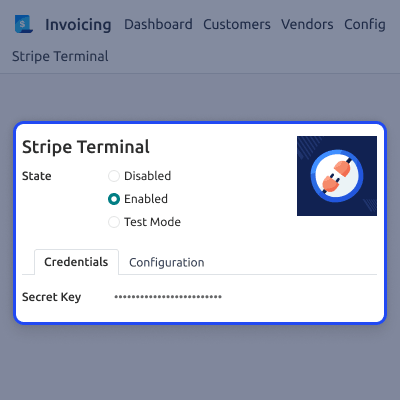
Connect your Stripe account with your API credentials. Set up payment journals, capture options, and user access in one place.
Create new Stripe locations or import existing ones. Manage every payment location from a single Odoo dashboard.
Add Stripe Terminal readers and assign them to the right locations. Keep all payment organized and ready to use.
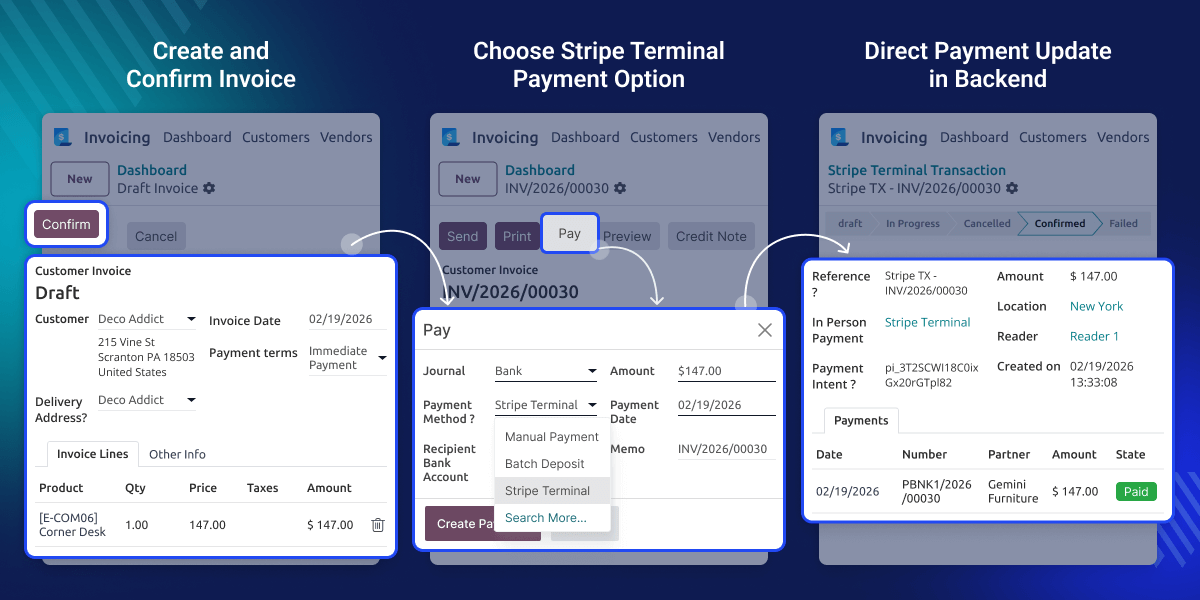
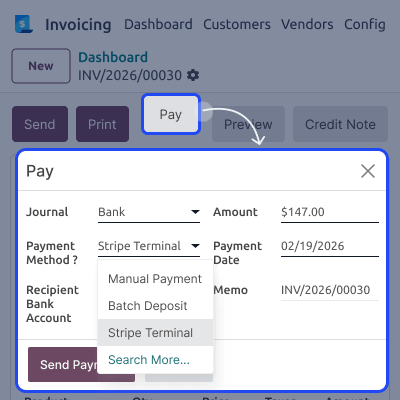
Open an invoice and start the payment in a few clicks. Send the request to the selected Stripe Terminal reader.
Watch the stripe payment update in real time. See reader activity and payment progress as the transaction continues.
Choose automatic or manual payment capture to match your workflow. Cancel a payment request before it is completed if needed.
View every payment from the Stripe Transactions menu. Check the amount, status, reader details, and Stripe response anytime.
Collect payments from the invoice form or the invoice list view. This saves time and makes the payment process faster.
Keep payment records accurate after every successful transaction. Review payment history whenever you need it.
Set up Stripe Terminal in Odoo in a few easy steps. Connect your Stripe account and get ready to accept in-person payments.
Create new payment locations or import them from Stripe. Keep every location in one place for easy management.
Add Stripe Terminal readers in Odoo with ease. Assign each reader to the right location and start taking payments.
Watch every payment as it happens. See the payment status and reader activity without refreshing the page.
Choose the payment method that works best for your business. Use automatic capture or record the payment after approval.
See every payment from one screen in Odoo. Check payment and reference details.
For Odoo Online (SaaS) users, you must first set up Odoo.sh before installing Odoo Stripe Terminal Integration, as Odoo Online (SaaS) restricts the installation of third-party modules.
Many businesses use one system to create invoices and another to take card payments. The payment starts from the invoice and follows an easy process.
Odoo Stripe Terminal Integration brings both tasks into one place. You can create invoices and collect payments without leaving Odoo.
Manage Stripe locations, terminal readers, and payment settings from one screen. Businesses can handle more payments with less effort.
See live payment updates as each payment moves forward. You always know if a payment is complete, pending, or cancelled.
Every payment is saved in Odoo automatically. You can check payment details and payment history whenever you need them.
It helps your team collect payments faster. It also reduces manual work and keeps payment records organized.
Take card payments with Stripe Terminal from customer invoices. Keep every payment safe, fast, and easy to manage in Odoo.
Take payments at any billing counter with ease. Use more than one Stripe Terminal reader to serve customers faster.
Manage all stores from one Odoo system. Keep every payment location and terminal reader in one place.
Send payment requests from customer invoices in a few clicks. Speed up billing and collect payments without extra steps.
Help your team take customer payments with Stripe Terminal. Give payment access only to staff who need it.
Give each cashier a Stripe Terminal reader for daily work. Handle more customer payments with less waiting time.
Set up Stripe Terminal from Odoo in a few simple steps. Connect your Stripe account, choose payment settings, and control who can use terminal payments.
Manage Stripe Terminal readers from one place in Odoo. Assign readers to locations and keep every payment device ready to use.

Collect payments directly from customer invoices. Send payment requests to the selected Stripe Terminal reader in a few clicks.
View every Stripe Terminal payment from one screen. Check payment details and keep a complete record of every transaction.

For any query or issue, please create a support ticket here CREATE A TICKET HERE
You may also check our other top-quality Odoo Modules.
Detailed technical features and requirements to help you understand the module’s capabilities and ensure smooth integration with your system.
Detailed technical features and requirements to help you understand the module’s capabilities and ensure smooth integration with your system.
We’re partnered with top-tier, trusted providers!
Want to know more how exactly we are going to power up your eCommerce Website with Cloud to fasten up your store
* Server Configuration may vary as per application requirements.



