USD
  • EUR
  • INR
  • USD
Cart
Cart 0
  • You have no items in your shopping cart.
    Cart
    Cart 0
    • You have no items in your shopping cart.
    Hire a Developer
    ×
    Contact Us!
    Send Again
    Close
    Please Login to Write Your Review

    Odoo Tamara Payment Integration

    Odoo Tamara Payment Integration helps you accept Buy Now Pay Later payments via Tamara. It tracks payments in real time and makes invoice processing smooth and easy.


    • Accept Buy Now Pay Later payments via Tamara in Odoo.

    • Choose Sandbox or Production environment easily.

    • Add API Token and Store Code for a secure connection.

    • Register Webhook URL for live payment updates.

    • Send payment requests from the invoice screen.

    • Prevent duplicate payments with instant warning messages.

    • Check live payment status with one click.

    • Invoices are automatically marked as Paid after successful payments.

    • View all transactions in the Tamara Terminal Transaction screen.

    Screenshots
    Odoo Tamara Payment Integration Odoo Tamara Payment Integration Odoo Tamara Payment Integration Odoo Tamara Payment Integration Odoo Tamara Payment Integration Odoo Tamara Payment Integration Odoo Tamara Payment Integration Odoo Tamara Payment Integration Odoo Tamara Payment Integration
    Show More Hide All
    $149.00

    * Required Fields

    Add To Cart
    $149.00
    Configure and Buy
    • Description
    • Reviews
    • FAQ
    • Customers ()
    • Specifications
    • Cloud Hosting
    • Changelog

    Odoo Tamara Payment Integration is a reliable Odoo Payment Integration solution for businesses using Buy Now Pay Later payments via Tamara. It connects the Tamara Terminal with the Invoicing module for fast payment processing.

    Go to the backend to set up your Tamara Terminal. Enter your API Token and Store Code. Pick Sandbox or Production. Add the Webhook URL to get live payment updates.

    Open the Invoicing module to create invoices. Select the Tamara Payment Method and send a payment request from the invoice screen with one click.

    Tamara Terminal Integration prevents duplicate payments. If a payment is already completed, the system instantly displays a warning message.

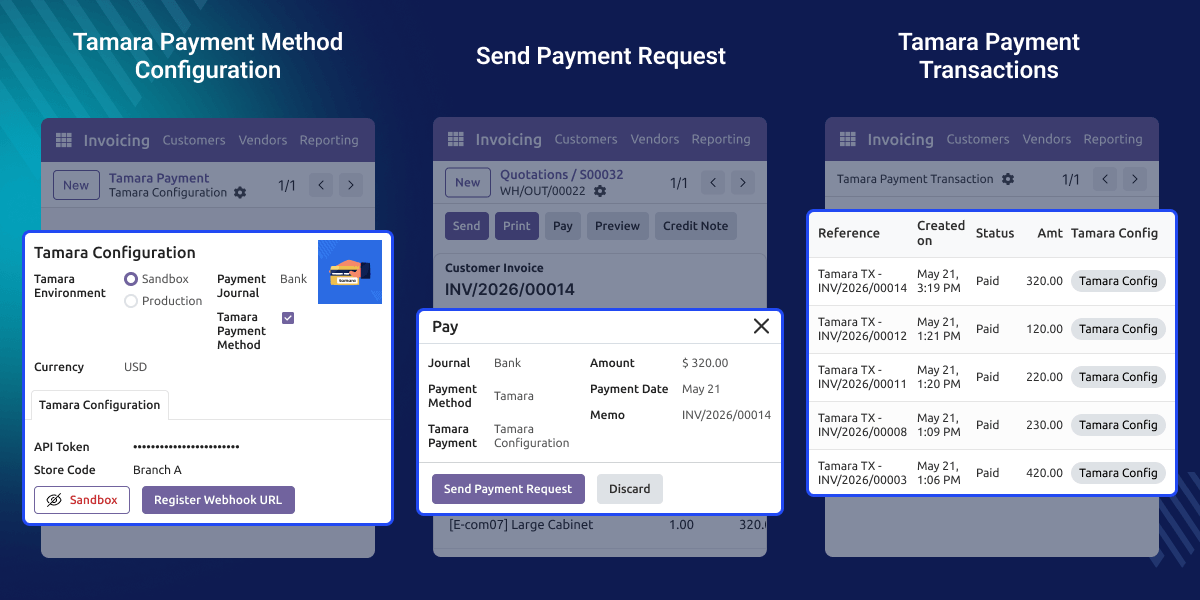
    All transactions are saved in the Tamara Terminal Transaction screen. Each record displays the reference, date, status, amount, and Tamara configuration. You can check and review them at any time.
    Odoo Tamara Payment Integration

    Highlighted Features of Odoo Tamara Payment Integration

      Tamara Terminal Configuration

    Set up your Tamara Terminal with API Token, Store Code, and Webhook URL quickly.

      Buy Now Pay Later Support

    Accept Buy Now Pay Later payments from the invoice screen.

      Inline & Sandbox and Production Mode

    Switch between Sandbox and Production modes for testing and live payments.

      Duplicate Payment Prevention

    Prevent duplicate payments with instant warning messages for already paid invoices.

      Real-Time Payment Status

    Click Get Payment Status to get the latest payment update from Tamara.

      Tamara Transaction Tracking

    View all payments with reference, date, status, amount and tamara configuration in one place.

    Why do we need Odoo Tamara Payment Integration ?

    Default invoicing systems do not support Buy Now Pay Later payments. This makes it hard for businesses to offer flexible payment options.

    Manual payment tracking causes errors and delays. Businesses need real-time payment updates to manage transactions easily.

    Default systems also do not prevent duplicate payments. This can lead to double charging and payment errors.

    Odoo Tamara Payment Integration fixes this problem. It connects the Tamara payment gateway with the Invoicing module. Businesses can send payment requests and track transactions from one place.

    Many businesses need fast and flexible payment solutions. Odoo Tamara Payment Integration makes Odoo Payment Integration simple and efficient for every business.

    Use Cases

      Retail Businesses

    Retail stores can offer Buy Now Pay Later payments to customers. This improves customer experience and boosts sales

      Wholesale and B2B Payments

    Wholesale businesses can send payment requests from invoices directly. This speeds up payment collection and saves time.

      Service-Based Businesses

    Service providers can collect invoice payments using Tamara. They can view all payments from one screen with ease.

    Tamara Payment Configuration

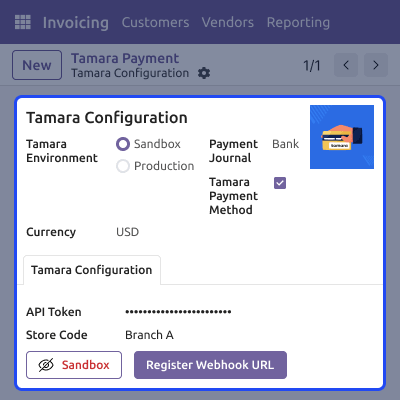
    You can set up the Tamara Payment Configuration  from the backend. Enter your API Token and Store Code to connect with the Tamara payment gateway.

    Pick Sandbox or Production as your mode. Add the Webhook URL to get live payment updates.
    • Set Sandbox or Production mode easily.
    • Add API Token and Store Code for a secure connection.
    • Select Payment Journal and enable the Tamara Payment Method.
    • Add the Webhook URL for live payment updates.
    Tamara Terminal Configuration

    Invoicing Module Support

    You can process payments directly from the invoice screen. Open any invoice, select Tamara, and choose your Tamara Terminal.

    Check the amount, date, and memo before sending. Click Send Payment Request to process the payment instantly.
    • Select the Tamara Payment Method from the invoice screen.
    • Choose the configured Tamara Terminal easily.
    • Review payment details before sending the payment request.
    • Send the payment request with a single click.
    Invoicing Module Support

    Real-Time Payment Status

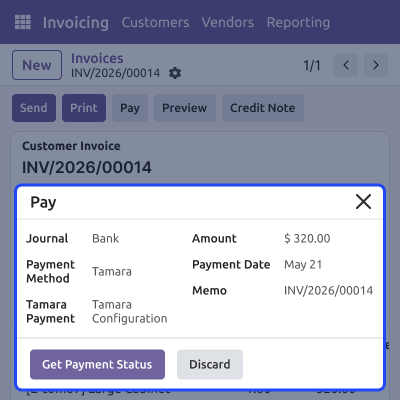
    You can check live payment status after sending the request. Click Get Payment Status to get the latest update from Tamara.

    The invoice marks as Paid once the payment is done. The Amount Due becomes zero automatically.
    • Check live payment status instantly.
    • Click Get Payment Status for the latest Tamara update.
    • Invoice is automatically marked as Paid after payment confirmation.
    • Amount Due is updated to zero after successful payment.
    Real-Time Payment Status

    Tamara Transaction Tracking

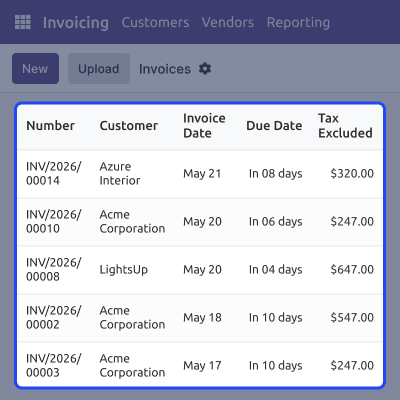
    All payments are saved in the Tamara Terminal Transaction screen. You can view each payment with its reference, date, status, amount and tamara configuration.

    Use filters and search to find any payment quickly. This makes payment management fast and easy.
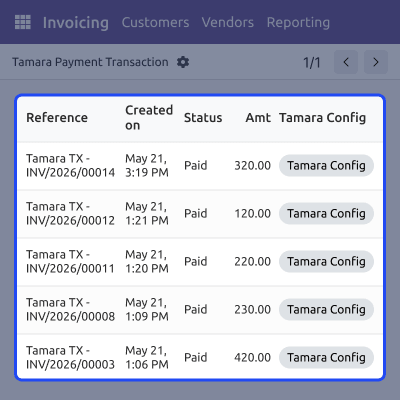
    • View all transactions in one place.
    • Each record displays the reference, date, status, amount, and Tamara configuration.
    • Filter and search transactions quickly.
    • Simplify reporting and payment management.
    Tamara Transaction Tracking

    Duplicate Payment Prevention

    Tamara Terminal Integration prevents duplicate payments on the same invoice. If a payment is already done, the system shows a warning message instantly.

    This keeps your payment records accurate and protects customers from being charged twice.
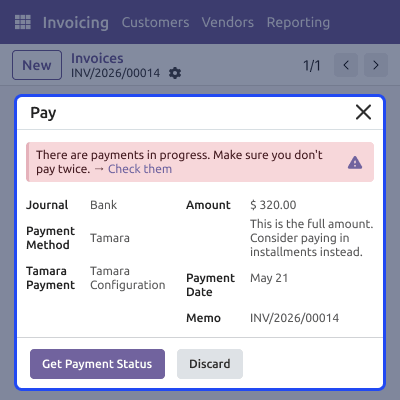
    • Detects duplicate payment attempts automatically.
    • Displays a warning message for already paid invoices.
    • Prevents customers from being charged multiple times.
    • Maintains accurate and clean payment records.
    Duplicate Payment Prevention

    Support

    For any query or issue, please create a support ticket here CREATE A TICKET HERE

    You may also check our other top-quality Odoo Modules.

    Specifications

    Product Version1.0.0
    ReleasedToday
    CategoryOdoo AppsPaymentERPNext
    Last UpdatedJune 5, 2026 (Today)
    Supported VersionsOdoo  17.x  18.x  19.x  
    Write a review

    FAQ’s

     What is Tamara Payment Integration?
    It connects the Tamara payment gateway with the Invoicing module. It lets businesses accept Buy Now Pay Later payments directly from customer invoices.
     Where is the Tamara Terminal configured?
    The Tamara Terminal is configured from the backend. Enter your API Token, Store Code, select the environment, and register the Webhook URL.
     What environments does the module support?
    The module supports both Sandbox and Production environments. You can test payments in Sandbox before going live in Production.
     How does Tamara Invoice Payment work?
    Open a posted invoice and click Pay. Select Tamara as the payment method, choose your Tamara Terminal, and click Send Payment Request.
     Can users check payment status in real time?
    Yes, click the Get Payment Status button on the payment popup. It fetches the latest payment status from the Tamara gateway instantly.
     What happens after a successful payment?
    The invoice is marked as Paid and the Amount Due becomes zero. The transaction is saved in the Tamara Terminal Transaction screen.
     Where can all Tamara transactions be viewed?
    Go to the Tamara Terminal Transaction screen in the Invoicing module. Each record shows the reference, date, status, amount, and Tamara configuration.
     Can multiple Tamara Terminals be configured?
    Yes, you can create multiple Tamara Terminal configurations. Link each one to a different payment journal as per your business needs.
     Can the system prevent duplicate payments?
    Yes, Tamara Payment Integration prevents duplicate payments. If a payment is already completed, the system instantly displays a warning message.

    Move to Cloud Today

    AWS Free tier hosting for one year by amazon web services, for more details please visit AWS Free Tier.

    GCP Free tier hosting for one year with 300 credit points by google cloud platform, for more details please visit GCP Free Tier.

    Azure free tier hosting for one year with 25+ always free services, for more details please visit Azure Free Tier.

    In our default configuration we will provide tremendous configuration for your eCommerce Website which is fast to load and response.

    Default Configuration Details of Server

    • 1 GB RAM
    • 1 Core Processor
    • 30 GB Hard Disk
    • DB with 1 GB RAM and 1 Core Processor

    * Server Configuration may vary as per application requirements.

    Want to know more how exactly we are going to power up your eCommerce Website with Cloud to fasten up your store. Please visit the Cloudkul Services.

    Get Started with Cloud
    Not Available


