USD
  • EUR
  • INR
  • USD
Cart
Cart 0
  • You have no items in your shopping cart.
    Cart
    Cart 0
    • You have no items in your shopping cart.
    Hire a Developer
    ×
    Contact Us!
    Send Again
    Close
    Please Login to Write Your Review

    Odoo TaxJar Connector

    Odoo TaxJar Connector connects Odoo with TaxJar API to calculate accurate U.S. sales tax and manage invoice and refund transactions easily.


    • Secure TaxJar API connection with sandbox support.

    • One-click import of Nexus regions data.

    • Real-time sales tax calculation on orders instantly.

    • Flexible timing for TaxJar transaction creation.

    • Automatic update and deletion of transactions.

    • Complete refund transaction handling from credit notes.

    Screenshots
    $149.00

    * Required Fields

    Add To Cart
    $149.00
    Configure and Buy
    • Description
    • Reviews
    • FAQ
    • Customers ()
    • Specifications
    • Cloud Hosting
    • Changelog

    Odoo TaxJar Connector connects Odoo with TaxJar API to manage U.S. sales tax using imported categories and nexus regions. It calculates accurate tax on sales orders in real time without creating any TaxJar transactions.

    It creates TaxJar transactions during invoicing based on selected workflow timing such as posted or paid invoices. Invoice changes, cancellations, and credit notes automatically sync updates or refunds for smooth compliance.
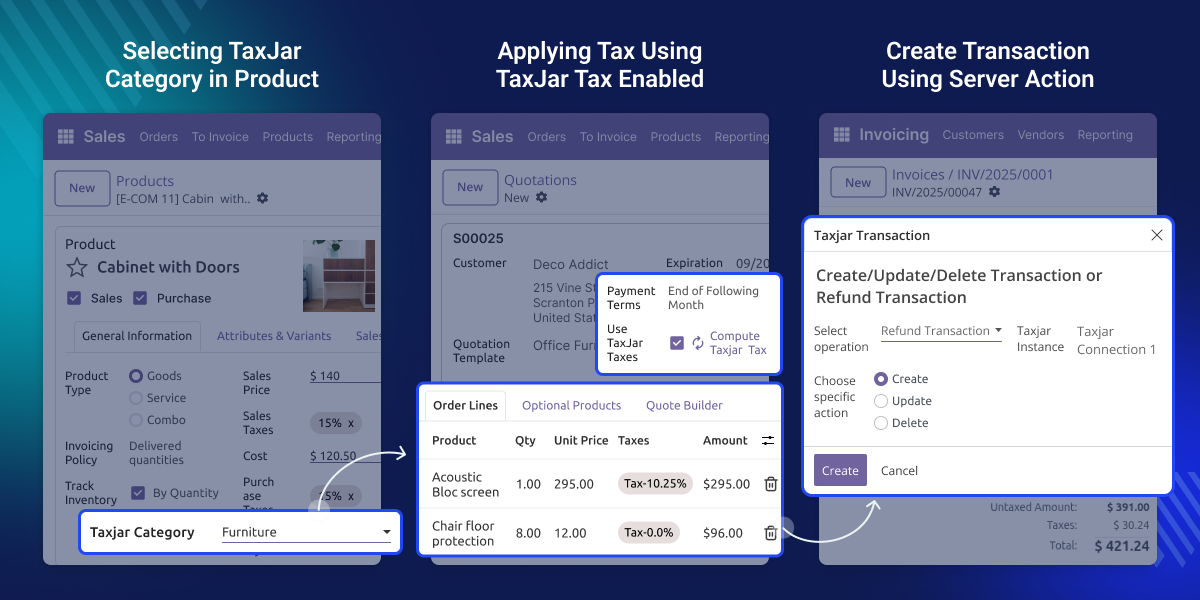
    Odoo TaxJar Connector

    Why Do We Need Odoo TaxJar Connector?

    Managing U.S. sales tax across multiple states is complex due to different nexus rules. Odoo TaxJar Connector calculates accurate sales tax on orders directly in Odoo.

    Businesses must also decide when tax transactions are created during invoicing. Odoo TaxJar Connector lets users control transaction timing so tax reporting matches their workflow.

    Invoice updates, cancellations, and refunds can cause reporting issues. The connector syncs these changes with TaxJar to keep tax records accurate.

    Highlighted Features of Odoo TaxJar Connector

    Accurate Real-Time Taxing

    Odoo TaxJar connector calculates sales order taxes instantly using delivery addresses and TaxJar category details without creating transactions.

    Nexus-Based Tax Rules

    Taxes apply only when customer delivery addresses fall within active nexus regions imported from your TaxJar account.

    Configurable Transaction Timing

    Choose when TaxJar transactions are created by selecting invoice-posted or payment-based triggers.

    Automatic Transaction Sync

    Invoice updates or cancellations automatically adjust or remove the corresponding TaxJar transaction for accurate reporting.

    Complete Refund Management

    Refund creation, updates, and deletions in Odoo instantly synchronize as matching refund transactions inside TaxJar.

    Flexible Automation Controls

    Users may enable or disable automated create, update, and delete actions for complete tax workflow customization.

    Real-Time Tax Calculation

    Calculates sales tax instantly on sales orders when TaxJar taxes are enabled, without creating TaxJar transactions and including shipping tax.
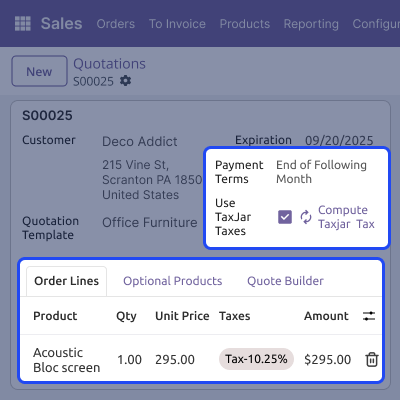
    • Calculates sales tax instantly on sales orders when TaxJar taxes are enabled.
    • Use TaxJar Taxes must be enabled to compute the taxes automatically
    • Uses delivery address, and TaxJar product category for accurate tax results.
    • Does not create any TaxJar transactions during order tax calculation.
    • Includes shipping tax when delivery methods are configured.
    Real-Time Tax Calculation

    Nexus Region Management

    Imports active nexus regions from TaxJar and applies taxes only for deliveries within those states, while standard Odoo taxes are used for non-nexus locations.
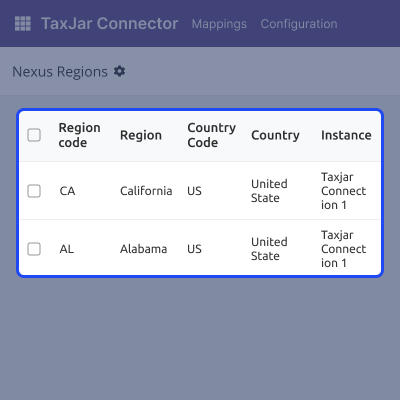
    • Imports all active nexus regions directly from your TaxJar account.
    • Applies TaxJar taxes only when delivery falls within an imported nexus state.
    • Uses standard Odoo taxes automatically for non-nexus states.
    • Helps maintain accurate state-level compliance for all sales.
    Nexus Region Management

    TaxJar Product Category

    Select an imported TaxJar category on the product form to enable tax calculation. Mapped categories are reused to apply correct tax rules automatically.
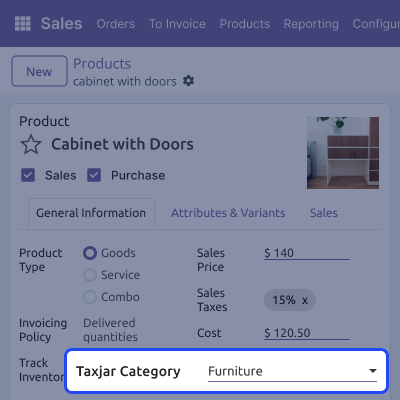
    • Select an imported TaxJar category on the product form.
    • TaxJar tax calculation works only when a TaxJar category is selected.
    • Imported categories are mapped and reused for tax calculation.
    • Ensures correct tax rules apply based on the TaxJar product category.
    TaxJar Product Category

    Configurable Automatic Transactions

    Allows users to choose when TaxJar transactions are created during invoice processing, helping match tax reporting with their accounting workflow.
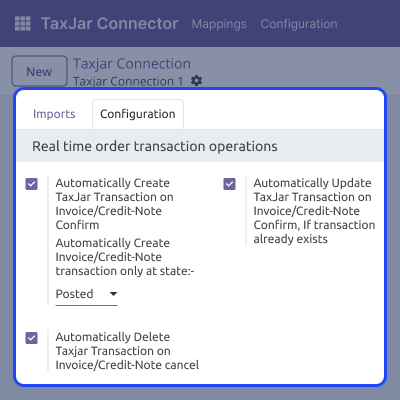
    • Allows choosing when TaxJar transaction is created during invoice processing.
    • Supports creation on posted invoices, or paid invoices.
    • Ensures perfect alignment with your accounting workflow preferences.
    • Eliminates manual transaction uploads for tax reporting.
    Configurable Automatic Transactions

    Handling Transaction Updates

    Automatically updates TaxJar transactions when posted invoices change, keeping tax data in sync and reducing manual corrections.
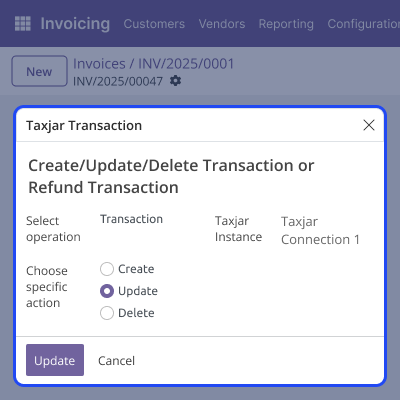
    • Updates TaxJar transaction when changes are made to a posted invoice.
    • Prevents mismatched data between Odoo and your TaxJar account.
    • Sync ensures invoice details always match reported tax values.
    • Reduces manual corrections in tax reporting.
     Handling Transaction Updates

    Cancellation and Refund Transaction Handling

    Creates refund transactions from Odoo credit notes, updates them when credit notes change, and deletes them on cancellation, with optional manual updates using server actions.
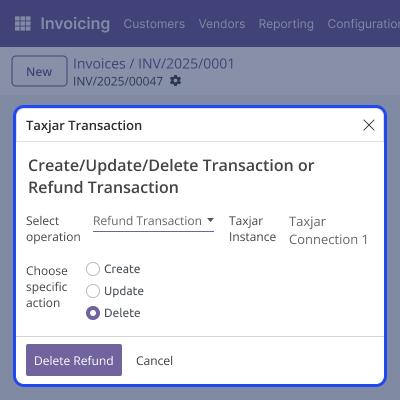
    • Creates refund transactions in TaxJar from Odoo credit notes.
    • Updates the refund transaction automatically when credit note changes.
    • Deletes refund transactions when credit notes are cancelled.
    • Follows the same configurable timing used for invoices.
    • We can also manually update refund transactions using server actions.
     Cancellation and Refund Transaction Handling

    Support

    For any query or issue, please create a support ticket here CREATE A TICKET HERE

    You may also check our other top-quality Odoo Modules.

    Specifications

    Product Version1.0.0
    Released2 months ago
    Last UpdatedFebruary 17, 2026 (18 days ago)
    Supported VersionsOdoo  17.x  18.x  
    Write a review

    FAQs

      Does Odoo TaxJar Connector calculate taxes in real time?
    Yes, the module calculates taxes in real time on sales orders, but it does not create any TaxJar transactions during this step.
      When are TaxJar transactions created from Odoo?
    Transactions are created only during invoicing, based on your chosen trigger: posted or paid invoice.
      Can I import TaxJar categories and nexus regions into Odoo?
    Yes, Odoo TaxJar Connector supports importing product categories, nexus regions, and tax rate details directly from your TaxJar account.
      Does the module handle invoice updates and cancellations?
    Yes, invoice changes update the matching TaxJar transaction, and cancelled invoices delete the related TaxJar entry.
      Does the connector support refunds or credit notes?
    Yes, the module creates, updates, and deletes refund transactions in TaxJar based on credit note actions in Odoo.

    Move to Cloud Today

    AWS Free tier hosting for one year by amazon web services, for more details please visit AWS Free Tier.

    GCP Free tier hosting for one year with 300 credit points by google cloud platform, for more details please visit GCP Free Tier.

    Azure free tier hosting for one year with 25+ always free services, for more details please visit Azure Free Tier.

    In our default configuration we will provide tremendous configuration for your eCommerce Website which is fast to load and response.

    Default Configuration Details of Server

    • 1 GB RAM
    • 1 Core Processor
    • 30 GB Hard Disk
    • DB with 1 GB RAM and 1 Core Processor

    * Server Configuration may vary as per application requirements.

    Want to know more how exactly we are going to power up your eCommerce Website with Cloud to fasten up your store. Please visit the Cloudkul Services.

    Get Started with Cloud
    Not Available


