Send Again
Close
Odoo Watermark Removal helps you detect and clean watermarks from images right inside Odoo. It uses advanced mask detection and inpainting, so you do not need any external tool.
The module gives you a dedicated workspace to handle all your cleanup jobs. Each record keeps the source image, generated mask, output image, and current processing status in one place.
A magic icon appears on hover over every image field across all Odoo form views. Clicking it opens the watermark wizard with the source image and field already pre-loaded.
The cleanup wizard supports three modes: Auto, Text/Logo, and Object/Inpaint. Each mode targets a different watermark type, giving you full control over how the image is processed.
Once the image is clean, the modal replace flow lets you send the result back to the original Odoo field with just one confirmation. The original image is never replaced on its own.
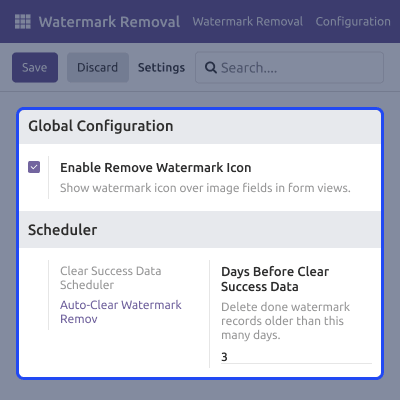
All settings in Odoo Watermark Removal are simple to manage from one configuration panel. This covers the global icon toggle and auto-delete scheduler, both available inside the settings menu.
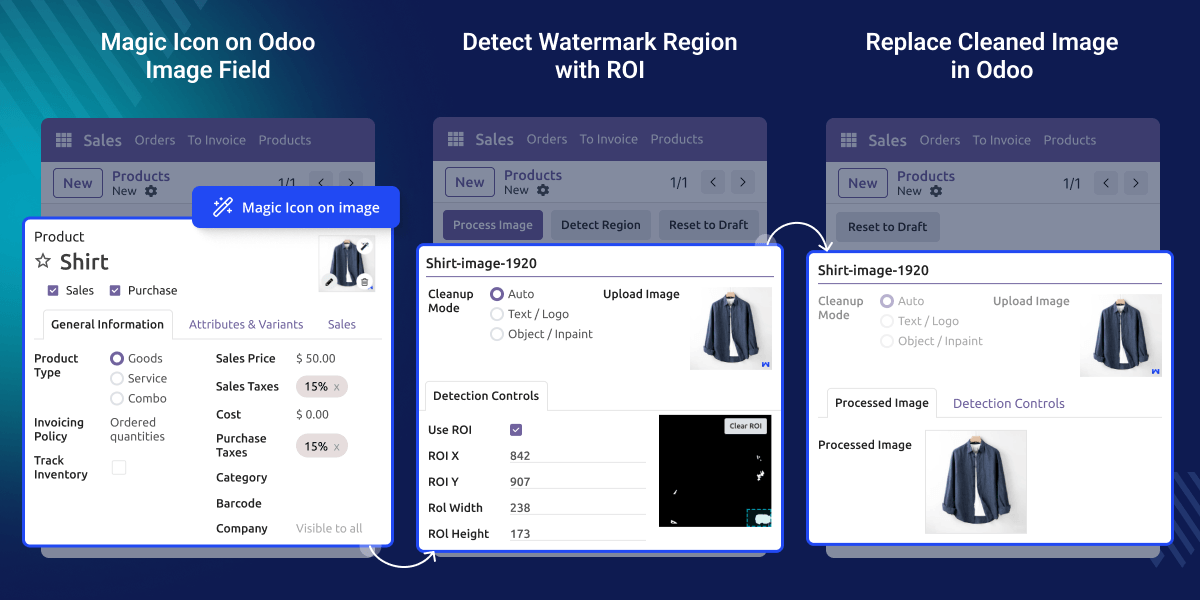
It scans your image and builds a mask over the watermark region it finds, before any processing starts.
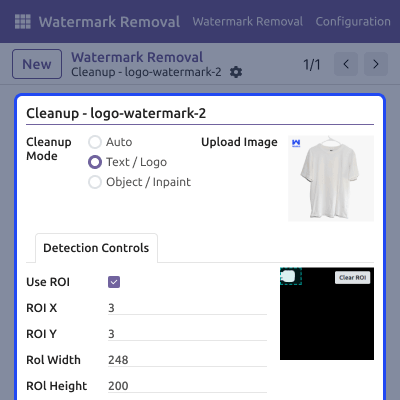
You can set exact pixel coordinates or drag-select the area to keep detection within a specific zone.
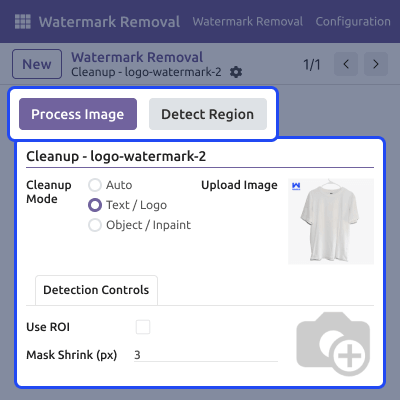
Run full mask detection and inpainting together in a single click using the Process Image button.
Preview and adjust the detected mask using Detect Region before triggering the final inpainting step.
A watermark removal icon appears on hover over any image field across all Odoo form views instantly.
Confirm once through the modal dialog to push the cleaned image back to its original Odoo field.
Export all processed images as a single ZIP archive directly from the watermark removal list view.
Set a retention period and let the scheduler remove completed records on its own once they pass the set date.
Odoo has no built-in tool to remove watermarks from images. Teams managing product images, media files, or scanned documents have no native way to clean them inside Odoo.
Without this module, the only option is to edit images in an external tool, save the file, and re-upload it manually to the correct Odoo field. This is slow and error-prone.
Odoo Watermark Removal brings the entire cleanup process inside Odoo. You detect, adjust, process, and replace the image without switching tabs, tools, or applications at any point.
Odoo Watermark Removal helps businesses take care of watermark removal from images in different real-world scenarios.
You can remove watermarks from product images right on the Odoo product form before you publish them.
Clean up watermarked brand assets or scanned documents without having to switch to any external tool.
Open the watermark wizard right away from any Odoo model that has an image field on its form.
Process and swap out watermarked stock photos across your product catalog without ever leaving Odoo.
Odoo Watermark Removal gives you two ways to process an image, one-click for quick results or two-step to review the mask before inpainting runs.
ROI controls let you focus watermark detection on a specific rectangular region, which helps improve accuracy when the watermark sits in a fixed position.
All module controls are easy to find in one Settings panel, where you can also set up the scheduler to remove completed records once they pass the retention days.
For any query or issue, please create a support ticket here CREATE A TICKET HERE
You may also check our other top-quality Odoo Modules.
Yes, When the global setting is enabled, the magic icon appears on all image fields across every model on your Odoo instance.
No, The original image stays unchanged until you explicitly confirm the replace action through the modal dialog.
One-click runs detection and inpainting together. Two-step runs detection first so you can review and adjust the mask before cleanup.
Three modes are available: Auto, Text/Logo, and Object/Inpaint. Each targets a different type of watermark.
ROI limits detection to a defined rectangular area using X, Y, width, and height values set in pixels.
No, It is optional. You enable it and set the retention days from the module settings panel inside Odoo.
Select completed records in the list view, open the Action menu, and choose Download ZIP.
PNG and JPEG are supported. High-resolution PNG files produce the best inpainting results.
Re-run the process any time using the two-step flow to adjust the ROI manually before the final inpainting runs.
Detailed technical features and requirements to help you understand the module’s capabilities and ensure smooth integration with your system.
Detailed technical features and requirements to help you understand the module’s capabilities and ensure smooth integration with your system.
We’re partnered with top-tier, trusted providers!
Want to know more how exactly we are going to power up your eCommerce Website with Cloud to fasten up your store
* Server Configuration may vary as per application requirements.



