USD
  • EUR
  • INR
  • USD
Cart
Cart 0
  • You have no items in your shopping cart.
    Cart
    Cart 0
    • You have no items in your shopping cart.
    Hire a Developer
    ×
    Contact Us!
    Send Again
    Close
    Please Login to Write Your Review

    Odoo Web Calendar Export (iCal)


    Odoo Web Calendar Export (iCal) lets you store events in iCal format or share a secure link, keeping calendars synced across Google, Outlook, and Apple


    • Share events easily with a public calendar link.

    • Sync Odoo calendar with Google, Outlook, and Apple.

    • Never miss deadlines with detailed event exports.

    • Organize team schedules with smooth calendar sharing.

    • Access calendars anywhere with real-time syncing.

    • Export Odoo events quickly into iCal files.

    • Keep your schedule always updated and showing the right information

    Screenshots
    Odoo Web Calendar Export (iCal) Odoo Web Calendar Export (iCal) Odoo Web Calendar Export (iCal) Odoo Web Calendar Export (iCal) Odoo Web Calendar Export (iCal)
    Show More Hide All
    $49.00

    * Required Fields

    Add To Cart
    $49.00
    Configure and Buy
    • Description
    • Reviews
    • FAQ
    • Customers ()
    • Specifications
    • Cloud Hosting
    • Changelog

    Odoo Web Calendar Export (iCal) makes scheduling easier by converting your Odoo events into the widely supported iCal format. With this module, your events stay accurate and up to date, helping you avoid missed appointments or double bookings.

    Create a secure link and share your calendar instantly.Odoo Web Calendar Export (iCal) lets others view and sync your Odoo events directly into their own calendars with no extra effort

    With just a few clicks, you can sync your appointments, meetings, and deadlines with platforms like Google, Outlook, and Apple Calendar.
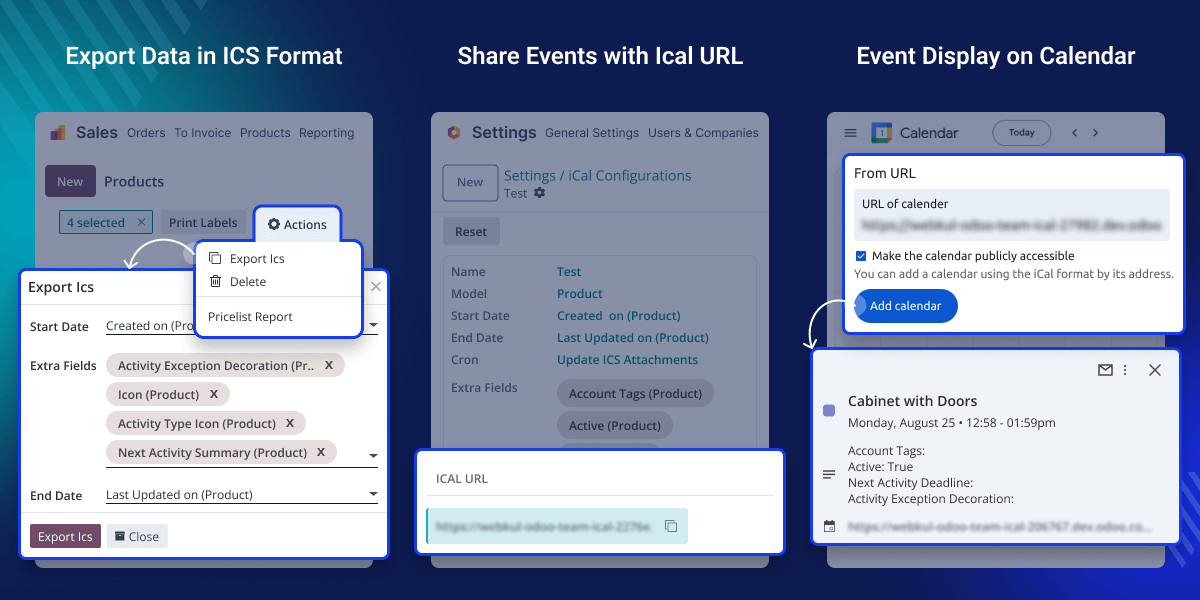
    Odoo Web Calendar Export

    Why do we need Odoo Web Calendar Export (iCal) ?

    When running projects or campaigns in Odoo Web Calendar Export (iCal), such as a product launch with multiple meetings, deadlines, and events, the whole team must stay aligned.

    By exporting it from Odoo Calendar as an iCal file and importing it into tools like Microsoft Outlook, everyone can see its full schedule in one place.

    In addition, it provides a public URL option that, can be pasted directly into external calendars. It means events update automatically, saving time and ensuring that team members or external partners always have the latest version of the schedule without extra effort.

    Highlighted Features of Odoo Web Calendar Export (iCal)

    Export to iCal

    You can take your Odoo calendar events and turn them into a file that works with other calendars like Google, Outlook, and Apple Calendar

    Detailed Event Data

    All key details like event name, date, time, and place are handled carefully so nothing is ever forgotten

    Public URL Sharing

    A personalized link to your calendar can be made and shared anytime While others open it, they’ll always see the newest events

    Quick Tree View Access

    You can save your calendar right from the main Odoo screen with just one click, making it super fast and easy

    Export to iCal Format

    Odoo Web Calendar Export quickly changes your Odoo events into iCal format. So you can open them on any phone, computer, or calendar app:

    • Move your events fast and never lose any important detail.
    • Works with Google, Outlook, and Apple calendars without any trouble.
    • Remembers repeating events like weekly classes or monthly meetings.
    • Keeps all calendars showing the same things so you don’t get confused.
    Export to iCal Format

    Export from Tree View Access

    Odoo Web Calendar Export (iCal) lets you access and export events directly from the tree view without interrupting your workflow, saving both time and effort:
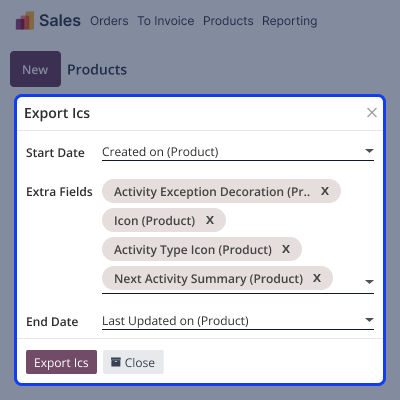
    • Export calendar events instantly with just one click from the tree view.
    • Follow a simple, clear, and intuitive process that anyone can understand easily.
    • Get fast access to event exports without adding unnecessary extra steps.
    • A smart choice for busy professionals who need speed and efficiency.
     Export from Tree View Access

    Public URL Sharing

    Odoo Web Calendar Export creates a special link for your Odoo data so it can update automatically in other calendars without extra effort:
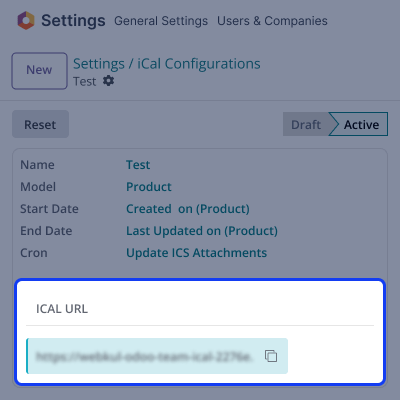
    • Share your entire calendar safely with one simple and secure link.
    • It works smoothly with Google Calendar, Apple Calendar, and Outlook.
    • Ensures every event is always refreshed, updated, and fully accurate.
    • Great option for sharing schedules easily with friends, teammates, or clients.
    Public URL Sharing

    Import to Any Calendar

    Odoo Web Calendar Export creates iCal files that open in many calendar apps, letting you check your Odoo events wherever you want
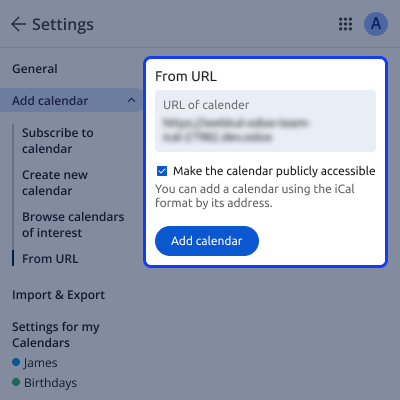
    • Easily import the file into Google Calendar or Microsoft Outlook.
    • Works smoothly and reliably with Apple Calendar without any issues.
    • Connects effortlessly with many other tools supporting iCal format
    • No extra steps required, making it simple for anyone to use.
    Import to Any Calendar

    Support

    For any query or issue please create a support ticket here CREATE A TICKET HERE

    You may also check our other top-quality Odoo Modules.

    Specifications

    Product Version1.0.0
    Released1 year ago
    Last UpdatedFebruary 2, 2026 (1 month ago)
    Supported VersionsOdoo  17.x  18.x  19.x  
    Write a review

    Frequently Asked Questions

      Can I share my calendar with others without sending files?
    Yes, you can generate a public URL for your Odoo calendar. Once shared, teammates or clients can paste the link into Google Calendar, Outlook, or Apple Calendar, and events will stay updated automatically.
      Is this module useful for both individuals and businesses?
    Absolutely! It works well for personal schedules, like birthdays or appointments, and for businesses to track deadlines, project meetings, or company events across different teams.
     What’s the process to export events from Odoo into iCal?
    To export events, go to your Odoo calendar, select the event(s), and use the Export ICS option. The system produces a .ics file that works seamlessly with Google, Outlook, and Apple calendars.
     Do recurring or repeating events get exported correctly?
    Odoo Web Calendar Export (iCal) helps with regular events. If you share or save your calendar, things like weekly meetings or monthly reminders will also show up and stay matched with other calendars.
      Is it possible to manage calendars for multiple users with this module?
    Yes, admins can export calendars for multiple users. This module is helpful for managers who need to oversee team schedules or coordinate events across different departments.

    Move to Cloud Today

    AWS Free tier hosting for one year by amazon web services, for more details please visit AWS Free Tier.

    GCP Free tier hosting for one year with 300 credit points by google cloud platform, for more details please visit GCP Free Tier.

    Azure free tier hosting for one year with 25+ always free services, for more details please visit Azure Free Tier.

    In our default configuration we will provide tremendous configuration for your eCommerce Website which is fast to load and response.

    Default Configuration Details of Server

    • 1 GB RAM
    • 1 Core Processor
    • 30 GB Hard Disk
    • DB with 1 GB RAM and 1 Core Processor

    * Server Configuration may vary as per application requirements.

    Want to know more how exactly we are going to power up your eCommerce Website with Cloud to fasten up your store. Please visit the Cloudkul Services.

    Get Started with Cloud
    Not Available


