USD
  • EUR
  • INR
  • USD
Cart
Cart 0
  • You have no items in your shopping cart.
    Cart
    Cart 0
    • You have no items in your shopping cart.
    Hire a Developer
    ×
    Contact Us!
    Send Again
    Close
    Please Login to Write Your Review

    Odoo Website Advance Product Sorting

    Odoo Website Advance Product Sorting allows you to change the order of products on your website. You can control which items appear first or last, creating a customized product sequence.


    • Drag-and-drop to reorder easily.

    • Change product order at any time.

    • Sort the product listing.

    • Sort products by category.

    • Backend sorting follows the frontend.

    • Sync products instantly to categories.

    Screenshots
    $45.00

    * Required Fields

    Add To Cart
    $45.00
    Configure and Buy
    • Description
    • Reviews
    • FAQ
    • Customers ()
    • Specifications
    • Cloud Hosting
    • Changelog

    Odoo Website Advance Product Sorting helps you to arrange product sequences on your website. It is like organizing toys in your room—put your favorites in the front and others at the back.

    You can change product positions by simply dragging them with your mouse. After changing the order, the website reflects products in the same order, like magic.
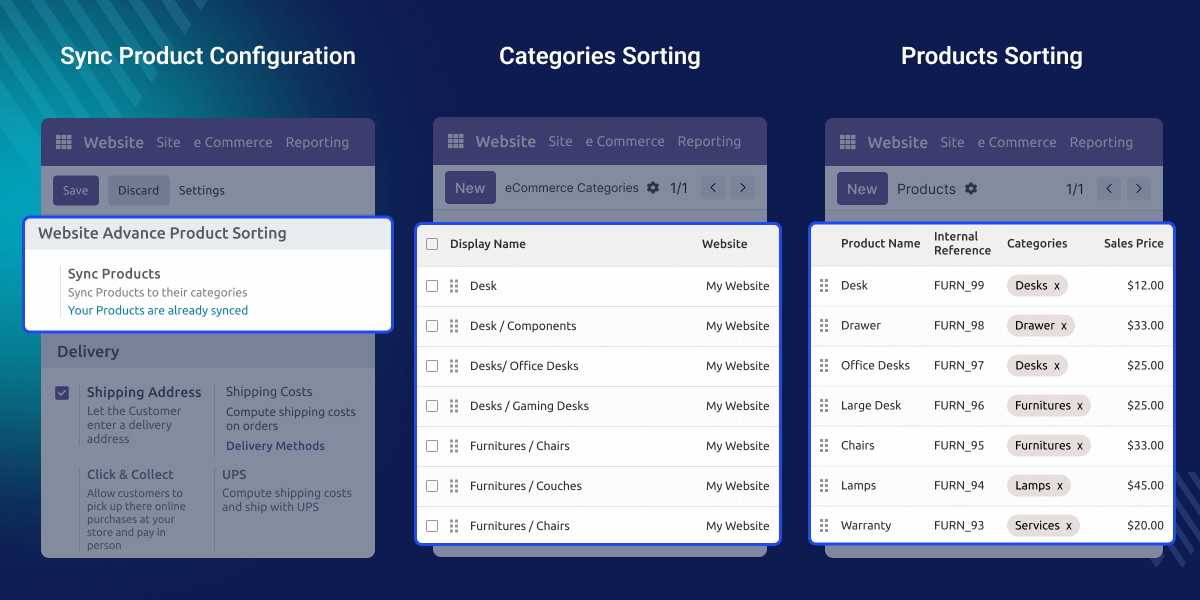
    Odoo Website Advance Product Sorting

    Why Do We Need Odoo Website Advance Product Sorting?

    Sometimes products on a website appear in a messy order. Important things stay hidden and visitors cannot find them. This module helps you put the best items at the top so customers can see them first.

    It makes your website look neat and organized. Just like arranging books on a shelf so your favorite books are always easy to reach.

    A Real-Life Example

    Imagine a shop selling toys. The shop owner wants new toys to appear first and old toys later. With this module, the owner can drag the toy pictures to the top and can save the sequence. Now, people visiting the website can see new toys first making the shopping experience better.

    Highlighted Features of Odoo Website Advance Product Sorting

     Drag & Drop

    Move products like puzzle pieces with your mouse.

     Quick Sync

    Click to make backend and website match.

     Category Sorting

    Sort products inside each category.

     Backend Sync Control

    Synchronizes product sequences from backend to website categories.

    Drag-and-Drop Sorting

    You can grab a product and move it anywhere. It feels like holding a toy and putting it where you want.
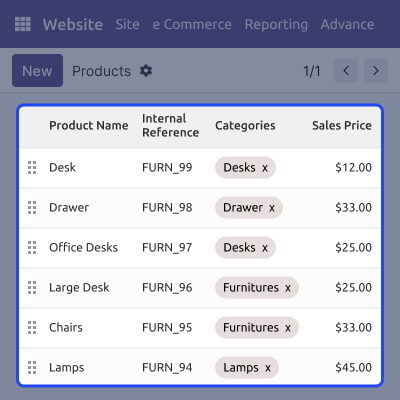
    • Pick a product with your mouse
    • Move it up or down
    • Drop it where you want
    • Save changes
    • The website updates automatically
    Drag-and-Drop Sorting

    Backend Sync Action

    Odoo Website Advance Product Sorting helps make the backend list and website list look exactly the same
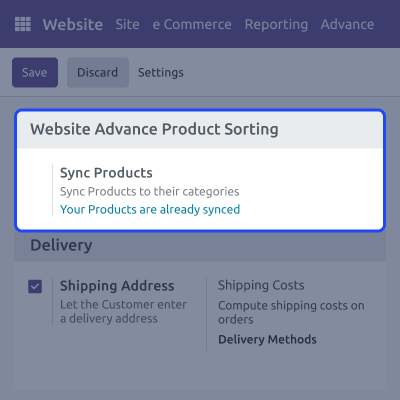
    • Click one button
    • Sync all products
    • Remove mismatches
    • Keep data clean
    • The arranged sequence is followed
    Backend Sync Action

    Sorting by Category

    Every category can have its own special product order, like sorting chocolates by flavor.
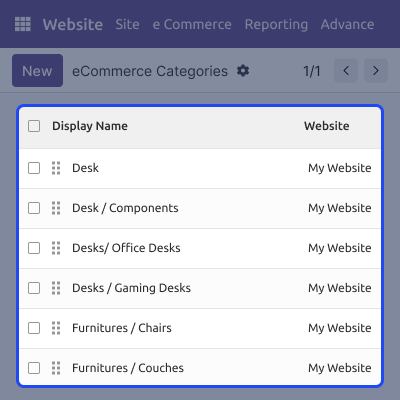
    • Choose a category
    • Arrange products inside it
    • Save the order
    • The website shows the same order
    • Easy for big shops
    Sorting by Category

    Product Sorting

    Product listing on the product page can be managed from the backend.
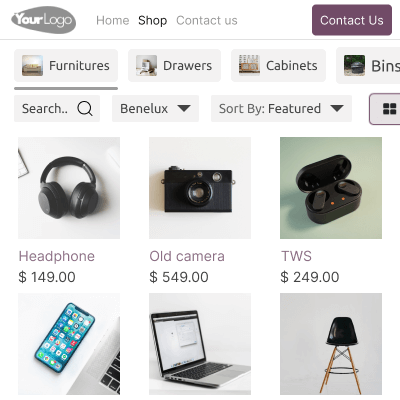
    • See all products
    • Drag to sort
    • Arrange products
    • One place to manage
    • No coding needed
    Product Sorting

    Support

    For any query or issue, please create a support ticket here CREATE A TICKET HERE

    You may also check our other top-quality Odoo Modules.

    Specifications

    Product Version1.0.0
    Released1 month ago
    Last UpdatedJanuary 27, 2026 (1 month ago)
    Supported VersionsOdoo  16.x  17.x  18.x  19.x  
    Write a review

    FAQs

     Can I move products by myself in Odoo Website Advance Product Sorting?
    Yes! You can simply drag and drop them.
     Will customers see the new order?
    Yes, once saved, customers see it right away.
     Do I need to install anything else?
    No, this module works alone.
     Can I sort products in only one category?
    You can sort in many categories, each with different orders.
     Do I need to be a developer?
    No, it is super easy—no coding at all.

    Move to Cloud Today

    AWS Free tier hosting for one year by amazon web services, for more details please visit AWS Free Tier.

    GCP Free tier hosting for one year with 300 credit points by google cloud platform, for more details please visit GCP Free Tier.

    Azure free tier hosting for one year with 25+ always free services, for more details please visit Azure Free Tier.

    In our default configuration we will provide tremendous configuration for your eCommerce Website which is fast to load and response.

    Default Configuration Details of Server

    • 1 GB RAM
    • 1 Core Processor
    • 30 GB Hard Disk
    • DB with 1 GB RAM and 1 Core Processor

    * Server Configuration may vary as per application requirements.

    Want to know more how exactly we are going to power up your eCommerce Website with Cloud to fasten up your store. Please visit the Cloudkul Services.

    Get Started with Cloud
    Not Available


