USD
  • EUR
  • INR
  • USD
Cart
Cart 0
  • You have no items in your shopping cart.
    Cart
    Cart 0
    • You have no items in your shopping cart.
    Hire a Developer
    ×
    Contact Us!
    Send Again
    Close
    Please Login to Write Your Review

    Odoo Website Monetico Payment Acquirer

    Odoo Website Monetico Payment Acquirer adds a trusted checkout option to your e-commerce website. This module allows you to process multiple foreign currencies and organize customer transactions in one place.


    • Accept safe online payments through Monetico.

    • Support different currencies for website orders.

    • Show Monetico as a payment option at checkout.

    • Update payment status after every sale.

    • Manage payment details from the Odoo backend.

    • Set up Website Payment Integration with ease.

    • Control payment availability based on your needs.

    • Track website payment records for every order.

    • Link payment details with related sales orders.

    • Keep payment records for future reference.

    Screenshots
    Odoo Website Monetico Payment Acquirer Odoo Website Monetico Payment Acquirer Odoo Website Monetico Payment Acquirer Odoo Website Monetico Payment Acquirer Odoo Website Monetico Payment Acquirer Odoo Website Monetico Payment Acquirer Odoo Website Monetico Payment Acquirer
    Show More Hide All
    $149.00

    * Required Fields

    Add To Cart
    $149.00
    Configure and Buy
    • Description
    • Reviews
    • FAQ
    • Customers ()
    • Specifications
    • Cloud Hosting
    • Changelog

    Odoo Website Monetico Payment Acquirer pairs your store with Monetico for safe web sales. It helps stores track online payments from one place.This module adds a Monetico payment option to your web checkout. This lets your customers pay for their online orders with ease.

    Payment status updates after each sale. This keeps your store records right without any extra work.Each transaction remains tied to its specific store receipt. You can check payment details whenever you need them.

    You can change all setup options from the backend. This lets you choose when the payment option shows at checkout.This module makes web order management easy from start to finish. It helps your business track payments and keep records organized.

    Odoo Website Monetico Payment Acquirer

    Highlighted Features of Odoo Website Monetico Payment Acquirer

      Multiple Currency Payments

    Accept payments in multiple currencies for website orders. This allows shops to assist customers in diverse global areas.

      Secure Payment Processing

    Handle digital sales via Monetico by using a safe transaction path for web requests.

      Real-Time Payment Updates

    Payment information updates automatically after transactions. Customers can check the latest payment status in Odoo.

      Backend Payment Management

    View payment details and transaction records from the backend. Manage website payments from one place.

    Why Do We Need This Odoo Website Monetico Payment Acquirer?

    Sorting online sales through scattered portals burns your energy. Stores need a simple way to take online payments without extra steps.Default Odoo does not have a direct Monetico option for web checkouts. This forces store owners to track every order by hand.

    Manual payment tracking slows down order processing and makes daily work harder for growing businesses.

    Odoo Website Monetico Payment Acquirer solves this by linking both tools safely. This removes repetitive tasks and saves all your customers logs safe.

    Use Cases

      E-Commerce Businesses

    Stores can accept safe digital sales via Monetico at checkout. This offers shops a protected and smooth way to process payments for their online orders.

      Multi-Currency Businesses

    Shops with global buyers can accept different currencies at checkout. This supports to get web payments fast from any country.

      Growing Online Stores

    Growing shops can check all web payments and orders inside Odoo. This saves time and stops manual payment errors for your business.

    Monetico Configuration

    Add Monetico to Odoo for Website Payment Integration and manage setup settings from one place.

    • Add your Monetico account details from the backend.
    • Set up payment options for your website.
    • Choose where customers can use Monetico.
    • Get your payment gateway ready for website orders.
     Monetico Configuration

    Website Payment Processing

    Customers can choose Monetico during website checkout. This module supports secure online payments for website orders.
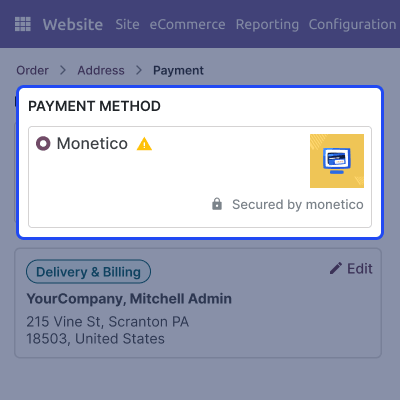
    • Let customers choose Monetico during checkout.
    • Accept secure payments for website orders.
    • Connect payments with the correct orders.
    • Make the checkout process simple for buyers.
    Website Payment Processing

    Payment Status & Order Management

    Store owners can track live payment activities and keep order data updated in Odoo. This supports you to check customers records effortlessly during normal working days.

    • Update payment details after each transaction.
    • Check payment and order information together.
    • Keep website payment records up to date.
    • Review customer payment activity with ease.
    Payment Status & Order Management

    Backend Payment Management

    Store owners can track Monetico payment records from the Odoo backend. This helps review transactions and keep website payment details organized.

    • View Monetico payment records from Odoo.
    • Check transaction details for website orders.
    • Track payment history from one place.
    • Keep payment information well organized.
    Backend Payment Management

    Support

    For any query or issue, please create a support ticket here CREATE A TICKET HERE

    You may also check our other top-quality Odoo Modules.

    Specifications

    Product Version1.0.0
    ReleasedToday
    CategoryOdoo AppsPayment
    Last UpdatedJuly 1, 2026 (Today)
    Supported VersionsOdoo  16.x  17.x  18.x  19.x  
    Write a review

    FAQ’s

      What is Odoo Website Monetico Payment Acquirer?
    Odoo Website Monetico Payment Acquirer integrates Monetico with your Odoo website. This allows store owners to accept secure online payments from customers during checkout.
     How do I configure Monetico in Odoo?
    Open the Monetico Payment Provider in Odoo, enter your account details, and save. Then, turn it on to show it as a live option at checkout.
     Does this module support Multiple Currency Payments?
    Yes, this module supports different currencies at checkout. This helps store owners collect website payments from global customers in their local money.
     How are website payments processed?
    Customers select Monetico during checkout to finalize the payment. This module updates the order status in Odoo after the transaction.
     Can I review payment details from Odoo?
    Yes, you can view all payment details directly inside Odoo. This helps store owners check and track website orders fast without any extra tools.
     Can I manage where Monetico is available?
    Yes, store owners can set up Monetico settings from the backend. You can easily control when and where to show this payment option on the site.
     Does this module update payment information automatically?
    Yes, the order status changes instantly once the customer pays. This helps store owners view correct payment data without any manual work.
     Can I view payment records for website orders?
    Yes, this module links every payment to its website order. This helps store owners check all customer order history fast from the backend.

    Move to Cloud Today

    AWS Free tier hosting for one year by amazon web services, for more details please visit AWS Free Tier.

    GCP Free tier hosting for one year with 300 credit points by google cloud platform, for more details please visit GCP Free Tier.

    Azure free tier hosting for one year with 25+ always free services, for more details please visit Azure Free Tier.

    In our default configuration we will provide tremendous configuration for your eCommerce Website which is fast to load and response.

    Default Configuration Details of Server

    • 1 GB RAM
    • 1 Core Processor
    • 30 GB Hard Disk
    • DB with 1 GB RAM and 1 Core Processor

    * Server Configuration may vary as per application requirements.

    Want to know more how exactly we are going to power up your eCommerce Website with Cloud to fasten up your store. Please visit the Cloudkul Services.

    Get Started with Cloud
    Not Available


