Send Again
Close
Odoo Website Order Advance Payment module lets customers pay a little at a time instead of all at once, making buying easier and more fun.
Each payment updates the order and invoice automatically, keeping all account records accurate.
Admins can define payment rules, and customers can view their paid amount, remaining balance, and upcoming installments in the portal.
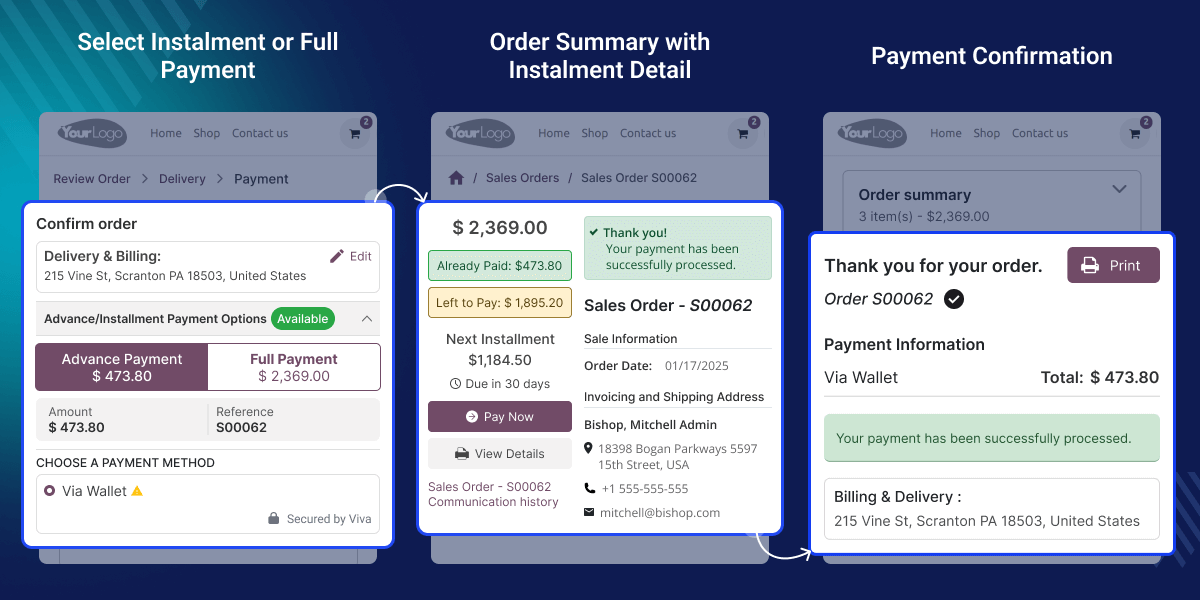
Many customers cannot pay a big amount all at once, and Odoo Website Order Advance Payment module helps by letting them pay a small part first and the rest later in easy installments.
It makes shopping flexible and reduces pressure while keeping the buying process simple. Customers can pay in planned parts like 25% now, 50% later, and 25% at the end, & the portal clearly shows paid amounts, balance, & the next due dates.
Admins can set payment rules, and customers can see what they paid, what is left, and what’s coming next in their portal.
Odoo Website Order Advance Payment works in conjunction with the following module:
Odoo Sales Order Advance Payments
You need to install the module mentioned above to use Odoo Website Order Advance Payment.
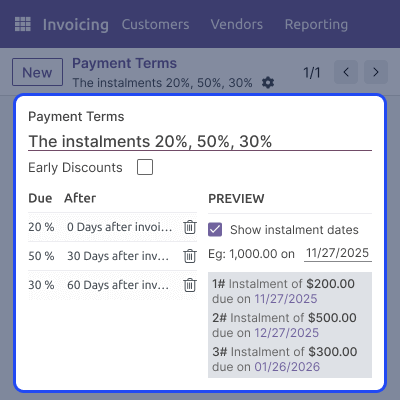
Create multi-line installment plans with percentages and due dates, managed easily with Odoo Website Order Advance Payment.
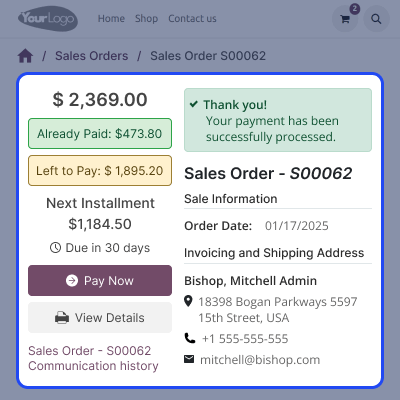
Customers can track paid amounts, remaining balance, and upcoming installments in their portal.
Offer “Advance Payment” or “Full Payment” at checkout with a clear preview of amounts.
All payments post to sales orders and invoices automatically, ensuring accurate records.
Define installment percentages, due dates, and see how terms appear on invoices. Using Odoo Website Order Advance Payment module, admins can create reusable payment plans for customers or orders.
Let customers pick advance or full payment at checkout and view the amount and payment reference. Customers opt for the installment or full payment and proceed with the selected payment acquirer.

The Portal displays order total, paid amount, balance, next installment, and “Pay Now” button. Customers can view communication history and make subsequent installment payments from the portal.
All installment payments are neatly organized in the backend, allowing admins to review, verify, and track every transaction linked to a sales order with ease.

For any query or issue, please create a support ticket here CREATE A TICKET HERE
You may also check our other top-quality Odoo Modules.
Detailed technical features and requirements to help you understand the module’s capabilities and ensure smooth integration with your system.
Detailed technical features and requirements to help you understand the module’s capabilities and ensure smooth integration with your system.
We’re partnered with top-tier, trusted providers!
Want to know more how exactly we are going to power up your eCommerce Website with Cloud to fasten up your store
* Server Configuration may vary as per application requirements.



