Send Again
Close
Odoo Website PayLane Payment Provider lets websites take card payments with PayLane. Customers pay on the checkout page.
The payment form shows on the same page. Payments are fast, and the order updates itself. Admins can see payments and orders in the backend. Odoo does not keep card details.

Online stores need a simple and safe payment method. Redirecting customers can slow down checkout and cause issues.
Odoo Website PayLane Payment Provider lets customers pay on the checkout page using an inline card form. Payments are quick and secure.
For example, a customer selects PayLane at checkout and completes payment on the same page. The admin then sees the payment status in Odoo.
Customers enter card details directly on the checkout page without being redirected to another payment page.
Payment status updates automatically after completion, allowing admins to track results instantly in Odoo.
Ensures customers pay the complete order amount during checkout for accurate order confirmation.
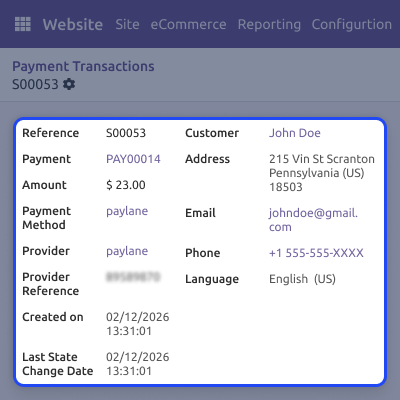
All PayLane payment records are stored in one place for easy review and backend management.
Admins can set up PayLane payment details easily from the backend. This helps businesses start accepting online payments quickly and safely.
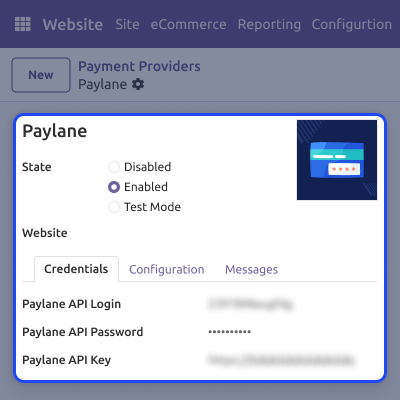
Odoo Website PayLane Payment Provider uses an inline checkout flow, so customers stay on the same page while paying. This makes checkout faster and easier.

Admins can manage and track all PayLane payments from the backend. This keeps payment records clear and organized.
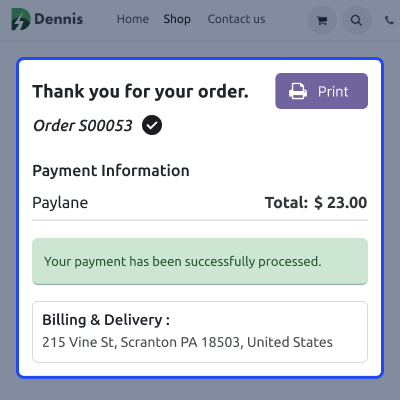
Odoo Website PayLane Payment Provider avoids redirecting customers to other pages. This improves trust and speeds up checkout.
For any query or issue, please create a support ticket here CREATE A TICKET HERE
You may also check our other top-quality Odoo Modules.
Detailed technical features and requirements to help you understand the module’s capabilities and ensure smooth integration with your system.
Detailed technical features and requirements to help you understand the module’s capabilities and ensure smooth integration with your system.
We’re partnered with top-tier, trusted providers!
Want to know more how exactly we are going to power up your eCommerce Website with Cloud to fasten up your store
* Server Configuration may vary as per application requirements.



