Odoo Website Payment Stripe Recurring For Enterprise
Odoo Website Payment Stripe Recurring For Enterprise helps businesses collect Stripe subscription payments during website checkout with automatic recurring billing for subscribed products.
- Stripe recurring subscription payments at website checkout.
- Secure Stripe-hosted checkout for subscription payments.
- Easy setup for product subscription billing plans.
- Automatic order confirmation after Stripe payment.
- Track Stripe subscription transactions in one dashboard.
- Stripe recurring payments integrated with website checkout.
- Description
- Reviews
- FAQ
- Customers ()
- Specifications
- Cloud Hosting
- Changelog
Odoo Website Payment Stripe Recurring for Enterprise helps businesses take Stripe payments at website checkout. Customers can subscribe to products and pay each billing cycle again.
The module connects Stripe payments with the website checkout. Admin users can view payments and manage plans from the backend.
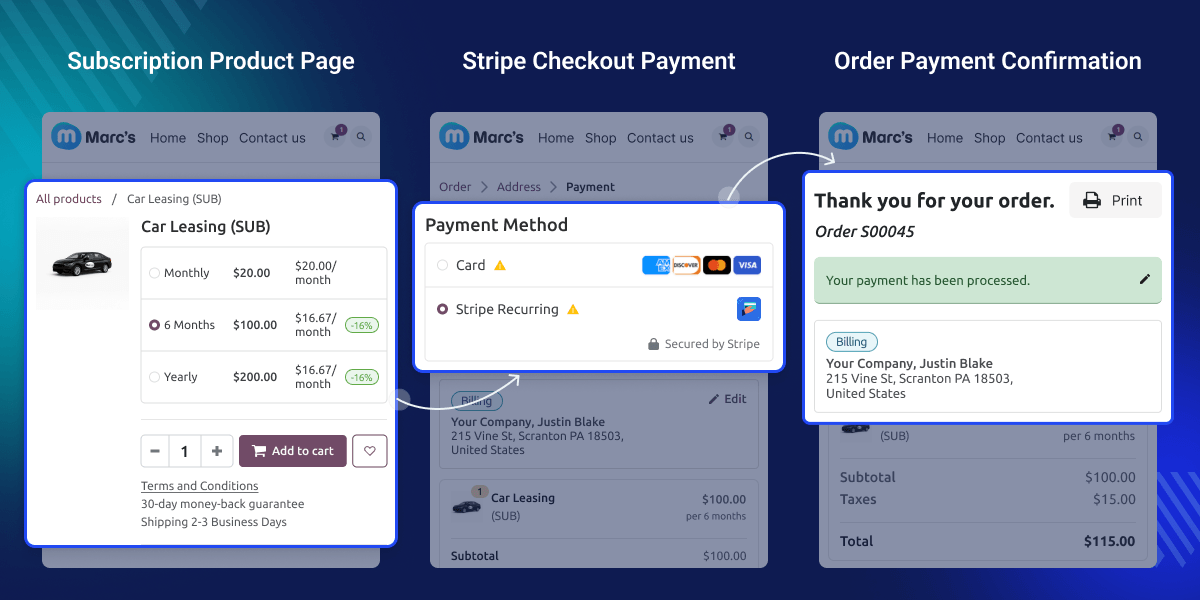
Why do we need Odoo Website Payment Stripe Recurring for Enterprise?
Many businesses sell products or services using subscription plans. Customers must pay again for each plan cycle.
Odoo Website Payment Stripe Recurring for Enterprise helps automate these payments with Stripe. Customers can subscribe at checkout and pay in a simple way.
After the first payment, the system handles repeat billing automatically. Admin users can view and track payments from the backend.
Highlighted Features of Odoo Website Payment Stripe Recurring For Enterprise
Recurring Subscription Payments
Customers can subscribe to products and pay automatically using Stripe recurring payments at website checkout.
Secure Stripe Checkout
Stripe processes subscription payments on a secure, hosted checkout page. The system doesn’t store card details.
Automatic Payment Confirmation
Orders confirm automatically after a successful Stripe subscription payment.
Centralized Transaction Tracking
Administrators can view and track Stripe subscription payments from the payment dashboard.
Stripe Payment Provider Setup
Odoo Website Payment Stripe Recurring for Enterprise helps administrators set up Stripe payments from the backend. This setup allows safe payments and supports recurring billing.
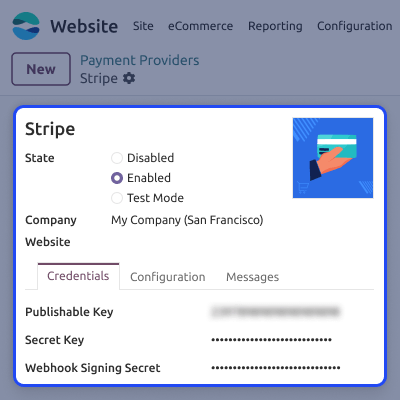
- Set up the Stripe payment provider from backend settings.
- Turn on Test Mode or Production Mode.
- Add Stripe API keys and webhook secret.
- Manage payment settings from one page.
- Enable Stripe recurring payment support.

Subscription Product Configuration
Businesses can create products with subscription plans and repeat billing. Customers pick a subscription plan when they buy the product.
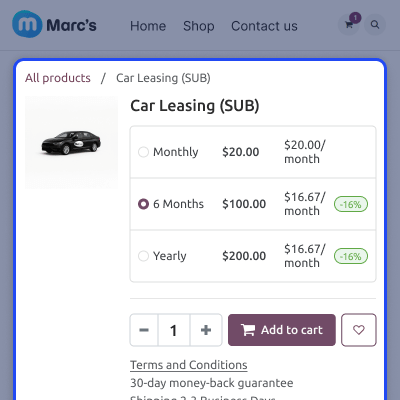
- Create subscription products from product settings.
- Create subscription plans with monthly or yearly payment periods.
- Add recurring pricing to products.
- Publish subscription products on the website.
- Let customers subscribe from the shop page.

Website Checkout Payment Flow
Customers can choose Stripe as the payment method during website checkout. This makes subscription payments simple and quick.
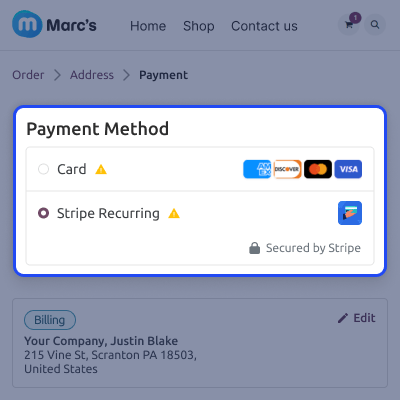
- Customers select subscription products on the website.
- Put the product in the cart and continue to the checkout step.
- Choose the Stripe recurring payment method.
- Choose Pay Now to proceed with the payment step.
- Complete payment through Stripe checkout.

Stripe Hosted Checkout Payment
Customers move to Stripe’s secure hosted payment page. This keeps payments safe and does not store card details.
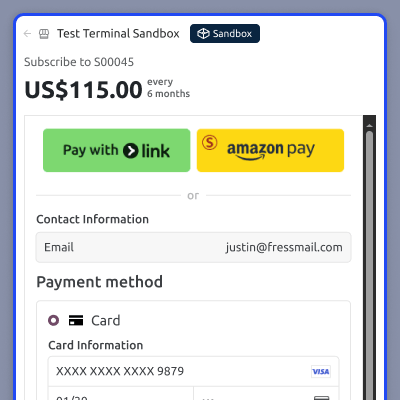
- Customers enter card details on the Stripe page.
- Stripe processes the subscription payment securely.
- Payment confirmation returns to the website.
- Orders confirm automatically after payment.
- Transactions appear in the backend dashboard.

Support
For any query or issue, please create a support ticket here CREATE A TICKET HERE
You may also check our other top-quality Odoo Modules.
Specifications
FAQ’s
Move to Cloud Today
AWS Free tier hosting for one year by amazon web services, for more details please visit AWS Free Tier.
GCP Free tier hosting for one year with 300 credit points by google cloud platform, for more details please visit GCP Free Tier.
Azure free tier hosting for one year with 25+ always free services, for more details please visit Azure Free Tier.
In our default configuration we will provide tremendous configuration for your eCommerce Website which is fast to load and response.
Default Configuration Details of Server
- 1 GB RAM
- 1 Core Processor
- 30 GB Hard Disk
- DB with 1 GB RAM and 1 Core Processor
* Server Configuration may vary as per application requirements.
Want to know more how exactly we are going to power up your eCommerce Website with Cloud to fasten up your store. Please visit the Cloudkul Services.
Get Started with Cloud


