USD
  • EUR
  • INR
  • USD
Cart
Cart 0
  • You have no items in your shopping cart.
    Cart
    Cart 0
    • You have no items in your shopping cart.
    Hire a Developer
    ×
    Contact Us!
    Send Again
    Close
    Please Login to Write Your Review

    Odoo Website RSS Feed Generator


    Odoo Website RSS Feed Generator creates an auto-updating link to share your latest blog posts with other websites, managed securely by admin users.


    • Quickly create RSS links for new blog posts.

    • Turn the feed on or off from the Webkul Addons settings.

    • Only admin users can manage the RSS feeds.

    • The feed updates automatically using Odoo’s cron jobs.

    • Each website can have only one active feed.

    • Blog posts are shown in XML format so other sites can read them easily.

    • New blog posts appear right away in the RSS feed.

    Screenshots
    $49.00
    Add To Cart
    $49.00
    Configure and Buy
    • Description
    • Reviews
    • FAQ
    • Customers ()
    • Specifications
    • Cloud Hosting
    • Changelog

    Odoo Website RSS Feed Generator is a powerful yet user-friendly module designed to help you share your blog content beyond your website. With this module, you can generate an RSS feed link automatically.

    It includes your latest published blogs, This module simplifies content distribution by generating an RSS feed URL that automatically features most recent blog posts published on module.

    To ensure clarity the system allows only one active RSS feed per website. If you try to activate more than one RSS feed for the same website, the system will show an error to stop it. It makes managing stuff super simple.
    Odoo Marketplace Product Tags

    Why do we need Odoo Website RSS feed Generator?

    Imagine you run a business and regularly post updates, tips, or news on your Odoo website blog. You also have partner websites, a mobile app, or even a news app where your blog posts show up automatically.

    Without RSS Feed Generator module, you would need to manually copy each new blog post and update it on all those other platforms. It’s time-consuming, repetitive, and easy to overlook with each new blog post.

    Using Odoo Website RSS Feed Generator means you skip all that hassle. It gives you a link that other websites or apps can use to show your newest blog posts automatically.

    Highlighted Features of Odoo Website RSS Feed Generator

    Auto-Generated RSS Feed Link

    Odoo Website RSS Feed Generator Instantly creates a shareable link to display your latest blog posts on external platforms.

    Admin-Only Access

    Only admin users can view and manage the feed, ensuring secure control over content sharing.

    One Active Feed per Website

    It keeps your website organized by limiting it to one active feed per site, which prevents mix-ups and duplicacy

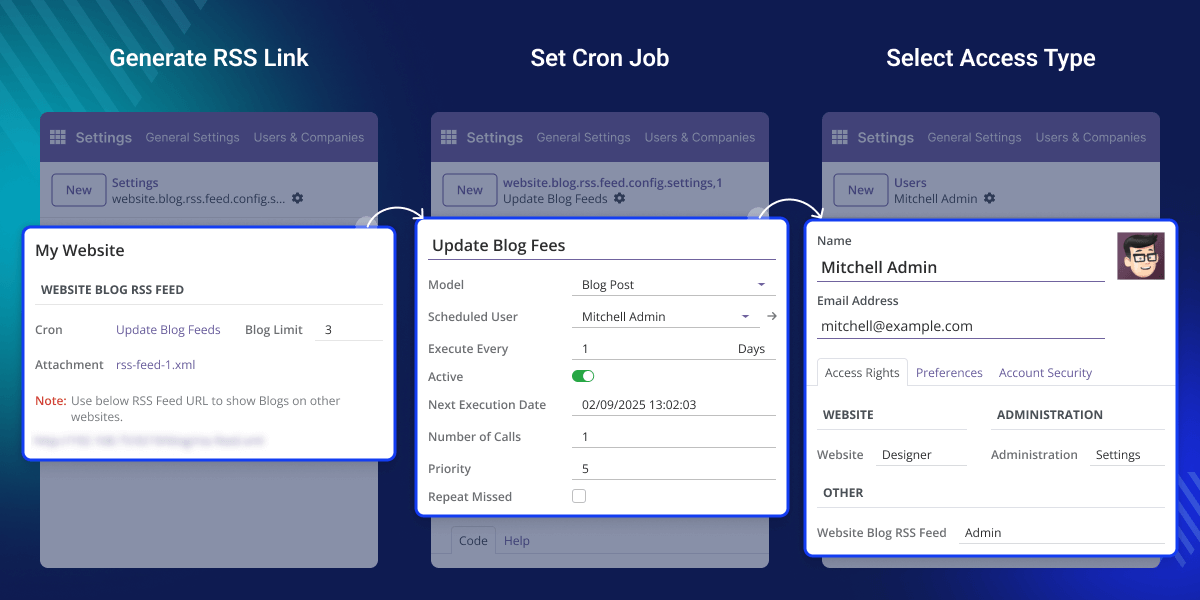
    Odoo Cron Automation

    RSS feed generator module uses scheduled tasks to update the RSS feed automatically, so you don't have to do anything manually.
    Odoo Cron Automation

    Odoo Cron Automation

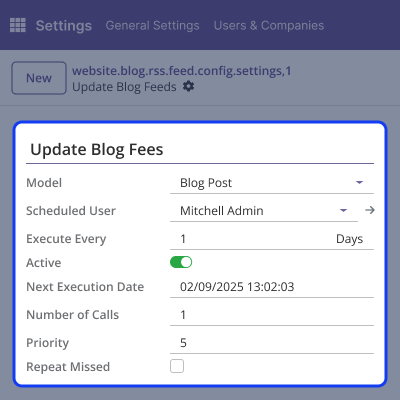
    Odoo’s cron jobs automatically update your RSS feed, so you don’t have to do it yourself. Once a blog is published, the cron job checks for new content at scheduled intervals and updates the feed accordingly.
    • The cron job runs at set time intervals to check for newly published blog posts.
    • When new blogs are found, they are instantly added to the RSS feed.
    • Once the setup is complete, it quietly operates in the background on its own.
    • Ensures your RSS feed always shows the most up-to-date blog content.
    • Once set, the cron runs automatically without help.

    Auto-Generated RSS Feed URL

    Auto-Generated RSS Feed URL

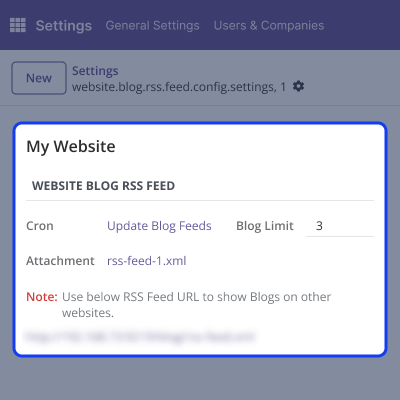
    Odoo Website RSS Feed Generator module creates a unique, ready-to-use RSS feed link that automatically includes your latest blog posts.You don’t have to do anything manually just share the link, and others can always see your latest posts.
    • Once module is set up, it creates an RSS link for your blog content.
    • When you publish a new blog post, an RSS feed automatically refreshes to display your latest content.
    • RSS feed is in standard XML format and is easily read by other websites, platforms, and RSS readers.
    • Share a feed URL with partners, apps, or aggregators to extend your blog’s visibility.
    • RSS URL is only visible to admin users, keeping your content control secure.

    Admin-Only Access Control

    Admin-Only Access Control

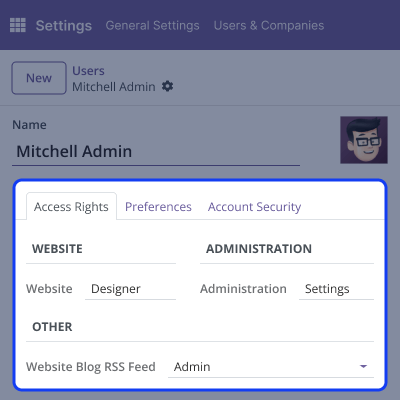
    To enhance security and prevent unauthorized access, this restriction ensures that only authorized personnel can view, manage, or share on feed, maintaining control over content distribution.

    • Only users with appropriate admin role can see an RSS feed URL in a backend.
    • Admin access can be assigned through Users and Groups by selecting an "Admin" role.
    • Restricting access helps avoid accidental changes to RSS feed setup or content limits.
    • Ensures feed link isn’t shared publicly or misused by non-admin users.
    • Offers full control over who can share your blog posts externally through an RSS feed.

    Support

    For any query or issue, please create a support ticket here CREATE A TICKET HERE

    You may also check our other top-quality Odoo Modules.

    Specifications

    Product Version1.0.0
    Released9 months ago
    Last UpdatedOctober 7, 2025 (5 months ago)
    Supported VersionsOdoo  16.x  17.x  18.x  19.x  
    Write a review

    Frequently Asked Questions

     What does this module do?
    Odoo website RSS feed generator module creates an RSS feed link for your Odoo website blogs, enabling you to automatically share your newest posts with other websites, apps, or RSS readers.
     Who can access RSS feed URL?
    Only users with admin rights can view and manage this RSS feed link. It keeps things secure by blocking unwanted access or edits.
     How feed be updated?
    The RSS feed is automatically updated using Odoo's built-in cron jobs. Once set, they automatically add new blog posts to RSS feed without manual action.
     Can I have multiple active feeds per website?
    No, this module allows only one active RSS feed per website to prevent confusion or duplication of content.
     Is RSS feed content customizable?
    You can configure how many blog posts appear in a feed, but a structure remains in standard XML format for compatibility with external platforms.

    Move to Cloud Today

    AWS Free tier hosting for one year by amazon web services, for more details please visit AWS Free Tier.

    GCP Free tier hosting for one year with 300 credit points by google cloud platform, for more details please visit GCP Free Tier.

    Azure free tier hosting for one year with 25+ always free services, for more details please visit Azure Free Tier.

    In our default configuration we will provide tremendous configuration for your eCommerce Website which is fast to load and response.

    Default Configuration Details of Server

    • 1 GB RAM
    • 1 Core Processor
    • 30 GB Hard Disk
    • DB with 1 GB RAM and 1 Core Processor

    * Server Configuration may vary as per application requirements.

    Want to know more how exactly we are going to power up your eCommerce Website with Cloud to fasten up your store. Please visit the Cloudkul Services.

    Get Started with Cloud
    Not Available


