USD
  • EUR
  • INR
  • USD
Cart
Cart 0
  • You have no items in your shopping cart.
    Odoo Apps Extensions
    Cart
    Cart 0
    • You have no items in your shopping cart.
    Hire a Developer
    ×
    Contact Us!
    Send Again
    Close
    Please Login to Write Your Review
    Odoo Website Stop/Block Content Copy
    Odoo Website Stop/Block Content Copy
    x
    Free

    * Required Fields

    $35.00
    Add To Cart

    Safeguard your content with Odoo Website Stop/Block Content Copy!


    • The module block users from copying, cutting, or pasting your website content.

    • It restricts content plagiarism from the Odoo website.

    • The Odoo app adds a secure layer of protection to your website.

    • Add multiple restrictions and limitations to protect website content.

    • Add options to disable print and drag and drop features.

    Odoo Website Stop/Block Content Copy
    Odoo Website Stop/Block Content Copy
    $35.00
    Odoo Silver Partner
    Odoo Functional Certified Experts
    Check How It Works
    $35.00
    Configure and Buy
    X
    • Description
    • Reviews
    • FAQ
    • Customers ()
    • Specifications
    • Cloud Hosting
    • Changelog

    Make website content unique with Odoo Website Stop/Block Content Copy!

    Plagiarism is one of the most renowned issues on the internet. According to some estimates, around 29% of the internet contains plagiarized content. Hence, to protect your website from content theft and restrict unauthorized content copy, you need some content lock feature or module to safeguard your website from content plagiarism.

    Odoo Website Stop/Block Content Copy allows you to control various keyboard functions that people use in content piracy. Also, the Odoo app is the perfect solution to protect your important content from exploitation. Further, the module also stops print, dragging and dropping, cutting, pasting, inspecting, saving, and several other functions.
    Odoo Website Stop/Block Content Copy

     Odoo Website Stop/Block Content Copy Features

    Secure Your Content from Copy or Plagiarism in Odoo

    • Odoo Website Stop/Block Content Copy helps you control the privacy of your Odoo website content.
    • The module adds a secure layer of protection to your web pages in Odoo.

     Disable the Copy, Cut, and Paste Options of the Content in Odoo

    • The Odoo app allows disabling right-clicking on your website’s web pages.
    • You can easily disable keyboard control functions i.e., copy (Ctrl+ C), Cut (Ctrl+ X), and Paste (Ctrl+ V) on the website.

    Restrict Source Code Viewing from the Odoo Backend

    • The Odoo admin can restrict the source code of the webpage from being displayed to visitors.
    • This enables you to make your website secure and free from plagiarism.

     Restrict Users from Using the Different function

    • The Odoo app allows you to restrict the save (Ctrl+ S), print (Ctrl+ P), etc., on the web pages.
    • Disable the inspect mode (F12 or Ctrl+ Shift+ I), drag and drop, and various other functions.

    Manage the Configuration from the Odoo Backend

    • Enable or disable the function keys from the Odoo backend.
    • Enter the popup message to be shown on the Odoo website.
    • Select the website to disable or enable the function key (if you have multiple websites).
    • Disable various other features related to content on the Odoo website.
    • It restricts the user from opening inspect mode.
    • Restrict the print and save command from the Odoo backend.
    • Restrictions are imposed on every registered or guest user, even the Odoo admin.
    Configuring Content Copy

     Show Different Messages on the Odoo Website

    Popup on the Odoo website
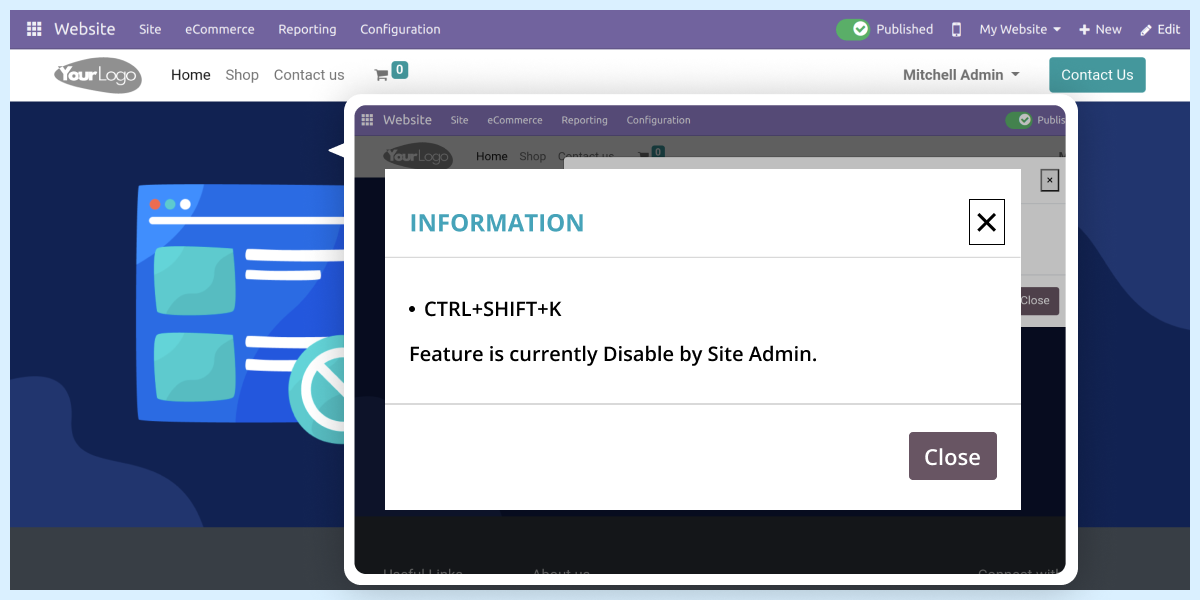
    • The module will show a popup whenever a user tries to copy, paste, or cut the page content.
    • It will show the pre-defined message, 'the feature is disabled by the site admin.'
    • The module will show a popup on every restricted function.
    • Users can not check the inspect (Ctrl+ Shift+ I or F12or Ctrl+ Shift+ C) function to view the source code.
    • Also, disable the Ctrl+ Shift+ J and Ctrl+ Shift+ K functions.
    • Users can not copy, cut, or paste the webpage content.
    • Neither, user are allowed to right-click or drag and drop on the Odoo website.

    Odoo Website Stop/Block Content Copy

    Webkul's dedicated support provides you with the customizations and troubleshooting solutions for Odoo Website Stop/Block Content Copy.

    For any query or issue please CREATE A TICKET HERE

    Specifications

    Product Version1.0.1
    Released8 years ago
    Last UpdatedApril 10, 2026 (3 months ago)
    Supported VersionsOdoo  11.x  12.x  13.x  14.x  15.x  16.x  17.x  18.x  19.x  

    Ratings

    We'd love to hear your thoughts! Share your feedback and help us craft an even better experience tailored just for you.

    Write a review

    Specification

    Detailed technical features and requirements to help you understand the module’s capabilities and ensure smooth integration with your system.

    Cloud Hosting

    Detailed technical features and requirements to help you understand the module’s capabilities and ensure smooth integration with your system.

    Default Configuration Details of Server

    1 GB
    RAM
    1 Core
    Processor
    30 GB
    Hard Disk
    1 GB RAM & 1 Core Processor
    Database

    Want to know more how exactly we are going to power up your eCommerce Website with Cloud to fasten up your store

    * Server Configuration may vary as per application requirements.

    Change Logs

    Not Available


