USD
  • EUR
  • INR
  • USD
Cart
Cart 0
  • You have no items in your shopping cart.
    Cart
    Cart 0
    • You have no items in your shopping cart.
    Hire a Developer
    ×
    Contact Us!
    Send Again
    Close
    Please Login to Write Your Review

    Odoo Website Swish Payment Acquirer

    Odoo Website Swish Payment Acquirer enables secure Swish payments on website checkout with mobile app approval, desktop phone-based flow, and real-time payment updates.


    • Accept Swish payments directly on website checkout pages.

    • Mobile users redirected to the Swish app for quick payment approval.

    • Desktop payment flow using phone number and mobile approval.

    • Real-time payment status updates in orders and transactions.

    • Secure certificate-based authentication for safe transactions.

    • Supports test mode and live mode for flexible usage.

    • Automatic payment confirmation and order status update.

    • Built-in timeout handling for incomplete transactions.

    Screenshots
    Odoo Website Swish Payment Acquirer Odoo Website Swish Payment Acquirer Odoo Website Swish Payment Acquirer Odoo Website Swish Payment Acquirer Odoo Website Swish Payment Acquirer Odoo Website Swish Payment Acquirer Odoo Website Swish Payment Acquirer
    Show More Hide All
    $149.00

    * Required Fields

    Add To Cart
    $149.00
    Configure and Buy
    • Description
    • Reviews
    • FAQ
    • Customers ()
    • Specifications
    • Cloud Hosting
    • Changelog

    Odoo Website Swish Payment Acquirer lets businesses take Swish payments from the website checkout. It makes payment easy and safe for customers.

    Customers pay using the Swish mobile app. This makes the checkout faster and needs fewer steps.

    Mobile users are sent to the Swish app automatically. The payment details are already filled out, so they only need to approve.

    Desktop users enter their phone number and then approve the payment on their mobile device. This works well on all devices.

    The module updates payment status in real time. Orders are updated automatically after payment is made.

    It also supports secure certificate setup and test mode. Timeout handling cancels incomplete payments automatically.
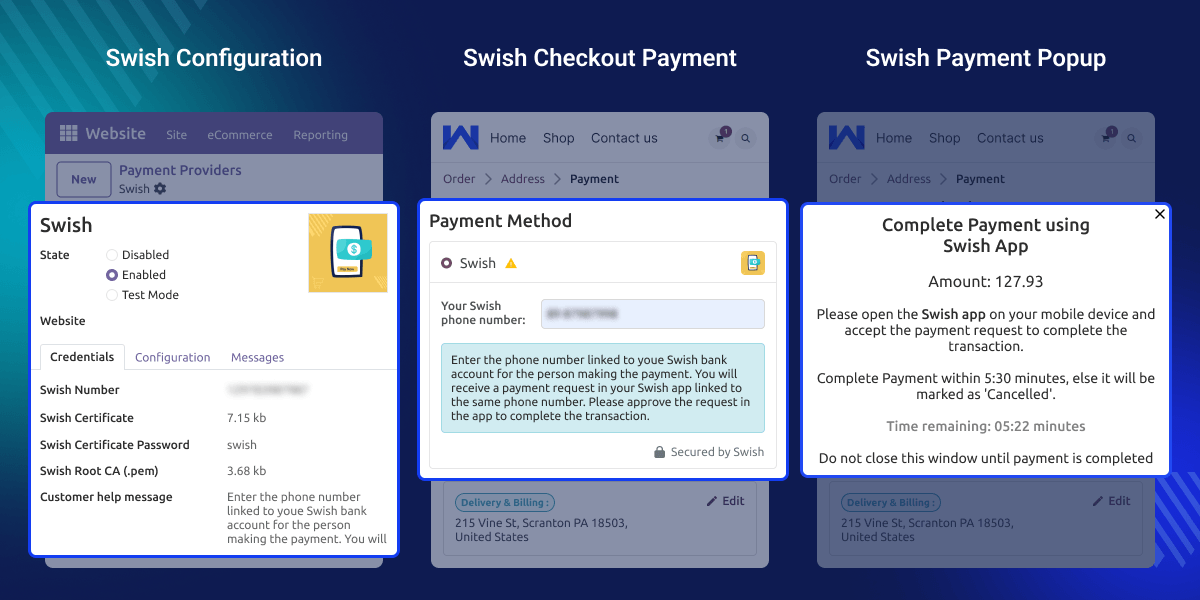
    Odoo Website Swish Payment Acquirer

    Highlighted Features

    Swish Checkout Option

    Customers can select Swish as a preferred payment option during checkout.

    Mobile Payment Flow

    Users are redirected to the Swish app with pre-filled payment details.

    Desktop Payment Support

    Users can enter a phone number and approve payment on mobile.

    Real-Time Updates

    Payment status updates instantly in orders and transactions.

    Auto Payment Confirmation

    Users are redirected automatically after successful payment.

    Timeout Handling

    Payments are cancelled automatically if not completed in time.

    Why do we need Odoo Website Swish Payment Acquirer?

    Many businesses still use card payments. These can take more time at checkout. This can make customers leave before they pay.

    Default systems may not support local apps like Swish. This means customers do not get their preferred payment option.

    Odoo Website Swish Payment Acquirer adds a fast mobile payment method. It makes checkout quicker and easier to use.

    This module is built for real business use, where fast and secure payments are important.

    Use Cases

    E-commerce Checkout

    Customers can complete orders quickly using Swish without card details.

    Mobile-First Stores

    Businesses targeting mobile users can offer faster app-based payments.

    Local Payment Preference

    Offer Swish, where customers prefer mobile payments over cards.

    Quick Order Processing

    Instant payment confirmation helps process orders faster.

    Swish Configuration

    This feature allows easy setup of the Swish payment provider using required credentials and certificates. It ensures secure communication and smooth payment setup.
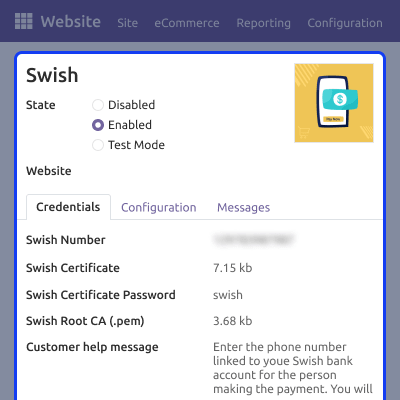
    • Configure Swish number and credentials
    • Upload certificate and Root CA file
    • Set certificate password securely
    • Enable Test Mode or Live Mode
    • Manage provider settings easily
    Swish Configuration

    Website Checkout Payment

    Customers can choose Swish during checkout and complete payment easily. This improves checkout experience and reduces friction.
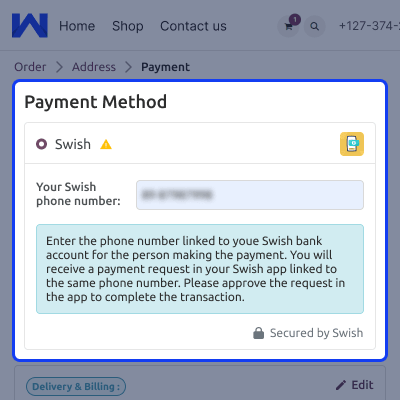
    • Select Swish as a payment method
    • Enter phone number for desktop flow
    • Display help message for users
    • Secure and simple payment process
    • Fast checkout experience
    Website Checkout Payment

    Payment Processing Flow

    This feature handles the complete payment process from start to confirmation. It ensures smooth interaction between the system and the Swish app.
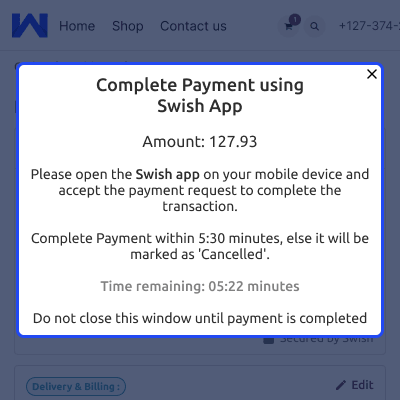
    • Show payment pop-up with instructions
    • Display countdown timer
    • Approve payment via mobile app
    • Auto redirect after success
    • Handle timeout automatically
    Payment Processing Flow

    Transaction Management

    All transactions are recorded and updated automatically in the system. This helps track payments easily and accurately.
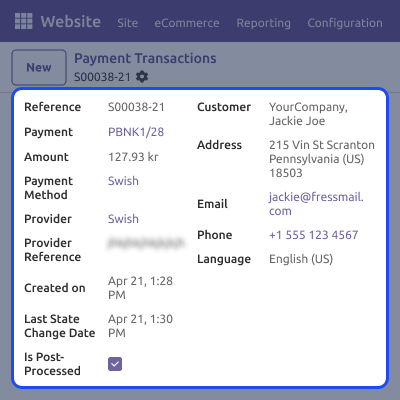
    • Create transaction records automatically
    • Show real-time payment status
    • Store payment details securely
    • Display success confirmation
    • Track transactions in the backend
    Transaction Management

    Support

    For any query or issue, please create a support ticket here CREATE A TICKET HERE

    You may also check our other top-quality Odoo Modules.

    Specifications

    Product Version1.0.0
    Released23 days ago
    CategoryOdoo AppsPayment
    Last UpdatedMay 18, 2026 (16 days ago)
    Supported Versions19.x  
    Write a review

    FAQs

     What is Odoo Website Swish Payment Acquirer?
    It helps businesses accept Swish payments directly from website checkout in a simple and secure way.
     How does Swish payment work on mobile devices?
    Users are redirected to the Swish app with pre-filled details and only need to approve the payment.
     Can customers pay using Swish on desktop?
    Yes, users enter their phone number and approve the payment through the Swish app on mobile.
     Is the Swish app required for payment?
    Yes, the Swish app must be installed and active to complete the payment process.
     What happens if the payment is not completed?
    The system cancels the transaction automatically after the timeout to avoid pending payments.
     Does the module support test and live mode?
    Yes, you can use test mode for setup and switch to live mode for real transactions.
     Is the payment process secure?
    Yes, it uses certificate-based authentication to ensure secure communication and safe transactions.
     Can I track payment status in the system?
    Yes, payment status is updated in real time and can be viewed in orders and transactions.

    Move to Cloud Today

    AWS Free tier hosting for one year by amazon web services, for more details please visit AWS Free Tier.

    GCP Free tier hosting for one year with 300 credit points by google cloud platform, for more details please visit GCP Free Tier.

    Azure free tier hosting for one year with 25+ always free services, for more details please visit Azure Free Tier.

    In our default configuration we will provide tremendous configuration for your eCommerce Website which is fast to load and response.

    Default Configuration Details of Server

    • 1 GB RAM
    • 1 Core Processor
    • 30 GB Hard Disk
    • DB with 1 GB RAM and 1 Core Processor

    * Server Configuration may vary as per application requirements.

    Want to know more how exactly we are going to power up your eCommerce Website with Cloud to fasten up your store. Please visit the Cloudkul Services.

    Get Started with Cloud
    Not Available


