USD
  • EUR
  • INR
  • USD
Cart
Cart 0
  • You have no items in your shopping cart.
    Cart
    Cart 0
    • You have no items in your shopping cart.
    Hire a Developer
    ×
    Contact Us!
    Send Again
    Close
    Please Login to Write Your Review

    Odoo WhatsApp OTP Authentication


    Odoo WhatsApp OTP Authentication enables users to easily sign up and log in to Odoo website using their WhatsApp number and an OTP sent instantly.


    • Login securely using WhatsApp number and OTP

    • Sign up quickly using WhatsApp and OTP

    • Login using WhatsApp number and password

    • Admin manages WhatsApp API credentials securely

    • Admin can set the OTP expiry duration

    • Reset password link sent via WhatsApp

    • No need to remember complex passwords

    Screenshots
    Odoo WhatsApp OTP Authentication Odoo WhatsApp OTP Authentication Odoo WhatsApp OTP Authentication Odoo WhatsApp OTP Authentication Odoo WhatsApp OTP Authentication Odoo WhatsApp OTP Authentication Odoo WhatsApp OTP Authentication Odoo WhatsApp OTP Authentication Odoo WhatsApp OTP Authentication
    Show More Hide All
    $99.00

    * Required Fields

    Add To Cart
    $99.00
    Configure and Buy
    • Description
    • Reviews
    • FAQ
    • Customers ()
    • Specifications
    • Cloud Hosting
    • Changelog

    Odoo WhatsApp OTP Authentication helps make logging in and signing up on the Odoo website faster and safer. Users can easily access their accounts using their WhatsApp number and a one-time password (OTP) sent via WhatsApp.

    This module also allows users to log in using a password if they prefer. Admins can set the OTP expiration time, add WhatsApp API details, and enable or disable WhatsApp login options. Odoo WhatsApp OTP Authentication provides a quick and secure way to authenticate users.
    Odoo WhatsApp OTP Authentication

    Why Do We Need an Odoo WhatsApp OTP Authentication?

    Odoo WhatsApp OTP Authentication is needed to provide fast and secure login for users. Instead of remembering complex passwords, users can verify easily using OTP sent via WhatsApp.

    For example, a customer in a region where WhatsApp is widely used can quickly enter their number, receive an OTP, and log in instantly. Similarly, new users can sign up without struggling to remember passwords.

    Moreover, this Odoo WhatsApp OTP Authentication reduces login errors and improves overall user experience. Admins can set OTP expiry time and configure WhatsApp API for safe and easy user access.

    Highlighted Features of Odoo WhatsApp OTP Authentication

     Secure Login via OTP

    Users can securely log in using a WhatsApp-delivered OTP.

     Quick Account Registration

    New users can sign up instantly by verifying their WhatsApp number with an OTP.

     Flexible Password Login

    Existing users can log in with their WhatsApp number and password.

     Customizable OTP Expiry

    Admins can define the OTP active time to keep accounts secure.

     WhatsApp API Management

    Administrators can add and manage API credentials for sending OTP messages seamlessly.

     OTP Length Configuration

    The admin can choose the OTP number of digits for better security.

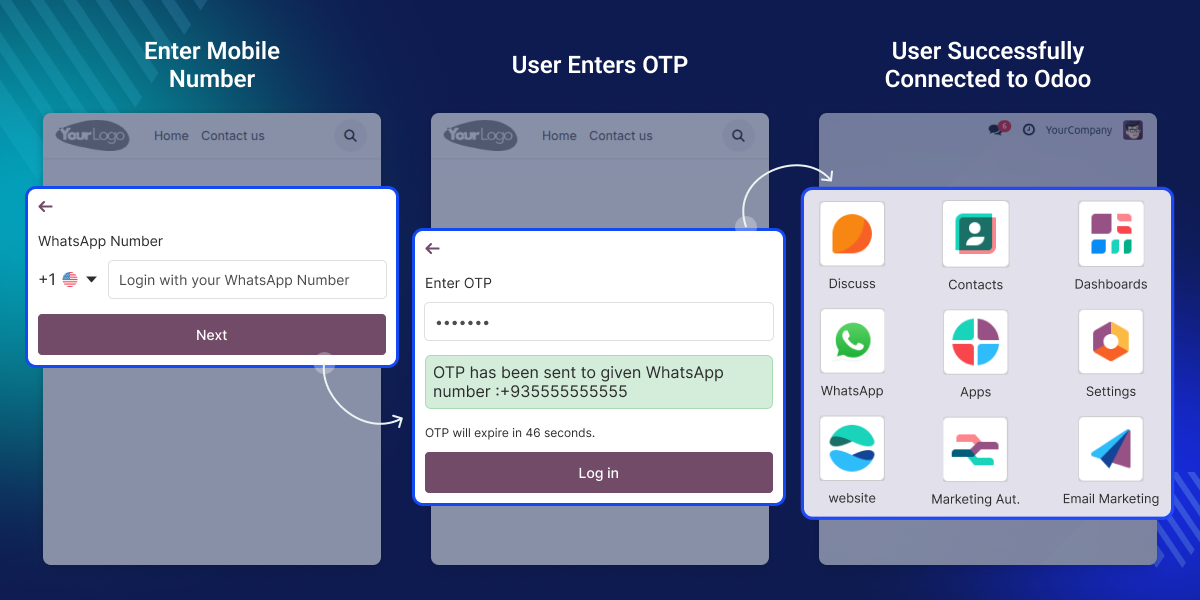
    Login with OTP

    Users can log in securely using an OTP sent to their WhatsApp number in Odoo WhatsApp OTP Authentication module. This removes the need to remember complicated passwords, making login fast and easy.
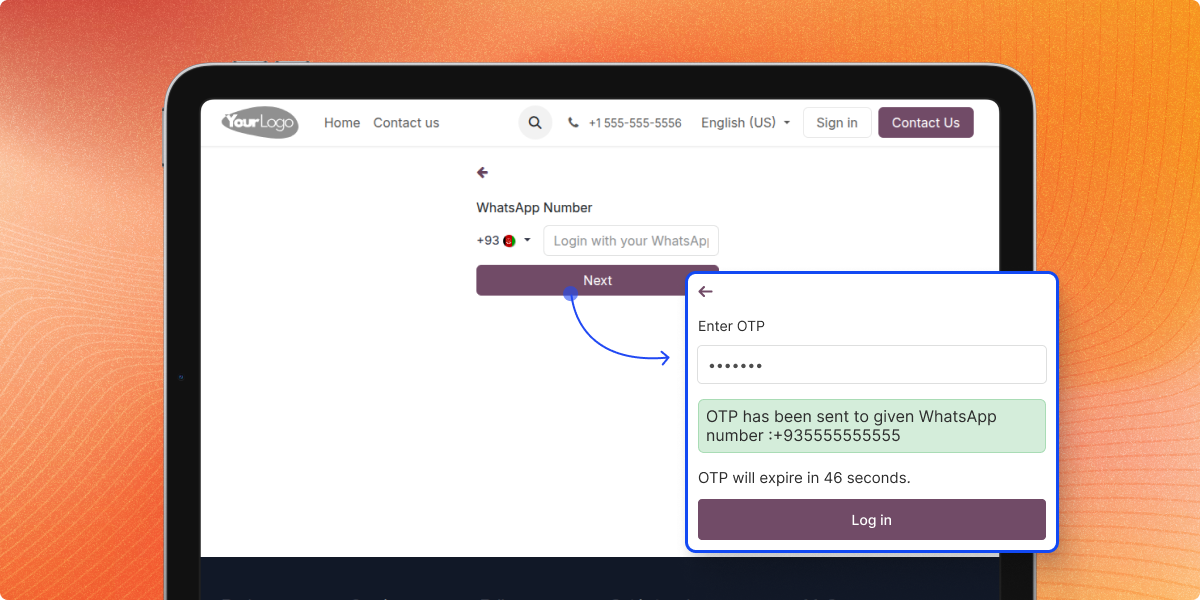
    • Enter WhatsApp number to receive OTP
    • OTP delivered instantly through WhatsApp
    • Login allowed only within the expiry time
    • Expired or invalid OTP is rejected
    Login with OTP

    Sign Up with OTP

    New users can sign up quickly by entering their WhatsApp number and verifying the OTP. After OTP verification, users fill in their profile details to set up their account.
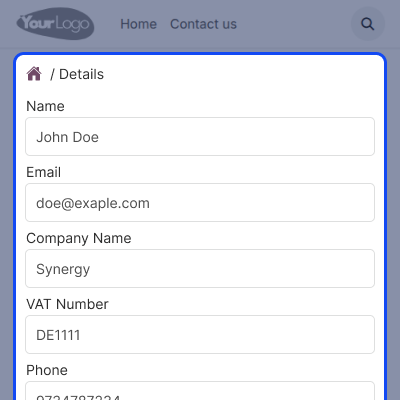
    • Register account using WhatsApp number
    • OTP sent via WhatsApp for verification
    • Complete profile details after OTP check
    • Account created after successful submission
    Sign Up with OTP

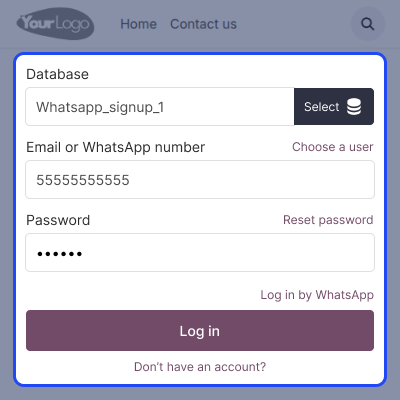
    Password Login Option

    Existing users can log in with their WhatsApp number and password if they prefer. It offers easy and safe login options for users.
    • Log in with WhatsApp number and password
    • Alternative method to OTP verification
    • Useful for users preferring password login
    • Provides flexibility in authentication
    Password Login Option

    Admin Configuration Settings

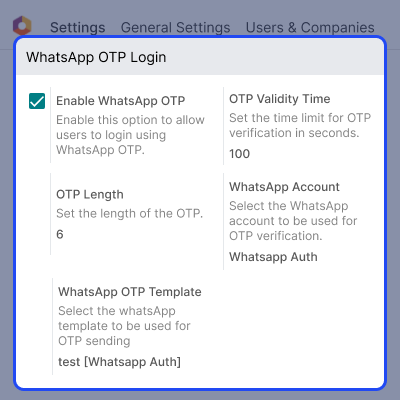
    Admins can set OTP expiry, add WhatsApp API credentials, and enable or disable login options. They can also define OTP length to maintain security and convenience.
    • Define OTP expiry duration easily
    • Add WhatsApp API credentials for sending OTP
    • Enable or disable the OTP login option
    • Admin can define how many digits OTP should have
    Admin Configuration

    Support

    For any query or issue, please create a support ticket here CREATE A TICKET HERE

    You may also check our other top-quality Odoo Modules.

    Specifications

    Product Version1.0.0
    Released2 months ago
    Last UpdatedJanuary 22, 2026 (1 month ago)
    Supported VersionsOdoo  18.x  19.x  
    Write a review

    FAQs

     What is Odoo WhatsApp OTP Authentication?
    It is a module that allows users to log in and sign up on the Odoo website using their WhatsApp number and OTP.
     Can users log in using a password instead of OTP?
    Yes, users who already have an account can log in using their WhatsApp number and password instead of using an OTP.
     How long can an OTP be used before it expires?
    The admin decides how long an OTP stays active. After that time, the OTP won’t work, keeping accounts safe.
     What happens if an OTP is expired or incorrect?
    Expired or invalid OTPs are rejected, and the system will prompt users to request a new one.
     Can the admin control OTP settings?
    Yes, the admin can manage OTP expiry, set OTP length, and configure WhatsApp API credentials for secure authentication.
     Do users need to remember their password?
    No, users can log in using OTP, so remembering complex passwords is not necessary.
     Can the admin disable OTP login if needed?
    Yes, the admin can enable or disable OTP login at any time based on business needs.

    Move to Cloud Today

    AWS Free tier hosting for one year by amazon web services, for more details please visit AWS Free Tier.

    GCP Free tier hosting for one year with 300 credit points by google cloud platform, for more details please visit GCP Free Tier.

    Azure free tier hosting for one year with 25+ always free services, for more details please visit Azure Free Tier.

    In our default configuration we will provide tremendous configuration for your eCommerce Website which is fast to load and response.

    Default Configuration Details of Server

    • 1 GB RAM
    • 1 Core Processor
    • 30 GB Hard Disk
    • DB with 1 GB RAM and 1 Core Processor

    * Server Configuration may vary as per application requirements.

    Want to know more how exactly we are going to power up your eCommerce Website with Cloud to fasten up your store. Please visit the Cloudkul Services.

    Get Started with Cloud
    Not Available


