USD
  • EUR
  • INR
  • USD
Cart
Cart 0
  • You have no items in your shopping cart.
    Cart
    Cart 0
    • You have no items in your shopping cart.
    Hire a Developer
    ×
    Contact Us!
    Send Again
    Close
    Please Login to Write Your Review

    Odoo Wipay Payment Integration

    Odoo Wipay payment integration lets you create card payments online. It supports payments in Jamaican Dollar (JMD), Trinidad and Tobago Dollar (TTD), and United States Dollar (USD) through a simple checkout process.


    • Accept card payments through the Wipay payment gateway in Odoo

    • Support customer payments in JMD, TTD, and USD currencies

    • Send customers to a secure Wipay payment page at checkout

    • Connect your Odoo store with Wipay in a few steps

    • Complete online payments through a simple and secure payment flow

    • Show payment amounts clearly in the selected currency during checkout

    • Receive payment updates directly in your Odoo transaction records

    • Save the WiPay Transaction ID as the Provider Reference

    • Match payment details between WiPay and Odoo without confusion

    • Track payments easily and simplify transaction review and reconciliation

    Screenshots
    Odoo Wipay Payment Integration Odoo Wipay Payment Integration Odoo Wipay Payment Integration Odoo Wipay Payment Integration Odoo Wipay Payment Integration
    Show More Hide All
    $59.00

    * Required Fields

    Add To Cart
    $59.00
    Configure and Buy
    • Description
    • Reviews
    • FAQ
    • Customers ()
    • Specifications
    • Cloud Hosting
    • Changelog

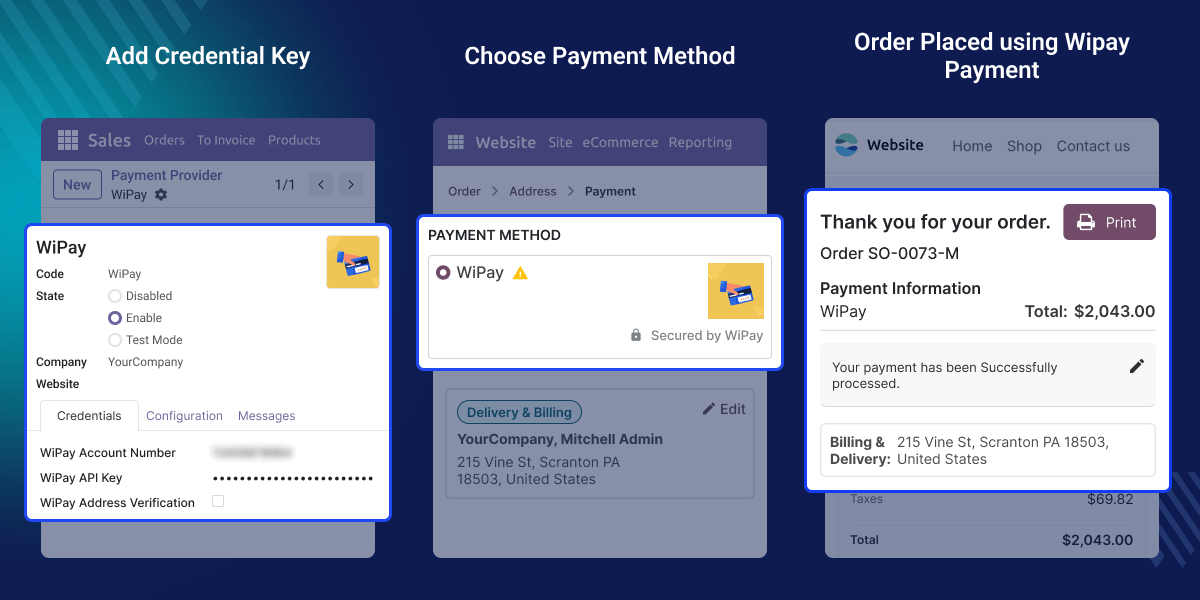
    Odoo Wipay Payment Integration lets businesses accept card payments through their Odoo store. It makes online payments simple and convenient for customers. It links Odoo with the Wipay payment gateway. Customers can select Wipay when they are ready to pay.

    Once an order is placed, customers are taken to the Wipay payment page. They can complete their payment in a secure and trusted environment. The integration supports Jamaican Dollar (JMD), Trinidad and Tobago Dollar (TTD), and United States Dollar (USD). This helps businesses accept payments in supported currencies.

    Store owners only need to add their Wipay account details to get started. The setup process is straightforward and easy to manage. Payment information is processed on Wipay's secure payment page. This helps provide a safe checkout experience for customers.

    It works smoothly with Odoo website checkout process. Customers can complete their purchase without confusion or extra effort. Whether you run a small store or a growing business, Wipay provides a simple way to accept online payments through Odoo.
    Odoo GLS ShipIT-Farm Shipping Integration

    Highlighted Features

    Secure Card Payments

    Customers can pay online using their payment cards through Wipay. The payment process is simple, secure, and easy to follow.

    Multi-Currency Support

    Odoo Wipay payment integration supports payments in JMD, TTD, and USD. This helps businesses accept payments in supported currencies.

    Redirect Checkout Process

    Customers are taken to the secure Wipay payment page to complete their payment. This keeps the checkout process simple and reliable.

    Easy Wipay Setup

    Add your Wipay account details and connect it with Odoo. The setup process is quick and does not require complex steps.

    Fast Payment Experience

    Customers can complete their payment in only a few steps. This helps reduce delays during checkout.

    Smooth Payment Flow

    It creates a smooth connection between Odoo and Wipay. This helps payments move through the checkout process without issues.

    Why do we need Odoo GLS ShipIT-Farm Shipping Integration?

    Many businesses want an easy way to accept online payments. Customers also expect a simple payment process when shopping online. Without the right payment method, some customers may not complete their purchase. A smooth checkout experience helps make payments easier.

    The Wipay Payment Gateway Integration adds Wipay to your Odoo store. Customers can choose Wipay and pay online with their cards. After selecting Wipay, customers are taken to a secure payment page. They can complete their payment in a few simple steps.

    Odoo Wipay payment integration supports JMD, TTD, and USD payments. This helps businesses accept payments in supported currencies. Store owners can connect their Wipay account and start receiving payments. The setup process is simple and easy to manage.

    A secure payment option can help build customer trust. It also makes the checkout process more comfortable for buyers. Odoo Wipay payment integration provides a reliable way to accept online payments through Odoo. It helps create a smooth and user-friendly checkout experience.

    Use Cases

    Online Retail Stores

    Online stores can accept payments through Wipay. Customers can pay with their cards while placing an order on the website.

    Secure Online Checkout

    Odoo Wipay payment integration can offer a secure payment method during checkout. Businesses can complete payments on the trusted Wipay payment page.

    Regional Businesses

    Businesses can accept payments in JMD, TTD, and USD. This makes it easier to serve customers in supported regions.

    Growing E-Commerce Stores

    As order volume grows, stores need a dependable payment option. Wipay helps provide a simple and smooth payment experience for customers.

    Wipay Account Configuration

    Configure your Wipay merchant credentials within Odoo to establish a connection with the payment gateway. Once the credentials are added, businesses can start accepting online payments through Wipay.
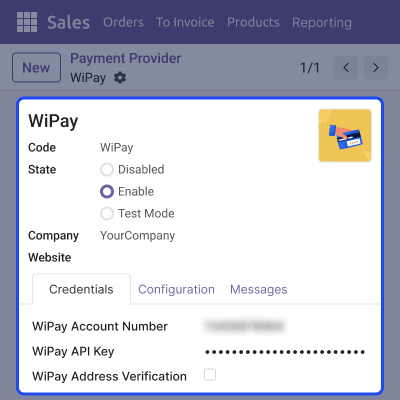
    • Add Wipay account credentials to establish the payment connection.
    • Enable, disable, or test the payment gateway whenever required.
    • Manage payment provider settings from a single configuration screen.
    • Start accepting secure card payments through Wipay after setup.

    Card Payment Processing

    They can choose wipay payment method and proceed with the payment. Customers can also finish their payment in just a few steps.
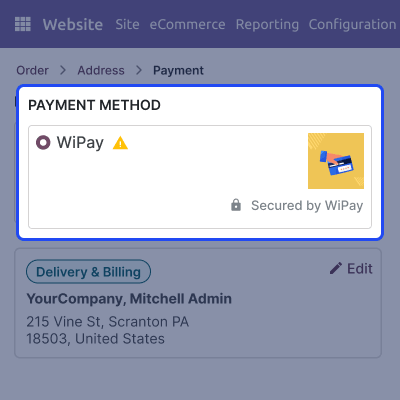
    • Customers can choose Wipay when making a payment.
    • A payment request is created automatically after selecting the wipay.
    • Customers are taken to the secure Wipay payment page.
    • Customers can complete card payments safely through Wipay.

    Secure Payment Checkout

    It supports transactions in multiple supported currencies through Wipay. Customers can complete purchases using the supported currency configured for their transaction.
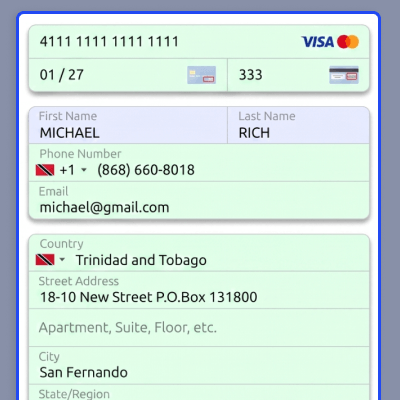
    • Customers can enter card details on the secure Wipay payment page.
    • The payment can be done easily in the selected currency.
    • Customer billing information is handled through a simple payment flow.
    • Secure payment processing helps protect transaction information.

    Wipay Payment Confirmation

    Wipay payment integration enables businesses to accept card payments through the Wipay payment gateway. Track payment records easily and keep transaction information organized within Odoo.
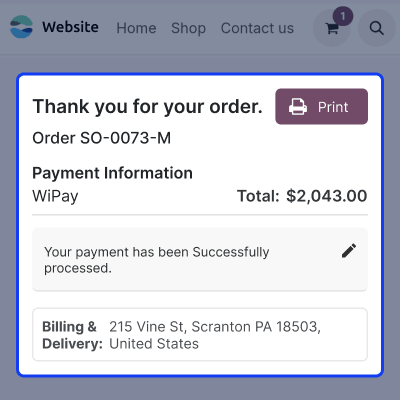
    • Accept payments in supported currencies, including JMD, TTD, and USD.
    • The WiPay Transaction ID is saved as the Provider Reference in Odoo.
    • Match payment records between WiPay and Odoo with ease.
    • Simplify payment tracking, reconciliation, and transaction reviews.

    Support

    For any query or issue, please create a support ticket here CREATE A TICKET HERE

    You may also check our other top-quality Odoo Modules.

    Specifications

    Product Version1.0.0
    Released4 days ago
    CategoryOdoo AppsPayment
    Last UpdatedJuly 3, 2026 (4 days ago)
    Supported VersionsOdoo  19.x  
    Write a review

    FAQs

     What does Odoo Wipay Payment Integration do?
    Odoo Wipay Payment Integration connects your Odoo store with the Wipay payment gateway. It allows customers to make secure online card payments during checkout.
     Which currencies are supported?
    Odoo Wipay payment integration supports Jamaican Dollar (JMD), Trinidad and Tobago Dollar (TTD), and United States Dollar (USD).
     How does the payment process work?
    Customers select Wipay while placing an order on Odoo website. They are redirected to the secure Wipay payment page to complete their card payment safely.
     Is the checkout process secure?
    Yes, Customers complete their payment on Wipay's secure payment page. Their payment details are processed through a protected checkout flow, helping provide a safe payment experience.
     Do I need a Wipay merchant account?
    Yes, require a valid Wipay merchant account and the required credentials before connecting the payment gateway. These details are used to process online payments through Odoo.
     Can I enable or disable the payment method?
    Yes, you can enable, disable, and test or manage the Wipay payment provider from Odoo Payment Provider settings. This lets you control when the payment method is available to customers.
     Does Wipay Payment Integration use a redirect payment flow?
    Yes, Customers are redirected to the secure Wipay payment page to complete their card payment. The payment is processed safely and securely.
     Who can we use this Payment Integration?
    Any business using Odoo and a Wipay merchant account can use this payment gateway integration for supported currencies for payment integration.

    Move to Cloud Today

    AWS Free tier hosting for one year by amazon web services, for more details please visit AWS Free Tier.

    GCP Free tier hosting for one year with 300 credit points by google cloud platform, for more details please visit GCP Free Tier.

    Azure free tier hosting for one year with 25+ always free services, for more details please visit Azure Free Tier.

    In our default configuration we will provide tremendous configuration for your eCommerce Website which is fast to load and response.

    Default Configuration Details of Server

    • 1 GB RAM
    • 1 Core Processor
    • 30 GB Hard Disk
    • DB with 1 GB RAM and 1 Core Processor

    * Server Configuration may vary as per application requirements.

    Want to know more how exactly we are going to power up your eCommerce Website with Cloud to fasten up your store. Please visit the Cloudkul Services.

    Get Started with Cloud
    Not Available


