USD
  • EUR
  • INR
  • USD
Cart
Cart 0
  • You have no items in your shopping cart.
    Cart
    Cart 0
    • You have no items in your shopping cart.
    Hire a Developer
    ×
    Contact Us!
    Send Again
    Close
    Please Login to Write Your Review

    Odoo ZPL Label Designer

    Odoo ZPL Label Designer helps create custom labels with dynamic fields, barcodes, QR codes,
    images, shapes, and reusable templates for Odoo records.


    • Design ZPL labels easily using a simple drag-and-drop editor.

    • Create labels for products, invoices, quotations, and other Odoo records.

    • Add dynamic fields to display real-time data automatically on labels.

    • Insert barcodes and QR codes for scanning and tracking purposes.

    • Customized labels with text, images, shapes, and flexible design settings.

    • Generate labels directly from selected Odoo records in a few clicks.


    Screenshots
    Odoo ZPL Label Designer Odoo ZPL Label Designer Odoo ZPL Label Designer Odoo ZPL Label Designer Odoo ZPL Label Designer Odoo ZPL Label Designer Odoo ZPL Label Designer
    Show More Hide All
    $99.00

    * Required Fields

    Add To Cart
    $99.00
    Configure and Buy
    • Description
    • Reviews
    • FAQ
    • Customers ()
    • Specifications
    • Cloud Hosting
    • Changelog

    Odoo ZPL Label Designer lets businesses create and manage custom labels right inside Odoo. It has a simple visual editor that anyone can use without any technical knowledge.

    Designing labels for products, quotations, invoices, and other Odoo records is easy. There is no coding. No complicated steps. Just design and go.

    Dynamic fields can be added to any label so that the right data appears automatically. Pick a record, and the label fills itself in, and no manual typing is needed.

    Barcodes and QR codes can also be added to any label. This makes product tracking, scanning, and inventory management simple and fast — all from the same editor.

    Labels can be changed and styled to the business's needs. Add text, images, and shapes. Adjust the size and layout.

    Reusable templates save even more time. Design a label once and use it for as many records as you need. No starting over every time.

    The drag-and-drop editor makes the whole process smooth and simple, even for someone who has never designed a label before.

    The result is clean, professional, and scan-ready labels created directly from Odoo in much less time and with much less effort.
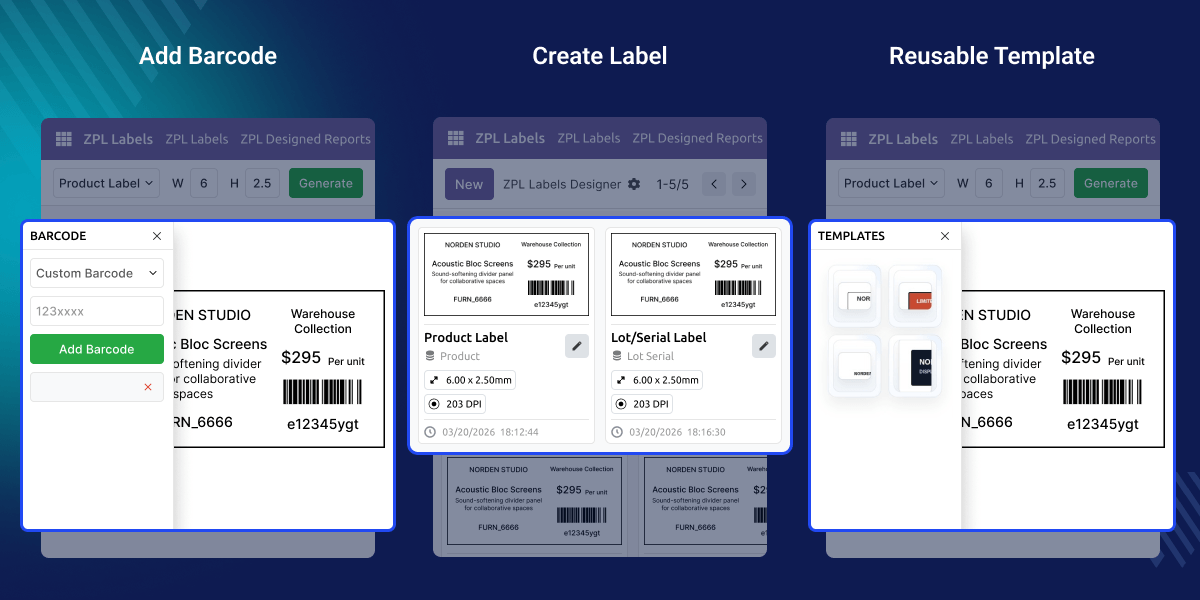
    Odoo ZPL Label Designer

    Highlighted Features of Odoo ZPL Label Designer

      Drag-and-Drop Label Designer

    With Odoo ZPL Label Designer just drag and drop things onto your label to design it. No coding. No complicated steps. Anyone can use it.

      Dynamic Field Mapping

    The label fills in the right information on its own. You pick a record in Odoo, and the data shows up on the label automatically.

      Barcode and QR Code Support

    Add a barcode or QR code to any label so it can be scanned quickly and easily.

      Multi-Record Label Support

    Use the same label designer for products, invoices, quotations, and more. One tool for everything.

      Flexible Label Customization

    Change the text, add images, pick shapes, adjust size, and arrange everything the way you want your label to look.

      Quick Label Generation

    Pick a record in Odoo, click a button, and your label is ready. No extra setup. No waiting.

    Why do we need Odoo ZPL Label Designer ?

    Making labels for products, invoices, quotations, and inventory by hand takes a lot of time, and the results are often inconsistent.

    Standard Odoo does not come with a built-in visual editor for creating custom ZPL labels with dynamic fields, barcodes, and QR codes.

    Odoo ZPL Label Designer solves this with a simple drag-and-drop editor. Anyone can create reusable, scan-ready labels directly inside Odoo with no technical skills needed at all.

    Businesses can make professional labels faster, keep label data accurate, and manage everything from one place.

    Use Cases

      Product Label Printing

    Businesses can create barcode and QR code labels for products to improve inventory tracking and warehouse management.

      Invoice and Quotation Labels

    Users can generate custom labels for invoices and quotations with dynamic customer and document information directly from Odoo.

    ZPL Label Designer Editor

    Design labels right inside Odoo using a simple drag-and-drop designer editor. Set the label size, width, and height and adjust elements exactly where you want them.
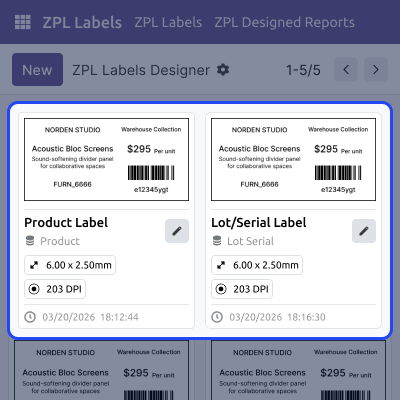
    • Design labels visually without writing any code.
    • Change the label size and layout in just a few clicks.
    • Put any element anywhere on the label freely.
    • Preview the label design in real time as you create it.
    • Make clean and professional labels every time.
    ZPL Label Designer Editor

    Dynamic Field Mapping

    Add dynamic fields to your label, and the data fills in on its own — straight from the Odoo record you pick.
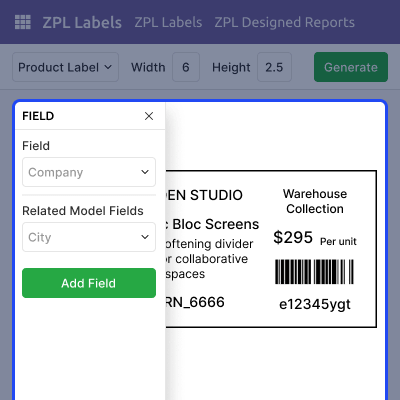
    • Show live data from any Odoo record on the label.
    • Use fields from products, invoices, and quotations.
    • Stop editing labels by hand every time.
    • Design one label and reuse it as many times as you need.
    Dynamic Field Mapping

    Barcode and QR Code Elements

    Add barcodes and QR codes to any label so it can be scanned, tracked, and identified quickly and easily.
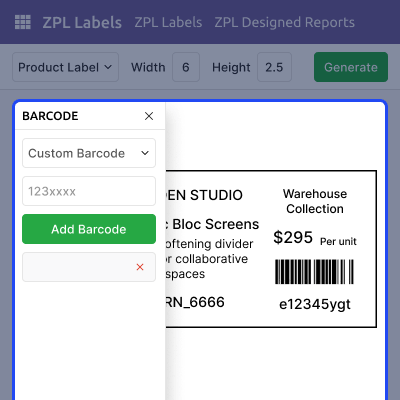
    • Add barcodes to labels in just a few steps.
    • Insert QR codes for fast and easy scanning.
    • Print labels that are ready to scan straight away.
    Barcode and QR Code Elements

    Label Generation Process

    Generate labels from any Odoo record in just a few clicks using a saved label design — fast, accurate, and simple.
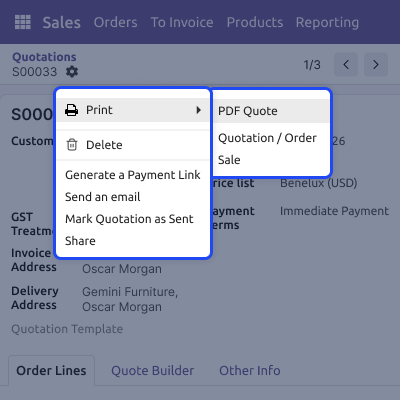
    • Get your label ready in just a few clicks.
    • Use the same label design for as many records as you need.
    • Create labels without ever leaving Odoo.
    • No manual setup. No extra printing steps.
    • Get accurate labels done quickly every time.
    Label Generation Process

    Support

    For any query or issue, please create a support ticket here CREATE A TICKET HERE

    You may also check our other top-quality Odoo Modules.

    Specifications

    Product Version1.0.0
    ReleasedToday
    CategoryOdoo AppsToolERPNext
    Last UpdatedJune 8, 2026 (Today)
    Supported VersionsOdoo  18.x  19.x  
    Write a review

    FAQ’s

     Can I use the same label design for multiple products or records?
    Yes, a single label design can be used to generate labels for multiple records. Dynamic fields automatically display the correct data for each selected record.
     Can I create labels without any coding or ZPL knowledge?
    Yes, This module provides a drag-and-drop editor that allows users to design labels visually without writing code or understanding ZPL commands.
     Will the label data update automatically when generating labels for different records?
    Yes, dynamic field mapping fetches data directly from the selected Odoo record, ensuring each generated label displays the correct information.
     Can I add both barcodes and QR codes to the same label?
    Yes, this module supports barcode and QR code elements, and both can be added to the same label design if required.

    Move to Cloud Today

    AWS Free tier hosting for one year by amazon web services, for more details please visit AWS Free Tier.

    GCP Free tier hosting for one year with 300 credit points by google cloud platform, for more details please visit GCP Free Tier.

    Azure free tier hosting for one year with 25+ always free services, for more details please visit Azure Free Tier.

    In our default configuration we will provide tremendous configuration for your eCommerce Website which is fast to load and response.

    Default Configuration Details of Server

    • 1 GB RAM
    • 1 Core Processor
    • 30 GB Hard Disk
    • DB with 1 GB RAM and 1 Core Processor

    * Server Configuration may vary as per application requirements.

    Want to know more how exactly we are going to power up your eCommerce Website with Cloud to fasten up your store. Please visit the Cloudkul Services.

    Get Started with Cloud
    Not Available


