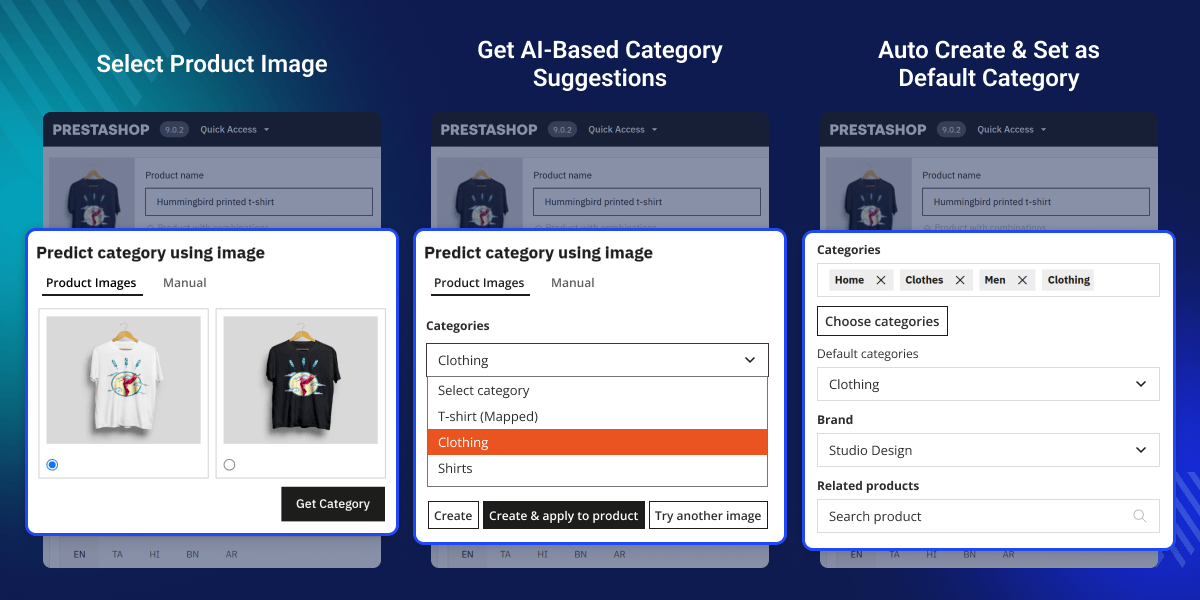
Prestashop AI Category Prediction
Prestashop AI Category Prediction is an advanced AI-powered category prediction module that automatically suggests and assigns categories to products based on product images.
- AI-powered category prediction from product images.
- Automatic category suggestion and assignment.
- Create and map new categories from AI predictions.
- Apply predicted categories to products with one click.
- Manual image upload for custom predictions.
- Persistent category mapping for repeated suggestions.
Note: Prestashop AI Category Prediction module is compatible with the multi-store feature of PrestaShop.
- Description
- Reviews
- FAQ
- Customers ()
- Specifications
- Cloud Hosting
- Changelog
PrestaShop AI Category Prediction module revolutionizes product categorization in PrestaShop by leveraging artificial intelligence to analyze product images and suggest relevant categories. By analyzing product images, the module intelligently predicts appropriate categories and allows the admin to quickly assign or create categories without manually browsing through the catalog. Once created or mapped, the category is automatically applied to the product and set as the default category.
This module is designed for PrestaShop store owners who manage large catalogs and handle frequent product uploads where manual category assignment is time-consuming and error-prone. It is especially valuable for businesses with extensive product ranges or any operation looking to streamline product data entry through intelligent automation.
Additionally, you can enhance your store's search capabilities by integrating the PrestaShop Advanced Search module, which provides intelligent product search with filters and autocomplete functionality.

Highlighted Features
AI-Based Category Prediction
Analyze product images using an external AI model to predict relevant PrestaShop categories.
Dual Image Input Modes
Choose from existing product images or upload a custom image for analysis.
Instant Category Creation
Create new categories directly from predicted AI labels with one click.
Duplicate Prevention
Mapped categories are marked and disabled in the dropdown to prevent duplicate creation.
PrestaShop AI Category Prediction
The full prediction, creation, and assignment workflow runs inside a modal on the product edit page without any page reload.
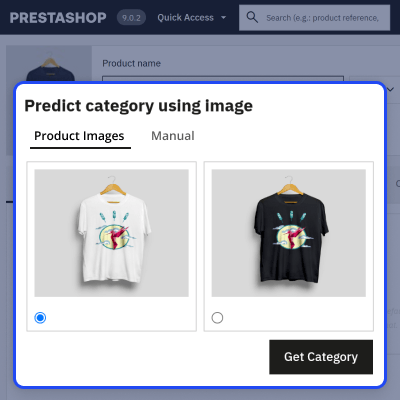
- Click the 'AI category prediction' button to open the prediction modal from the product edit page
- Browse the product image gallery, select an image via radio button, and preview it with navigation arrows
- Click 'Get Category' to send the selected image to the AI server and receive predicted category labels
- Review the predicted categories in a dropdown; already-mapped categories are shown as disabled
- Click 'Create' to create and map the category, or 'Create & apply to product' to also set it as the product's default category

Manual Image Upload
When a product has no uploaded images, or when a different image is needed for prediction, the Manual tab provides an alternative input method.
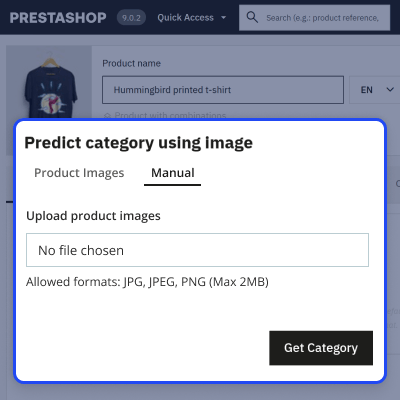
- Switch to the Manual tab inside the prediction modal
- Upload any JPG, JPEG, or PNG image up to 2MB in size
- The uploaded image is sent to the AI server, and predicted categories are returned in the same dropdown interface
- The same Create and Create & apply workflow is available after manual image prediction

Category Mapping
The module maintains a database table of AI label-to-PrestaShop category mappings built up through each confirmed prediction session.
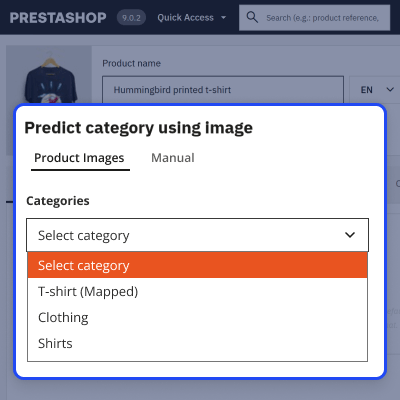
- Every time a category is created or applied, the AI label key is stored alongside the PrestaShop category ID
- On future predictions, if an AI label already has a confirmed mapping, the category ID is resolved automatically
- Mapped categories are indicated in the results dropdown to prevent duplicates

Product Category Assignment
Using the AI Category Prediction module, the admin can create a selected category and assign it to a product. The module also sets it as the default category for the product.
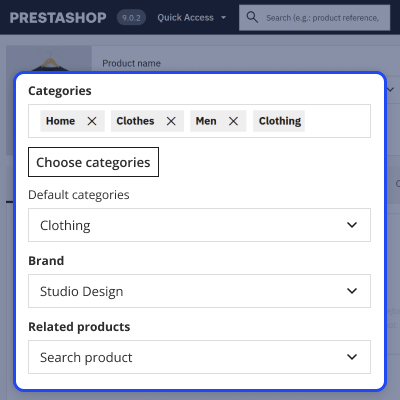
- The selected category (Clothing) is created in the PrestaShop Back Office with one click.
- The category (Clothing) is added to the product’s category list.
- The selected category is automatically set as the default category.

Prestashop AI Category Prediction Features -
- Use AI-powered category prediction to automatically determine suitable product categories.
- Trigger the prediction process directly from the product edit page.
- Choose an image from the product gallery or upload a new one for analysis.
- Get instant category recommendations based on the selected image.
- View multiple AI-generated category options in a dropdown list.
- Create new categories instantly from suggested labels with a single click.
- Assign and set the predicted category as the product’s default in one step.
- Apply suggested or mapped categories directly to products.
- Link AI-generated labels with existing store categories.
- Store category mappings in the database to avoid duplicate creation.
Prestashop AI Category Prediction Support-
For any query or issue, please create a support ticket here http://webkul.uvdesk.com
You may also check our other top-quality PrestaShop Extensions.
Specifications
Frequently Asked Questions
Move to Cloud Today
AWS Free tier hosting for one year by amazon web services, for more details please visit AWS Free Tier.
GCP Free tier hosting for one year with 300 credit points by google cloud platform, for more details please visit GCP Free Tier.
Azure free tier hosting for one year with 25+ always free services, for more details please visit Azure Free Tier.
In our default configuration we will provide tremendous configuration for your eCommerce Website which is fast to load and response.
Default Configuration Details of Server
- 1 GB RAM
- 1 Core Processor
- 30 GB Hard Disk
- DB with 1 GB RAM and 1 Core Processor
* Server Configuration may vary as per application requirements.
Want to know more how exactly we are going to power up your eCommerce Website with Cloud to fasten up your store. Please visit the Cloudkul Services.
Get Started with Cloud