USD
  • EUR
  • INR
  • USD
Cart
Cart 0
  • You have no items in your shopping cart.
    Cart
    Cart 0
    • You have no items in your shopping cart.
    Hire a Developer
    ×
    Contact Us!
    Send Again
    Close
    Please Login to Write Your Review

    Prestashop AI Locale Translator

    Reach customers in their own language without hiring a translator or writing everything twice. The PrestaShop AI Locale Translator translates products and pages, helping visitors shop in their preferred language.


    • Reach more buyers worldwide — turn your store into a multilingual shop in minutes.

    • Translate 26 types of store content — products, categories, pages, brands, delivery options and more.

    • Connect the AI you already use — link popular services like OpenAI, Google Gemini or Anthropic with a simple key, or use your own AI.

    • Watch every translation happen live — a clear progress screen shows what is done, what is running, and what is waiting.

    • Translate instantly or in the background — do it on the spot from your admin panel, or let it run automatically while you are away.

    • Keep your design perfectly intact — layout, prices, images, and special codes stay exactly as they are.

    • Help Google find you — the module creates clean, readable web addresses for each translated page.


    Note: Prestashop AI Locale Translator module is compatible with the multi-store feature of PrestaShop.

    Screenshots
    Prestashop AI Locale Translator Prestashop AI Locale Translator Prestashop AI Locale Translator Prestashop AI Locale Translator Prestashop AI Locale Translator Prestashop AI Locale Translator Prestashop AI Locale Translator Prestashop AI Locale Translator Prestashop AI Locale Translator
    Show More Hide All
    $59.00

    * Required Fields

    Add To Cart
    $59.00
    Configure and Buy
    • Description
    • Reviews
    • FAQ
    • Customers ()
    • Specifications
    • Cloud Hosting
    • Changelog

    Running a store in just one language means turning away customers who do not speak it. Writing every product description, category note, and page in several languages by hand takes endless hours — and most store owners simply never get around to it.

    The PrestaShop AI Locale Translator removes that barrier by letting AI rewrite your store content into any language you choose, so international shoppers see a store that speaks their language. Whether you sell a handful of products or run a large catalogue, you can translate a single item or your whole store with a few clicks.

    Pick the languages you want, choose what to translate, and let the module handle the rest. It is a practical way to open your store to new countries and regions without adding translation work to your to-do list. Unlike copying text into a free online translator and pasting it back by hand, this module keeps your store structure, formatting, and links safe. It also works inside PrestaShop itself, so you never leave your familiar admin panel.
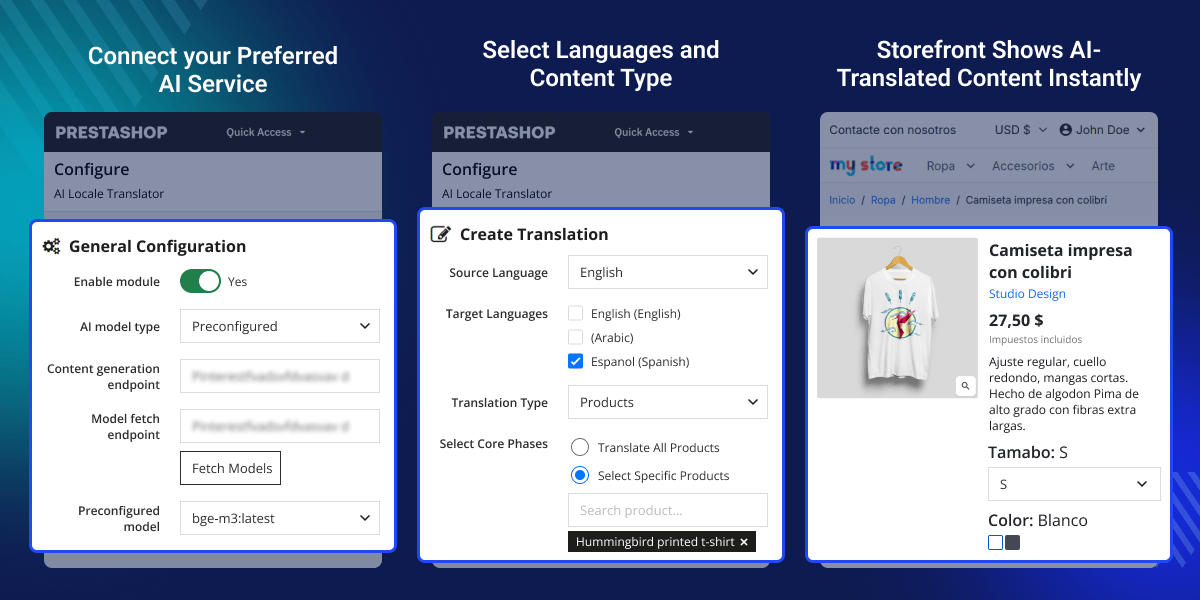
    Prestashop AI Locale Translator

    Highlighted Features

     Two easy ways to connect AI

    Use a popular AI service by adding the key it gives you — or connect your own AI that you host yourself.

     Translate 26 types of store content

    Products, categories, pages, attributes, features, brands, suppliers, delivery methods, and many more — translate the parts of your store that matter most.

     Follow every translation live

    A simple progress screen shows each translation as Pending, In Progress, Completed, or Failed, and lets you cancel or remove any job whenever you want.

     Auto-created readable web addresses

    For each translated page, the module builds a clean, easy-to-read web address, which helps search engines understand and list your store in more languages.

     Your layout stays exactly as it is

    Special design elements, codes, and placeholders are preserved during translation, so your pages look correct and keep working as expected.

     Translate now or let it run automatically

    Get a translation right away from your admin panel, or set the module to process background translations during quiet times so your work is never interrupted.

    AI Connection Setup

    AI Connection Setup

    Connect the module to an AI service so it can produce translations. This is a one-time setup that decides which AI does the writing for your store.
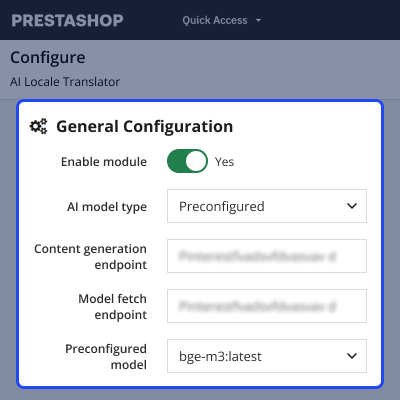
    • Choose how to connect — use a well-known AI service with a key, or point the module at your own AI that you host.
    • Add your AI key safely — it is stored privately and never shown in plain text to others.
    • Pick the AI model you want — select from the list your service provides, then confirm it works before you start.

    Content Translation

    Content Translation

    Tell the module what to translate and into which languages. You stay in full control of both the content and the target languages.
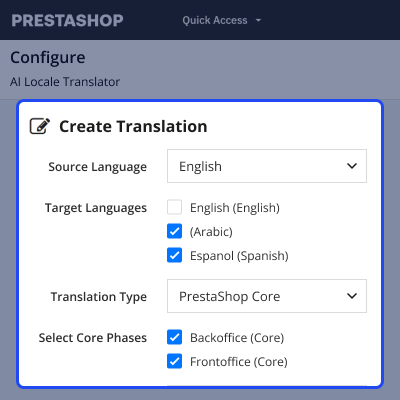
    • Pick a source language and one or more target languages — translate into as many languages as you like at once.
    • Choose what to translate — your store content, installed modules, your theme, or the built-in PrestaShop text.
    • Translate everything or just what you need — pick all items of a type, or search and select specific products, categories or pages.
    • Select the exact fields — for example name, description, short description or page text — so only the words you want get translated.

    Live Progress Tracking

    Live Progress Tracking

    Keep an eye on every translation as it happens. The progress screen turns a behind-the-scenes task into something you can simply watch.
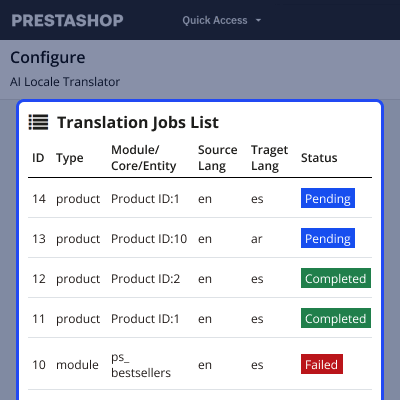
    • See the status of each job — Pending, In Progress, Completed or Failed — at a glance.
    • Stop or remove a job — cancel a translation that is waiting, or delete one that is already done or failed.
    • Move through your history — page back and forward through past and current translation jobs.

    Automatic Background Translation

    Automatic Background Translation

    Let translations run on their own during quiet periods, so you do not have to sit and wait. This is ideal for larger stores or ongoing translation work.
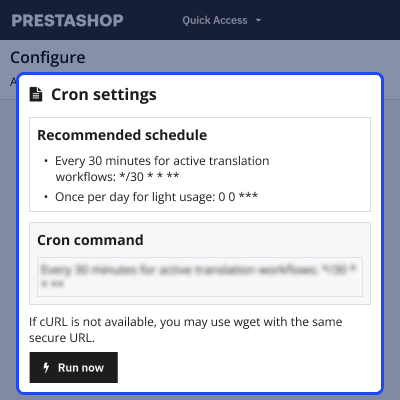
    • Set a schedule — the module checks for waiting jobs automatically, for example every 30 minutes.
    • Process while you are away — each run handles a batch of translations without any action from you.
    • Run on demand — use the "Run now" button whenever you want an immediate pass.

    Prestashop LLMs TXT Generator Features -

    • Connects to popular AI services like OpenAI, Google Gemini, Anthropic, OpenRouter, Cerebras, or DeepSeek using a key.
    • Connects to your own AI that you host on your server through a simple web address.
    • Translates 26 types of store content, including products, categories, pages, attributes, features, brands, suppliers, and delivery methods.
    • Translates the text inside your installed modules, your active theme, and the built-in PrestaShop labels on both the admin and customer sides.
    • Shows a live progress screen so you can watch each translation as Pending, In Progress, Completed, or Failed.
    • Let’s you cancel a waiting translation or delete a finished or failed one.
    • Creates clean, readable web addresses for each translated page to help search engines list your store
    • Keeps your layout, images, prices, links, and special codes exactly as they are — only the words change.
    • Translates right away from your admin panel, or runs automatically in the background on a schedule.
    • Adds a quick “Translate” button on individual category edit pages.
    • Adds bulk “Translate” actions to the product, pages, attribute, and feature listing tabs.

    Prestashop AI Locale Translator Support-

    For any query or issue, please create a support ticket here http://webkul.uvdesk.com

    You may also check our other top-quality PrestaShop Extensions.

    Specifications

    Product Version1.0.0
    Released2 days ago
    CategoryPrestaShop
    Last UpdatedJuly 15, 2026 (1 day ago)
    Supported VersionsPrestaShop  1.7.x.x​  8.x.x  9.x.x  
    Write a review

    Frequently Asked Questions

     Does this module work with PrestaShop 9?
    Yes. The module supports PrestaShop 9.x.x, 8.x.x, and 1.7.x.x.
     
     Do I have to translate everything by hand?
    No. You choose the languages and content, and the AI writes the translations. Translate a single product or your whole store, and pick which parts — like the name or description — to include.
     
     Which AI services can I connect?
    You can use a popular service such as OpenAI, Google Gemini, Anthropic, OpenRouter, Cerebras, or DeepSeek using its key. Or use your own self-hosted AI. Both are set up once in the configuration screen.
     
     Will my images, prices and page layout stay correct?
    Yes. Only the text is translated — images, prices, links, and design stay exactly as they are, and special codes are preserved so pages keep working. In multi-store setups, translations stay separate per shop.
     
     What if a translation is wrong or I want to stop it?
    You're in control. Cancel a translation that's still waiting, or remove one that's finished or failed — then re-run it or adjust your selection and try again.

    Move to Cloud Today

    AWS Free tier hosting for one year by amazon web services, for more details please visit AWS Free Tier.

    GCP Free tier hosting for one year with 300 credit points by google cloud platform, for more details please visit GCP Free Tier.

    Azure free tier hosting for one year with 25+ always free services, for more details please visit Azure Free Tier.

    In our default configuration we will provide tremendous configuration for your eCommerce Website which is fast to load and response.

    Default Configuration Details of Server

    • 1 GB RAM
    • 1 Core Processor
    • 30 GB Hard Disk
    • DB with 1 GB RAM and 1 Core Processor

    * Server Configuration may vary as per application requirements.

    Want to know more how exactly we are going to power up your eCommerce Website with Cloud to fasten up your store. Please visit the Cloudkul Services.

    Get Started with Cloud
    Not Available


