AI OCR Invoice to Order reads your PDF invoices and pulls out every line item, price, customer detail, and address — then creates a PrestaShop order with everything already filled in.
- Create orders instantly — upload a PDF invoice and the module builds a complete PrestaShop order in seconds.
- Save time on every invoice — AI OCR reads the PDF, extracts the data, and you only need to review and click Create Order.
- Choose your AI engine — pick from OpenAI, Gemini, Anthropic, OpenRouter, Cerebras, DeepSeek, or point to your own preconfigured OCR endpoint.
- See a preview before ordering — review every product match, quantity, and address in a clear screen before committing.
- Handle missing items smartly — automatically create new products and customers when they are not yet in your catalog.
- Stay safe on pricing — order totals always use your shop catalog prices, taxes, and rules, not the invoice numbers.
Note: PrestaShop AI OCR Invoice to Order is compatible with the PrestaShop Multi-store feature.
- Description
- Reviews
- FAQ
- Customers ()
- Specifications
- Cloud Hosting
- Changelog
Store managers spend valuable time manually creating PrestaShop orders using information from PDF invoices such as supplier invoices, POS receipts, offline store invoices, etc. Every line item, every price, every address has to be typed by hand, and one mistake means a wrong order, a wrong customer, or a call from accounting. AI OCR Invoice to Order replaces that work with a smart AI that reads your PDF invoices and turns them into ready-to-go PrestaShop orders.
The module works with the AI providers you already trust. Upload a PDF invoice, pick OpenAI, Gemini, Anthropic, or any other supported AI, and the module sends the file to extract names, quantities, unit prices, customer details, billing and delivery addresses, currency, and even special remarks.
Before any order is created, you see a clear preview that highlights which products matched your catalog, which need to be created, and any quantities that look uncertain — so you always know exactly what is about to happen.
Unlike manual entry or simple data copying, this module handles everything end-to-end. It reads the PDF, integrates with PrestaShop's own Customer, Cart, Product, and Payment systems, applies your tax and shipping rules, and creates a real order that looks identical to one placed on your storefront. It also keeps a full history of every import, with status tracking and the ability to create orders from stored drafts.
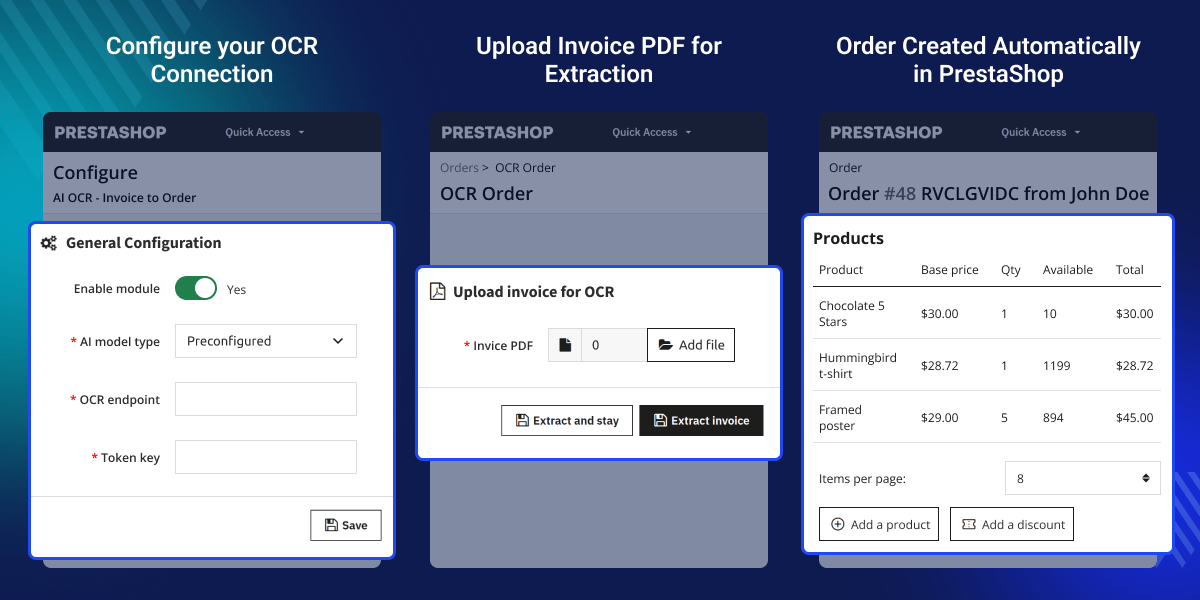
Highlighted Features
AI-Powered PDF Invoice Extraction
AI reads every single line of your PDF invoice and pulls out products, prices, quantities, customer info, and addresses — no retyping needed at all.
Multiple AI Provider Support
Pick your favourite AI — OpenAI, Gemini, Claude, OpenRouter, Cerebras, or DeepSeek. Just enter your API key and pick a model, then you are done.
Preconfigured Endpoint Mode
Already use your own OCR service? Enter the endpoint URL and token key — the module connects to your existing setup with zero extra work done.
Full Import History
Track every uploaded invoice with status (Draft, Order Created, Failed), download original PDFs, and create orders from stored drafts.
AI Provider Configuration
The module connects to the AI provider of your choice from a single configuration screen, so setup takes minutes, not hours.
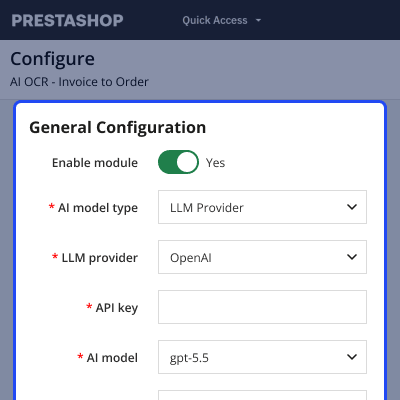
- Enable or disable the module with one toggle
- Choose your AI model type — Preconfigured endpoint or LLM Provider
- Pick a provider (OpenAI, Gemini, Claude, and more) and enter your API key
- Select the exact AI model to use and set a max token limit
- Validate the provider connection with the "Validate Provider" button before uploading any invoices

Order Creation Rules
Once the AI provider is configured, define the rules the module follows when turning an extraction into an order — these apply automatically every time an order is created.
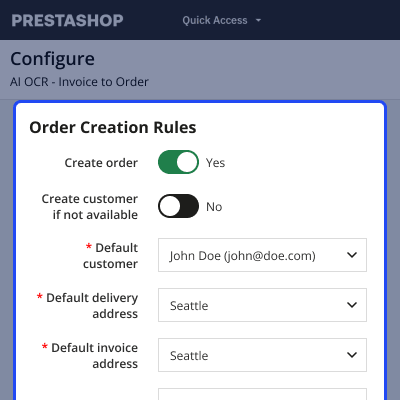
- Turn automatic order creation on or off
- Choose whether to auto-create a customer if one isn't found, or fall back to a default customer
- Set default delivery and invoice addresses to use when none are detected
- Set a default order message that gets attached to every order the module creates, plus a default payment method and order status
- Decide whether missing products should be auto-created in the catalog — if this is turned off, order creation fails whenever the invoice contains a product that isn't already in your catalog.

Invoice Extraction & Order Preview
Upload an invoice PDF and the AI processes it in the background — check back on the extraction to review a full preview before any order is created.
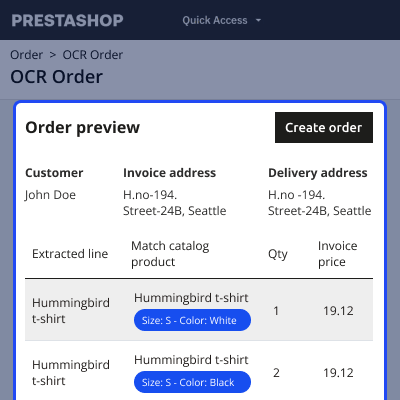
- Upload any invoice PDF and track its status as it moves from Draft to Order Created (or Failed)
- See customer, invoice address, and delivery address pulled directly from the invoice
- Review each extracted line item matched against your catalog products, with quantity and invoice price shown side by side
- Inspect the full raw extraction data for complete transparency into what the AI detected
- Create the order directly from the preview screen with a single click, once you're satisfied with the match

Automatic Order Creation in PrestaShop
The end result is a standard PrestaShop order, built using the rules you configured earlier — created automatically, but indistinguishable from one placed through your storefront.
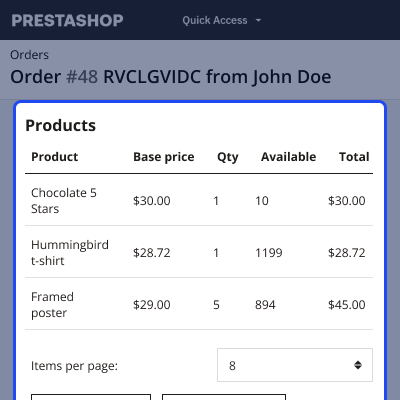
- Products, quantities, and totals are filled in directly from the matched invoice data
- Customer details and both shipping and invoice addresses are attached automatically
- Order status, payment method, and totals follow your store's own catalog prices and tax rules, not the invoice figures
- The order appears in your normal Orders list, fully editable like any manual order
- Nothing about your existing invoicing, shipping, or documentation workflow needs to change

Minimum System Requirements (API Setup) -
The following minimum system requirements are needed for this extension.
- Python Version – 3.10
- Space (8 GB)
- RAM (1 GB)
- API Key (Anthropic Claude, Gemini, OpenAI, Grok, etc.)
- Server key and cert files (for Flask API)
- An Active Port (5000)
Note -
- The selected LLM model may have different Rate Tier Limits. It supports various LLM models like Anthropic Claude, Gemini, OpenAI, Grok, etc.
- To install the AI module, we need SSH access. You can also check the AI Models Server Installation Guide.
PrestaShop AI OCR Invoice to Order Features -
- Uses AI to read PDF invoices and pull out details like products, quantities, prices, customer info, addresses, and currency.
- Works with several AI providers: OpenAI, Gemini, Anthropic, OpenRouter, Cerebras, and DeepSeek.
- Also supports a ready-made OCR endpoint for self-hosted setups.
- Checks that your AI provider connection is working before you begin uploading invoices.
- Gives you a detailed preview before an order is created, flagging which products matched, which will be newly added, and which couldn't be found.
- Automatically sets up new customer accounts when customer details are found on the invoice.
- Automatically adds new products to your catalog if they aren't already listed in your store.
- Relies on your store's own prices, taxes, and shipping rules — the invoice's prices are only for reference.
- Maintains a complete log of every import along with its status: Draft, Order Created, or Failed.
- Lets you download original PDFs, preview stored extractions, and create orders from drafts whenever you need to.
- Secures your AI API keys using AES-256-CBC encryption.
PrestaShop AI OCR Invoice to Order Support-
For any query or issue, please create a support ticket here http://webkul.uvdesk.com
You may also check our other top-quality PrestaShop Extensions.
Specifications
Frequently Asked Questions
Specification
Detailed technical features and requirements to help you understand the module’s capabilities and ensure smooth integration with your system.
Cloud Hosting
Detailed technical features and requirements to help you understand the module’s capabilities and ensure smooth integration with your system.
Move to Cloud Today
We’re partnered with top-tier, trusted providers!
Default Configuration Details of Server
RAM 1 Core
Processor 30 GB
Hard Disk
Database
Want to know more how exactly we are going to power up your eCommerce Website with Cloud to fasten up your store
* Server Configuration may vary as per application requirements.


