USD
  • EUR
  • INR
  • USD
Cart
Cart 0
  • You have no items in your shopping cart.
    PrestaShop Extensions
    Cart
    Cart 0
    • You have no items in your shopping cart.
    Hire a Developer
    ×
    Contact Us!
    Send Again
    Close
    Please Login to Write Your Review
    PrestaShop Buy One Get One

    PrestaShop Buy One Get One

    x
    Free

    * Required Fields

    $49.00
    Add To Cart
    30 Days Money Back Guarantee*
    Only One Time Payment

    PrestaShop Buy One Get One allows you to create attractive promotional offers that encourage customers to purchase more from your store. Offer free products, discounts, free shipping, and mix-and-match deals based on cart contents, purchase quantities, product categories, and customer eligibility.


    With flexible promotion strategies, configurable conditions, automatic rewards, and campaign analytics, you can manage promotional campaigns and create a more engaging shopping experience for your customers.

    PrestaShop Buy One Get One
    PrestaShop Buy One Get One
    $49.00
    PrestaShop Expert Certification Core Skills
    Check How It Works

    Need Help Deciding?

    Support answers within one business day.

    Open a ticket
    $49.00
    Configure and Buy
    30 Days Money Back Guarantee*
    Only One Time Payment
    X
    • Description
    • Reviews
    • FAQ
    • Customers ()
    • Specifications
    • Cloud Hosting
    • Changelog

    Boost your sales and encourage customers to purchase more with the PrestaShop Buy One Get One module. Create attractive promotional offers that reward customers with free products, discounts, and free shipping when they meet specific purchase conditions.
    The module allows you to create different types of promotions, including Buy X Get X, Buy X Get Y, Spend X Get Y, and Mix & Match offers. You can define eligibility rules, configure rewards, set campaign validity, and control who can use each offer.
    Display promotional badges, offer details, countdown timers, and banners on your store to make customers aware of available deals. You can also automatically add eligible rewards to the cart, manage free gift selection, and track campaign performance through the built-in analytics dashboard.
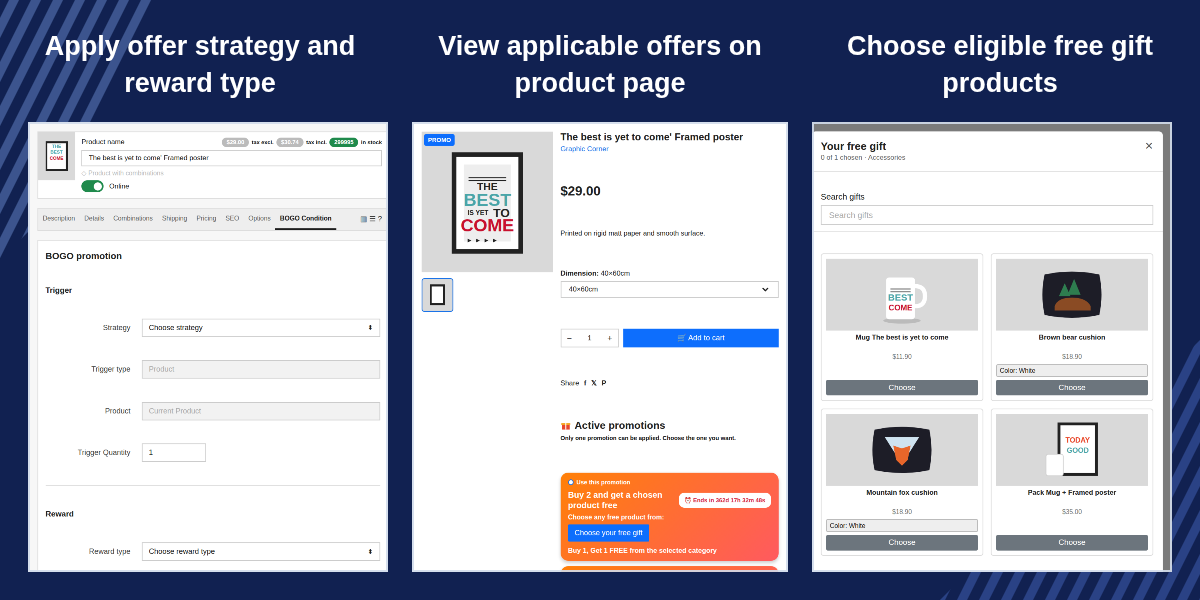
    PrestaShop Buy One Get One

    Highlighted Features

     Multiple Buy One Get One Offer Types

    Create Buy X Get X, Buy X Get Y, Spend X Get Y, and Mix & Match promotions according to your marketing requirements.

     Flexible Reward Options

    Offer free products, specific gifts, the cheapest qualifying product for free, category-based gifts, percentage discounts, fixed discounts, or free shipping.

     Custom Promotion Rules

    Define offer eligibility using products, categories, manufacturers, suppliers, cart totals, cart quantities, and customer groups, depending on the selected promotion type.

     Promotional Badges and Countdown Timers

    Display offer badges on product listings and countdown timers on product pages to highlight active promotions.

     Automatic Reward Management

    Automatically add eligible rewards to the cart or allow customers to claim their rewards manually.

     Targeted Promotions

    Restrict offers to selected customers, customer groups, or new customers. Configure campaign dates, usage limits, and promotion priorities.

    Create Attractive Buy One Get One Offers

    The PrestaShop Buy One Get One module helps merchants create promotional campaigns that encourage customers to purchase more products and take advantage of special offers.
    Whether you want to offer an additional product for free, reward customers who spend a specific amount, provide free shipping, or combine multiple purchase conditions, the module provides flexible options for setting up promotions.
    Configure the promotion type, eligibility criteria, reward, validity period, usage restrictions, and customer targeting to suit your store's marketing strategy.
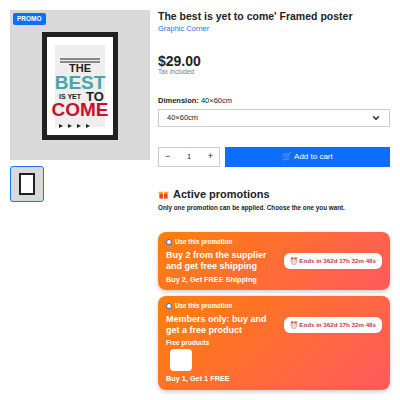
    Create Attractive Buy One Get One Offers

    Configure General Promotion Settings

    Navigate to BOGO → Buy and Get Offers → Configuration to manage the module's general settings.
    Administrators can configure:

    • Promotion stacking mode.
    • Automatic reward addition.
    • Rewards for signed-in customers only.
    • Promotional badges on product listings.
    • Badge text for different languages.
    • Countdown timers on product pages.
    • Promotional banner on the home page.
    • Banner image.
    • Maintenance URL for scheduled cleanup.

    These settings allow merchants to control how promotions are applied and how customers see the offers throughout the store.
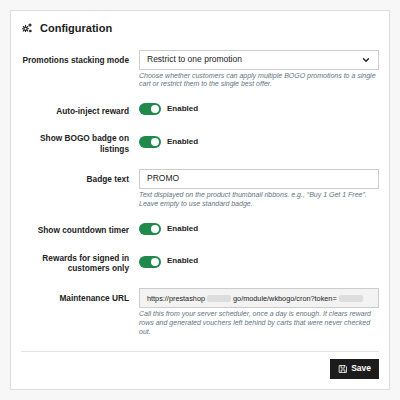
    Configure General Promotion Settings

    Configure Promotion Rules

    Rules determine which customers and baskets qualify for a promotion. Navigate to BOGO → Buy and Get Offers → Rules to create or edit eligibility conditions. The module supports the following rule types, depending on the promotion strategy:

    • Product Rule: Require customers to purchase selected products in the required quantities.
    • Category Rule: Allow qualifying purchases from selected product categories.
    • Manufacturer Rule: Apply offers to products associated with selected manufacturers.
    • Supplier Rule: Apply offers to products from selected suppliers.
    • Cart Total Rule: Require the cart value to fall within a specified minimum and maximum amount.
    • Cart Quantity Rule: Require customers to purchase at least a specified number of items.
    • Customer Group Rule: Restrict qualifying offers to selected customer groups.
    • For Mix & Match offers, administrators can configure multiple rules. The reward becomes available only when all required conditions are satisfied.
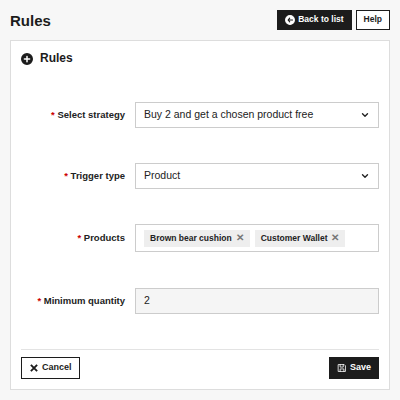
    Configure Promotion Rules

    Allow Customers to Choose Free Gifts

    When a promotion allows customers to select a gift, the storefront provides options to choose eligible products. Customers can open the gift selector from the product page or the shopping cart. The gift selector supports:

    • Browsing eligible gift products.
    • Viewing product prices.
    • Searching for products by name.
    • Navigating through paginated gift listings.
    • Selecting product variants where applicable.
    • Viewing unavailable variants.
    • Tracking the number of gifts selected against the allowed quantity.

    Out-of-stock gifts are displayed as unavailable rather than hidden. Products that permit backorders can still be considered available.
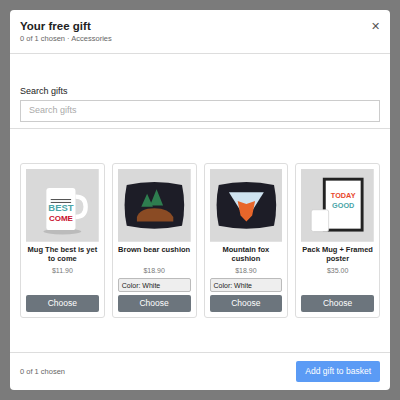
    Allow Customers to Choose Free Gifts

    Features of PrestaShop Buy One Get One

    • Create multiple Buy X Get Y promotions at a single time.
    • Manage strategies, rules, and rewards separately.
    • Set promotion start and end dates.
    • Configure trigger and reward quantities.
    • Set promotion priorities.
    • Set per-customer usage limits.
    • Target selected customers and customer groups.
    • Restrict promotions to new customers.
    • Create product, category, manufacturer, and supplier-based eligibility rules.
    • Create cart-total, cart quantity and customer-group rules.
    • Configure multiple rules for Mix & Match offers.
    • Offer the same, specific, cheapest product for free.
    • Allow gift selection from a category.
    • Apply percentage/fixed discounts or free shipping.
    • Automatically add eligible rewards to the cart.
    • Display promotional badges on product listings.
    • Display offer cards on product pages.
    • Show countdown timers for time-limited offers.
    • Display a promotional home-page banner.
    • Configure offers from the product editing page.
    • View campaign analytics.
    • Monitor campaign revenue and activations.
    • Export analytics reports as CSV.
    • Review disbursed reward records.

    Prestashop Buy One Get One Support -

    For any query or issue please create a support ticket here http://webkul.uvdesk.com

    You may also check our other top-quality PrestaShop Modules.

    Specifications

    Product Version1.0.0
    Released8 days ago
    Last UpdatedOctober 14, 2026 (3 days ago)
    Supported VersionsPrestaShop  1.7.x.x​  8.x.x  9.x.x  

    Ratings

    We'd love to hear your thoughts! Share your feedback and help us craft an even better experience tailored just for you.

    Write a review

    Frequently Asked Questions

     Can I offer a different product as a free gift?
    Yes. You can configure a specific product as a free reward. The module also supports category-based gift selection and the cheapest qualifying product as a reward.
     
     Can customers choose their own free gifts?
    Yes. When the configured reward allows gift selection, customers can browse eligible gifts and select the required quantity.
     
     Can I track promotion performance?
    Yes. The analytics dashboard provides campaign activations, revenue, free product distribution, gift value, average order value, and other campaign metrics.
     
     Can I view the rewards issued with orders?
    Yes. The Disbursed Rewards section records information about the order, customer, offer, gift, quantity, discount, order value, and date.

    Specification

    Detailed technical features and requirements to help you understand the module’s capabilities and ensure smooth integration with your system.

    Cloud Hosting

    Detailed technical features and requirements to help you understand the module’s capabilities and ensure smooth integration with your system.

    Default Configuration Details of Server

    1 GB
    RAM
    1 Core
    Processor
    30 GB
    Hard Disk
    1 GB RAM & 1 Core Processor
    Database

    Want to know more how exactly we are going to power up your eCommerce Website with Cloud to fasten up your store

    * Server Configuration may vary as per application requirements.

    Change Logs

    Not Available


