USD
  • EUR
  • INR
  • USD
Cart
Cart 0
  • You have no items in your shopping cart.
    PrestaShop Extensions
    Cart
    Cart 0
    • You have no items in your shopping cart.
    Hire a Developer
    ×
    Contact Us!
    Send Again
    Close
    Please Login to Write Your Review
    Countdown Deals | Offers Collection Page | Flash Sale Campaign

    Countdown Deals | Offers Collection Page | Flash Sale Campaign

    x
    Free

    * Required Fields

    $49.00
    Add To Cart

    PrestaShop Countdown Deals | Flash Sale Campaign allows store owners to create dedicated offers and flash-sale pages with selected products, discounts, countdown timers, banners, customer-group restrictions, and scheduled campaigns. Create multiple promotional campaigns, display running and upcoming offers, and use analytics to track campaign performance.


    Countdown Deals | Offers Collection Page | Flash Sale Campaign
    Countdown Deals | Offers Collection Page | Flash Sale Campaign
    $49.00
    PrestaShop Expert Certification Core Skills
    Check How It Works
    $49.00
    Configure and Buy
    X
    • Description
    • Reviews
    • FAQ
    • Customers ()
    • Specifications
    • Cloud Hosting
    • Changelog

    Running limited-time promotions is an effective way to create urgency and encourage customers to purchase products before an offer expires. However, managing multiple campaigns, displaying promotional products, creating dedicated landing pages, and tracking campaign performance can become difficult when handled manually.
    PrestaShop Countdown Deals | Flash Sale Campaign provides a complete solution for creating and managing promotional campaigns directly from the PrestaShop back office.
    The admin can create dedicated offer pages, select products manually or through dynamic filters, schedule campaigns, configure discounts, display countdown timers, add promotional banners, restrict offers to customer groups, and promote offers across different areas of the store.
    Customers can browse running, upcoming, and expired offers from a dedicated offer collection page. The module also provides countdown timers to create urgency around limited-time deals.

    Highlighted Features

     Create Unlimited Offer Pages

    Create multiple dedicated offer and flash-sale pages for different promotional campaigns. Each offer can have its own title, friendly URL, products, schedule, banner, customer-group restrictions, discount, countdown timer, and social-sharing settings.

     Schedule Flash Sale Campaigns

    Define the start and end date of every campaign. The offer automatically becomes relevant according to its configured campaign period, allowing admins to prepare upcoming campaigns in advance.

     Product Filtering

    Select the products that should be included in an offer using different filtering options. The admin can filter products based on: Product name, Price range, Quantity, Discount range, Category, Manufacturer, Supplier.

     Offer Analytics

    Monitor the performance of promotional campaigns from the back office. The analytics dashboard provides KPIs such as: Total Revenue, Total Quantity Sold, Total Orders, Valid Orders. Admins can also analyze top-performing categories, manufacturers, suppliers, offers, and individual products.

    Flash Sale Offer Page Builder

    Admins can add new pages, edit existing ones, toggle status in bulk, and preview upcoming offers before they go live.
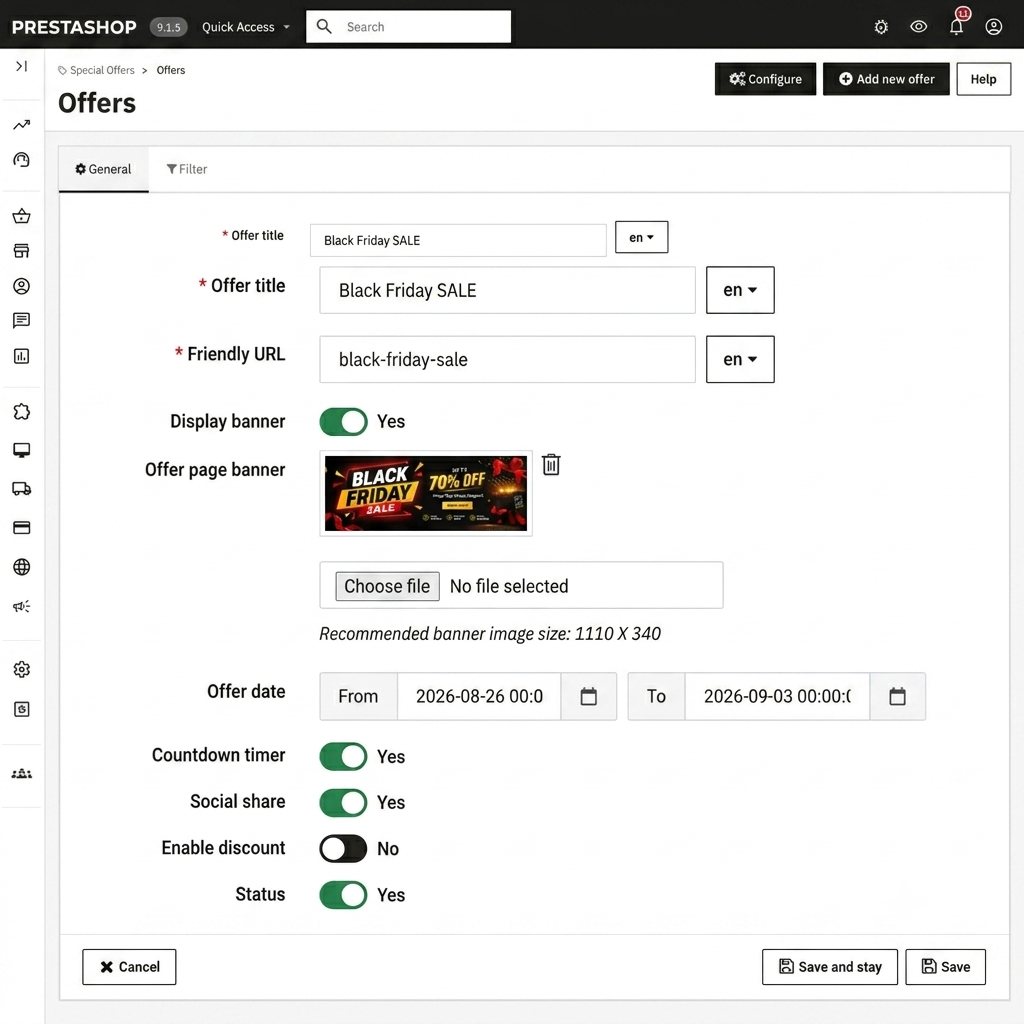
    • Create an offer with a translatable page name and a unique friendly URL per language.
    • Set a start date and end date to control when the offer becomes visible to customers.
    • Upload a per-page banner image or rely on global slider banners.
    • Toggle countdown timer and social share on a per-offer basis.
    • Assign a specific discount (percentage or fixed amount) with tax inclusion settings and a priority value.
    Flash Sale Offer Page Builder

    Product Filtering & Rules Engine

    When building an offer, you choose between two population methods: select products manually by name, or let the module build the product list dynamically from filter rules. The filter method supports overlapping criteria so you can target, for example, products in the 'Sale' category priced under $50 with stock below 10 units.
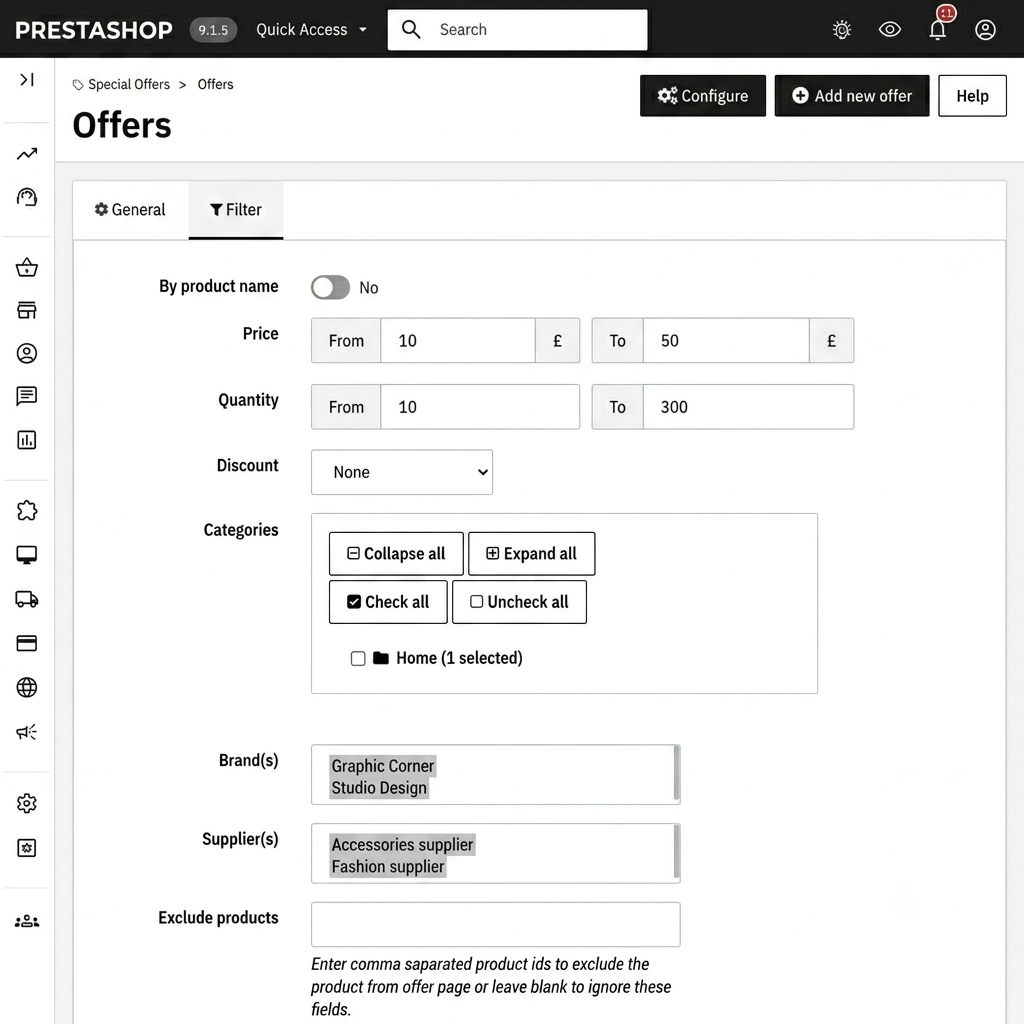
    • Price filters: less than / greater than a defined amount.
    • Quantity filters: less than / greater than a defined stock level.
    • Category, manufacturer, and supplier multi-select filters.
    • Discount range filter: include only products whose active specific price reduction falls within a minimum and maximum percentage or amount.
    • Exclude individual products by comma-separated ID list.
    Product Filtering & Rules Engine

    Flash Sale Countdown Timers & Urgency

    Countdown timers appear on upcoming offer pages when the start date is in the future, and on offer product listings when enabled. The timer uses the simplyCountdown library and supports five visual styles to match your theme.
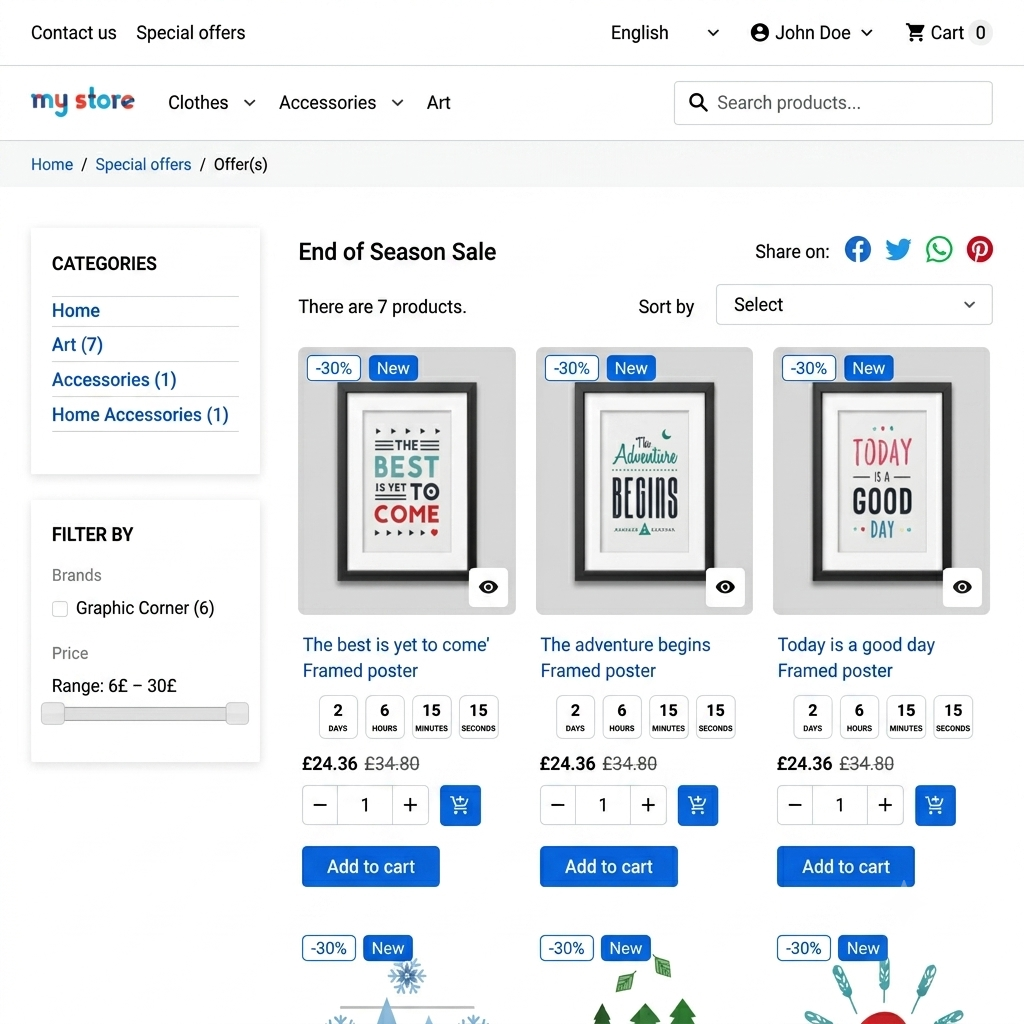
    • Choose from Default, Circle, Cyber, Dark, and Losange styles.
    • Position the timer above or below the product price on product listing pages.
    • Show timers on all pages or restrict them to offer pages only.
    • Enable or disable the countdown per offer page from the offer edit form.
    Flash Sale Countdown Timers & Urgency

    Analytics & Reporting

    The Analytics tab gives you a real-time view of offer performance without leaving the PrestaShop back office. Data is recorded automatically on order placement and status changes.
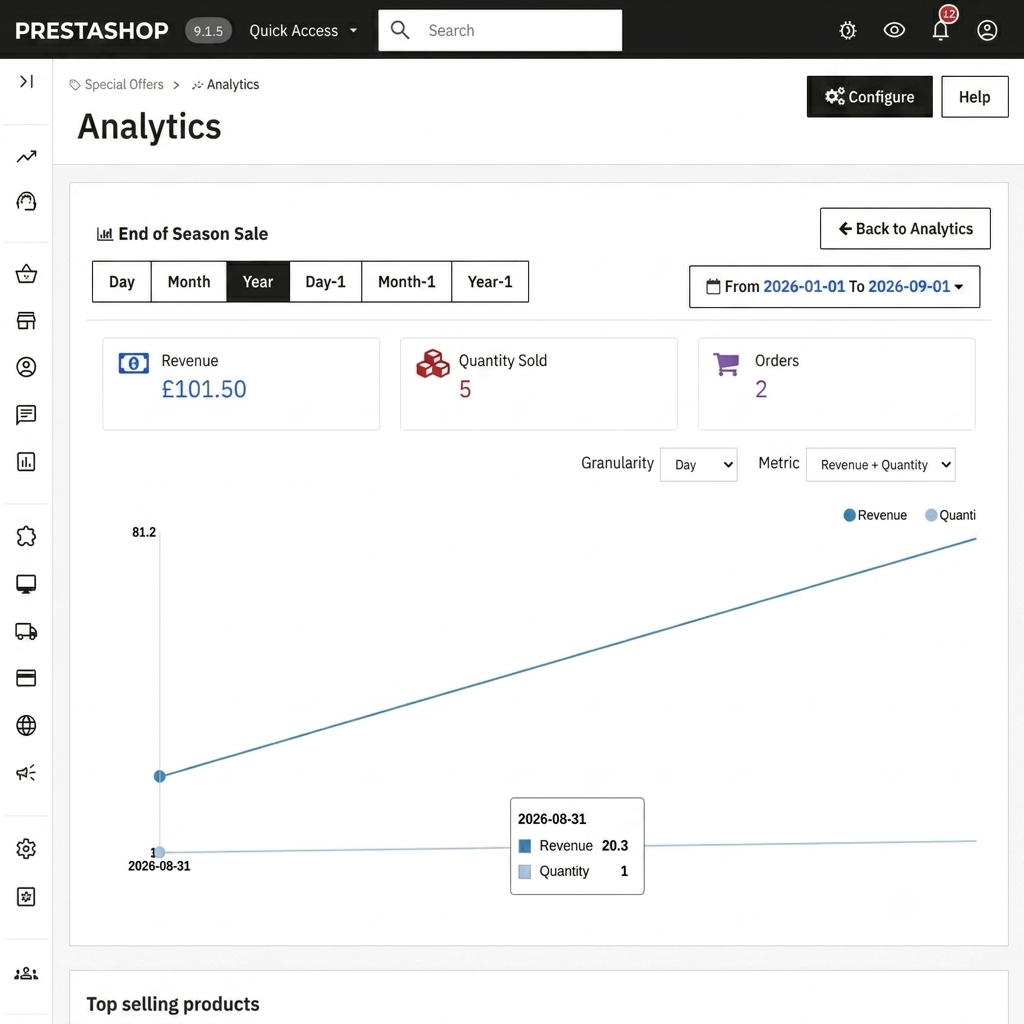
    • KPI row: Total Revenue, Total Quantity Sold, Total Orders, and Valid Orders.
    • Top Categories, Top Brands, and Top Suppliers leaderboards.
    • Searchable offer listing with sortable columns and date-range filtering.
    • Per-offer detail view showing product-level breakdown.
    • Order status changes (cancel, refund, payment error) are tracked and reflected in the Valid Orders KPI.
    Analytics & Reporting

    Features of PrestaShop Countdown Deals | Flash Sale Campaign

    • Create unlimited offer pages with custom titles and SEO-friendly URLs
    • Filter products by price, quantity, category, manufacturer, supplier, or discount range
    • Restrict offers to specific customer groups and exclude individual products
    • Date-based scheduling with start and end dates
    • Multiple countdown timer styles (Default, Circle, Cyber, Dark, Losange)
    • Configurable countdown timer position (above or below price)
    • Banner slider on offer pages and category pages
    • Social sharing for Facebook, X/Twitter, WhatsApp, and Pinterest
    • Homepage offer widget with sortable product display
    • Built-in analytics dashboard with KPIs and top-performer leaderboards
    • Discount priority and SpecificPriceRule integration
    • Multi-store and multi-language support
    • Offer preview for upcoming campaigns
    • Separate running and upcoming offer tabs on the front office

    Specifications

    Product Version6.0.0
    Released10 years ago
    CategoryPrestaShop
    Last UpdatedSeptember 2, 2026 (2 days ago)
    Supported VersionsPrestaShop  1.7.x.x​  8.x.x  9.x.x  

    Ratings

    We'd love to hear your thoughts! Share your feedback and help us craft an even better experience tailored just for you.

    Write a review

    Frequently Asked Questions

     Can I run multiple flash sales at the same time?
    Yes. Each offer page is independent, with its own date range, product filters, banner, and customer-group restrictions. You can have running, upcoming, and expired offers coexisting in the admin panel.
     
     Is the module multi-store compatible?
    Yes, the module is compatible with the PrestaShop multi-store feature.
     
     Can customers share offer pages on social media?
    Yes, social sharing can be enabled per offer page. Supported networks are Facebook, X (Twitter), WhatsApp, and Pinterest.

    Specification

    Detailed technical features and requirements to help you understand the module’s capabilities and ensure smooth integration with your system.

    Cloud Hosting

    Detailed technical features and requirements to help you understand the module’s capabilities and ensure smooth integration with your system.

    Default Configuration Details of Server

    1 GB
    RAM
    1 Core
    Processor
    30 GB
    Hard Disk
    1 GB RAM & 1 Core Processor
    Database

    Want to know more how exactly we are going to power up your eCommerce Website with Cloud to fasten up your store

    * Server Configuration may vary as per application requirements.

    Change Logs

    Not Available


