USD
  • EUR
  • INR
  • USD
Cart
Cart 0
  • You have no items in your shopping cart.
    PrestaShop Extensions
    Cart
    Cart 0
    • You have no items in your shopping cart.
    Hire a Developer
    ×
    Contact Us!
    Send Again
    Close
    Please Login to Write Your Review
    PrestaShop Delete Customer Account
    PrestaShop Delete Customer Account
    x
    Free

    * Required Fields

    $49.00
    Add To Cart

    PrestaShop Delete Customer Account allows customers to remove their account from the front end. Customers can now delete their account on their own from the My Accounts section.


    • Let customers delete their accounts by themselves.

    • Allow customers to request account deletion.

    • Customers can also deactivate their account.

    • View a list of requests submitted by customers from a single place.


    Note: PrestaShop Delete Customer Account module is compatible with the multi-store feature of PrestaShop.

    PrestaShop Delete Customer Account
    PrestaShop Delete Customer Account
    $49.00
    PrestaShop Expert Partner
    PrestaShop Superhero Seller
    PrestaShop Expert Certification Core Skills
    Check How It Works
    $49.00
    Configure and Buy
    X
    • Description
    • Reviews
    • FAQ
    • Customers ()
    • Specifications
    • Cloud Hosting
    • Changelog

    PrestaShop Delete Customer Account - In PrestaShop default, deleting an account from the store can be time-consuming for the customers. They have to send an email to the store admin and then wait for the admin to delete their account. With the PrestaShop Delete Customer Account extension, the customers can delete their accounts at any time as and when required.
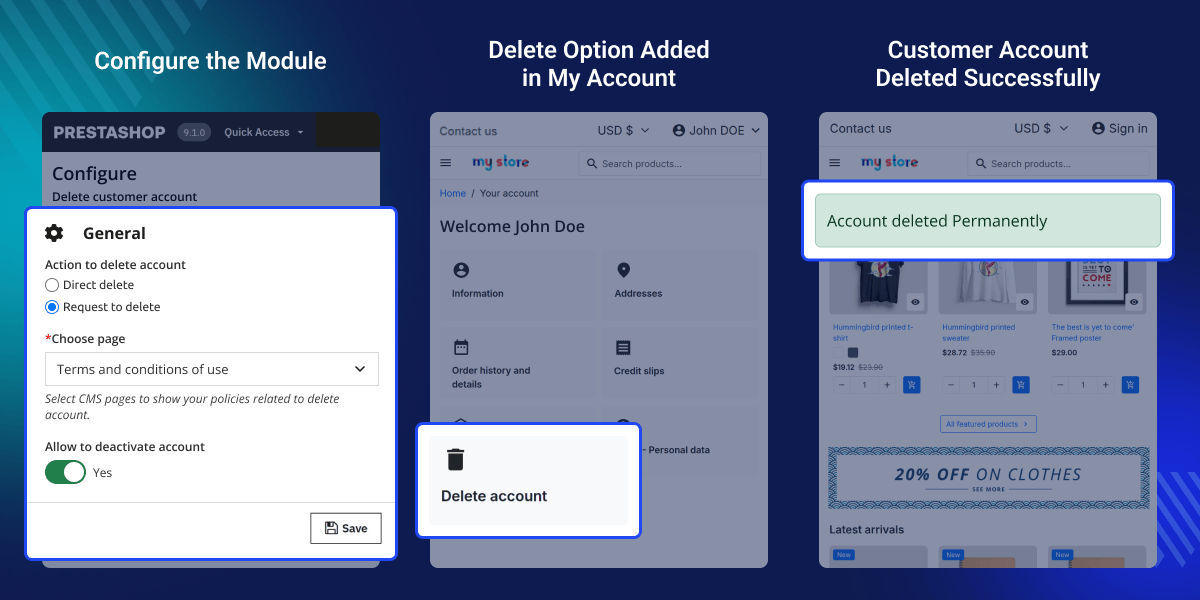
    PrestaShop Delete Customer Account

    Highlighted Features

     Easily Delete Your Account

    The module makes it easy for customers to permanently delete their account from the store without need to request to admin.

     Reduce Admin’s Workload

    Allowing customers to delete account on their own will reduce the number of account deletion requests and this save time.

    Directly Delete Account

    The store admin can allow their customers to directly delete their account from the customer account section. A button “Delete Account” is available under Delete Account. On clicking the button, a popup appears on the page, where the customers can confirm their password and delete their account. A message of permanent account deletion will be displayed on the store to the customer.

    Product list

    Request to Delete Account

    The store admin can also make customer requests for account deletion. The customer needs to click on the “Request to Delete” button under Delete Account. On clicking the button, a popup appears on the page where the customer needs to specify the reason for account deletion and click on the confirm button. Once submitted, an email for account deletion will be sent to the admin.

    Product list

    PrestaShop Delete Customer Account Features -

    • Allow customers to delete their account or request for account deletion from the My Account section.
    • Allow customers to deactivate their account.
    • A dedicated tab to view a list of all the requests submitted by customers to delete account.
    • Delete customer’s account from the back office.
    • Send custom mail to customers who have submitted account delete request.
    • Select CMS page that will show on the store when customers click on delete account tab.
    • A confirmation popup is shown to the customer before account deletion.
    • An email is sent to the Admin whenver the customer requests for account deletion.

    PrestaShop Delete Customer Account Support

    For any query or issue please create a support ticket here http://webkul.uvdesk.com

    You may also check our other top-quality PrestaShop Extensions.

    Specifications

    Product Version5.1.1
    Released2 years ago
    CategoryPrestaShop
    Last UpdatedMay 25, 2026 (2 months ago)
    Supported VersionsPrestaShop  1.7.x.x​  8.x.x  9.x.x  

    Ratings

    We'd love to hear your thoughts! Share your feedback and help us craft an even better experience tailored just for you.

    Write a review

    Specification

    Detailed technical features and requirements to help you understand the module’s capabilities and ensure smooth integration with your system.

    Cloud Hosting

    Detailed technical features and requirements to help you understand the module’s capabilities and ensure smooth integration with your system.

    Default Configuration Details of Server

    1 GB
    RAM
    1 Core
    Processor
    30 GB
    Hard Disk
    1 GB RAM & 1 Core Processor
    Database

    Want to know more how exactly we are going to power up your eCommerce Website with Cloud to fasten up your store

    * Server Configuration may vary as per application requirements.

    Change Logs

    Not Available


