USD
  • EUR
  • INR
  • USD
Cart
Cart 0
  • You have no items in your shopping cart.
    Cart
    Cart 0
    • You have no items in your shopping cart.
    Hire a Developer
    ×
    Contact Us!
    Send Again
    Close
    Please Login to Write Your Review

    PrestaShop Error Reporting

    PrestaShop Error Reporting:  The module helps the admin to record the logs for troubleshooting any issues that may arise from the PHP, MySQL, and JavaScript servers. Error logs include details such as the date of the error, the type of error, the specific source of the error, a description of the error, and any other relevant information that may help to identify and resolve the issue.


    It also sends email alerts to the selected employees whenever the system records the selected error type.

    Screenshots
    $49.00

    * Required Fields

    Add To Cart
    $49.00
    Configure and Buy
    • Description
    • Reviews
    • FAQ
    • Customers ()
    • Specifications
    • Cloud Hosting
    • Changelog

    PrestaShop Error Reporting -  Error reporting is the process of identifying and logging errors that occur in hardware or software, and then using the data collected to help diagnose and fix the errors. Error reporting helps organizations quickly address issues as they arise, and it can also be used to track patterns and trends in errors to help prevent future issues. Error reporting systems can also be used to detect security breaches, so that organizations can take action to protect their systems from malicious actors.

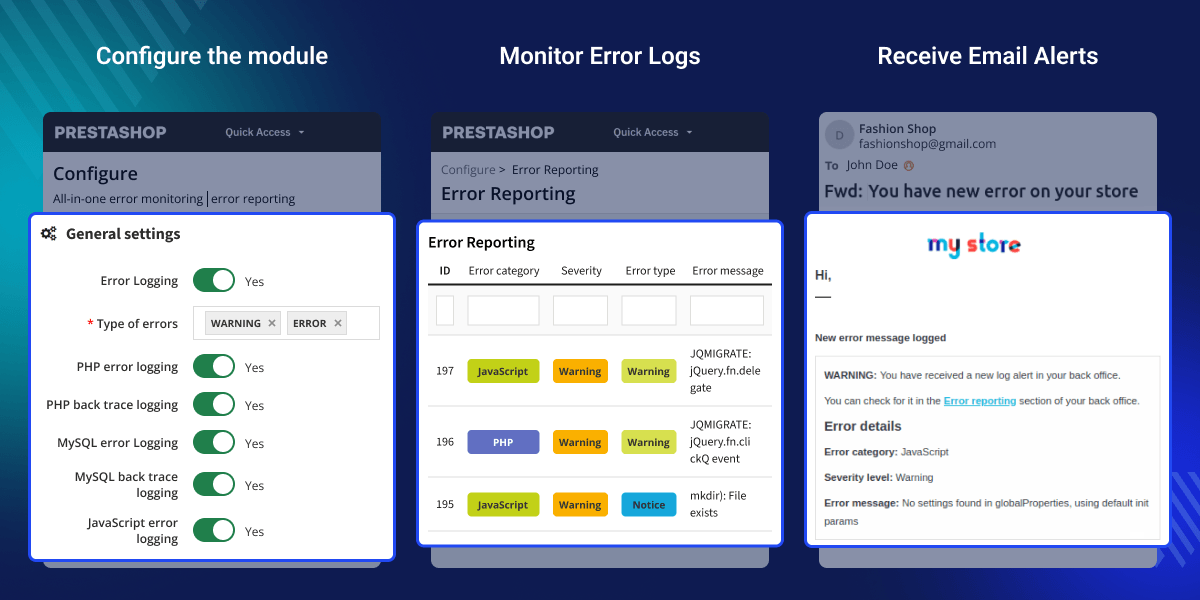
    With this PrestaShop Error Reporting module, the admin can receive the email alert notification and record the backtrace of the error so that they can diagnose and fix the error at the earliest.
    PrestaShop Error Reporting Module

    Highlighted Features

     Record error logs

    Record the PHP, MySQL, and JavaScript error logs. whenever encounter any error when it's running.

     Record backtrace of Error

    Record the backtrace of the error to diagnose and fix the error at the earliest.

     Email notification

    Select employee email to receive the alert notification whenever the system records the error log.

     Export Error logs

    Easily export all the available error logs in a CSV file.

    Workflow of the Module

    Recording error logs is important in many ways. Like in the case of server issues or PHP errors. This module helps you to record MySQL, PHP, and JavaScript error logs on the server. The admin can configure the module as per their requirement.

    There are several options available in the module to configure it. Like choosing the type and category of the error log he wants to record. Also, select the employee's email to send an email alert whenever the server records any error log.

    error reporting configuration

    List of Error Logs

    Error reporting is fundamental to the broad goal of error reduction. Recording and checking error logs help you prevent sales losses simply by allowing your team to react quickly, which reduces the overall impact of issues and bugs.

    The admin can view the list of error logs that the server has recorded on getting any error. Here the recorded error log files indicate the type, severity, category, message of the error log, and the date of the error recorded.

    list of error logs

    Record Error Backtrace

    Error backtracing is a powerful tool that helps developers quickly identify, isolate, and debug errors in their code. By recording the backtrace of an error, developers can quickly narrow down the root cause of the problem and resolve the issue as quickly as possible.

    Error backtracing can also provide invaluable insight into the state.

    backtrace of error

    PrestaShop Error Reporting Features -

    • Record the PHP, MySQL, and JavaScript error logs.
    • Enable/Disable to record the backtrace of error logs.
    • Send email notifications on recording the error logs.
    • Select the error category and error type to receive the email error logs.
    • Select the types of errors to record logs.
    • Export all the error logs in a CSV file.
    • Delete all the error logs.

    PrestaShop Error Reporting Support -

    For any query or issue, please create a support ticket here http://webkul.uvdesk.com

    You may also check our other top-quality PrestaShop Extensions.

    Specifications

    Product Version4.0.3
    Released3 years ago
    CategoryPrestaShop
    Last UpdatedJuly 1, 2026 (3 days ago)
    Supported VersionsPrestaShop  1.7.x.x​  8.x.x  9.x.x  
    Write a review

    Frequently Asked Questions

     What types of errors does this module capture?
    This module captures PHP errors (fatal errors, warnings, notices), MySQL/database query failures, and JavaScript browser console errors. Each error type can be enabled or disabled independently based on your monitoring preferences, and you can filter by severity level from DEBUG to EMERGENCY.
     
     How do I configure email notifications for errors?
    Enable the 'Send mail on error' toggle in configuration, then select specific employee email addresses from the dropdown. You can also choose which error categories (PHP, MySQL, JavaScript) and severity levels should trigger email notifications, ensuring critical issues reach your team immediately while minor notices stay in the log.
     
     Where can I view the error logs?
    After configuration, a new menu item 'Error Reporting' appears under the Configure section in your back-office. This dashboard shows all logged errors with filtering by category and severity, and clicking any error reveals full details including backtraces showing exact file locations and code paths.
     
     Can I control which error severity levels get logged?
    Yes, the 'Type of errors' multi-select field lets you choose from INFO, DEBUG, NOTICE, WARNING, ERROR, CRITICAL, ALERT, and EMERGENCY levels. Higher severity levels (CRITICAL, ALERT, EMERGENCY) are recommended for better performance, as they focus on issues requiring immediate attention rather than informational notices.
     
     What information is included in the backtrace?
    Backtraces include the file path and line number where each error originated, along with function names, class names, and any custom error messages. This information is captured for PHP, MySQL, and JavaScript errors when back trace logging is enabled, dramatically reducing debugging time.

    Move to Cloud Today

    AWS Free tier hosting for one year by amazon web services, for more details please visit AWS Free Tier.

    GCP Free tier hosting for one year with 300 credit points by google cloud platform, for more details please visit GCP Free Tier.

    Azure free tier hosting for one year with 25+ always free services, for more details please visit Azure Free Tier.

    In our default configuration we will provide tremendous configuration for your eCommerce Website which is fast to load and response.

    Default Configuration Details of Server

    • 1 GB RAM
    • 1 Core Processor
    • 30 GB Hard Disk
    • DB with 1 GB RAM and 1 Core Processor

    * Server Configuration may vary as per application requirements.

    Want to know more how exactly we are going to power up your eCommerce Website with Cloud to fasten up your store. Please visit the Cloudkul Services.

    Get Started with Cloud
    Not Available


